When you want to try out an HFM demo account, you might be wondering how to open one
"I want to open an HFM demo account on my smartphone!"
"Can I use MT5 with an HFM demo account?"
"Does a demo account have an expiration date?"
This article will answer all of the common questions you might have about opening a demo account with HFM
This article will explain the features, opening process, benefits, and points to note regarding HFM demo accounts in an easy-to-understand way for beginners. Please use it as a reference
Contents
- 1 Differences between HFM demo accounts and real accounts
- 1.1 Features of an HFM demo account: ① No real money (cash) is used
- 1.2 HFM Demo Account Feature ②: Choose from 3 Account Types
- 1.3 HFM Demo Account Feature ③: Multiple Accounts Can Be Opened
- 1.4 HFM Demo Account Feature ④: Has an expiration date if unused
- 1.5 HFM Demo Account Feature #5: No Identity Verification Required
- 2 A thorough explanation of the benefits of the HFM demo account
- 2.1 Advantages of an HFM demo account: ① Easy to open a real account
- 2.2 HFM Demo Account Advantage #2: You can practice FX trading risk-free
- 2.3 Advantage #3 of the HFM demo account: You can earn funds through demo contests
- 2.4 Advantages of an HFM demo account ④ You can use real-time charts for MT4 and MT5
- 2.5 Advantage #5 of the HFM demo account: You can try out countless indicators and EAs
- 3 A complete guide to all the important points to note about HFM demo accounts
- 4 How to open an HFM demo account (smartphone version)
- 4.1 Step 1. Register as a member on the HFM official website
- 4.2 Step 2. Perform email verification
- 4.3 Step 3. Open a demo account from the myHF area
- 4.4 Step 4. Setting the account type and trading conditions
- 4.5 Step 5. You will receive an email confirming that your demo account has been opened
- 4.6 Step 6. Download MT4/MT5 for free
- 4.7 Step 7. Log in to your demo account and start trading!
- 4.8 How to reset your account balance
- 5 How to use and master an HFM demo account
- 6 How to close/delete an HFM demo account
- 7 Summary: HFM's demo account offers many advantages and is highly recommended!
Differences between HFM demo accounts and real accounts
An HFM demo account isan account that allows anyone to try virtual FX trading for free.
You can use virtual funds to trade FX on real-time charts, just like with a real account
You can easily open a demo account for overseas forex trading completely free of charge by simply registering your email address on their official website

[HFM Demo Account vs. Live Account Comparison Chart]
| Comparison items | HFM Demo Account | HFM Real Account |
|---|---|---|
| funds | Virtual Funds | own funds |
| Leverage | Up to 2000x magnification, selectable | Up to 2000x magnification, selectable |
| Trading Tools | MT4, MT5 | MT4, MT5 |
| Profit and loss risks | none | can be |
| Account type, number of accounts | Three account types available. Multiple account opening is OK. | |
| Indicator | A wide variety of options are available | A wide variety of options are available |
| EA, Copy Trading | Only available in the free version | No restrictions |
| date of expiry | Automatic cancellation after 30 days of non-use | Automatic cancellation after 90 days of unused period |
| Identity verification | none | can be |
| Campaigns, events | You can win prize money in the demo trading contest. | Deposit bonuses , loyalty programs, cashback, etc. |
First, let's look at the features of the HFM demo account, comparing them to a real account
Features of an HFM demo account: ① No real money (cash) is used
The HFM demo account offers the exact same leverage and trading tools as a real account. The only difference is thata risk-free FX trading experience that doesn't use any of your own funds. Because you trade with virtual money, there's no risk of losing your own money.
HFM offers a maximum leverage of 2,000 times. While high leverage is generally considered high-risk, actually trading with real money requires courage. However, a demo account allows you to practice without any upfront investment, providing peace of mind
In a real account, you use your own funds
In a real account, you use actual funds. The maximum leverage can be set to any value in both real and demo accounts. However, while high-leverage trading in a real account can potentially yield profits,The risk of losing a large portion of your fundsThere is
HFM Demo Account Feature ②: Choose from 3 Account Types
HFM's demo account allows you to choose from three different real accounts
- Cent account (for small transactions)
- Premium Account (Standard)
- Demo Contest Account
The three accounts mentioned above allow you to choose between MT4 and MT5, just like with a real account. The Cent account is designed for small-amount trading, with a lot size of 1,000 currency units. The Premium account is the average account for overseas forex brokers and corresponds to the Standard account.Beginnersare recommended to try the Cent account.
Additionally,demo contest account where you can compete in rankings through demo trading. Although trading uses virtual funds, top performers can win prize money.
With a real account, you can choose from six different account types
With a real account, you can choose from six account types
- Cent account (for small transactions)
- Premium Account (Standard)
- Pro account (narrower spreads)
- Zero account (extremely narrow spread, with fees)
- Top-up bonus account (for deposit bonuses only)
- HF Copy Account (for copy trading only)
For more details on HFM account types, please refer to this article
HFM Demo Account Feature ③: Multiple Accounts Can Be Opened
Some overseas forex brokers limit the number of demo accounts you can open.HFM, however, allows you to open up to six demo accounts. For example, you can use a single Cent account with both MT4 and MT5. You can also open three account types simultaneously and compare them.
You can use multiple demo accounts to compare results for each trading strategy, which can be used for testing and developing new methods
You can open up to 10 real accounts
Even with a physical account, you can use multiple accounts simultaneously.open up to 10 accounts. Even if you reach the maximum number of accounts, you can add more accounts by requesting the closure of unnecessary accounts.
HFM Demo Account Feature ④: Has an expiration date if unused
HFM demo accountBasically indefiniteHowever,If the account remains inactive for more than 30 days, it will be closedIt will happen
If a demo account remains unused for more than 30 days, it will be automatically closed. However, by making at least one trade every 29 days, you can use it indefinitely. Other brokers often limit the usage period regardless of whether the account is used or not. With HFM, you can utilize the demo account for medium- to long-term trading as well
The period during which a real account is unused is 90 days
On the other hand, the validity period for a real account is 90 days based on the period of inactivity.If there are no trades for 90 days, the account will be automatically frozen and closed. You are required to make at least one trade within 89 days.
HFM Demo Account Feature #5: No Identity Verification Required
Opening an HFM demo account does not require identity verification. You can easily open a demo account by simply registering your email address.
Opening a demo account takes only a few minutes, making it easy for anyone to try it out. Even those who are hesitant to immediately provide personal information to an overseas forex broker can try it out with a demo account, providing peace of mind
Identity verification is required for real accounts
Real accounts require identity verificationbecause you will be using your own funds to trade.
The system is designed so that only bank accounts and accounts in the user's own name can be used for deposits and withdrawals. To prevent money laundering, fraud, and financial crimes, overseas forex brokers thoroughly verify the user's identity
A thorough explanation of the benefits of the HFM demo account
Next, let's discuss the benefits of using an HFM demo account
Advantages of an HFM demo account: ① Easy to open a real account
One of the advantages of using HFM's demo accountyou can easily open a real account from the member page.
Opening a demo account gives users access to HFM's member page. This is very convenient as it allows you to familiarize yourself with the member page's usability and apply for a real account at any time. You can open a real account from the member page menu under "Trading Account" → "Real Account"
Once you have entered your personal information and completed identity verification, you can start live trading with real money on a real account
HFM Demo Account Advantage #2: You can practice FX trading risk-free
Another advantage of using an HFM demo account is that you can practice trading completely risk-free
For beginners, it can be difficult to visualize how to enter a trade (take a position) and how to close it to make a profit in FX trading. Using your capital without understanding the tricks to making money is dangerous because the risk of loss is too high
With a demo account, even if you incur a large loss, your actual capital loss will be zero. You can then move on to real trading after you've grasped the tricks of trading and the techniques for making money
Advantage #3 of the HFM demo account: You can earn funds through demo contests
Furthermore, a great benefit of the HFM demo accountto participate in demo trading contests.
This trading contest is literally conducted using a demo account, and requires absolutely no real money. Its appeal lies in the fact that it's completely risk-free and allows you to compete with virtual funds
By opening a dedicated account for the demo trading contest, anyone from beginners to advanced traders can aim for a top prize. You will be given $10,000 in virtual money as trading funds, and you will compete based on your profits from the 1st to the last day of each month
Examples of prize money for demo trading contests published on the HFM official website
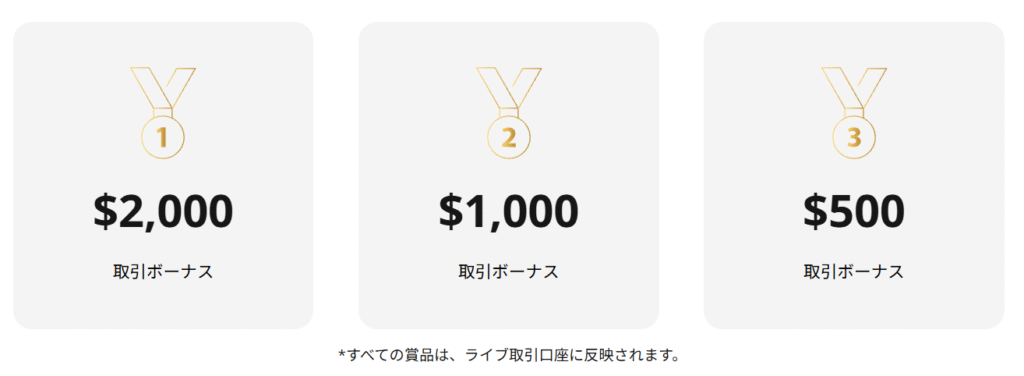
Top finishers will receive trading bonuses ranging from $500 for 3rd place to $2,000 for 1st place. This prize money can be used as capital to earn cash through HFM
Advantages of an HFM demo account ④ You can use real-time charts for MT4 and MT5

HFM's demo accountto trade on the MT4/MT5 trading platform under the exact same conditions as a real account.
One of the advantages of using an HFM demo account is that you can use the globally acclaimed MT4/MT5 real-time charts without using any funds
MT4 and MT5 are the world's most popular trading platforms. You can perform more effective technical analysis using MT4 and MT5 charts and technical tools. You can learn how to use them and prepare for real trading
Advantage #5 of the HFM demo account: You can try out countless indicators and EAs

And one more thing: another advantage of the HFM demo account is that you can try out numerous indicators and free automated trading systems on MT4 and MT5
MT4 and MT5 come standard with approximately 60 technical tools, including drawing functions. Not only can you use all of these, but you can also install as many corresponding custom indicators and tools as you like for free. Automated trading EAs (Expert Advisors) can also be installed and used for free on MT4 and MT5 if they are free versions
A wide variety of indicators and automated trading EAs are being developed all over the world. You can find the one that suits your needs on the MQL5 marketplace
What is the MQL5 Market?
Incidentally, MQL5 Market is a community site specifically for MT4 and MT5, and anyone can register and use it, regardless of whether they have a demo account or a real account
Once you've become familiar with using MT4/MT5, try experimenting with various indicators and automated trading systems on a demo account
You can find basic information about MQL5 in this article. Please refer to it as well
A complete guide to all the important points to note about HFM demo accounts
As we've seen, HFM demo accounts certainly offer many advantages. However, there are a few things to be aware of
Now,look at some important points to keep in mind when using an HFM demo account.
I keep making unplanned, gambling-style trades
First, the most important thing to remember when using a demo accountto avoid practicing with high-leverage, gambling-style trading.
There are only two answers in FX trading: in principle, it's either "go up" or "go down." Because it's a simple choice between two options, it seems easy at first glance, and with leverage of 1000x or 2000x, you can aim for huge profitsI tend to fall into the trap of "all or nothing gambling."is
You must be careful, because if you're just gambling on whether something will go up or down, you won't actually acquire any skills even if you practice on a demo account
Practice finding the rationale for your trades using a demo account
Demo trading is a great way to learn the basics of FX trading. It's recommended to practice using chart analysis and fundamentals to find the reasons behind "why buy" and "why sell."
The expiration date for HFM demo accounts is "29 days of non-use."
Another point to note isyour demo account will be closed if it remains inactive for 29 days.
HFM demo accounts will be closed if they remain inactive for 29 daysYour account will be automatically canceled and you will no longer be able to log inYour account will cease to exist. If you wish to use it for an extended period, please log in and trade regularly without interruption
You can use it indefinitely as long as you make at least one trade in 29 days
A demo account can be opened in just a few minutes
With HFM, you can open up to six demo accounts. Even if one account is closed,you can easily open another one, soyou can rest assured.
HFM's paid EAs and copy trading are not available
It's also important to note that with a demo account, you cannot use paid versions of automated trading EAs or copy trading.
HFM is also a popular overseas forex broker known for its automated trading EAs and copy trading. Perhaps some of you might want to open a demo account and try out automated trading or copy trading
MT4 and MT5 automated trading platforms offer both free and paid versions. Generally, the free version can be used with a demo account, and paid versions that support demo accounts can also be used. However,All copy trading services are paid versions, and even automated trading services are not available on demo accountsThis feature is not available on demo accounts
The paid version can only be used with a real account
If you wish to try the paid versions of automated trading or copy trading,you will need to open a real account.
Live trading is completely different from demo trading
And the most important thing to be aware of when using a demo account is that your mental state is completely different when you're trading in real time compared to demo trading
In live trading,you actually invest your own money. This is incomparably more emotionally driven than demo trading, which uses fictitious funds. When exchange rates surge or plummet right before your eyes, or when your balance or profit/loss decreases or increases, it often becomes difficult to stick to your own strategy and rules.
Cases where people are swayed by the emotions of "wanting to make a profit" and "not wanting to incur a loss," leading to huge lossesThis is not uncommon. This applies not only to beginners but to all traders
You'll gain more by investing money in practice
Some FX traders believe that demo accounts are not truly effective for practice. They argue that the ability to calmly manage risk and funds without being swayed by emotions is a skill that can only be learned when your own capital is damaged
If you truly want to acquire trading skills,you'll improve faster by trading with real money.
How to open an HFM demo account (smartphone version)
Now, let's actually open a demo account with HFM together
The general process for opening a demo account is as follows:
- Register as a member on the HFM official website
- Perform email verification
- Log in to myHF (member page) and open a demo account
- Set your account type and trading conditions
- You will receive an email confirming that your demo account is complete
- Free download of MT4 and MT5
- Log in to your demo account and start trading!
Here,how to open a demo account using the smartphone version, which can be easily operated. The general process is the same for Android, iPhone, and PC versions of demo account opening. Please use this as a reference for the basic steps and methods.
Step 1. Register as a member on the HFM official website
First, register as a new member on the HFM official website
If you are already registered, please log in to your member page and start from Step 3
the HFM official website,"Menu" in the upper right corner of the top screen, thentap "Register".
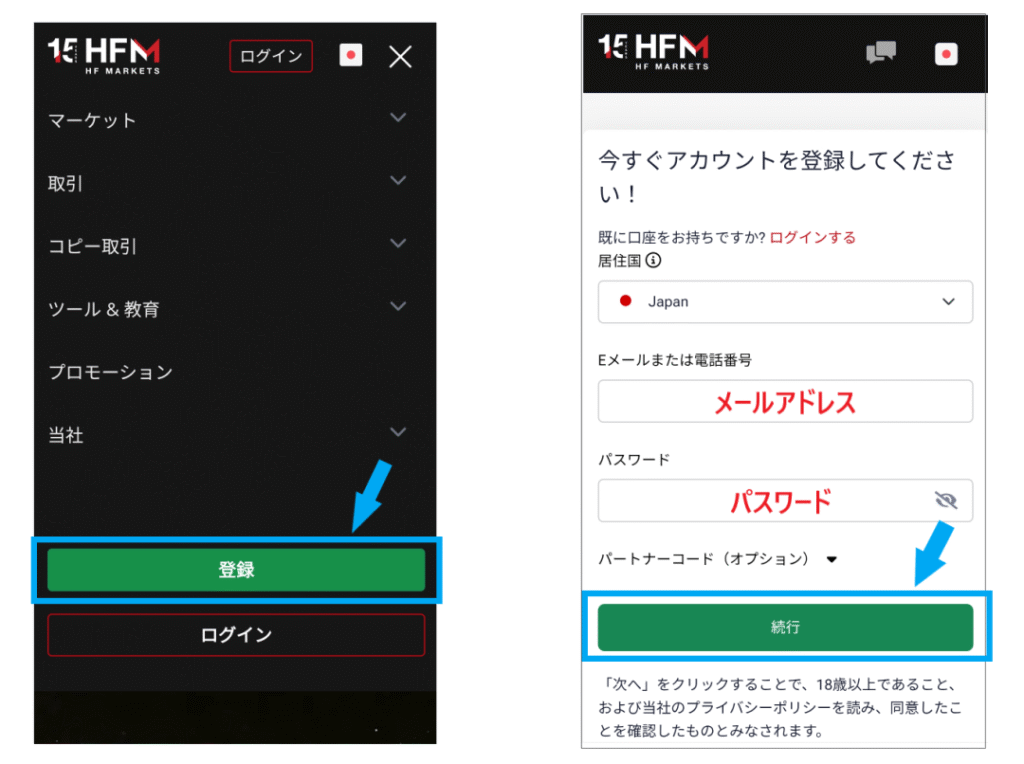
Enter your email address and password (optional), thentap "Continue".
Step 2. Perform email verification
Next, you will receive a verification code via email. Enter the verification code you received to complete email verification

Step 3. Open a demo account from the myHF area
Next, please log in to the myHF area (member page)
You will log in using the email address and password you initially set
Go to the "Trading Accounts" page from the menu and select "Demo Account" .
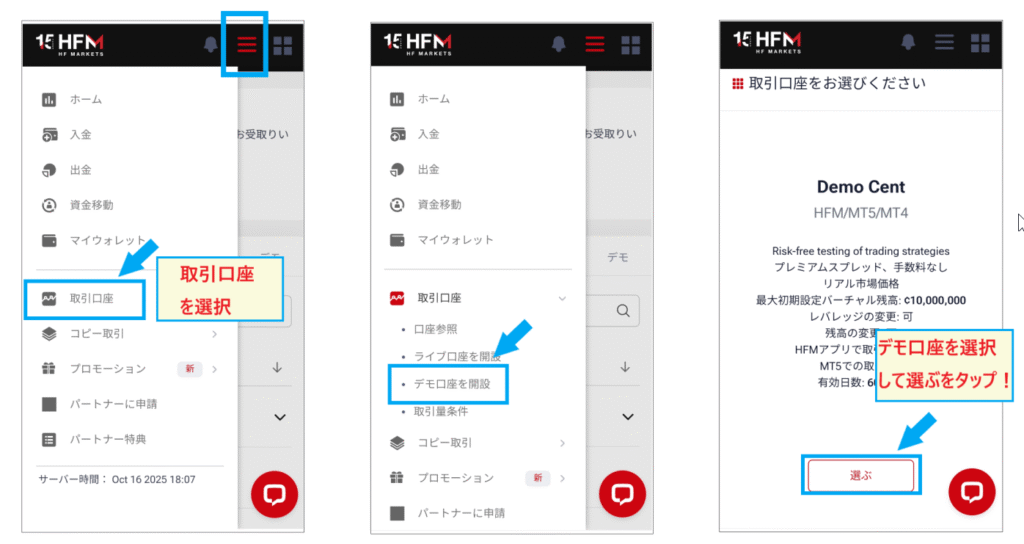
Once you've selected a demo account,tap "Select"to proceed.
Step 4. Setting the account type and trading conditions
Next, select the type of demo account and set the trading conditions
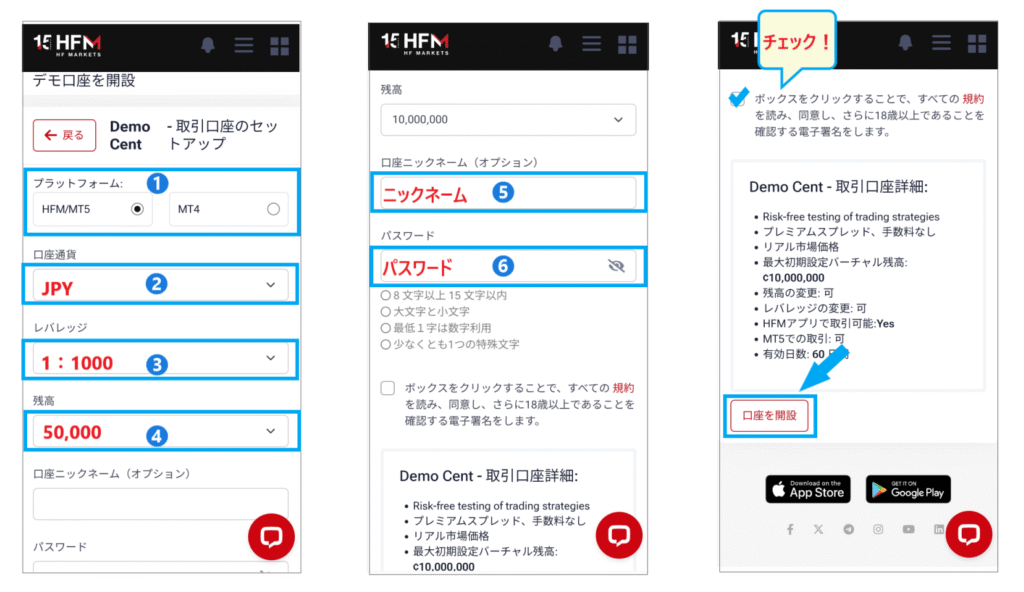
- Choose either MT4 or MT5 (Important!)
- Currencies → Japanese Yen, USD
- Leverage
- Funds (Enter the amount)
- Nickname (optional)
- Password (optional)
- I agree to the terms of service
- "Open an account" → Tap
Be sure to check the section where you first decide whether to use MT4 or MT5
Step 5. You will receive an email confirming that your demo account has been opened
When you tap the "Open Account" button, you will receive an email confirming that your demo account has been opened
This emailcontains your MT4/MT5 login ID, password, and server name, so please save it in a safe place.
Step 6. Download MT4/MT5 for free
Now, the next step is to download and install "MT4/MT5"
On the HFM official website, select "Trading" → "MT5 (MT4)" from the menu . Scroll down the MT5 (MT4) page and you will find a screen to select your terminal.
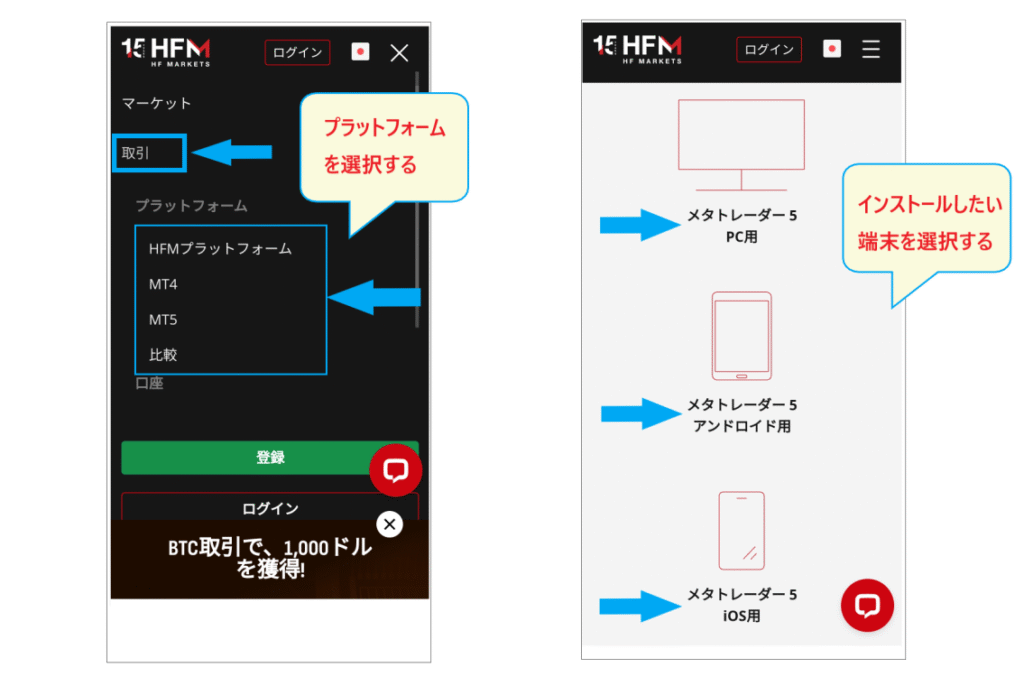
Please select your desired device and download and install the software. If you wish to install it on a PC, please download it from the official PC version website
Step 7. Log in to your demo account and start trading!
Once the installation is complete, log in to the platform using your MT4/MT5 ID, password, and server name
Open the menu in the upper right corner of MT5, select "Account Management," and then tap the "+" icon on the next screen. This will bring up a screen where you can either "Open a Demo Account" or "Log in to an Existing Account."
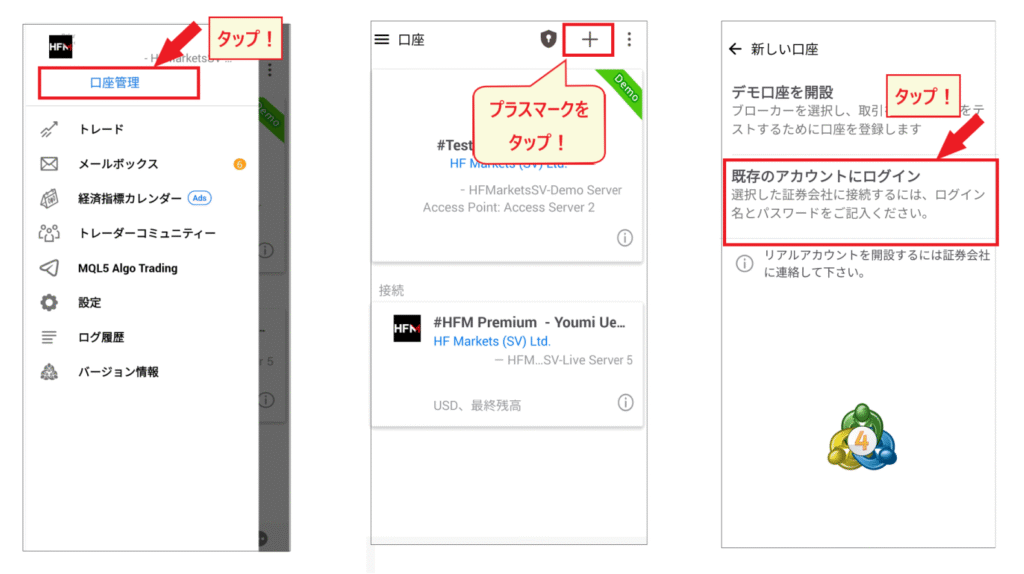
Since you have already opened a demo account with HFM, the optionyou should select here is "Log in to an existing account".
On the next screen, you will see a search bar for the brokerage firm's name.Enter "HFM" and select the corresponding server name.
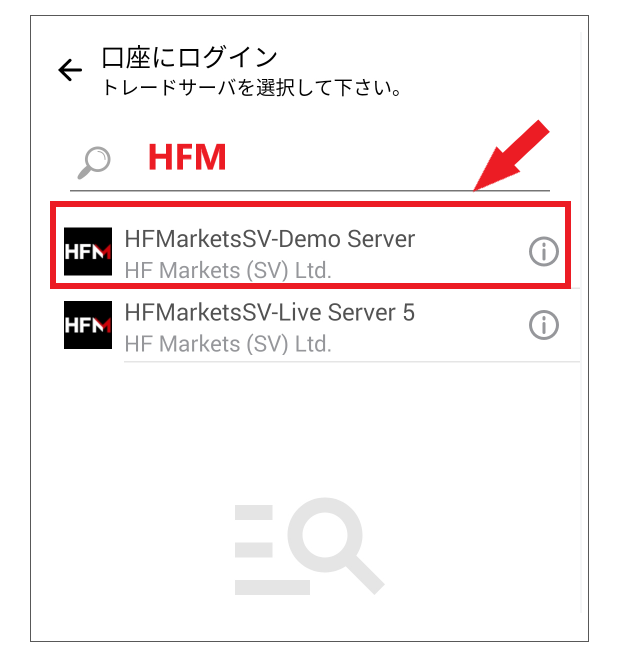
After selecting the server name,a login screen will appear. Log in using your ID and password.
At this point, you are ready to trade on your demo account
After reviewing how to use MT4 and MT5, you can start demo trading anytime. Detailed instructions on setting up and using MT4 and MT5 are provided in the following article. Please refer to it as well
How to reset your account balance
HFM demo accounts do not have a balance reset function。
If you want to reset your balance, you can open a new demo account. HFM allows you to open up to six demo accounts. If you want to start trading from scratch again, you can open another demo account. Opening a demo account only takes a few minutes, so it's convenient to use even if you want to reset your balance
How to use and master an HFM demo account
Once your HFM demo account is ready, you can finally start trading. Since you're using a demo account, you'll want to use it effectively to prepare for real trading
Here, we'll introduce how to use and master the HFM demo account
Check the usability of HFM
How to use a demo account ①
Once you've opened a demo account,HFM's member page is easy to use. Check how to navigate the menus and the content of each page, especially the deposit and withdrawal methods page and the real account opening page, to see if they suit your needs.
Demo accounts are used not only for trading practice, but also to check the usability of overseas forex brokers. You should also check if the available deposit and withdrawal methods are convenient for you
Find safe leverage and lot sizes
How to use a demo account (Part 2)
Demo trading helps you understand what leverage is safe relative to your capital and what lot size you can trade. Monitor your margin maintenance ratio to determine safe trading practices. Remember that you won't lose your capital if you make mistakes in demo trading. It's a good opportunity to experiment with different patterns.
If possible, it's best to use a demo trading amount that matches your actual planned deposit amount to practice risk management in a more realistic trading environment
Learn how to use MT4 and MT5
How to use a demo account ③
for learning how to use MT4 and MT5. Having some understanding of the operation methods will give you an advantage in real trading. In live trading, you might panic due to sudden currency fluctuations. Knowing the operation methods beforehand will allow you to act calmly.
You can deepen your knowledge of MT4 and MT5 even while trading with real money. However, you should definitely make sure you understand the order methods before trading with real money
Test indicators and trading methods
How to use a demo account (Part 2)
Demo trading is extremely useful for testing indicators and trading methods.use demo trading to test which indicators and trading methodsto use, and then develop your real trading strategy. Try testing methods you're good at, such as scalping or swing trading.
HFM's demo account is a popular choice for a wide range of users, from beginners to advanced players. It can be opened in just a few minutes using only an email address, and it's valid indefinitely
Some traders use demo accounts in conjunction with real accounts for technical analysis, so let's make good use of them
How to close/delete an HFM demo account
Finally, let's look at how to close or delete your HFM demo account
No cancellation or deletion procedures are necessary
HFM demo accounts are automatically closed after 30 days of inactivity. Therefore, there is no need to take any special steps to cancel or delete them
If you want to close or delete your demo account for any reason, simply leave it inactive for 30 days without logging in .
If you wish to use a demo account again, you can log in to the myHF area (member page) and open a new demo account, so you can rest assured
By the way, if you'd like to try out demo accounts from different overseas forex brokers, please refer to the article below for more information
Summary: HFM's demo account offers many advantages and is highly recommended!
As we've seen, HFM's demo account offersnumerous advantages, including "easy access to opening a real account," "no risk," "the opportunity to win prizes in trading contests," "the ability to use MT4 and MT5," and "the chance to test indicators and automated trading EAs.
HFM is a major broker with 15 years of experience and holds financial licenses in 7 countries.a highly reliable and trustworthy overseas forex broker, using a demo account as preparation for actual trading is highly worthwhile.
Let's take this opportunity to try out HFM's demo account
Furthermore, opening a real account with HFMour website, "Money Charger (Manecha)," allows you to receive cashback for every trade. HFM offers a high cashback rate anda popular broker among our customers. Please take advantage of this when trading with an HFM real account.