with an overseas forex brokersimply by registering your email address, and you can practice trading on real market conditions without using your own money. However,the validity period and the degree of customizationvary greatly from broker to broker, sochoosing the right overseas forex broker's demo accountis surprisingly important.
"Can I open a demo account for free?"
"Is there a demo account that can be used indefinitely?"
"Where is the best place to create a demo account for MT4/MT5?"
This articlecompares the demo account conditions of 10 overseas forex brokers by checking each company's official website, and explains recommended brokers, how to open an account, and even how to conduct MT5 demo trading without going through a broker.
Conclusion | Key Points of Overseas Forex Demo Accounts
- Demo accounts are free with any broker. You can open one with just an email address, and no identity verification documents or deposits are required.
- Truly unlimited accounts are practically nonexistent . Most have conditions such as "expiration if there is no login or trading for a certain period." FXGT,HFM, XMTrading, TitanFX, andBigBoss BigBoss are of platforms where regular use effectively makes an account unlimited.
- There is also a way to conduct demo trading using only the official MT5 server (MetaQuotes-Demo server) without going through a broker . Creating a new MT4 demo account requires going through a broker.
*This article was created by the MoneyCharger editorial team in accordance with our content creation policy , by individually checking the validity period, leverage, account type, etc. of each broker's demo account on their official website (as of August 2026). Demo account conditions may change, so please check the latest information on each broker's official website and account opening screen. For important points regarding the use of overseas FX brokers , please also refer to the information published by the Financial Services Agency and the Consumer Affairs Agency
If you're a beginner in overseas forex trading, you should definitely read " The Complete Guide to Overseas Forex Trading for Beginners ."
Are demo accounts for overseas forex brokers free to use?

Just like with domestic FX brokers, overseas FX brokers also offer demo accounts that can be used with a simple registration. These overseas FX demo accounts are used by FX beginners who don't want to make mistakes, as well as advanced traders who want to test their trading methods
Opening a demo accountis free. No identification documents or personal funds are required.
First, let's look at the features of overseas forex demo accounts and how they differ from real accounts
What is a demo account for overseas forex trading?
A demo account with an overseas forex broker is an account that allows you to practice trading using virtual money (fictitious funds)
You can trade using real-time charts while the foreign exchange market is actually moving . A fictitious amount is displayed in your account balance, and it decreases or increases according to your trading results, allowing you to experience realistic FX trading.
Demo accounts are recommended for beginners who want to try overseas forex trading without worrying about losing their own funds, as they don't use your own money . The appeal of demo accounts is that you can start anytime, anywhere , without having to enter troublesome personal information or provide identity verification.
Differences between demo accounts and real accounts in overseas forex trading
Demo accounts areeasy for anyone to start with zero capital. They use the same trading platform as real accounts and allow access to member pages, so many traders try them out to see how they work.
However, demo accounts have some differences from real accounts, such as limitations on the period and features that can be used . Let's take a look at the differences between demo and real accounts in the table below
| Terms of Transaction | Demo account | Real account |
|---|---|---|
| Account opening and trading fees | free | Free (trading fees apply to some accounts) |
| Account expiration date | Yes (Many companies will expire the contract if it remains unused for an extended period). | If used, it will last indefinitely |
| Maximum leverage | Selected at the time of opening (often at the same level as in reality) | The multiplier varies from 1,000 to 5,000 times, depending on the company |
| Number of brands | There may be restrictions | Over 100 to 1000 types |
| Trading Tools | Some restrictions may apply | Fully equipped |
| Campaigns and benefits | Unavailable | You can get bonuses and cashback |
| EAs and copy trading | Partially restricted | Unlimited use, both free and paid |
| Loss risk | No financial risk | Potential for loss |
| Impact on mental health | Stress-free | The mental burden is great |
While demo accounts are convenient and easy to use, they lack the sense of tension and have limitations compared to real accounts, making them less suitable as a substitute for actual trading
Whileexchange rates and spreadsare provided under conditions very similar to a real account,the slippage during execution and the momentary widening of spreads will not perfectly match those of a real account where actual orders are flowing into the market. When verifying performance in units of a few pips in the demo account, please keep this difference in mind.
Overseas forex demo accounts are not "completely unlimited" [3 patterns of expiration conditions]
There are very few demo accounts for overseas forex brokers that are completely unrestricted and can be used indefinitely
Even companies that advertise "unlimited" usage actuallyhave a condition that "it will expire if not used for a certain period of time." Based on the information on each company's official website, the expiration conditions can be categorized into the following three patterns.
| pattern | Conditions for expiration | Examples of relevant companies |
|---|---|---|
| ① Login to extend lifespan | If you log in regularly, it's essentially unlimited. If you don't log in for an extended period, it will become dormant or frozen | FXGT(30 days), XMTrading (60 days), TitanFX (30 days),BigBoss(1 year) |
| ② Survival type through transactions | It will expire if there are no transactions , not just login activity. | HFM(29th *and every 60 days thereafter) andAxi(30th) |
| ③Fixed deadline type | It expires after a certain number of days from the date of opening (re-application is possible) | AXIORY(90 days), FxPro (180 days),Vantage(30 days) |
If you want to use a demo account for an extended period, it's best to choose option ① or ②, the "extended type," and use it regularly. For medium- to long-term investment testing or chart analysis, choose a broker marked with "unlimited*" in the comparison table that will be introduced later.
Key points to consider when comparing (how to choose) demo accounts for overseas forex brokers
Even with demo accounts,the terms and conditions of use vary from one overseas forex broker to another. It's important to choose an overseas forex broker whose conditions meet your needs. So, what should you compare when choosing an overseas forex demo account?
Below is a summary of key points to consider when choosing a demo account
- Features of a real account (something I'd like to use eventually)
- Expiration date (conditions for expiration and whether re-application is possible)
- Trading tools (MT4/MT5/other options)
- Maximum leverage (can this setting be changed?)
- Funding amount (can it be reset or added?)
- Account types (account types that support demos)
If you're going to try it out anyway,you want to switch to a real account right away. After opening a demo account, using a real account will be smooth.
Make sure to check the "advantages and specifications of a real account" before choosing a demo account. The "expiration date" is also an important comparison point, and you should also check whether you can set the "maximum leverage" and "fund amount" as you like
A thorough comparison of recommended overseas forex demo account brokers!

Most overseas forex brokers offer demo accounts. Before looking at recommended brokers, let's firstexamine a comparison table of 10 companies. All specificationsbased on information available on each company's official website as of August 2026(items not officially listed are marked as "undisclosed").
[Comparison Table of Demo Accounts from 10 Overseas Forex Brokers]
→ You can scroll
| Overseas Forex Brokers | Real account | Expiration date | Trading Tools | Leverage setting | Funding amount setting | Account type | Additional deposit |
|---|---|---|---|---|---|---|---|
 FXGT
FXGT
|
bonus | Indefinite* | 3 types | 5,000 times | Settings OK | 6 types | Addition OK |
 HFM
HFM
|
bonus | Indefinite* | 2 types | 2,000 times* | Settings OK | 2 types* | Addition OK |
 Exness
|
Swap-free | private※ | 3 types | Multiple choice | Settings OK | 4 types | Increase/decrease OK |
 Vantage
|
bonus | 30th | 3 types | private | private | private | Resettable |
 XMTrading
|
bonus | Indefinite* | 3 types | 1,000 times | Settings OK | 3 types | Resettable |
 AXIORY
|
Narrow spread | 90 days | 3 types | 2,000 times | Settings OK | 5 types | Addition OK |
 BigBoss
|
bonus | Indefinite* | 3 types | private | Settings OK | 3-4 types | Not possible |
 FxPro
FxPro
|
Narrow spread | 180 days | 3 types | private | Settings OK | private | Replenishment possible |
 Axi
Axi
|
Cashback | 30th | 2 types | private | Contact required | private | Contact required |
 TitanFX
|
Narrow spread | Indefinite* | 2 types | private | Contact required | private | Addition OK |
First, the "Real Account" column summarizes the biggest strength of that broker's real account in a single sentence. "Bonus" refers to brokers that offer generous account opening bonuses and deposit bonuses
The "unlimited*" usage period means that the account will expire if there is no login or trading activity for a certain period of time (see the three expiration patterns mentioned above). If you use it regularly, you can use it indefinitely.Exness's "not disclosed*" indicates that the official website only states that "the demo account will be deleted if there is no activity for an extended period," and does not disclose the specific number of days.
"Confidential" indicates items that could not be found on the official website, and "Contact Required" indicates items that can be addressed by contacting customer support. Since there is some variation in the official information regardingHFM's leverage of "2,000x*", please check the actual options on the account opening screen
Based on this comparison data, we've carefully selected some recommended demo accounts. Let's take a look at the details in order
Recommended demo account ①FXGT

- :FXGTOverseas Forex Broker Name
- Benefits of opening a real account: Account opening bonus
- Demo Account: Choose from 6 account types
- Usage period: Unlimited (Account becomes dormant after 30 days of inactivity)
- Leverage and capital setting: OK (Choose from 50 to 5,000 times; initial capital of 10 million yen can be increased)
FXGT's demo account offers six account types to choose from. You can also experience high leverage of up to 5,000x in the demo
You can choose leverage from 50 to 5,000 times when opening an account, and the initial virtual funds are 10 million yen (for Japanese yen accounts), which can be increased from your My Page. You can open up to two demo accounts per base currency, and up to six demo accounts if your account is verified
The usage period is conditionally unlimited。
If you do not log in to MT4/MT5 for more than 30 days, your account will enter a dormant state
FXGT's Recommended Features
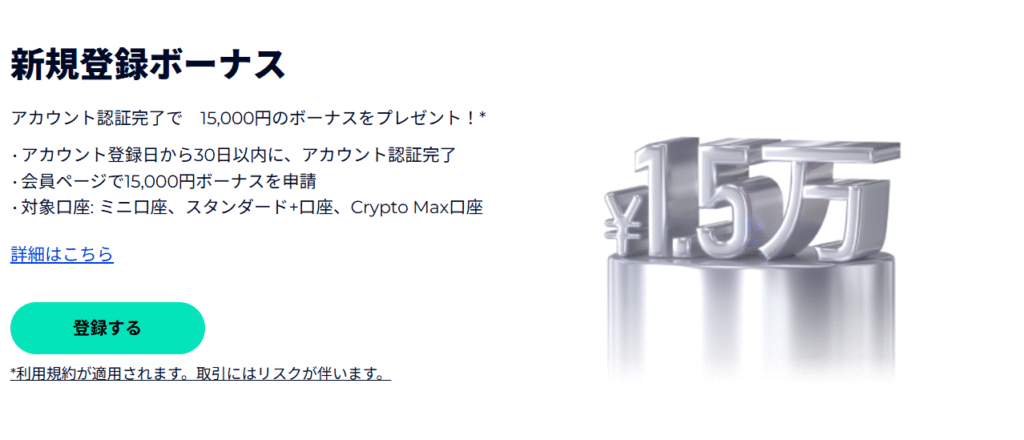
Assuming you plan to switch to a real account,FXGTis a suitable overseas forex broker.a new account opening bonusis being offered, you can try real trading with the margin you receive without making a deposit (the bonus ranking).
eventually want to trade with a real account,FXGTstart by practicing with
FXGT's account types and cashback conditions are explained in detail in " FXGTThe Complete Guide to "
Recommended Demo Account ②HFM

- :HFMOverseas Forex broker name
- Benefits of opening a real account: A wide selection of stocks and events
- Demo Accounts: Premium accounts + Contest accounts (Pro accounts and Zero accounts are not available for demoplay as of July 2026)
- Usage period: Unlimited (Continued if a transaction is made within 29 days of opening, and every 60 days thereafter)
- Leverage and capital setting: OK (Maximum 2,000x*, additional virtual funds up to 10 million yen are possible)
HFM's demo accountsnot only with MT4 and MT5, butHFMapp and Webtrader. You can test out the feel of using a real account with demo trading, from small-capacity options to standard specifications.
Note:Pro accounts and Zero accounts do not support demo accounts(official information as of July 2026). Also, the official information lists both 2,000x and 500x leverage limits, so please check the actual options on the account opening screen.
The usage period is unlimited, subject to the continuation of the transaction.
Accounts will be closed if there are no transactions for 29 days after opening (they will be reopened with at least one transaction every 60 days thereafter)
HFM's Recommended Features
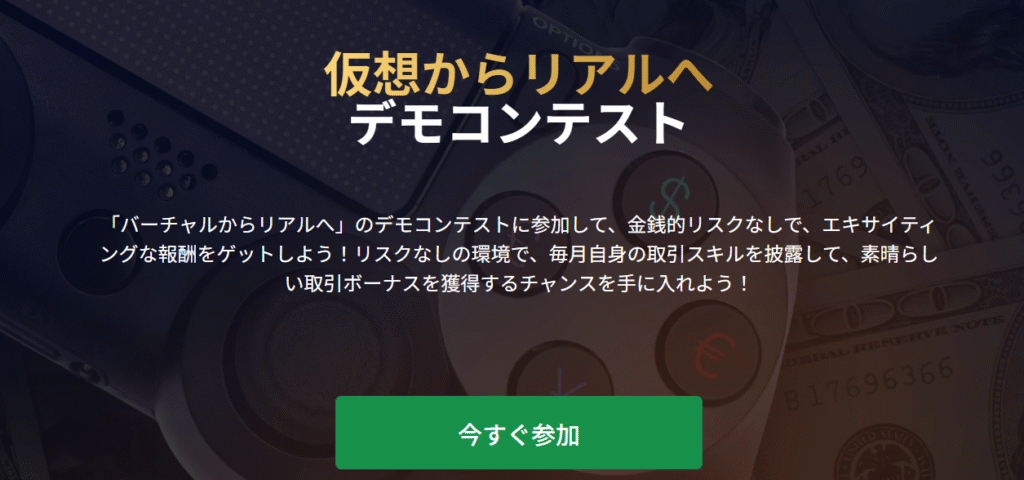
HFMA unique feature ofthat they sometimes hold demo trading contests where participants compete to see who can achieve the highest profit margin on their demo account. Since you participate using demo funds, no deposit is required, and winners receive trading bonuses that can be used on a real account (please check the official website for details on contests and prize amounts, as they vary depending on the time of year).
This broker offers a wide range of uses for its demo account, including opportunities to win prizes while practicing
HFMFor actual reviews and testimonials about , please see " HFMReviews and Testimonials "
Recommended Demo Account ③Exness

- Overseas Forex broker:Exnessname
- Benefits of opening a real account: Swap-free, unlimited leverage (real account, conditions apply)
- Demo accounts: Standard account, Low Spread account, Zero account, Pro account (4 types other than cents)
- Expiration Date: Deleted after prolonged inactivity (specific number of days is not disclosed; recovery is not possible).
- Leverage and capital amount settings: Select at the time of account opening (capital can be increased or decreased at any time).
Exnessis a popular overseas forex broker known for its unique services, such as unlimited leverage and swap-free instruments . Demo accounts can be opened for all account types except Standard Cent (Standard, Low Spread, Zero, and Pro)
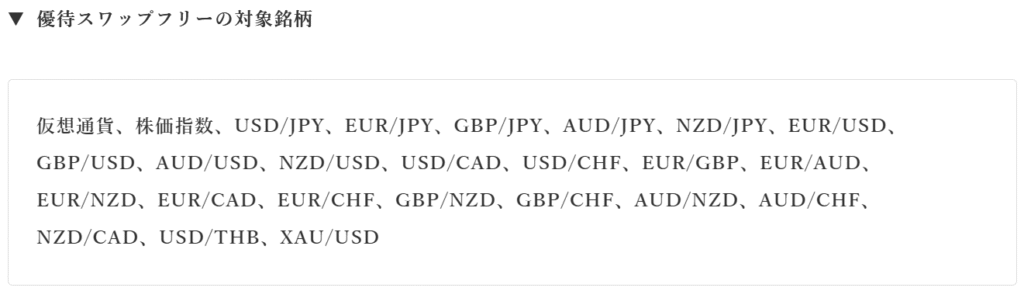
Swap-free trading, available in real accounts, is a system that exempts you from the negative swap fees incurred when holding positions overnight. It is highly regarded as making it easier to hold stocks for the medium to long term, even those with high swap costs
One of its strengths is that you can easily test different amounts of virtual funds because you can increase or decrease them at any time by setting the balance
Note: Demo accounts will be deleted if they remain inactive for an extended period (this is a deletion, not archiving, and cannot be recovered. The exact number of days is not officially disclosed). If you plan to use it long-term, be sure to log in and trade regularly.
Exness's Recommended Points
ExnessOne of the advantages of 's demo account is Exnessthat it can be opened through trading app, and you can freely increase or decrease your funds. It's ideal for simulations with different amounts of capital , such as "How far can I withstand trading with 100,000 yen?" or "How should I allocate my lot size if I have 5 million yen?"
With unlimited leverage (unlocked upon meeting certain conditions) a key feature of real accounts in mind, let's first familiarize ourselves withExness's trading environment using a demo account
ExnessFor actual reviews and testimonials about , please see " ExnessReviews and Testimonials "
Recommended Demo Account ④ XMTrading
- Overseas Forex Broker Name: XMTrading
- Benefits of opening a real account: Account opening bonus
- Demo accounts: Standard account, Zero account, KIWAMI account (3 types, up to 5 accounts)
- Usage period: Account will be frozen if you do not log in for 60 days or more (you can continue using the account if you log in within 60 days).
- Leverage and Funding Amount Settings: OK (Choose from 1 to 1,000x *Maximum 500x for Zero Accounts; Balance can be reset at any time)
XMTrading is one of the overseas forex brokers that is well-known among Japanese traders. One of XM's strengths is that it's easy to find information, even for those new to overseas forex trading. You can choose from three types of demo accounts: Standard, Zero, and KIWAMI
The only information required for registration is your email address. The fact that you can easily find plenty of XM user guides online is another reassuring point
You can continue using it if you log in within the last 60 days。
If you do not log in for more than 60 days from your last usage date, your account will expire and be frozen, and it cannot be reactivated (new accounts can be created)

XMTrading's Recommended Features
XM allows you to open up to five demo accounts per email address.The balance can be reset and changed at any time, making it easy to restart your testing.beginner-friendly webinars and educational content, allowing you to learn while using your demo account.
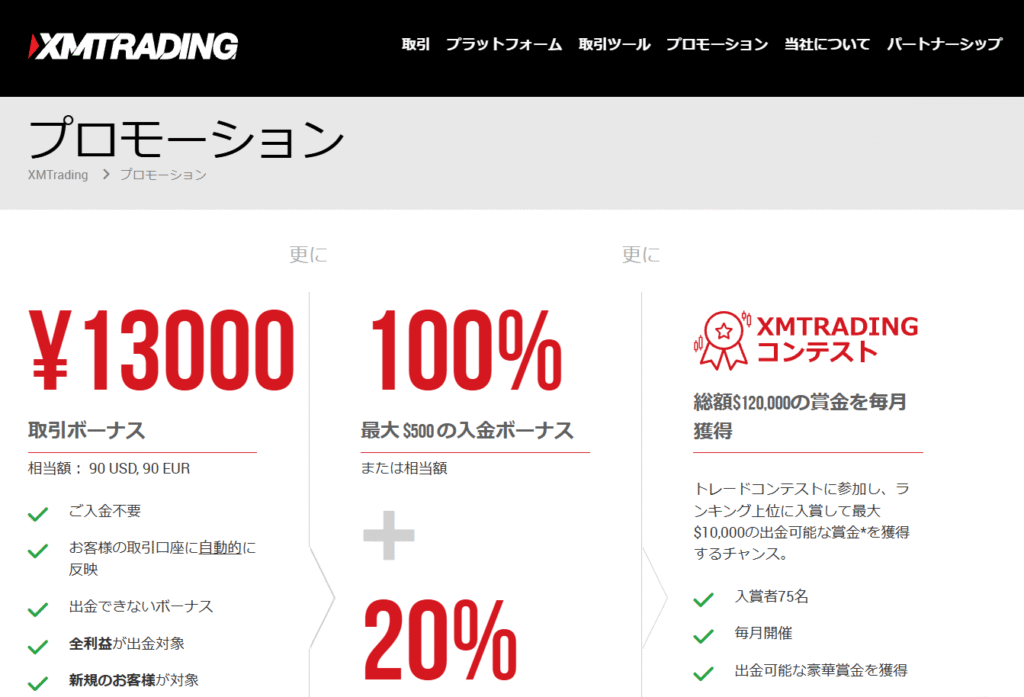
One of the advantages of XM is that you can receive an account opening bonus when you open a new real account (see the bonus ranking for the latest amount ). If you intend to use a real account, why not try out a demo account to see how it works for you?
You can find information about XM's security and withdrawal process below. Please take a look
Recommended Demo Account ⑤ MT4/MT5 Demo Trading

- Provided by: MetaQuotes Ltd (Developer of MT4/MT5)
- Advantages: You can do demo trading without going through an overseas forex broker.
- Demo account: MetaQuotes-Demo server (MT5)
- Expiration Date: Service will be suspended if unused for an extended period.
- Leverage and capital amount settings: Select as desired when opening an account.
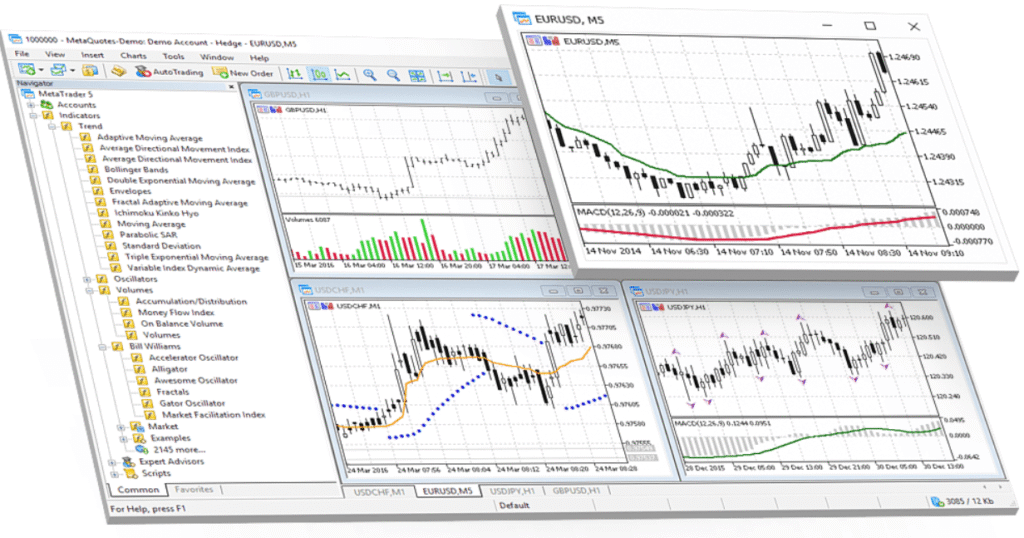
Now, there's one more thing I'd like to introduce: the official MT5 demo account . With MT5, you can open a free demo account without going through an overseas forex broker . This demo account is a service provided by "MetaQuotes Ltd," the developer of MT4/MT5
Leverage and investment amounts can be freely set. With a wide variety of currency pairs and CFD products available, it can be used for market exploration and finding suitable instruments
Please note thatonly MT5 accounts can be opened on the official MetaQuotes demo server. If you wish to create an MT4 demo account, please apply through an overseas forex broker.
Recommended features of the MT5 demo
One of the advantages of using an MT5 demo account is that you don't need to choose an overseas forex broker. Once you've installed the platform, you can use real-time charts regardless of whether you have a forex account or not
You can also register for overseas forex accounts later. The ability to register for accounts with different overseas forex brokers all on one platform is extremely convenient
I'll explain how to open an MT5 demo account later, so please refer to that
If you want to choose a demo account based on a real account, please also refer to our " Recommended Overseas Forex Broker Comparison Ranking ."
How to open a demo account with an overseas forex broker [Setup instructions]

Next, let's look at how to open a demo account with an overseas forex broker and how to install MT4/MT5 from an overseas forex broker
Register through each company's official website
Opening a demo account is easy and can be done through the official website of the overseas forex broker you wish to use. Here, we'll useFXGT's demo account opening as an example, but the process is almost the same for any broker, so please use this as a reference
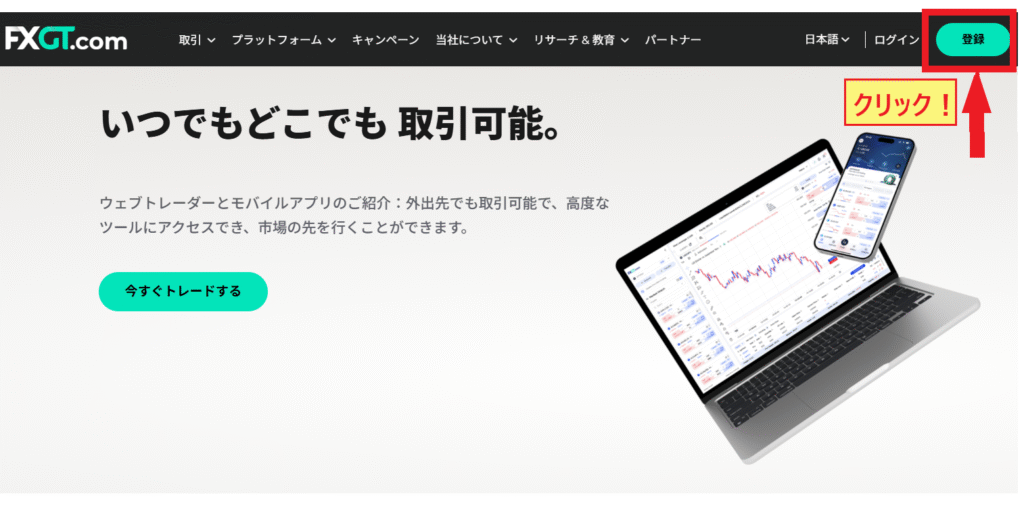
Step 1. Go to the registration screen
First, click the "Open an Account" or "Register" button on the top page of the overseas forex broker's official website
Step 2. Enter your name, email address, and phone number
A registration screen will appear, so enter your email address and some basic information

- Full name → (Yamada Taro)
- email address
- password
- Country of residence
- Phone number → (omit the initial 0)
The settings at this timeYour email address and password will be used to log inSo, let's save it so we don't forget
After reviewing your input,click the "Register Now" buttonto proceed.
Step 3. Log in to the member page via the email link
You will receive an email with a verification link. Click the verification link button to access your member page
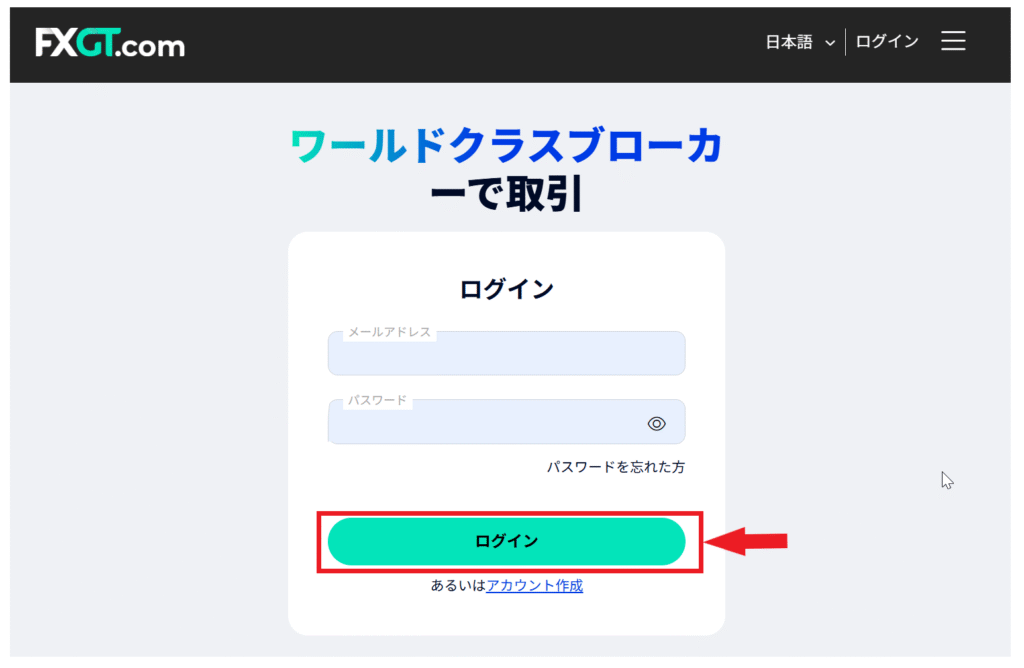
Log in using the email address and password you set. Once you have successfully logged in,email verificationis complete.
Step 4. Apply for a demo account from the "Trading Account" menu
Next, you will apply for a demo account from the member page .
Select the PC icon from the menu on the far left to go to the "Trading Account" screen
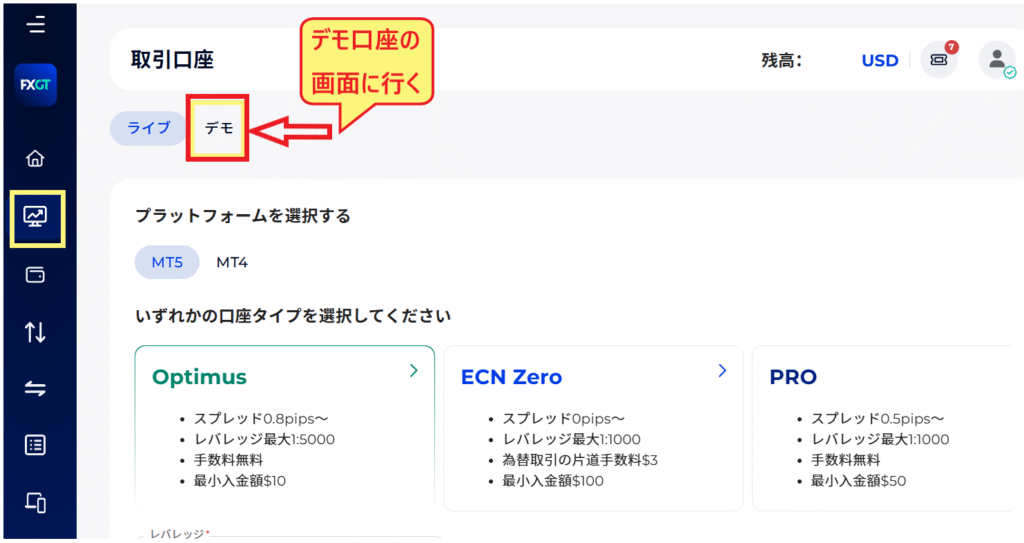
Set the account type and trading conditions for your demo account
Once the demo account screen appears, the next stepto set the account type and trading conditions you want to use for the demo account.
Step 1. Set up a demo account

- Platform → Select MT5 or MT4
- Account type → Account you want to use for demo
- Leverage → Select from the dropdown menu
- Account currency → Japanese Yen (or your preferred currency)
- Account Label → Give your account a name (any name you like)
Select the platform and account type you want to use , and then optionally set the "leverage," "currency," "account name," etc.
While the trading conditions and options available vary slightly from one overseas forex broker to another, withFXGT, for example, it might be worth trying out a leverage of 5,000 times
Once you have finished the setup, please press the "Proceed (Confirm)" button. Your demo account registration is now complete
Step 2. You will receive your login information via email
Once registration is complete,you will receive your login information via email.You can use the following information to log in to your demo account.
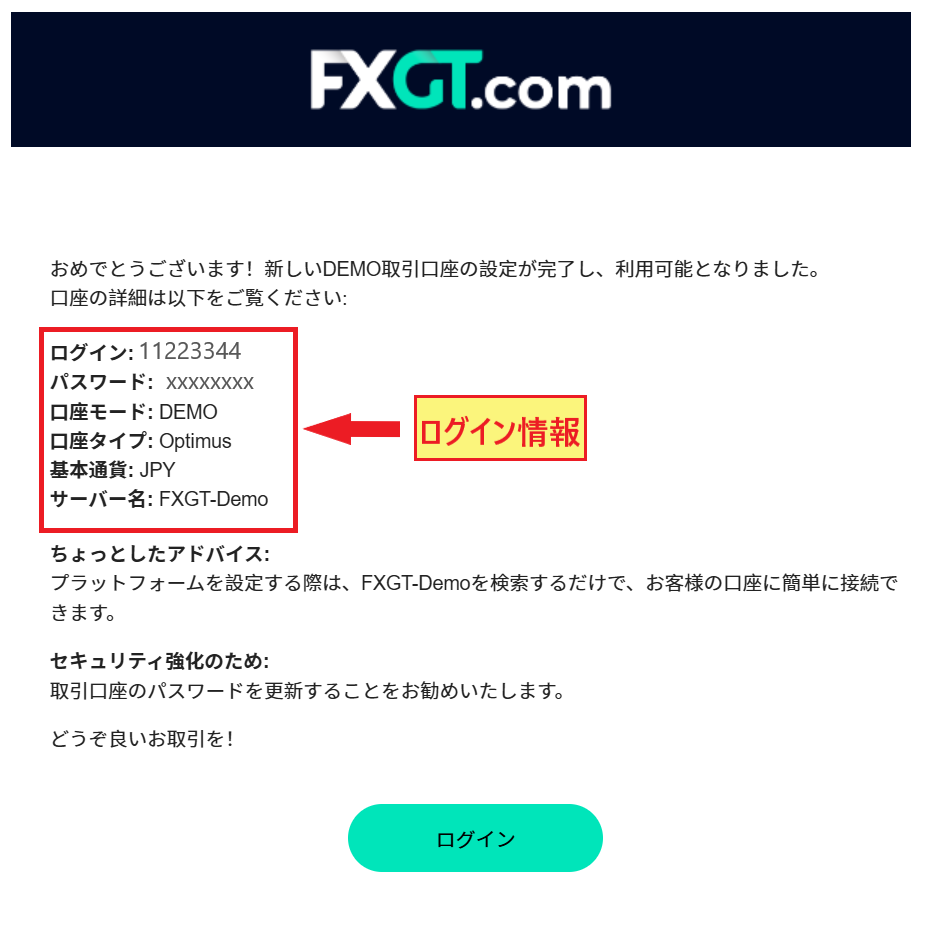
The ID, password, and server name in this email are:Important information for logging into MT4/MT5Yes. Make sure to save it so you don't accidentally delete it
Download MT4/MT5 for free from the dedicated page
Now that your demo account application is complete, the next stepdownload and install the platform (MT4/MT5).Using MT4/MT5is free with all overseas forex brokers.
Even with a demo account, you can choose from Windows, macOS, Android, iPhone, or the web version (browser version)
Let's look at how to install MT4/MT5
Step 1. Go to the platform page

Once you open the platform page, click on the device you want to install it on. The file will download, so click "Open File" to begin the installation
Step 2. Click the "Installation Complete" button
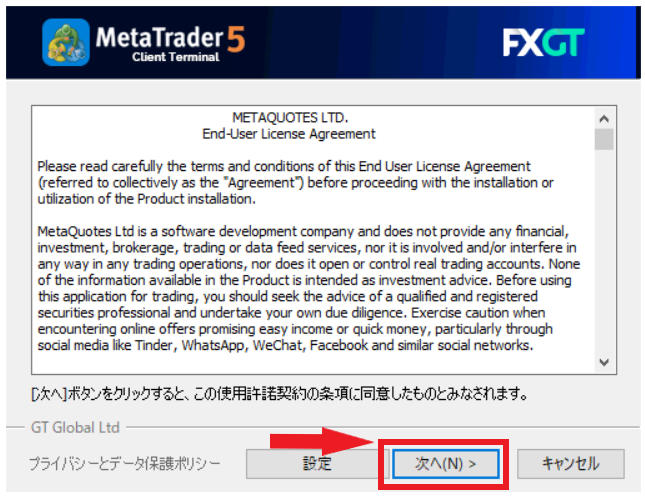
Clicking "Next" will cause the screen to change rapidly as the installation process begins. Please wait for a few minutes

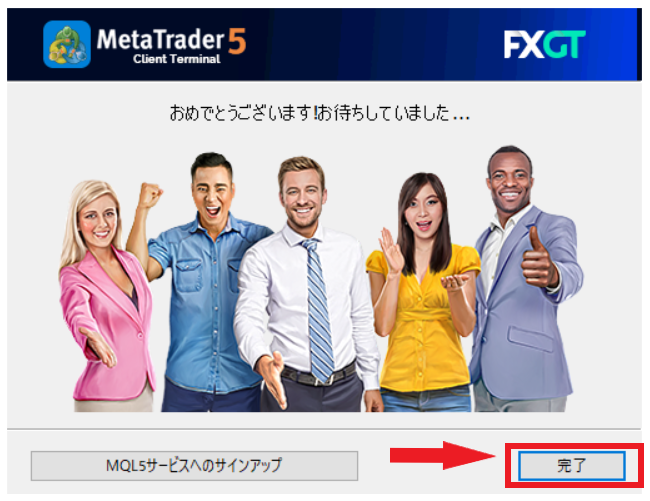
Once this screen appears, the installation is complete. Clicking the "Finish" button will display MT4/MT5
Log in to a demo account of an overseas forex broker
Once the MT4/MT5 screen is displayed,select "File" → "Log in to trading account".
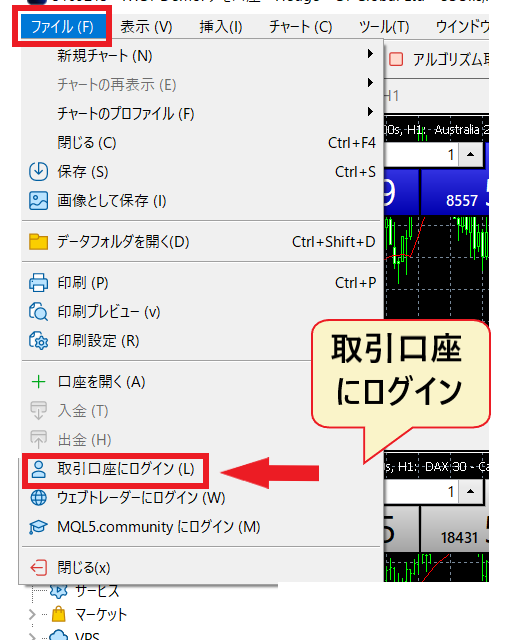
Enter your "ID," "Password," and "Server Name" on the login screen to log in

Your overseas forex demo account is nowready. You can start trading anytime.
If you're unsure whether to use MT4 or MT5, please refer to this article
How to install MT4/MT5 for free [Open a demo account]

Next, I'll show you how to use an MT5 demo account for free without going through an overseas forex broker
*MT4 can no longer be downloaded without going through a broker, so if you want to use MT4, please apply for a demo account with an overseas forex broker
How to open a demo account with MetaTrader
First, go to the official MetaTrader 5 website
Step 1. Download MT5 from the official website
Click the blue button that says "Download MetaTrader 5 for Windows" at the bottom center of the MetaTrader 5 official website
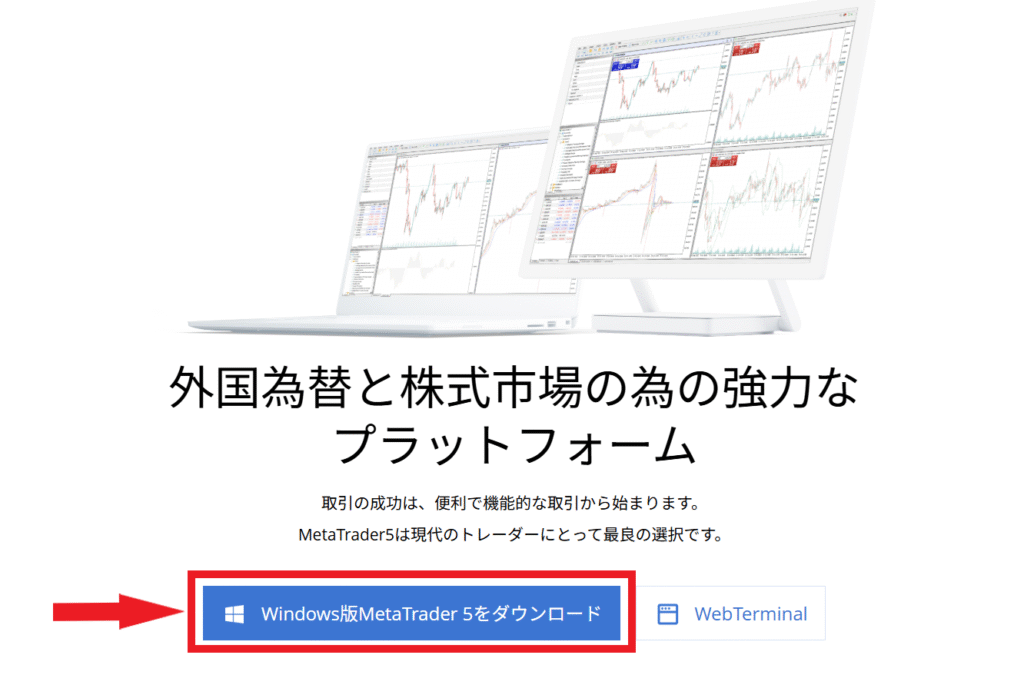
Step 2. Open the file and install
Clicking "Allow" after the prompt "Do you want to allow the use of this file?" will bring up the MetaTrader Terms of Service screen. Click "Next" to install
Clicking "Next" means you agree to the terms of service

The installation will begin, and images of people will change rapidly. This will take a few minutes, so please wait
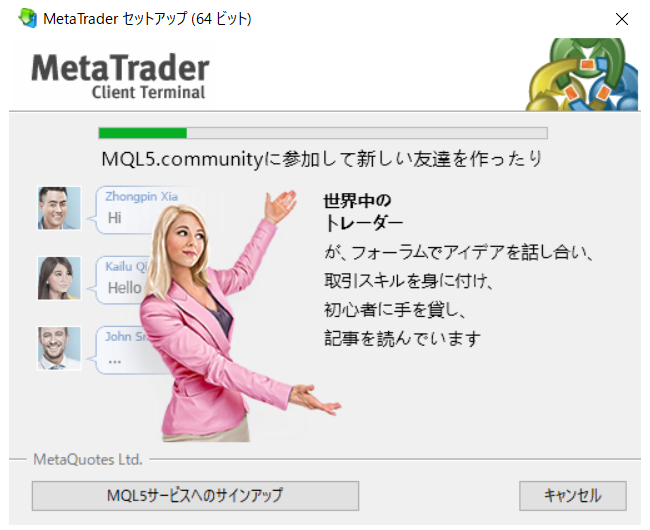
The installation is complete when the image below appears .

Clicking the "Complete" button will display MT5. Once the MT5 screen appears, register for a demo account
Step 3. Register for a Meta Quotes demo account
Select "File" → "Open Account" from the top menu

A screen will appear where you can select a broker. Enter the broker name "MetaQuotes" to display it in the list

- Enter the broker name "MetaQuotes"
- Click "Find a company"
- Select "MetaQuotes" from the broker list
- Click "Next"
Select (click) "MetaQuotes Software Corp"and proceed to "Next". On the next screen, you will register for a demo account.
Step 3. Set up a demo account
A screen will appear where you can choose the type of account. Please check the box at the top that says "Open a demo account and trade with risk-free virtual money."

Next, you will register an account
Since it's a demo account, you can open one even if the information other than your email address isn't real
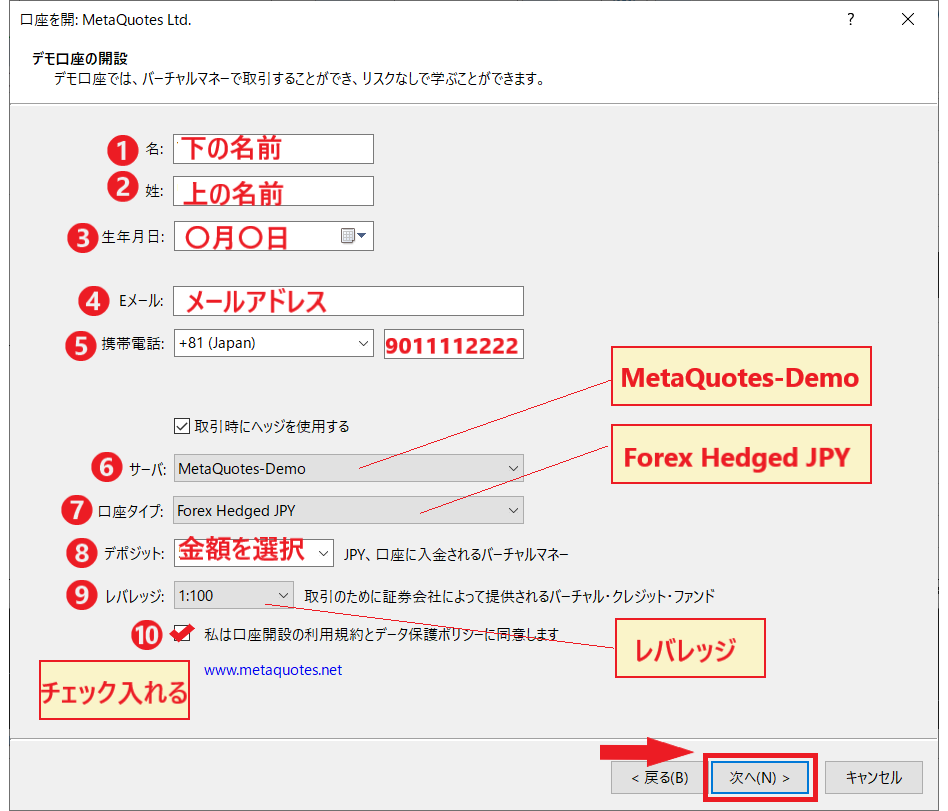
- First name
- Last name
- date of birth
- email address
- Phone number (omit the initial 0)
- Select the server name "MetaQuotes-Demo"
- Select the account type "Forex Hedged JPY"
- Deposit → Select the deposit amount as desired
- Leverage → Select as desired
- Check the box to agree to the terms of service
Once you've confirmed that all fields are filled in, click "Next," and yourID and password will be displayed. Remember to save this ID and password, as you will use them to log in.
Step 3. Log in with your ID and password
The next step is to click "Log in to trading account" and log in to MT5 with your ID and password
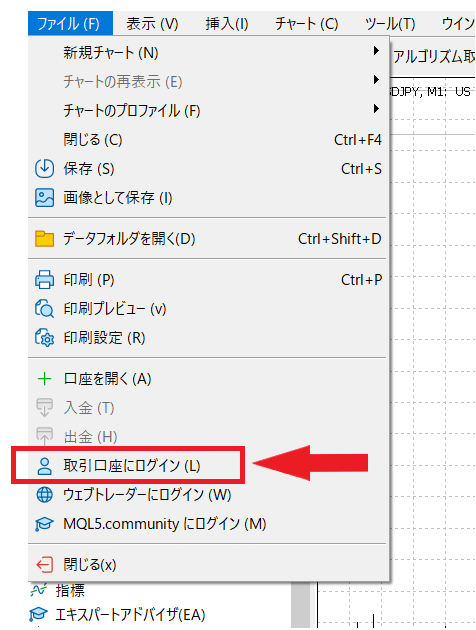
Once you log in, the deposit amount you set will be displayed in the trading menu. You can check it from the "Trading" tab menu in the toolbox at the bottom of MT5

Now you're ready to start demo trading
How to register for a demo account with an overseas forex broker
The MT5 platform used for the MetaTrader demo account can be used to register demo and real accounts with overseas forex brokers. Having just one MT5 platform allows you to register multiple overseas forex brokers and multiple accounts, which is very convenient
Information required for account registration
- Login ID
- password
- Server name
The information required to register for a demo account consists of three items : "Login ID," "Password," and "Server Name."
Log in using your overseas forex broker's ID, password, and server name
You can open an account with an overseas forex broker by selecting "Open Account" from the "File" menu
- Select "File" → "Open Account" from the menu
- Enter the name of the overseas forex broker in the broker list
- Select Server Name
- Select Log in to an existing trading account
- Enter your ID and password on the login screen
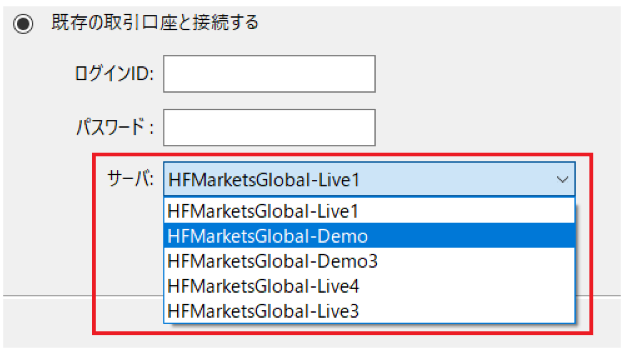
For example, if you were to register forHFMdemo account, you would enter the broker name "HFM" and then select the company name
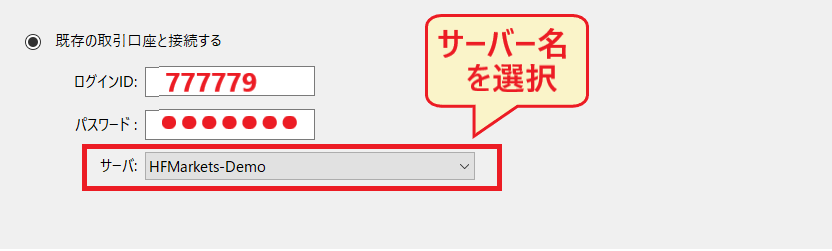
By searching for the company name, you will be able to select the server name of the overseas forex broker from a dropdown menu
A diagram showing how to select a server name from a dropdown menu
Account switching is possible
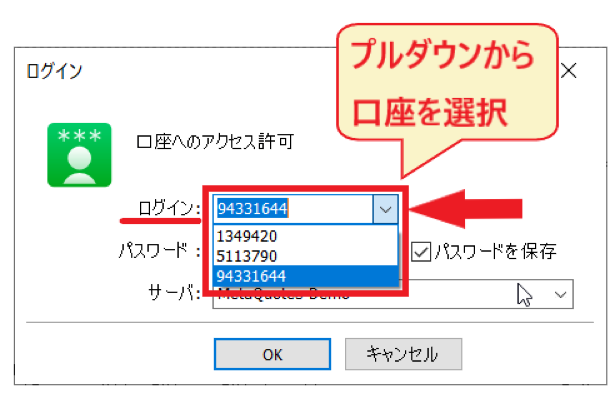
Saving your login informationmakes switching accounts easy. This is a convenient method for creating multiple MetaTrader demo accounts or registering accounts with different brokers.
Advantages of trading on a demo account

As we've seen, anyone can easily start a demo account with an overseas forex broker for free. Not only is it easy to get started, but demo accounts also offer several advantages that real accounts don't
Now, let's look at the advantages of using an overseas forex demo account
Benefit 1: Can be used for practicing FX trading
The biggest advantage of using a demo account with an overseas forex brokerpractice forex trading without spending any of your own money.
Even demo accounts feature real-time charts, just like real accounts. You can buy and sell currency pairs under the same conditions as live trading, including exchange rates and spreads
Even if you incur losses, since it's virtual trading, there's no damage to your own capital . There's no need to be afraid even if you get stopped out. A demo account is useful as a practice tool to avoid losing money
Benefit 2: You can learn how to use MT4/MT5
One of the biggest advantages of using a demo account is that you can learn how to use MT4/MT5
MT4/MT5, a well-known FX platform, boasts high performance, butits drawback is that its operation is complex and difficult to understand. Initially,confused about how to use the tool. However, by using a demo account, you can learn how to operate it through practical experience while referring to guides and manuals.
Before trading, make sure you review things like how to place orders, how to set up charts, and how to interpret your positions
Benefit 3: You can test indicators and EAs
Furthermore, one of the key advantages of a demo accountyou can try out indicators and EAs for free.
MT4/MT5 comes pre-loaded with over 12,000 Expert Advisors (EAs) and more than 60 indicators and drawing tools . You can test these features with demo trading, and you can also install as many indicators and EAs as you like from other sources .
With a highly scalable platform, you'll be able to plan a variety of trading strategies
By the way, if you're interested in EAs, please also check out this article
Benefit 4: You'll get a feel for how easy overseas forex brokers are to use
Another advantage of using a demo account is that it allows you to get a feel for how easy it is to use an overseas forex broker
Even if you only register with your email address, opening a demo account will allow you to log in to the overseas forex broker's member site . You can learn about how to use the member site, its functions, and how to log in to the trading tools , understanding how it all works.
Using a demo account beforehand helps you determine whether a broker is easy for you to use
Benefit 5: Trading methods can be verified
Furthermore, one of the advantages is that you can test your own trading methods by repeatedly engaging in demo trading
With a demo account's real-time charts, you can constantly monitor fluctuating rates while analyzing candlestick patterns and moving averages . You can also observe chart movements after economic indicator announcements
You can use real-time charts for technical analysis, check economic news, practice market forecasting, and test trading strategies
One of the attractive features of MT4/MT5 for overseas forex trading is its comprehensive technical analysis capabilities. Please also refer to the following article
Points to note when using a demo account

Certainly, there are significant advantages to using a demo account with an overseas forex broker. However, at the same time,There are also some disadvantages, so you must be careful。
Next, let's look at some important points to keep in mind when using overseas forex demo accounts
Point to note 1: Lacks the tension of actual trading
In demo trading, you don't actually use your own moneyA lack of tension is a disadvantage of demo accountsis
In actual trading, you use your own money, soyou'll likely feel more nervous than you imagined.
Due to the pressure, you might become confused about order methods even when it comes to buying and selling . You might even incur losses by placing orders incorrectly . It's important to familiarize yourself with the basic operations during the demo trading stage .
Point to note 2: There is a "perceived difference" in execution and spread
Demo accounts operate with almost the same rate feeds and spreads as real accounts, butthe way trades are executed (slippage) does not perfectly match that of real accounts.
Orders placed on a real account are subject to actual market liquidity, soslippage and momentary spread wideningcan occur during economic indicator announcements or periods of low trading volume. Demo accounts may not accurately reproduce this load, which isone reason why "you could win in the demo but your performance drops in the real account.
Especially when testing strategies involving small profits of a few pips, such as scalping, on a demo account, design your lot size and stop-loss range assuming that execution costs will be slightly worse in live trading than on the demo
Point to note 3: Lacks realism regarding profits and losses
Emotional changes when trading with personal fundsThis cannot be understood with a demo account
The fluctuations in your own funds, whether increasing or decreasing, can evoke more emotions than you might expect and sometimes become a source of mental stress . It's no exaggeration to say that as long as you continue to use fictitious funds, you're not truly practicing trading
The emotional changes caused by profits and losses, and the skills to control those emotions, are things that can only be learned through real money . Starting with small trades at an early stage will likely lead to improved skills.
Point 4: Demo trading is for practice only
A demo account is, after all, just a demo accountPractice for actual tradingIt is a preparatory stage
Experience in FX tradingby using your own money, being swayed by emotions, and making profits. It's important to remember that you're testing a demo account as preparation for real trading.
To avoid panicking during the actual trading session,make sure to practice thoroughly using a demo account.
If this is your first time trading in overseas forex, please refer to "The Complete Guide to Overseas Forex for Beginners" first
Frequently Asked Questions (Q&A) about Demo Accounts for Overseas Forex Brokers
Finally,frequently asked questions about demo accounts at overseas forex brokers. Please use this as a reference when using demo accounts in the future.
Is there a demo account available as a smartphone app?
Yes.Most overseas forex brokers allow you to use a demo account on your smartphone. You can install it on both Android and iPhone, and you can choose between the official smartphone app provided by the broker and the MT4/MT5 app.
For easy-to-use smartphone apps, please refer to the following article
Can I change the balance in my demo account?
It depends on the broker.FXGTandHFMallow you to add virtual funds,Exnessallows you to increase or decrease them at any time, and XMTrading allows you to reset them at any time. On the other hand,Axiyou need to contact support.
For more details, please refer to the broker comparison list in "A Thorough Comparison of Recommended Brokers for Overseas Forex Demo Accounts!" in this article
Can I change the leverage settings on a demo account just like I can on a live account?
Most brokersallow you to select your leverage when opening a demo account(for example,FXGToffers leverage from 50 to 5,000 times, and XMTrading offers leverage from 1 to 1,000 times). A major advantage of demo accounts is that you can experience how your margin maintenance ratio changes with high leverage without using actual funds.
However, whether you can change the leverage after opening an account depends on the broker , so if you want to try multiple leverage levels, the surest way is to "open an additional demo account with different settings." For practicing high-leverage trading, please also see " The Mechanism and Precautions of High Leverage ."
What are the differences between demo accounts for overseas and domestic forex trading?
The main differences between overseas and domestic forex demo accounts lie in the trading tools and leverage . Overseas forex demo accounts typically offer MT4/MT5, which are widely used globally , while domestic forex accounts often use proprietary, in-house developed tools
Furthermore, while domestic FX trading is limited to a maximum leverage of 25x due to leverage regulations , overseas FX demo accounts allow for leverage of 1,000x to 5,000x, which is unique to overseas FX
Why can't I create or log into an MT5 demo account?
There are three common causes:① Incorrect server name selection(mistaking the broker's demo server for the production server),② Expiration of the demo account(deletion or freezing due to prolonged inactivity),and ③ Mistaking MT4 for MT5(trying to log in to MT5 with an MT4 ID).
Please check the ID, password, and server name listed in the account creation confirmation email. If you still cannot log in, it is highly likely that your account has expired, so please create a new demo account.
Can I use an Expert Advisor (EA) on a demo account with an overseas forex broker?
Yes.Most free EAsare compatible with demo accounts. Paid EAs are divided into those that are compatible with demo accounts and those that are not.an EA is compatible with demo accounts, you can install it on MT4/MT5 and try it out with demo trading.
The procedure for installing an EA is summarized in five steps in the " EA Installation Guide "
How do I switch to a real account?
You cannot directly upgrade a demo account to a live account . If you wish to change from a demo account to a live account, you must open a separate live account . You can apply for and complete the process for a live account through the official website. You will need an email address and identification documents to apply .
The following article will show you the documents required to open an overseas forex account
Summary: Try out overseas forex trading with a demo account

As we've shown, many overseas forex brokers offer free demo accounts, and you can easily start demo trading just by entering your email address . Free demo accounts from overseas forex brokers can be very useful for practicing trading and testing trading strategies
Key points of this article
- Demo accounts arefree with all brokers and can be opened with just an email address(no identity verification or deposit required).
- Truly unlimited accounts are rare;expiration conditions fall into three categories: login-based, trading-based, and fixed-term. For long-term use,FXGT,HFM, XM,BigBossit's recommended to regularly use
- If you don't want to go through a broker,MT5 platform (MetaQuotes-Demo)for demo trading (MT4 requires going through a broker).
- The way trades are executed and the mental stress involved are different between demo and live trading . Once you've mastered the basic operations and trading methods in demo trading, move on to small-scale real trading.
Look for a demo account that suits your needs based on factors such as the specifications, expiration date, and flexibility of settings available for real accounts . When you switch to a real account, opening an account through a cashback site will give you a portion of the spread back , allowing you to start with lower trading costs from the beginning.
If you're unsure whether to use MT4 or MT5, please also check out " MT4 for Overseas Forex Trading " and " MT5 for Overseas Forex Trading ." If you primarily use a smartphone, please also see " Recommended Overseas Forex Trading Apps ."