"What exactly is automated trading (EA)?" "Should I run it on MT4 or MT5?" "Can I really make a profit with a free EA?" — There are three questions that people often get stuck on before starting automated trading in overseas forex.To answer them upfront, an EA is "a program of trading rules that runs on MT4 or MT5," and can be used with any broker, but whether or not you make a profit depends on the contents of the EA and how you use it.
This article provides a diagram illustrating how EAs work, and then covers everything fromhow to find free EAs, the market price of paid EAs, three routes to creating your own, five steps to getting started, six indicators to numerically identify profitable EAs, EA usage rules of major brokers, and how to spot fraudulent EAs warned about by public institutions, all based on official MetaQuotes information, company terms and conditions, and primary information from the National Consumer Affairs Center. Recommended brokers and recommended free EAs are covered inthe Overseas FX Automated Trading (EA) Recommendation Ranking, and detailed instructions on installation and backtestingthe EA Setup and Usage Guide, so this article focuses solely on "how it works and how to get started."
Conclusion | Key Points of Automated Trading (EA) in Overseas Forex (as of September 2026)
- EA = Expert Advisor, a program of trading rules that runs on MT4/MT5. It automatically determines the rules and places orders and closes positions based on price movements. This is a feature of the MetaQuotes platform, not a function provided by a broker.
- Major overseas forex brokers allow the use of Expert Advisors (EAs). What is prohibited are "techniques" such as arbitrage, exploitation of delays, and bonus abuse (confirmed in the original terms and conditions). In Japan, some major brokers, like DMM FX, prohibit the use of automated trading software other than their own proprietary tools in their terms and conditions, meaning that only a limited number of brokers allow the use of EAs on MT4.
- There are four ways to obtain an EA: free EAs on the MQL5 Market / paid EAs (one-time purchase, non-refundable, tester verification available before purchase) / distribution/sale sites / creating your own (no code required if using MQL5 Wizard).
- If you're just starting out, MT5 is the standard. MetaQuotes has officially stated that it has stopped providing new licenses for MT4, and future major updates will only be for MT5. Only choose MT4 if the EA you want to use is MT4-specific.
- There is no such thing as an EA (Expert Advisor) that "guarantees profits." You should evaluate it using metrics such as profit factor, maximum drawdown, number of trades, and the discrepancy between backtest and forward test results. Test it on a demo account with a small amount of money before using it for real-world trading. The National Consumer Affairs Center of Japan has repeatedly issued warnings about solicitation troubles involving automated trading software.
*This article was created by the MoneyCharger editorial teamtheir content creation policy. The specifications for MT4, MT5, and EAs were verified on September 5, 2026, based on the official website, official help, MQL5 official documentation, and market terms of service of MetaQuotes, the terms of service and official VPS guide of each company for EA usage conditions (the date of verification is specified in the text), and the materials published by the National Consumer Affairs Center of Japan for information on fraudulent practices. Overseas FX brokers are not registered with the Japanese Financial Services Agency,the Financial Services Agencyandthe Consumer Affairs Agencyhave issued warnings about trading with unregistered brokers. This article is for general informational purposes only and does not endorse the use of any specific EA or broker. Past performance of an EA does not guarantee future profits.
If you are new to overseas forex trading,our complete guide for overseas forex trading beginners.
What is automated trading (EA) in overseas forex? | A trading rule program that runs on MT4/MT5
An Expert Advisor (EA) isan automated trading program that runs on MT4 or MT5. MetaQuotes officially defines an EA as "an application for price analysis and trading that can analyze market conditions and execute assigned trading operations." The reason why automated trading is often referred to as "EA" or "MT4 automated trading" in overseas forex trading is because most overseas forex brokers offer MT4 or MT5, and automated trading that runs on these platforms is what we call an EA.
The important point is thatEAs are not a service provided by overseas forex brokers. EAs are collections of "if... then buy/sell" statements written in the MQL4/MQL5 programming languages, and are created by developers all over the world and distributed on MQL5 marketplaces and distribution sites. Brokers are the ones that receive and execute the orders; they do not guarantee or manage the performance of the EAs.

As shown in the diagram, the EA① it checks the rules every time the price moves (each tick) → ② if the conditions are met, it issues an order → ③ if the settlement conditions are met, it issues a settlement order. The official MQL5 documentation also explains that the EA makes buy/sell decisions based on an event called "OnTick," which is called every time a new quote arrives. The difference from discretionary trading is that it "mechanically follows the rules," so there are no delays in stop-loss orders due to emotions or impulsive entries. On the other hand,it cannot adapt to market changes on its own, it may continue to lose in market conditions that do not match the rules.
There are three prerequisites for an EA to work: "MT4/MT5 is running," "Automated trading is turned ON," and "It is connected to the broker's server." If any one of these is missing, orders will not be placed. Since the EA will also stop if you turn off your home PC, it is common to use a VPS (Virtual Private Server) to run it 24 hours a day (the necessity of a VPSwill be discussed later).

The most common mistake people make is the misconception that "if you install an EA, you can make profits without doing anything." An EA is a tool that "mechanically executes predetermined rules 24 hours a day," not a brain that reads the market. The ability to choose a good EA and the judgment to stop it when the market is unsuitable remain the responsibility of a human being until the very end
Differences between EA, copy trading, mirror trading, and domestic selectable automated trading systems
Even though we use the single term "automated trading," there are four different types with varying mechanisms. EA (Expert Advisor) is a method where you "run a program on your own MT4/MT5," offering the highest degree of freedom, but requiring you to prepare everything yourself—selection, settings, and operating environment
| kinds | What determines buying and selling? | Moving places | Number of options | Suitable people |
|---|---|---|---|---|
| EA (MT4/MT5) | Buy and sell rules written in the program | MT4/MT5 on my PC/VPS | Thousands of free and paid titles combined (MQL5 Marketplace) + distribution/self-made | People who can verify and configure things themselves. People who want to understand the rules and operate accordingly |
| Copy trading | Discretionary trading by other traders (people) | Automatic replication on the vendor's server | Each broker has dozens to hundreds of traders | For those who want to avoid the hassle of setup. However, it relies on the trader's discretion (copy trading scams and points to be aware of). |
| Mirror trading (selection type) | Strategy provided by the service provider | Provider's server | dozens to hundreds of strategies | People who just want to choose a strategy |
| Domestic repeat-type and select-type | Broker's proprietary logic (e.g., Trailing Stop, Loop If-Then) | Vendor's system | Fixed for each contractor | For those who want to start easily within the protection framework of domestic brokers (25x leverage, margin call possible) |
In Japan, automated FX trading is predominantly done by selecting from pre-defined systems provided by the broker , such as Money Square's "TraLiPi" and iNet Securities' "Loop Ifdan." While this eliminates the need to write programs in MQL, it also lacks the flexibility of Expert Advisors (EAs). Although some brokers in Japan, such as OANDA Securities and Rakuten MT4, allow MT4/MT5 EAs, major players like DMM FX prohibit the use of automated trading software other than their own tools in their terms and conditions ( more details on differences from domestic FX ).
Main types of EAs and their strengths and weaknesses in different market conditions
EAs (Expert Advisors) have different strengths and weaknesses depending on their trading logic.Most failures in choosing an EA stem from not knowing "which type" it is. In particular, martingale-type EAs may appear to have a high win rate, but they are structured in such a way that a single sudden market change can cause you to lose most of your account funds, so be sure to identify them.
| type | Logic Overview | My preferred market | Weaknesses/Points to note |
|---|---|---|---|
| Trend-following type | Trend following based on moving average crossovers and breakouts | A trending market moving in one direction | In range-bound markets, false signals increase, leading to a series of small losses |
| Contrarian (mean reversion) type | Aiming to profit from a price rebound after it has gone too far | A range-bound market that fluctuates within a certain range | When a strong trend emerges, unrealized losses expand |
| Scalping type | Take small profits of a few pips or a few minutes at a high frequency | High liquidity and narrow spreads during certain time periods | Spread and execution speed have a significant impact. Frequent orders may be restricted by the broker's terms and conditions |
| Grid type | Place orders at regular intervals to capture the price fluctuations | Range market | When a trend develops, positions tend to accumulate on one side |
| Martingale-style averaging down | Each time a loss occurs, I increase the lot size in the opposite direction, buying more or selling more | The market recovers after a small setback | The win rate may look high, but you could lose your margin all at once in a market that doesn't recover. Even if the performance graph is steadily rising, always check the maximum drawdown. |
| Arbitrage type | They exploit the delays in price distribution between vendors to gain a price advantage | — | Many overseas forex brokers prohibit this in their terms and conditions. It could result in profit confiscation and account freezing. |
According to the official MQL5 documentation, almost all EAs (Expert Advisors) are composed of three modules: "Signals (when to buy or sell)," "Money Management (how much to invest)," and "Trailing Stop (how to close positions)." When reading an EA description, checking how these three points are designed will help you understand its type and weaknesses
MT4 or MT5: Which is better for using EAs? | MT5 is the basic choice for beginners
In short,if you're starting out with EAs, MT5is the standard. MetaQuotes has officially stated on its MT4 broker page that "new MetaTrader 4 licenses can no longer be purchased" and "future major updates will only be for MT5" (confirmed September 5, 2026). However, thisdoesn't mean MT4 is unusable; existing MT4 accounts and EAs are still working. If the EA you want to use is MT4-specific (MQL4), then choosing an MT4-compatible account is a reasonable decision.
| item | MT4 | MT5 |
|---|---|---|
| EA's language | MQL4 (procedural) | MQL5 (object-oriented programming based on C++ concepts) |
| EA file compatibility | Incompatible. MT4 (.ex4) files will not work on MT5, and vice versa. Check your platform before obtaining the EA. | |
| Hourly timeframe | 9 types (official) | 21 types (official) |
| Built-in technical indicators | 30 types (official) | Over 80 types of indicators and analysis tools (official) |
| Order management method | Hedging (two-way trading) | Supports both netting and hedging (official) |
| Strategy Tester | Testing a single currency | Simultaneous testing of multiple currencies, optimization using genetic algorithms, and forward testing functionality (official) |
| Board information (DOM) | can be | Yes (Expanded version, official) |
| Future development | New license offerings have ended. No fundamental updates will be provided (official) | Main focus of development (official) |
| Number of EAs in circulation | It has a long history and offers a wealth of free EAs and information | New releases are primarily for MT5. The MQL5 marketplace has separate categories for MT5 and MT4 |
*The figures are from the official websites of MetaTrader 4 and MetaTrader 5 (verified September 5-6, 2026)
The real difference in EA (Expert Advisor) trading lies in the strategy tester (backtesting function) . MT5 allows simultaneous testing of multiple currencies and uses a genetic algorithm for optimization, enabling verification of EAs with many parameter combinations within a realistic timeframe. The official explanation for the forward testing function is that it "helps avoid so-called over-optimization (parameter fitting)," which becomes important in the "identifying winning EAs" section discussed later. Differences from MT4 are also summarized in our comparison article of overseas FX brokers that support MT4
Advantages and disadvantages of using EAs in overseas forex trading | Differences from domestic forex trading
The biggest advantages of using EAs in overseas forex trading can be summarized: "EAs are permitted by all major brokers," "You can use free and paid EAs from the MQL5 marketplace as is," and "Youcan start trading with small amounts thanks to high leverage and zero-cut protection." On the other hand, brokers do not guarantee the performance of EAs, selection and configuration are generally the user's responsibility, and the operating environment (VPS) must be prepared by the user, meaning that trading takes place outside the protection framework of the Japanese Financial Services Agency.
Advantages of using EAs in overseas forex trading
- The use of EAs is permitted regardless of the broker or account type—XM,Exness,FXGT,AXIORY, TitanFX,HFM,BigBoss,ThreeTrader,Axi, andIS6FX—allow the use of EAs on MT4 and MT5 (our editorial team has confirmed that there are no clauses prohibiting EAs in each company's terms and conditions).
- Choose from EAs created by developers worldwide—free EAs on the MQL5 marketplace can be used simply by registering an account, and paid EAs can be tested with a strategy tester before purchase.
- It can be tested with small amounts and high leverage—even with deposits of a few thousand to tens of thousands of yen, the required margin is small, allowing you to run the EA's minimum lot size. For normal trading within the terms and conditions, losses are limited to the deposit amount with zero-cut protection.
- It can be operated 24 hours a day, without emotion—even people with full-time jobs can mechanically execute stop-loss and profit-taking according to the rules.
- Some brokers offer free VPS—for example, XM offers it for a total balance of over $1,000 and more than 5 round-trip lots in the past 30 days, while TitanFX offers it for an effective margin of over $1,000 (approx. $937.50) and more than 5 lots per month (official information from each company, confirmed September 5, 2026).
Disadvantages and precautions of using EAs in overseas forex trading
- There is no EA that guarantees profits—it will continue to lose in market conditions that do not match its rules. The MQL5 Marketplace terms and conditions also stipulate that sellers are not liable for test results or product descriptions guaranteeing future profits.
- The service provider does not guarantee the performance of the EA(Expert Advisor)—while some providers offer VPS (Virtual Private Server) services and educational content, the selection, configuration, and troubleshooting of the EA are generally the user's responsibility. Even OANDA Securities in Japan states in its official FAQ that EAs are provided by the user and backtesting is generally not supported.
- It requires a working environment and costs—either keep your PC running constantly or use a VPS. An official MQL5 VPS costs $10-15 per month, while free VPSs from other providers have balance and trading volume requirements.
- High leverage leads to rapid losses—running a martingale-style EA with high leverage can result in losing your margin in a single sharp market fluctuation. Zero-cut does not function in situations where trades are deemed to violate the terms and conditions or exceed the broker's ability to pay (zero-cut conditions and limits).
- Outside the scope of Japanese protection—overseas forex brokers are not registered with the Financial Services Agency, and Japanese systems (financial ADR and trust protection) cannot be used in the event of withdrawal problems (the reality of withdrawal refusals and how to deal with them)
Differences from domestic FX brokers | Only a limited number of domestic brokers allow you to run MT4/MT5 EAs
The answer to the question, "Can MT4 EAs be used in domestic FX trading?""Some brokers allow them, but some major brokers prohibit them." OANDA Securities states in its official FAQ that users can trade using EAs they have created or obtained themselves (MT4 service is scheduled to end on November 27, 2026, after which MT5 will be used), and Rakuten Securities' Rakuten MT4 also allows the use of EAs obtained from external sources. On the other hand, DMM FX's terms and conditions, in Article 7, Paragraph 1, list trading using tools other than their own trading system, such as automated trading software, as a prohibited act, and stipulate that accounts may be frozen or trades may be invalidated in case of violation (both confirmed in September 2026).
| item | Overseas Forex (EA for MT4/MT5) | Domestic FX |
|---|---|---|
| Whether or not EA is acceptable | All 10 major companies are permitted (only methods such as arbitrage and delay exploitation are prohibited) | OANDA Securities (MT5; MT4 is scheduled to be discontinued in November 2026), Rakuten MT4, Gaitame Finest (MT4), Goldenway Japan (FXTF MT4), etc. are available. FOREX.com has stopped opening new MT4 accounts and is migrating to MT5. Major companies with their own tools, such as DMM FX, prohibit automated trading software in their terms and conditions |
| Mainstream of automated trading | MT4/MT5 EA (Expert Advisor - running your own program) | Proprietary repeat-order/selection-type systems (e.g., Toraripi, Loop Ifdan, TriAuto FX, Minna no Shisutore, etc.) |
| Leverage | Hundreds of times to unlimited (set by the vendor) | Maximum leverage of 25x (margin requirement of 4%, Cabinet Office Ordinance Article 117). The same applies to EAs |
| Margin call | None (Zero cut for normal transactions within the terms and conditions) | Yes. If the EA malfunctions and your balance goes into the negative, you will be charged for the deficit |
| EA support | None (at your own risk) | None (OANDA also states "generally not supported") |
| Protection of funds | It depends on the rules of the company and the country they belong to | Trust protection is mandatory (Financial Instruments and Exchange Act, Article 43-3) |
| tax | Comprehensive taxation (approximately 15-56%); losses cannot be carried forward | Taxation by separate declaration (flat rate of 20.315%) and loss carryforward for 3 years |
From the perspective of EA (Expert Advisor) trading, overseas forex is chosen for two reasons: "EA flexibility" and "margin efficiency." Even when running the same EA, a domestic account with 25x leverage requires a large margin, and with a small amount of capital, it may not even be possible to trade the minimum lot size. Conversely, domestic forex offers advantages in terms of capital protection and tax benefits. This structural difference is explained with specific clauses in the article on the differences between overseas and domestic forex
Four ways to obtain an EA (Expert Advisor): Free EAs, Paid EAs, Distribution Sites, and Self-Made EAs
There are four ways to obtain EAs, butfor beginners, starting with free EAs from the MQL5 Marketplace is the safest and most cost-effective option. The Marketplace is an official distribution channel operated by MetaQuotes, where reviews, backtest results, and update history are publicly available, and even paid EAs can be verified with a strategy tester before purchase. While distribution sites and individual sellers offer a large number of EAs, they lack verification mechanisms, and fraudulent sales practices are mixed in.
| How to obtain | cost | Pre-purchase verification | merit | Points to note |
|---|---|---|---|---|
| ① Free EA for MQL5 Marketplace | Free (MQL5 account registration required) | Can be done with a strategy tester | Reviews and update history are now available. Installation is one-click | Many free Expert Advisors (EAs) are feature-limited or promotional in nature. There are so many of them that careful selection is necessary |
| ② Paid EAs on MQL5 Market | Prices generally range from a few tens of dollars to over $1,000 (as of September 2026). Some sellers also offer one-month rentals | The demo version can be tested by a tester (it cannot be run on live account charts) | Purchase history and reviews are saved. Activation (PC authentication) is performed 5 to 20 times per purchaser | Items purchased through the marketplace are non-refundable(Marketplace Terms IV.14). Test results do not guarantee future profits (Seller's Disclaimer). |
| ③ Distribution sites and individual sales | Free to several hundred thousand yen | It depends on the seller (often cannot be verified) | There is a lot of information in Japanese. You can find EAs made by domestic traders | This scam involves a mix of falsified performance data, promises of guaranteed profits, and directing victims to unregistered businesses. The National Consumer Affairs Center of Japan has issued a warning about this typical tactic (how to spot a scam). |
| ④ Self-developed (MQL5 wizard, EA builder, MQL coding, outsourced) | Free or less (outsourcing to MQL5 freelancers costs $30 to several thousand dollars) | Backtesting by myself | You can fully understand the logic. You can automate your own methods that are not available in commercially available EAs | Verification and maintenance will be my responsibility. I will bear the risk of malfunction |
*The MQL5 Marketplace terms, price ranges, and activation limits are based on the official MQL5 Market Rules and Marketplace listing information as of September 5, 2026
Steps to find and install free EAs on the MQL5 marketplace
Free Expert Advisors (EAs) from the MQL5 Market: register an MQL5 account (free) → select "Experts" in the Market → filter by "Free" → download and install directly to MT4/MT5. Regardless of the broker you use, such as XM, you can download free EAs from the MQL5 Market and run them on your account. There are separate categories for MT4 and MT5, so choose the one that matches your platform.
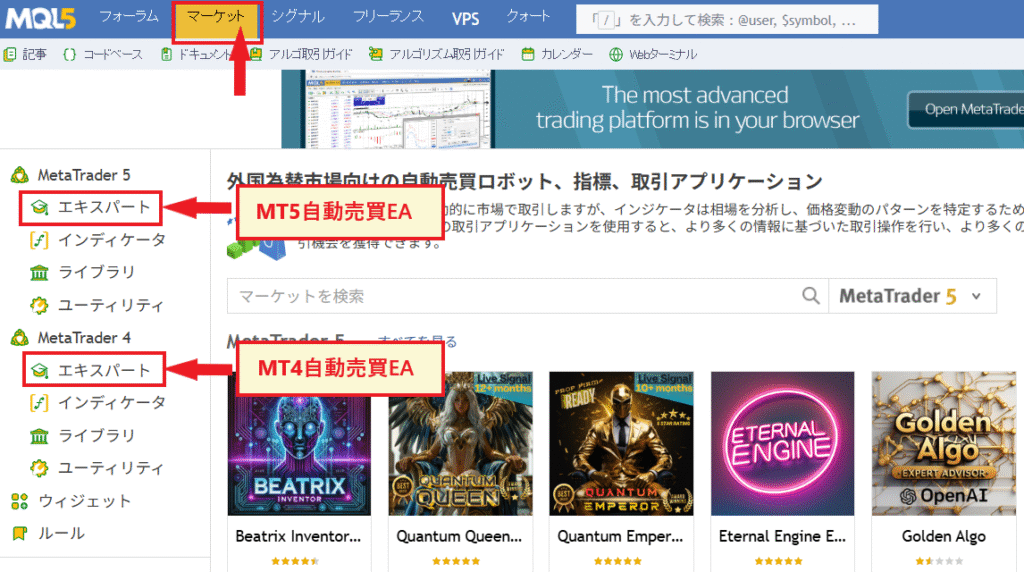
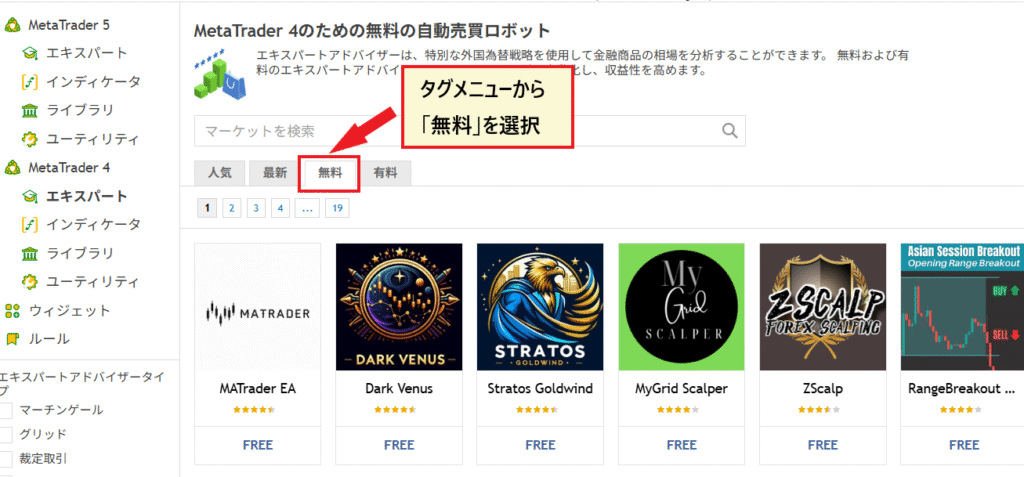

Downloaded EAs are added to "Expert Advisors" in the MT4/MT5 Navigator and can be launched by dragging and dropping them onto a chart (MetaTrader official help). On the details page, be sure to check three things : the number and content of reviews, the last update date, and whether there are actual trading results for the "signals" . If you manually download the EA file, place it in "File" → "Open Data Folder" → "MQL4 (MQL5 for MT5)" → "Experts" in MT4/MT5 and restart. Operation after installation, including running, stopping, and backtesting, is explained with screenshots in the EA settings and usage guide
The market price of paid EAs and things to check before buying
Paid EAs aregenerally sold as one-time purchases, and items purchased through the MQL5 marketplace are non-refundable(Market Rules IV.14, confirmed September 5, 2026). Prices vary widely on the marketplace, from tens of dollars to over $1,000, and there is no correlation between higher prices and higher profits. There are four things you should check before buying.
- Have you run the demo version using the strategy tester?-- The Market demo version is for testers only (it won't run on live account charts). Check the performance and maximum drawdown with a backtest before purchasing.
- Can you try it out through rental? Sellers can offer a one-month rental for a small fee (Market Rules IV.9). It's safer to try it out for a month before buying it outright.
- Activation Count –One activation is consumed each time you switch PCs or VPS. The seller sets the minimum to 5 and the maximum to 20 activations.
- Are the signals (forward performance) from actual trading publicly available?EAs that only have backtesting results and no actual trading performance should be viewed with suspicion due to the possibility of over-optimization.
How to Create an Expert Advisor (EA) (DIY): 3 Routes | MQL5 Wizard, EA Builder, MQL Coding
If you want to create your own EA (Expert Advisor),two ways to do so even if you can't program, and one way to write the code. According to the official MetaQuotes explanation, almost all EAs consist of three modules: "Signals," "Money Management," and "Trailing Stop," so you can create the basic structure by deciding on these three elements.
| root | Required skills | cost | What you can do | limit |
|---|---|---|---|---|
| ① MQL5 Wizard (built into MetaEditor, official) | Not necessary. In MetaEditor, select "New" → "Expert Advisor (Generate)" and choose the signal, money management, and trailing stop settings on the screen | free | It can generate an Expert Advisor (EA) in minutes by combining built-in standard signals (moving average, RSI, MACD, etc.) and then backtest it immediately | Within the scope of the provided modules. Custom logic requires additional code |
| ② EA Builder (External tool such as fxDreema) | Unnecessary to low. Visual operation of connecting blocks with lines | A free version is available. Higher-end versions are one-time purchases costing tens of thousands of yen (according to each company's official website, as of September 2026) | You can create more flexible logic than with a wizard, including conditional branching and averaging down | Making it complex makes it difficult to understand its behavior. The tool does not guarantee the operation of the generated code |
| ③ Coding with MQL4 and MQL5 | Programming (MQL5 is C++ based) | Free (Learning Cost) | Complete freedom. You can automate your own discretionary methods | Bugs and unexpected orders directly impact your funds. Long-term testing with a demo account is essential |
| (Support) Outsourcing | The ability to write requirements in writing | MQL5 freelancers earn between $30 and several thousand dollars (depending on the complexity of the project; based on officially posted job listings) | Official freelancers have over 90,000 completed projects, and payments are protected by escrow | Ambiguous requirements will result in an EA that doesn't meet the intended purpose. Post-delivery verification is my responsibility |
When writing the code, the core of an EA is the three event functions defined in the official MQL5 documentation:OnInit (initialization at startup) → OnTick (the main body of the buy/sell decision, called every time a new quote arrives) → OnDeinit (termination process). The buy/sell logic is written in OnTick in the form of "send an order when the conditions are met". You can also create a draft of MQL code using generation AI such as ChatGPT, but there is no guarantee of operation, and it may contain critical bugs such as duplicate orders or infinite loops, sobe sure to test it with a strategy tester and demo account before putting it on a live account.
The most common problems with custom-built EAs are "errors in lot size calculation" and "omissions in settlement conditions." For the first time, set the lot size to a fixed minimum value and be sure to include a stop-loss in the code before running it
5 Steps to Starting Automated Trading (EA) in Overseas Forex Markets
The steps to start using an EA in overseas forex trading are:① Open an account that supports EAs → ② Install and log in to MT4 or MT5 → ③ Obtain and install the EA → ④ Apply it to the chart and turn on automated trading →⑤ Test it on a demo account with a small amount of money before going live on a VPS. The three most common stumbling blocks are ① choosing the right account type, ③ confusing MT4 and MT5 versions, and ④ forgetting to authorize the automated trading button.

- Open an overseas forex account that supports EAs ( Expert Advisors) – While major brokers allow EA use, some account types may not support MT4 (only MT5). If the EA you want to use is for MT4, choose an MT4-compatible account. Compare brokers using the overseas forex broker ranking recommended for EAs.
- Install and log in to MT4 or MT5—download it for free from your broker's official website. Log in using your account number, password, and server name (listed in the email from your broker). Choosing the wrong server name is a common cause of login failure.
- Obtain an EA and install it on MT4/MT5:If you're using the MQL5 Marketplace, simply download and install. If you obtained the EA as a file, place it in "File" → "Open Data Folder" → "MQL4 (MQL5)" → "Experts". MT4 (.ex4) and MT5 (.ex5) versions are not compatible.
- Apply to the chart and turn on "Automated Trading"- Drag the EA from the Navigator onto the chart and check "Allow automated trading" in the settings screen. Also turn on the "Automated Trading" button on the toolbar. As stated in the official MetaTrader help, orders will not be placed unless permission is granted on both the EA side and the terminal side. The icon next to the EA name in the upper right corner of the chart indicates the operating status.
- Test with a demo account or small amount before deploying to a VPS: First, backtest using a strategy tester, then run on a demo account or with the minimum lot size for several weeks to check for deviations from the backtest results. Move to a VPS when you need to run it 24 hours a day.
The screen operations for each step (installation, parameter settings, determining backtest settings, stopping and deleting the EA, and troubleshooting when it doesn't work) are all summarized in the overseas forex automated trading (EA) setup and usage guide
Do I need a VPS? | Requirements for free VPS and guidelines for paid VPS
If you want to run your EA 24/7, a VPS is practically essential.EAs only run while MT4/MT5 is running, so they stop when you shut down your home PC. According to MQL5's official VPS guide, while market analysis and network latency can reach 100 milliseconds when using a home PC, it's only 0-5 milliseconds on a VPS, with an uptime of 99.99% (confirmed September 5, 2026). For scalping-type EAs, this latency difference directly impacts performance.
| Options | cost | Conditions and Features | Suitable people |
|---|---|---|---|
| Free VPS from a provider (e.g., XMTrading) | Free (or $25 per month if conditions are not met) | A total balance of over $1,000 across all trading accounts, and a trading volume of 5 lots round trip or more in the past 30 days (XM official, confirmed September 5, 2026) | People who manage their investments with a fixed amount of capital and trading volume |
| Free VPS from the provider (e.g., TitanFX) | Free (If conditions are not met, it will cost $28/month / approx. $18.75) | Effective margin of $1,000 (approx. $937.50) or more, and trading of 5 lots or more in the past 30 days (TitanFX official, confirmed September 5, 2026). Beeks Financial Cloud New York server | Same as above |
| MQL5 VPS (MetaQuotes official) | $10-$15 per month ($10 per month with a 12-month contract, $15 per month with a 1-month contract). A 24-hour free trial is available | Sign up with just a few clicks from MT4/MT5. Connect to 96% of broker servers in less than 10 milliseconds (official) | People who want to try investing with a small amount first. People who do not meet the free trial conditions of the broker |
| Windows VPS in Japan | From a few hundred yen per month to approximately $18.75 | Multiple MT4, MT5, and other tools can coexist. Latency varies depending on the server's location (Tokyo or overseas) | People who want to manage multiple accounts and multiple EAs on one device |
| Always running home PC | Electricity bill only | There is a risk that EA will stop due to power outages, reboots, or network disconnections. Be careful of automatic reboots due to Windows Update | People in the demonstration/testing stage |
Exness,FXGT,AXIORY,HFM, andBigBossmay offer free or conditional VPS services, our editorial team has not been able to verify this on their official pages (due to access restrictions and page migration as of September 5th-6th, 2026). Conditions such as balance and trading volume vary by provider and are subject to frequent changes.Always check the latest conditions on each company's official VPS page.
How to identify a winning EA | 6 indicators and warning signs to judge by numbers
The quality of an EA (Expert Advisor) is not judged by whether its performance graph is consistently upward-sloping, but by the six numbers displayed in the Strategy Tester report . The official MetaTrader help documentation precisely defines each indicator in the report, and knowing these definitions will prevent you from being misled by advertising claims like "95% win rate." The benchmarks often listed on competing sites, such as "PF 1.3 or higher, maximum drawdown of 10% or less, and 1,000 or more trades," are merely cutoff criteria and not guarantees of success.
| index | MetaTrader's official definition (summary) | Guide to interpretation | Pitfalls of numbers |
|---|---|---|---|
| ① Profit Factor (PF) | Total profit ÷ Total loss. If it's 1, profit and loss are equal | A value of 1.3 or higher is worth considering. A value below 1.0 will result in a decrease in funds if invested | If the number of trades is low, a few wins can cause a significant jump in performance. This should be viewed in conjunction with the number of trades |
| ② Maximum drawdown (Balance/Equity Drawdown Maximal) | The magnitude of the decline from the maximum balance (or effective margin) to the next minimum balance. Expressed as an amount and a percentage | The smaller the amount relative to the capital, the safer it is. Be cautious if it exceeds 20-30% of your investment capital | The averaging down/martingale strategy results in a small balance but a huge effective margin. Always check the equity side as well. |
| ③ Number of transactions | Number of settled transactions during the test period | A number of occurrences ranging from several hundred to over 1,000 makes the data more statistically reliable | Dozens of good results are within the realm of chance. A period of 5 years or more is also desirable |
| ④Expected Payoff | Average return per trade (statistical value) | Plus, is there a profit left over even after deducting spreads and fees? | Scalping strategies have small expected gains and can easily turn into losses due to widening spreads |
| ⑤ Recovery Factor | Profit gained ÷ Maximum drawdown. The magnitude of the risk taken to gain profit | The higher the value, the more likely the EA (Expert Advisor) has "generated profits with less risk." | Since longer periods are more advantageous, we compare data over the same period |
| ⑥ Discrepancy between backtesting and forward testing | The official explanation states that forward testing "helps avoid over-optimization (parameter fitting)." It involves separating the history into optimization and validation data for comparison | If the results for both sections show the same trend, it indicates reproducibility | EAs that perform well in backtests but poorly in forward testing are too focused on past performance. EAs that don't disclose their actual trading signals should be viewed with suspicion. |
*The definition of the indicator is from the official MetaTrader 5 Help "Test Report" (confirmed September 5, 2026). In backtesting, the "All Ticks" tick model is officially considered the most accurate, while "Opens Only" is officially positioned as a coarser, faster test. Therefore, please use the same model when comparing results
Avoid EAs that have this sign
- Highly advertising a win rate of over 90%—a high win rate is typical of the "win small, lose big" averaging-down/Martingale type strategy. Without disclosing the maximum drawdown (based on effective margin), it's impossible to judge.
- The graph only shows performance data, without mentioning the test period, number of trades, or tick model—a graph that hides the validation conditions cannot be used for comparison.
- "Guaranteed monthly return of X%", "Zero losses", "Guaranteed profits"-- The MQL5 marketplace rules also state that performance does not guarantee future profits. The very act of making guarantees is a sign of fraud (next chapter).
- Opening an account with a specific overseas broker is a condition for use—this is a system where EA providers earn referral commissions, and if the broker is unregistered or of unknown origin, it becomes a gateway to withdrawal problems.
- Without any explanation of the logic—an EA whose type (trend, counter-trend, grid, etc.) is unclear—makes it impossible to make the decision to stop trading in unsuitable market conditions.
Money management after selecting an EA also affects performance.Initially, use the minimum lot size, invest only the amount you can afford to lose in each EA, and diversify across multiple EAs and currency pairs. Use high leverage to reduce required margin without increasing lot size; do not increase lot size solely because of leverage.
EA Usage Conditions of 10 Major Overseas Forex Brokers | What is Prohibited is "Trading Methods"
The concern that "using an EA will result in account freezing" can be addressed by reading the terms and conditions.All 10 major companies allow the use of EAs on MT4 and MT5, and the terms and conditions prohibit not the EA itself, but "techniques" such as arbitrage, trading that exploits delays in price feeds, internal hedging with multiple accounts, and abuse of bonuses and zero-cut features. Our editorial team has reviewed the original terms and conditions of each company and compiled a list (terms and conditions were reviewed in September 2026. Article numbers are from the version at the time of review. "EA use permitted" means that there is no clause in the terms and conditions that prohibits the use of EAs themselves).
| Contractor | EA usage | platform | Methods prohibited by the terms and conditions (basis clause) | Free VPS |
|---|---|---|---|---|
| XMTrading | Possible | MT4/MT5 | Arbitrage using delays and price errors, trading patterns that avoid market risk, coordinating internal hedging with others, and abuse of zero-cut (Articles 47.3, 47.4, and 39.9) → Transaction invalidation, profit recovery, and non-application of zero-cut | Yes (Total balance of $1,000 or more + 5 or more round-trip lots in the past 30 days - $25 per month if not met) |
| Exness | Possible | MT4/MT5 | General clauses such as suspension of deposits and withdrawals if the source of funds is not verified (Part B 7.3 and 7.5). Within the scope of our editorial team's review, there are no clauses specifically mentioning EAs or arbitrage | Information available (Not confirmed by our editorial team; official confirmation required) |
| FXGT | Possible | MT4/MT5 | Abuse of AI/EAs, arbitrage, sniping, and bonus abuse (Articles 2.6, 8.5, and 8.6) → Immediate termination of account and forfeiture of profits and bonuses | Information available (Not confirmed by our editorial team; official confirmation required) |
| AXIORY | Possible | MT4, MT5, cTrader | Excessive high-frequency trading and latency arbitrage are considered "abuses" and payments are withheld (Article 30.6) | Information available (Not confirmed by our editorial team; official confirmation required) |
| TitanFX | Possible | MT4/MT5 | High-frequency trading and scalping are mentioned in the context of violations of applicable law (Section 5.17(a)), and balances are withheld when KYC is not submitted (Section 1.6) | Yes (Effective margin of $1,000 or more + 5 lots or more in the past 30 days; if not met, $28 per month) |
| HFM | Possible | MT4/MT5 | Arbitrage, hedging targeting only news and gap openings (Article 27.1) → Profits forfeited, only principal returned | Information available (Not confirmed by our editorial team; official confirmation required) |
| BigBoss | Possible | MT4/MT5 | Excessive risky hedging and exploiting bonus loopholes (trading guidelines) → All trades invalidated, principal refunded, account deleted | Information available (Not confirmed by our editorial team; official confirmation required) |
| ThreeTrader | Possible | MT4/MT5 | Arbitrage, simultaneous trading in multiple accounts, internal/external hedging, etc. (Article 9.7) → Invalidation of favorable trades | Official confirmation is required |
| Axi | Possible | MT4/MT5 | Price manipulation (including arbitrage techniques, latency exploitation, and price/time manipulation) and market abuse (Article 3.6) → Account suspension/closure, cancellation of related transactions (Article 6.2(d)) | Official confirmation is required |
| IS6FX | Possible | MT4/MT5 | Hedging across multiple accounts, arbitrage using bonuses, and trading that targets only sudden changes during economic indicator announcements or interventions (Article 12) → Access suspension and account blocking | Official confirmation is required |
*The availability of EAs and prohibited trading methods were confirmed by our editorial team from September 1st to 5th, 2026, based on the original terms of service of each company. For free VPS conditions, only XM and TitanFX were initially confirmed on their official websites (September 5th, 2026); for other companies, please check their official VPS information. Conditions are subject to change
There are two practical points to note. Firstly, zero cut (no margin call) is based on the premise of "normal trading within the scope of the terms and conditions ," and XM reserves the right not to apply zero cut if there are signs of arbitrage, abuse, or internal hedging. If the behavior of the EA is determined to be in violation of the terms and conditions, a negative balance may be subject to charges ( conditions for no margin call (zero cut) in overseas FX ). Secondly, for scalping and high-frequency EAs,AXIORYand TitanFX, have clauses that can restrict high-frequency trading some brokers, such as . Please check the compatibility of the EA type with the terms and conditions before opening an account. Trends in account freezing cases and the freezing clauses of each company are summarized in the article on overseas FX account freezing
brokers based on factors such as spreads, execution speed, bonuses, and ease of use with EAsour recommended ranking of overseas FX automated trading (EA) brokers. Opening an account through MoneyChat also provides cashback on EA trading based on trading volume.
The account on which the EA runs is accessed via MoneyChat, which accumulates cashback with every trade
How to identify EA (Expert Advisor) scams and their risks | Common tactics warned against by public institutions
Fraud involving automated trading systems for overseas forexthat the National Consumer Affairs Center of Japan has repeatedly warned about, publishing specific details of the methods used. A typical scenario involves selling automated trading software, having victims deposit funds into a designated overseas broker (often unregistered and of unknown legitimacy), and ultimately preventing them from withdrawing their money. The problem lies not so much with the EA (Expert Advisor) itself, but with the "destination for which funds are transferred, using the EA as a pretext."
| Publicly available documents | Methods and Examples (Summary) | lesson |
|---|---|---|
| National Consumer Affairs Center of Japan: "Making profits but unable to withdraw funds!? Beware of troubles surrounding overseas FX trading - Scams that lure people into overseas FX trading by getting them to purchase automated trading software, etc." (Published June 19, 2014) | After requesting information through an online advertisement, she was told that "an automated FX trading software developed by an overseas company is being sold to a limited number of 500 people, and it is expected to increase by 15% each month." She paid approximately $187.50 for the software and deposited approximately $3,125 into an overseas account. After making an additional deposit of approximately $312.50 for the software and approximately $18,750, she was refused withdrawal with the explanation that "withdrawal is not possible until all trades are completed." (Woman in her 30s, received April 2013) | "Limited time offer," "X% per month," and "no effort required" are standard phrases used in scams. The same tactics have been going on for over 10 years. The real culprit isn't the software itself, but the company to which the money is received |
| The National Consumer Affairs Center of Japan's Consumer Trouble Commentary Collection: "I was encouraged to buy an automated FX trading system with the promise that 'you can make money without doing anything.'" | A senior student from my university called me in and tried to persuade me to buy an automated FX trading system for approximately $3,125, promising me to make money without doing anything. He then told me to take out a student loan to pay for it | The tactic of getting young people to borrow money through acquaintances or seniors is common. Refuse as soon as they say "you don't have to do anything." |
| National Consumer Affairs Center of Japan: "Fraudulent FX trading troubles solicited through investment groups on social media" (Published January 24, 2024) | A man in his 60s was invited to join an investment group on social media, where he was told about the success stories of other participants and entered into FX trading. He repeatedly transferred money to designated personal accounts, and initially it appeared that he was making profits, but in the end, he was unable to withdraw any money and lost contact with both the broker and the other members. This is an example of a man in his 60s who transferred approximately $31,250 and was subsequently billed twice for approximately $10,000 in taxes (received September 2023) | If the recipient of the transfer is an individual and the account is specified, it is not a transaction but a money transfer scam |
| National Police Agency Statistics on SNS-type Investment Fraud in 2024 | There were 6,413 reported cases, with losses totaling approximately $544,375,000 (about three times the previous year's figure). This is part of the overall investment fraud statistics; the breakdown of FX automated trading cases is not publicly available | If you receive an offer via social media or a dating app promising to "increase your money through automated trading," you should immediately suspect it's a scam |
*Source: Information released by the National Consumer Affairs Center of Japan (published June 19, 2014; the original page is no longer publicly available, so it was checked using the Internet Archive version saved on April 18, 2025), the Consumer Trouble Explanation Collection, the materials published on January 24, 2024, and the National Police Agency's "Status of Recognition and Arrests Regarding Special Fraud and SNS-Type Investment/Romance Fraud in 2024" (all checked September 5-6, 2026)
Checklist for identifying fraudulent EAs and fraudulent solicitations
- "monthly return of X%", "zero losses", "guaranteed", and "without doing anything"are present—legitimate EA providers, in accordance with MQL5 marketplace rules, do not guarantee performance.
- Cases published by the National Consumer Affairs Center of Japan in 2024 show that victims learned about the schemes through social media, dating apps, and LINE groups . However, there are also cases where online advertisements or face-to-face solicitations from acquaintances are the initial entry points
- Even if the recipient of the deposit is an individual's account or an unknown overseas company —even if it's on the Financial Services Agency's list of unregistered companies—a company with an unknown identity is different from a major company. Check how to interpret the Financial Services Agency's warning list based on the company name
- Using EAs requires opening an account through a specific broker or IB—the provider's goal is to earn referral commissions. The EA itself should ideally be able to run on the MQL5 marketplace or within your own account.
- Withdrawals may be subject to conditions such as "closing all transactions," "making additional deposits," or "prepaying taxes"—legitimate brokers do not have these conditions (withdrawal refusal tactics and how to deal with them)
Let's also summarize the risks other than fraud.① Martingale-type averaging down failure: The method of increasing the lot size each time you lose will inevitably become unsustainable if you continue to lose, as long as your capital is limited. This can be detected by the maximum drawdown based on effective margin in backtesting.② Operation environment failure: The EA will stop with open positions if the PC is restarted, the internet connection is lost, or the VPS expires.③ Violation of terms and conditions: EAs that behave in a way that constitutes arbitrage or delay abuse may be subject to profit forfeiture or non-application of zero-cut.④ Taxes: Profits from EAs are subject to comprehensive taxation as miscellaneous income, just like discretionary trading, and the purchase price of paid EAs and VPS fees may be deductible as expenses (Overseas FX Tax Guide).
If you have already been a victim or have been solicited and are unsure, please contact the Consumer Hotline "188" (your nearest consumer affairs center). While using overseas forex trading itself is not illegal, it is important to understand that trading with unregistered brokers will not provide protection under Japanese law (Isoverseas forex trading illegal? Why aren't users punished?).
Frequently Asked Questions about Automated Trading Systems (EAs) in Overseas Forex Markets
What does EA in FX stand for?
Expert Advisor (MT4/MT5) is an automated trading program that runs on MT4 and MT5 platforms. It automatically places orders and closes positions based on trading rules written in MQL4 and MQL5 languages, making decisions whenever the price moves. This is a feature of the MetaQuotes platform and is not provided by FX brokers
Can I make a profit using a free Expert Advisor (EA)?
Whether an EA is free or paid does not directly correlate to its performance. While many free EAs on the MQL5 marketplace are feature-limited or promotional, there are also high-quality ones that publish signals from actual trading. Evaluate based on metrics such as profit factor, maximum drawdown, number of trades, and deviation from forward test results. First, test it on a demo account or with the minimum lot size for several weeks. Free EAs verified by our editorial team are featured in our recommended ranking of overseas FX automated trading (EAs)
Are there any top-tier or recommended EAs (Expert Advisors)?
While searches for "strongest EA" and "strongest MT4 EA" are common, no EA exists that can consistently win in all market conditions. EAs come in various types, such as trend following, counter-trend, and grid trading, each with its own strengths and weaknesses. Be suspicious of EAs that claim to be "strongest" or "guaranteed" win rates; they are either martingale-type EAs designed to artificially inflate win rates, or they are fraudulent. We've compiled a list ofrecommended free EAsthe right one for each type in our ranking of recommended EAs.
Is it difficult to create your own Expert Advisor (EA)?
You can create EAs without programming. The MQL5 wizard built into MetaEditor allows you to generate an EA simply by selecting signals, money management, and trailing stops on the screen, and it's free. If you want to build your own logic, you have the option of using the EA Builder, coding in MQL4 or MQL5, or outsourcing to an official MQL5 freelancer (from $30 to several thousand dollars). In any case, you cannot skip testing with a strategy tester and a demo account
Are there any overseas forex brokers that prohibit the use of Expert Advisors (EAs)?
The top 10 brokers—XM,Exness,FXGT,AXIORY, TitanFX,HFM,BigBoss,ThreeTrader,Axi, andIS6FX—all allow the use of Expert Advisors (EAs) on MT4 and MT5 (terms and conditions of each company were confirmed in September 2026). What is prohibited is not the EA itself, but methods such as arbitrage trading, trading that exploits delays in price feeds, internal hedging across multiple accounts, and abuse of bonuses and zero-cut features. Some brokers also have clauses that may restrict high-frequency trading, so please check the compatibility of scalping EAs with their terms and conditions
Can I run an EA (Expert Advisor) using only my smartphone?
Expert Advisors (EAs) cannot be run on the smartphone app versions of MT4 and MT5. Since EAs only run while the PC version of MT4 or MT5 is running, you need to either keep your PC running constantly or run the PC version on a VPS (Virtual Private Server). Connecting to the VPS using a smartphone remote desktop app allows you to monitor and stop the EAs remotely
Can I use EAs (Expert Advisors) for automated trading with Exness?
Yes, you can use it.Exnessoffers MT4 and MT5, and to our knowledge, there are no clauses in their terms and conditions that restrict the use of EAs. They also offer a free VPS, but the balance and trading volume requirements may change, soExnessplease check the officialExnessthe account types and unlimited leverage conditions VPS guide for the latest figures. You can check of on Exnessaccount opening and specifications page
Are profits from EAs taxable?
Yes, it does. Profits from overseas forex trading, whether automated or discretionary, are considered miscellaneous income subject to comprehensive taxation, and a tax rate of approximately 15-56% is applied depending on your total taxable income, including salary. The cost of purchasing paid EAs and VPS usage fees may be deductible as expenses necessary for trading. For more details,the overseas forex tax guide, and for individual tax declarations, please consult a tax accountant or the tax office.
Summary | EAs start with "understanding the mechanism, selecting based on numbers, and testing with small amounts."
Automated trading systems (EAs) in overseas forex trading are systems that run trading rule programs on MT4 or MT5. Major overseas forex brokers allow the use of EAs, and you can start with free EAs from the MQL5 marketplace for free. However, thereis no "EA that guarantees profits," brokers do not provide support for EAs, and trading outside the framework of Japanese protectionremains unchanged.
Key points of this article
- An EA (Expert Advisor) is a tool that determines rules and places orders every time the price moves. Since it doesn't adapt to market conditions on its own, you need to understand its type (trend, counter-trend, grid, averaging down, etc.) before using it
- If you're just starting out, MT5 is the basic platform. While new MT4 licenses are no longer being offered, existing MT4 accounts and EAs can still be used
- The safest way to obtain an EA is in this order: free EAs on the MQL5 marketplace → paid EAs with rental/demo testing → creating your own (no code required if using a wizard)
- The six key indicators to consider are Profit Factor (PF), maximum drawdown (based on effective margin), number of trades, expected profit, recovery factor, and deviation from forward testing. Avoid strategies that promise "over 90% win rate" or "guaranteed monthly returns."
- The top 10 companies allow the use of Expert Advisors (EAs). Prohibited methods include arbitrage, delay exploitation, internal hedging, and bonus abuse. For free VPS, both XM and TitanFX require a balance of $1,000 plus 5 lots per month
- Solicitations via social media, transfers to personal bank accounts, and promises of "doing nothing" are typical scams that the National Consumer Affairs Center of Japan warns against. If you're in trouble, call 188
The next step is to choose a broker and EA from a ranking of recommended overseas forex brokers and free EAs , and then actually run the automated trading (EA) using the overseas forex broker setup and backtesting procedures . If you open an account through MoneyChat, you will also receive cashback on EA trading based on trading volume.
Open an account with an overseas forex broker that supports EAs (Expert Advisors) via MoneyChat, where you can earn cashback