Anyone can open a free demo account with FXGT through their official website . FXGT is a popular overseas forex broker known for its bonus campaigns, and many people are likely interested in learning how to use and open a demo account.
"Can I use FXGT's demo account on my smartphone?"
"I want to know how to open an FXGT demo account."
"Is there an expiration date for using a demo account?"
This time, we will answer all of the questions mentioned above.such as the features of the FXGT demo account, how to open one, its expiration date, balance reset, and how to use MT4/MT5, so please refer to it.
For more information on FXGT's security and rumors of withdrawal refusals, please also see "FXGT Reviews and Reputation."
Contents
- 1 Basic information on opening an FXGT demo account (from the official guide)
- 2 How to open an FXGT demo account (smartphone version)
- 3 Download MT4/MT5 on your FXGT demo account (smartphone version)
- 4 How to use MT4/MT5 with an FXGT demo account (smartphone version)
- 5 A thorough explanation of the 5 advantages of the FXGT demo account
- 5.1 The FXGT demo account lets you try out high leverage up to 5000 times!
- 5.2 FXGT demo accounts are eligible for all real accounts!
- 5.3 FXGT demo accounts can be used with both MT4 and MT5!
- 5.4 You can trade 130 different pairs and instruments with an FXGT demo account!
- 5.5 Get a bonus when you open a new account through FXGT's demo account!
- 6 Tips and precautions for using an FXGT demo account
- 6.1 Check out the user experience of the FXGT demo account
- 6.2 Master the basics of FX trading with an FXGT demo account
- 6.3 Test your trading strategy on an FXGT demo account
- 6.4 Learn how to use MT4/MT5 with an FXGT demo account
- 6.5 I'm going to try out an automated trading EA (free) on an FXGT demo account
- 7 How to reset your FXGT demo account balance (delete/add)
- 8 How to change the settings of your FXGT demo account
- 9 Practice with an FXGT demo account and learn the tricks to winning!
Basic information on opening an FXGT demo account (from the official guide)
FXGT's demo accounts can be opened up to 16 times and are completely free to use. The trading platform supports both MT4 and MT5 , and it's popular for its bonuses , so many people seem interested in trying it out.
Opening a demo account with FXGT is completely free. You don't need to submit any identification documents or use your own funds.
First of all, what kind of overseas forex broker is FXGT? What are the specifications of their demo account?
First,start by introducing FXGT's service information and the features of its demo account.
What kind of overseas forex broker is FXGT?
To put it simply, FXGT's key features include : "Many attractive bonus campaigns," "Maximum leverage of 5000x," and "A wide variety of cryptocurrency options."
This overseas forex broker is also popular for its bonuses, wide selection of trading instruments, and comprehensive Japanese language support
Below isa summary of the features of the FXGT.
- Reliable financial licenses obtained in 3 countries for overseas forex trading
- New account opening bonus for no-deposit, risk-free FX trading
- With leverage up to 5000 times, it's easy to make a profit even with a small amount of capital
- We handle over 130 different brands
- FX trading with generous bonus campaigns is popular
- Zero swap on FX currency pairs, cryptocurrencies, gold, and stock indices (Pro account and ECN account)
- Zero-cut and margin call protection eliminate the risk of debt
- 100% Japanese-language support system
FXGT holds financial licenses in three countries : the Republic of Seychelles, South Africa, and the Republic of Vanuatu. Many Japanese traders use FXGT for its frequent bonuses , and it is a broker that often appears in recommended overseas FX rankings.
Among the many overseas forex brokers, FXGT offers peace of mind due to its high level of reliability and recognition
Maximum leverage for FXGT demo accounts
A major feature of FXGT's demo account isit allows you to use leverage of up to 5000 times even in demo trading. There are very few other demo accounts that allow trading with such high leverage.
If you multiply your initial capital of 1,000 yen by 5,000, you can trade with 5 million yen (1,000 yen x 5,000). What exactly is it like to have 5,000x high leverage? For those who want to try it out, FXGT's demo account is an ideal no-risk account and a practice account for high-leverage trading
FXGT Demo Account Account Types
FXGT's demo account offers the same six account types as its real accounts. All real accounts can be tested in the demo account
| Comparison items | Optimus | Pro | ECN Zero | Standard | Crypto Max | Mini |
|---|---|---|---|---|---|---|
| Base currency | 8 types including JPY, USD, BTC, etc | 8 types including JPY, USD, BTC, etc | 8 types including JPY, USD, BTC, etc | 8 types including JPY, USD, BTC, etc | 8 types including JPY and BTC | 8 types including JPY and BTC |
| Maximum leverage | 5000 times | 1000 times | 1000 times | 200 times | 500 times | 1000 times |
| Trading Tools | MT4/MT5 | MT4/MT5 | MT4/MT5 | MT4/MT5 | MT4/MT5 | MT4/MT5 |
| Minimum trading unit (currency volume) | 0.01 Lot (1000 units of currency) | 0.01 Lot (1000 units of currency) | 0.01 Lot (1000 units of currency) | 0.01 Lot (1000 units of currency) | 0.01 Lot (0.01 currency) | 0.01 Lot (100 units of currency) |
| Minimum spread | 0.8 pips~ | 0.5 pips~ | 0.0 pips~ | 1.0 pips~ | Low setting | 1.0 pips~ |
| Trading stocks | Currency Pair Stock Index Metal Energy Crypto Asset GTi12 Index | Currency pairs, stock indices, metals, energy crypto assets, synthetic crypto assets, GTi12 index , DeFi tokens , NFTs | Currency pairs, stock indices, metals, energy crypto assets, synthetic crypto assets, GTi12 index | FX currency pairs, stock indices, metals, energy stocks crypto assets, synthetic crypto assets, GTi12 index | Cryptocurrency Synthetic Cryptocurrency GTi12 Index | Currency Pair Stock Index Metal Energy Crypto Asset GTi12 Index |
| Fees * Real account | free | free | Round trip $5-6, cryptocurrency returns 0.04% | free | free | free |
| Minimum deposit amount * Real account | $10 and up | $50 and up | $100 and up | $10 and up | $5 and up | $5 and up |
| Bonus eligible | ✕ | ✕ | ✕ | 〇 | 〇 | 〇 |
Reference:FXGT official website
With so many types of accounts available, some people may be wondering which one is best for them
The key to choosing an account is to select one you'd like to use with a real account . For beginners, an account eligible for bonuses is a good choice. If leverage is your priority , the Optimus account offers up to 5000x leverage. For cryptocurrency trading , the Crypto Max or Pro account is recommended. The commission-fee ECN Zero account is suitable for short-term traders who prioritize spreads.
*Fees and minimum deposit amounts are for real accounts. (Demo accounts are completely free.)
Details on each account type and how to choose the right one can be found in the article below. Please refer to it as well
Initial balance of FXGT demo account
In a demo account, you will use virtual money (fictitious funds).The initial demo account balance/fund amountis set to "10 million yen".
The amount "10 million yen" lacks realism, doesn't it? It's recommended to set the amount yourself. Instructions on how to change the amount are explained later in this article under "How to Reset Account Balance."
Alternatively, it might be fun to try it out like a game to see how much you can increase a fictitious fund of "10 million yen," or how much you can lose
FXGT demo account base currency
You can choose from eight different base currencies for your demo account , including fiat currencies and cryptocurrencies
- Legal tender: JPY, USD, EUR
- Cryptocurrencies: BTC, ETH, USDT, ADA, XRP
Even those who hold cryptocurrency can deposit it directly into their real account, eliminating the need to exchange it for fiat currency
FXGT demo account expiration date
FXGT's demo account is,Accounts that remain inactive for more than 30 days are automatically deactivated (effectively closed)As long as you log in and trade without a 30-day gap,Unlimited demo tradingThis can be done
If you intend to use it for an extended period, please be careful not to let it remain unused for more than 30 days
Even if you have a balance in your demo account, it will become unusable if it has been inactive for more than one month
If you'd like to compare multiple demo accounts for overseas forex trading, the following article is also recommended
How to open an FXGT demo account (smartphone version)
Now, let's get straightto explaining how to open an FXGT demo account.
This example uses the smartphone version, but the process and steps are the same for the PC version, so please use it as a reference
STEP 1. Register and verify your email address on the FXGT official website
First, tap the "Register" button on the FXGT official website to complete the new registration

- Country of residence → Japan
- Full name → Tanaka Taro (use half-width English letters, with a space between first and last name)
- email address
- password
- Country code → JP (81)
- Mobile phone number → 8012345678 (omit the initial 0)
After entering the required information, tap "Register Now".
After submitting your registration, you will receive an email verification link. Please click the verification link to complete the verification process
This completes your FXGT registration
STEP 2. Log in to your FXGT My Page
Once email verification is complete,log in to your FXGT My Page (member page) using the email address and password you registered.
STEP 4. Select and open a demo account with FXGT
You can open a demo account from the "Trading Account" menu on the top screen
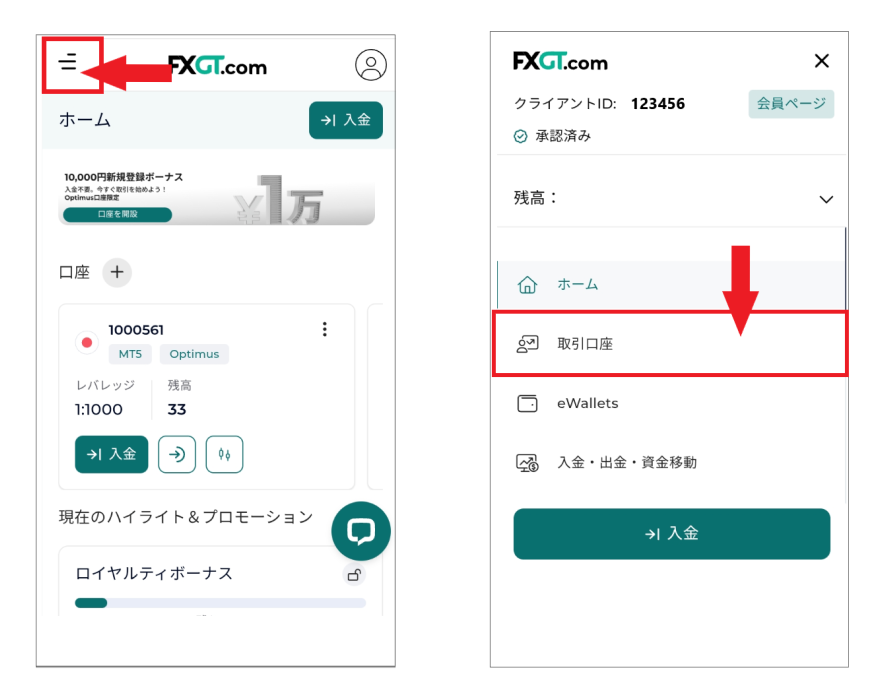
Open the menu in the upper left corner and go to "Trading Account" → "Create Account"
On the next screen, switch the tag to "Demo Account" and select either "MT5 or MT4" . The first account name that appears is Optimus. Scroll to the right to select the account type you want to use .
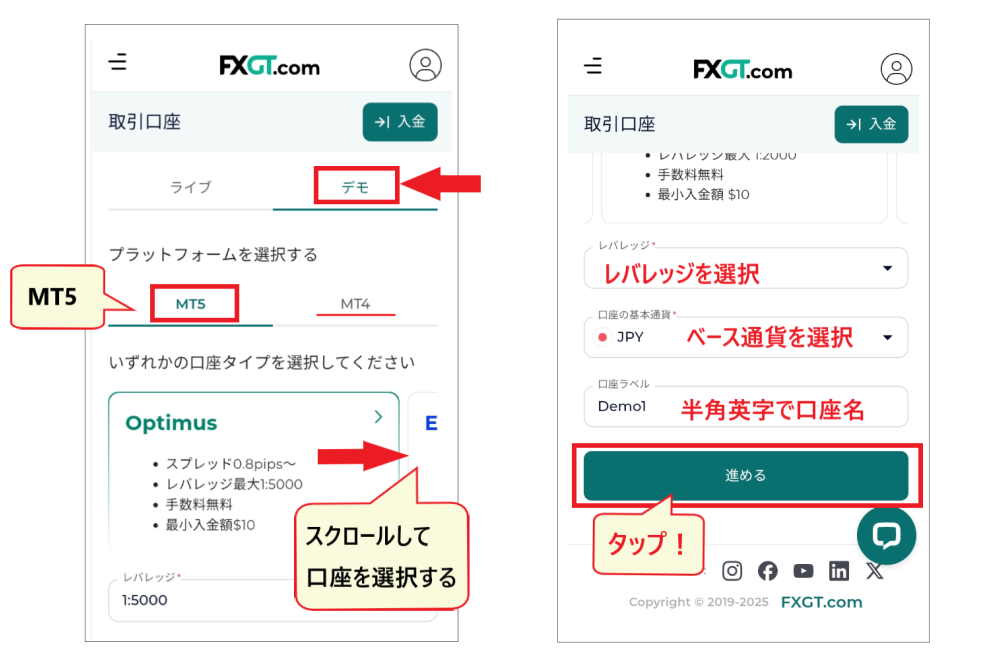
After selecting your "Account Type," enter your "Leverage," "Base Currency," and "Account Name (Nickname)," thentap "Proceed.
This completes the process of opening a demo account.
STEP 5. FXGT demo account opening is complete
Once your demo account application is complete, you will receive an email stating, "Your new trading account is now available."
The information in this emailcrucial for logging into the MT4/MT5. Please save it in a safe place.
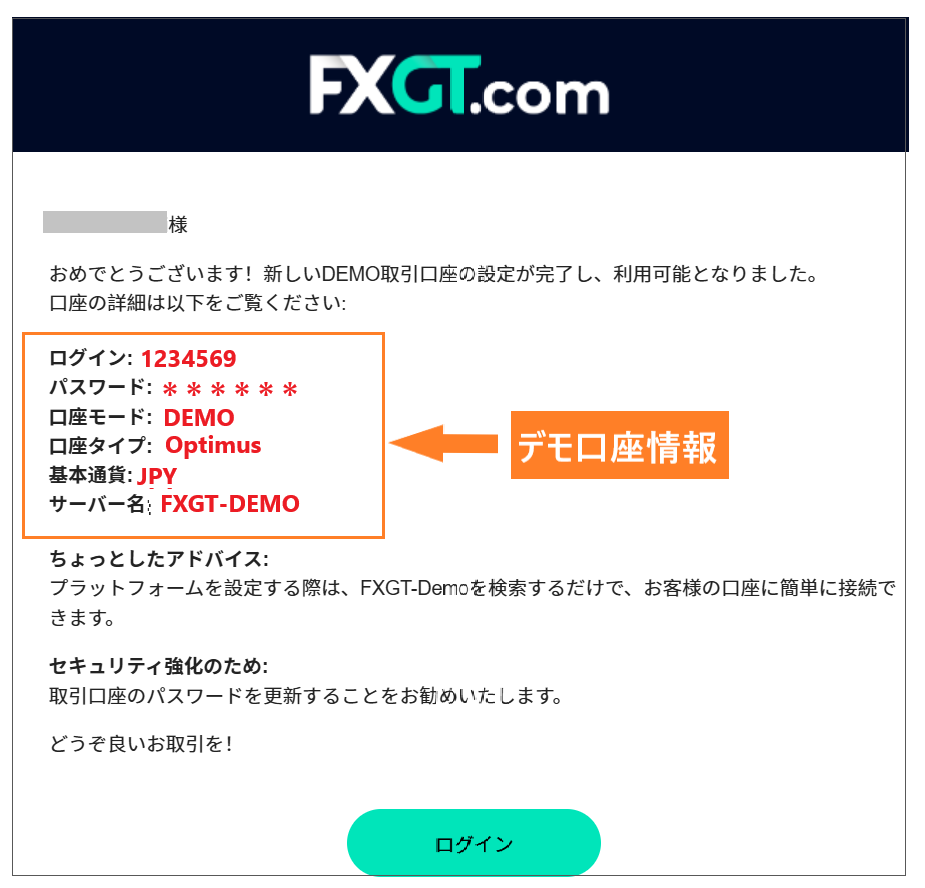
The following three points are particularly important:
- Login ID(MT4/MT5)
- Login password(MT4/MT5)
- Server name(required for login)
Once you've completed these steps, the next thing to do is download MT4/MT5. We'll explain how to do that in the next chapter
Download MT4/MT5 on your FXGT demo account (smartphone version)
Once you have opened a demo account with FXGT, download MT4/MT5
If you happen to forget which option you selected, you can find it in your account information on My Page
Here,how to download the smartphone versions of MT4/MT5. The general process is almost the same for both MT4 and MT5. The process is also the same for the PC version and smartphone versions from other brokers, so please use this as a reference.
How to install the FXGT demo account "MT5"
Log in to your My Page (member page) andselect "Platform" from the menu icon in the upper left corner.
The "Platform" option is located near the bottom of the menu, so you'll need to scroll down to find it
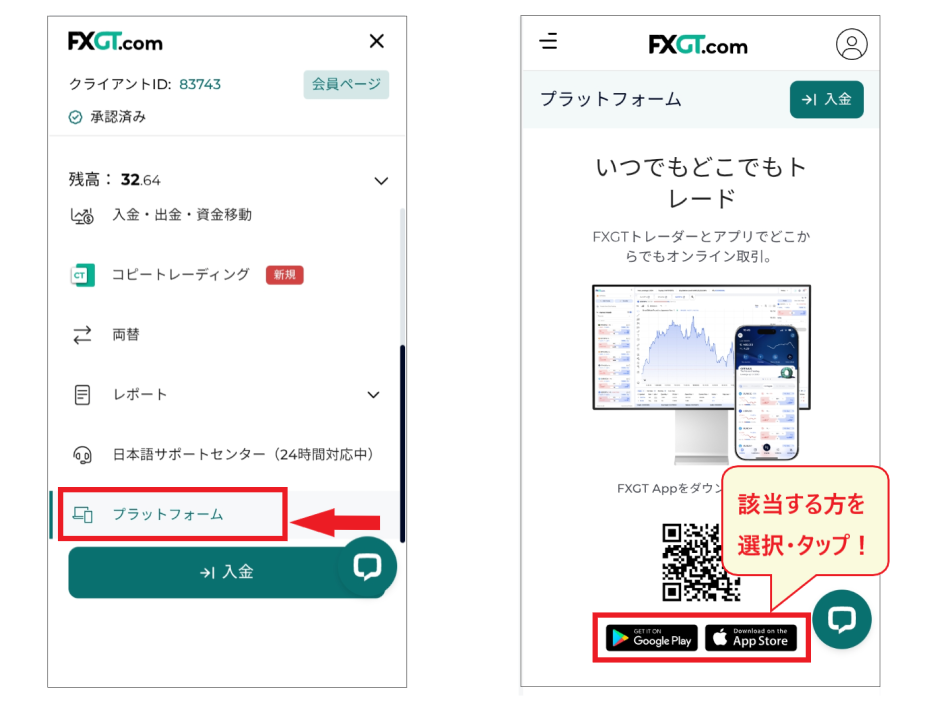
When you select "Platform," buttons to download MT5 or MT4 will appear; please tap the appropriate one
On the next screen, an install button will appear; simply tap "Install" to complete the process
How to log in to an FXGT demo account using MT5
Once MT5 (MT4) is installed, let's try logging in.the "account information" sent to you in the email confirming your demo account opening ready. Note that this is different from your FXGT account information.
The following three pieces of information are required to log in
- Login ID (account number - digits)
- Login password(alphanumeric characters and symbols)
- Server name(FXGT-Demo)
Add an account from the "Account Management" menu by clicking the "+" mark
Open the MT5 (MT4) app andselect "Account Management" → "+" from the menu in the upper left corner.
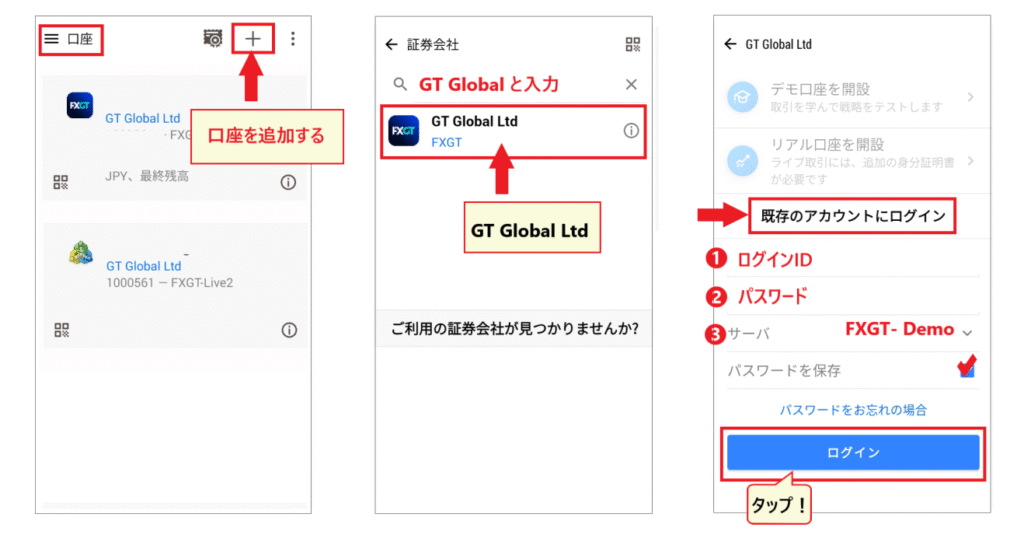
Enter "GT Global" in the name of the brokerage firm and click the FXGT icon that appears. On the next screen, select "Log in to an existing account" and enter the required information. After entering your "Login ID," "Password," and "Server Name ," tap "Login."
*Checking the "Save password" option will allow you to log in automatically next time, which is convenient
You have now successfully logged into the MT4 (MT5) app
How to use MT4/MT5 with an FXGT demo account (smartphone version)
Next, let's explain the basic operation of the MT4/MT5 smartphone app
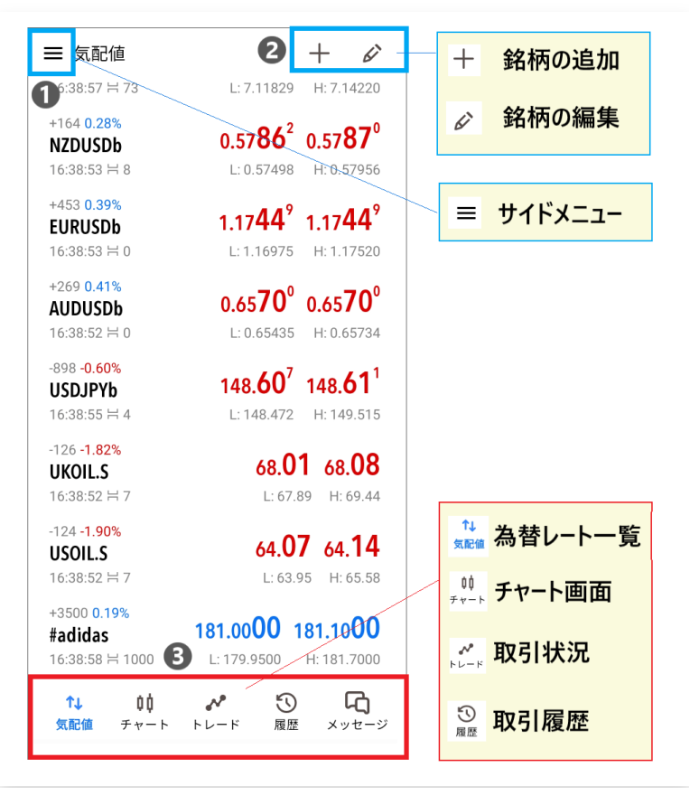
❶ The side menu in the upper left is"App Basic Settings" and "Account Management." The MT5 (MT4) app allows you to register multiple accounts from different brokers, so if you want to switch accounts, you can do so from "Account Management" in the side menu.
❷ The icon in the upper right is used to add or edit stocks
❸ The menu at the bottom is used to switch between main screens. Memorizing this menu will be useful for accessing "List of Quotes," "Chart Screen," and "Checking Trading Status."
Chart settings for the FXGT demo account "MT5"
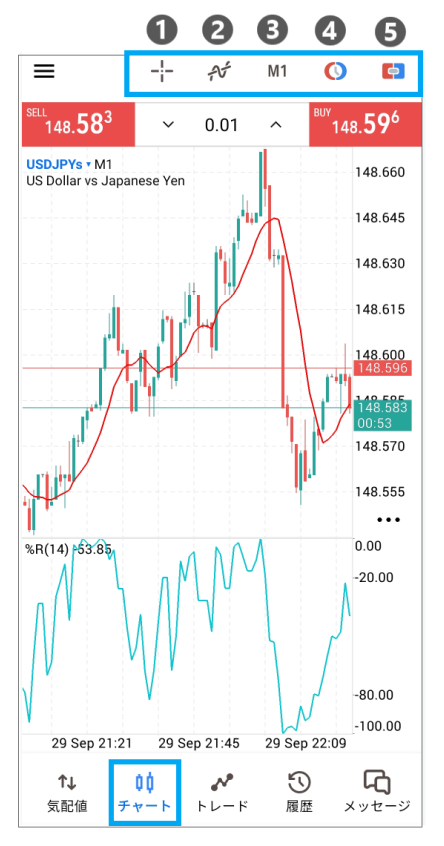
[Chart screen]
The chart screen is used for technical analysis and market orders. The menus shown above allow for the following operations:
- Crosshair display
- Insertion of technical tools
- Display of the order screen
- Display one-click order button
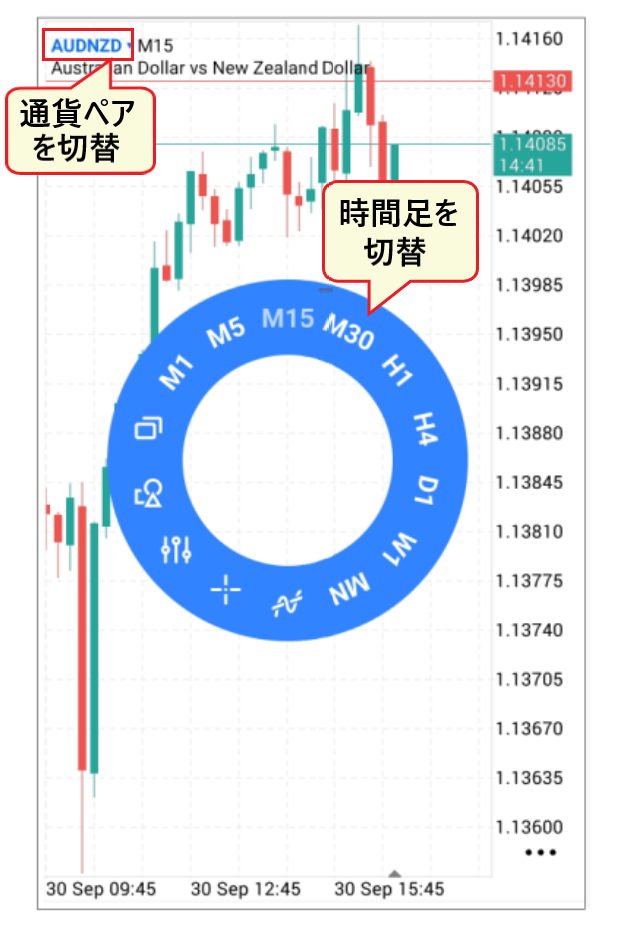
[Timeframe switching menu]
To switch the chart's timeframe , simply tap the screen lightly to display a circular timeframe menu.
switch between currency pairs (symbols), tap the symbol name in the upper left corner.
How to place orders on the FXGT demo account "MT5"
When starting demo trading, the most important thing is to thoroughly learn how to place orders (how to trade)
If you make a mistake in how you place an order or how you buy and sell,Be careful, as this can sometimes result in significant losses

The order screen can be accessed from either the "Quote List" or the "Chart Screen"
You can choose from two order types: "Market Order (One-Click Order)" and "Limit Order/Stop Order"
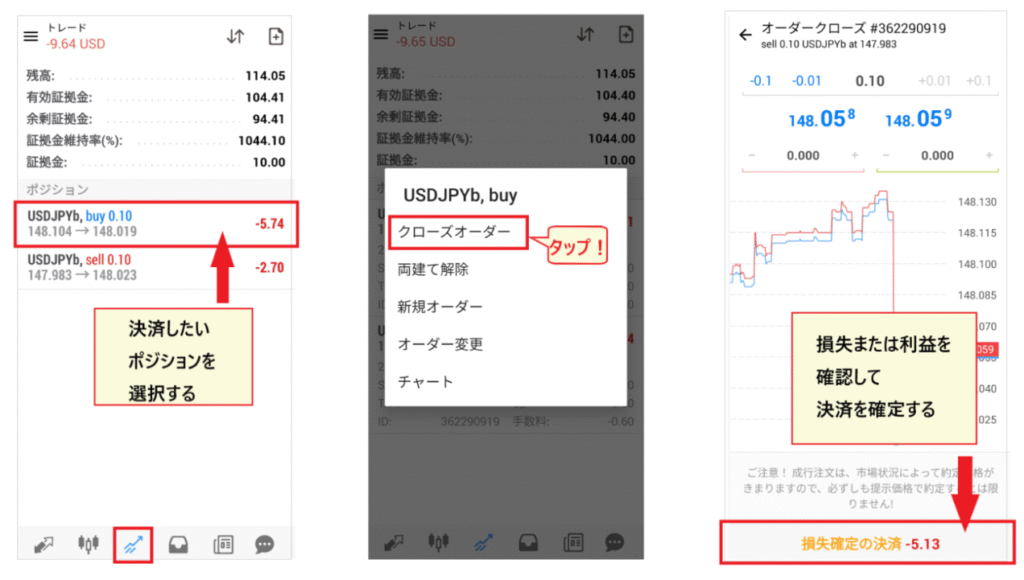
close a position, simply "long-press" the position you want to close and select "Close Order".set stop-loss and take-profit levelsby "long-pressing" the position and selecting "Modify Order".
For more detailed instructions on how to use MT4/MT5, pleaserefer to the article "HFM's MT4/MT5". You can see how to set up orders and how to implement stop-loss and take-profit strategies, complete with images.
Even though the brokers may differ, the app used (and the operation method) is the same, so please use this as a reference. The MT5 app is a common platform that can be used with any broker, including XM Trading, Vantage, HFM, and Exness
A thorough explanation of the 5 advantages of the FXGT demo account
Most overseas forex brokers offer demo accounts, but what are the advantages of using an FXGT demo account?
Hereare five advantages of trading with an FXGT demo account.
The FXGT demo account lets you try out high leverage up to 5000 times!
First, what's noteworthy about the FXGT demo account is that you can trade with leverage up to 5000 times (Optimus account)
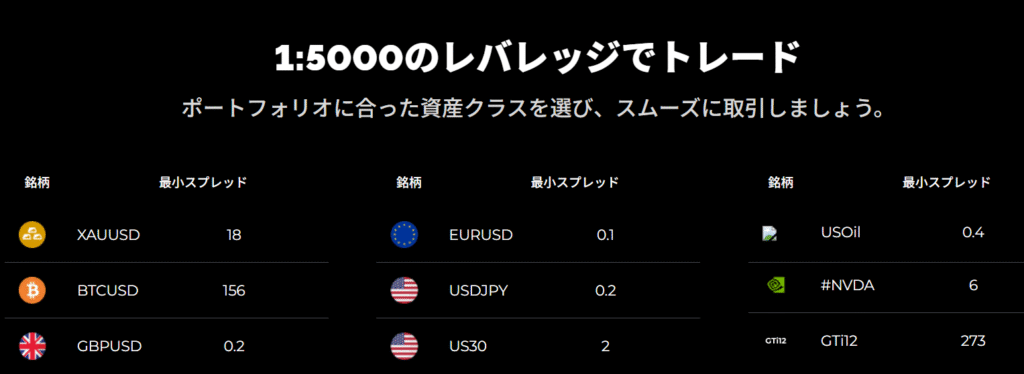
FXGT is particularly popular among overseas forex brokers for its high leverage . Typical high leverage is around 500 to 1000 times, and even the highest is around 2000 times
While the ability to experience high leverage, which is not available with other brokers, is a major attraction, jumping straight into 5000x leverage can be worrying. With FXGT,You can easily try it out with a risk-free demo trading accountThat's why it's popular
FXGT demo accounts are eligible for all real accounts!
Another advantage of the FXGT demo account isyou can try out all of the real accounts in the demo.
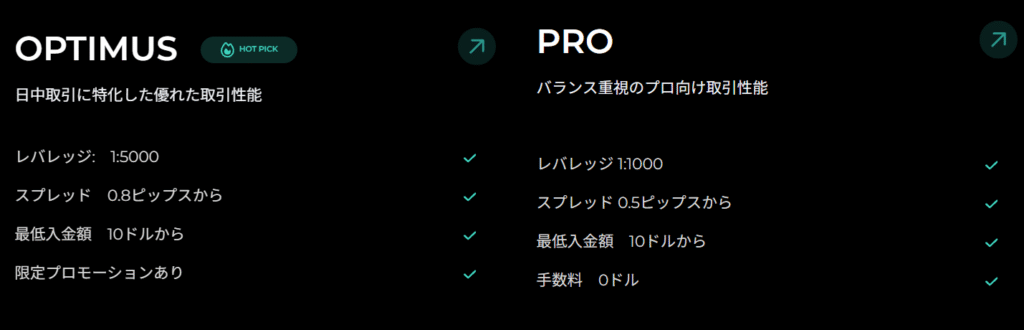
To be honest, you won't know if an FX account is right for you until you try it. With other platforms,the types of demo accounts available are often limited, so you might regret it after actually depositing money.
However, with FXGT, you can do demo trading beforehandCheck the spread, execution speed, and ease of useIt is possible to do so. You can open up to 16 demo accountsAfter thoroughly testing the tradesYou can choose which live account to use
FXGT demo accounts can be used with both MT4 and MT5!
Another advantage of the FXGT demo accountyou to use both the high-performance MT4/MT5.
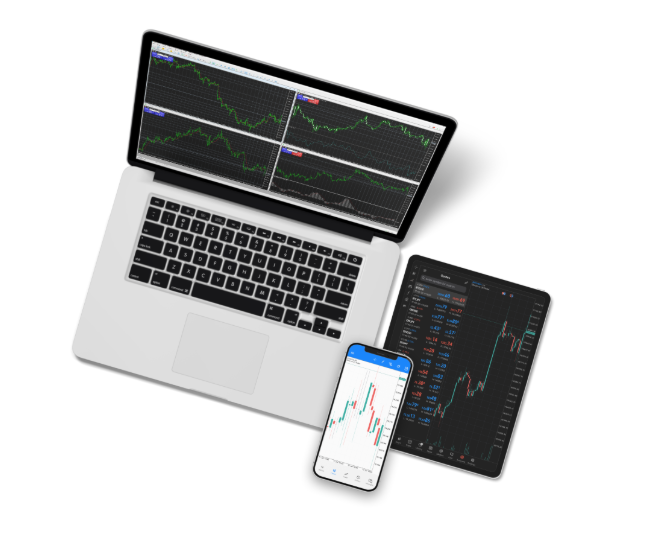
MT4/MT5 is the world's most popular FX platform , and an increasing number of brokers in Japan are now offering it . It boasts a comprehensive suite of technical analysis tools, including 38 technical indicators, 22 analysis tools, and 46 charting objects as standard features.
customizability and expandability, along with the ability to freely adjust chart sizes, will boost your motivation to trade.
You can trade 130 different pairs and instruments with an FXGT demo account!
Furthermore, a great feature of the FXGT demo accountyou can trade a wide variety of currency pairs and cryptocurrencies.
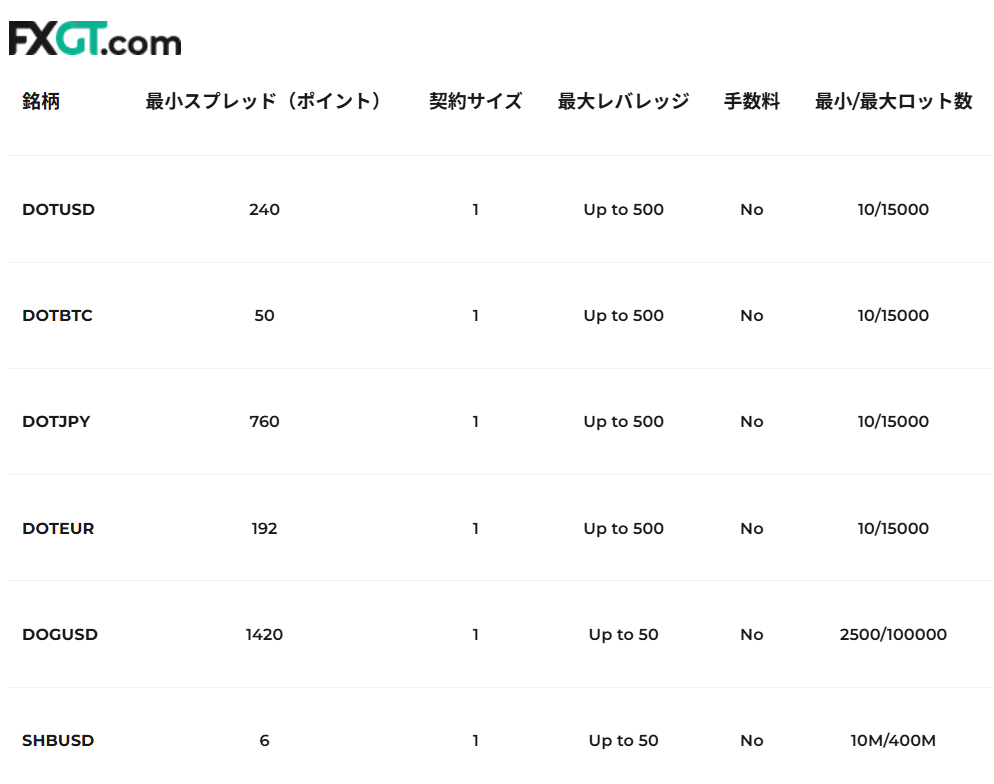
In addition to common major and minor currencies, we also offer currencies such as HKD (Hong Kong Dollar), SGD (Singapore Dollar ), and MXN (Mexican Peso)
It offers a wide variety of cryptocurrencies beyond BTC, ETH, BCH, and USDT , as well as a rich selection of synthetic cryptocurrencies such as BTCXAU (Bitcoin-Gold). Its strengths also lie in its extensive selection of stocks, energy, and stock indices.
Get a bonus when you open a new account through FXGT's demo account!
Another advantage of FXGT that deserves attentionyou can receive a bonus when you open a new real account.
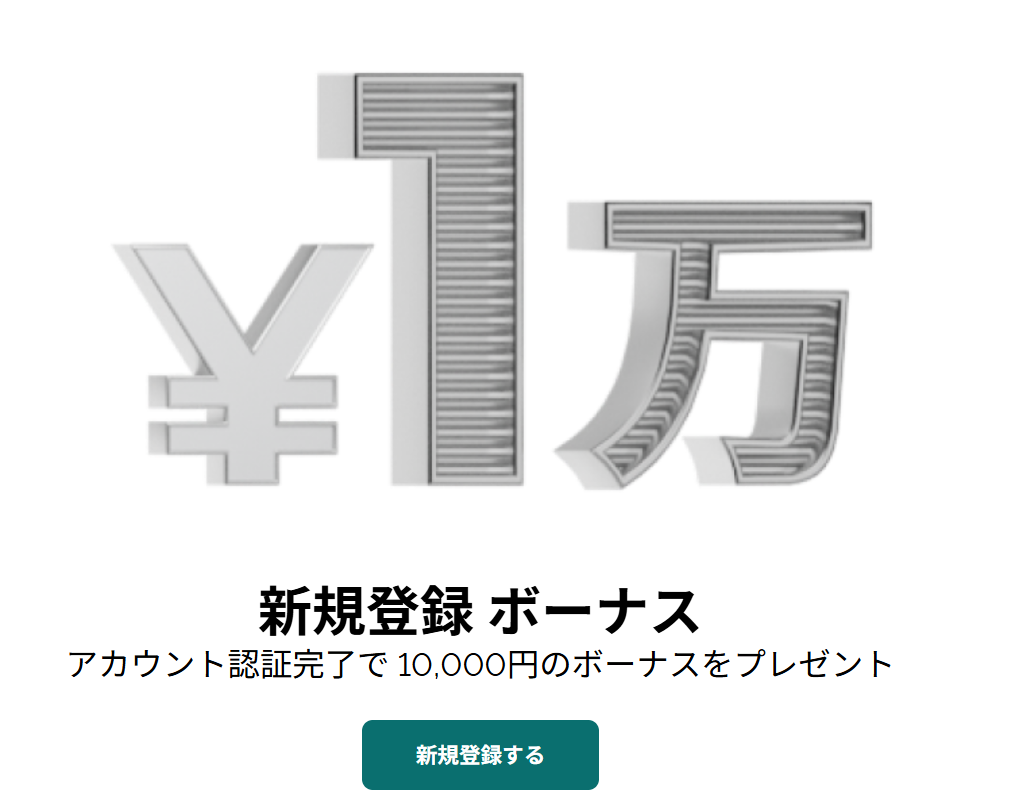
FXGT is a very popular overseas forex broker known for its new account opening bonus. Upon opening your first real account,a bonus of margin that can be used for trading without making a deposit. While the bonus itself cannot be withdrawn, any profits earned using the bonus can be withdrawn as cash.
By using the account opening bonus,zero out-of-pocket expenses. Once you're ready with demo trading, be sure to open a new account and try live trading with the bonus.
By the way, the following article introduces a ranking of bonuses offered by overseas forex brokers. Please take this opportunity to read it
Tips and precautions for using an FXGT demo account
When practicing trading on a demo account, keeping a few points in mind will make it more effective
Next, let's look at some tips and precautions for using a demo account
Check out the user experience of the FXGT demo account
The FXGT demo account is useful not only for trading butchecking the usability of the member page and account management. By registering as a member and opening a demo account, you can access all the functions of the member page.
This is an opportunity to learn about deposit and withdrawal methods, how to open various accounts, and how to view and manage account information. Explore what other services are available and whether they are easy for you to use
Points to note
When actually using it for live trading,the ease of use of the deposit and withdrawal methodsbecomes a crucial factor.
While you're using the demo account, you should also check the deposit and withdrawal methods available at FXGT
You can also find information on how to deposit funds into FXGT here
Master the basics of FX trading with an FXGT demo account
Demo trading is an excellent opportunity to learn the basics of FX trading
practice the entire process, from chart analysis to entry and exit points, and stop-loss methods. Keeping a trading journal and noting down your insights each time is also recommended. Demo trading is useful for understanding the relationship between your capital and leverage, and for determining safe lot sizes and position sizes.
Points to note
Of particular importancethe balance between leverage and margin maintenance ratio.
With high leverage, the required margin amount is small, resulting in a high margin maintenance ratio, whichcan easily create the illusion of safety. Let's research the appropriate leverage and position size for safe trading and use this as practice for risk management.
Test your trading strategy on an FXGT demo account
Furthermore, demo trading is frequently used not only by beginners but also by intermediate and advanced traders for trading practice and verification
MT4/MT5 comes equipped with a wide variety of indicators and drawing tools.Technical tools such as moving averages, Bollinger Bands, RSI, horizontal lines, and trend lines are all available for free use.
Experiment with different types of indicators and drawing toolsto explore your own trading strategies.
Points to note
It's common to win in demo trading but not in live trading. This isbecause using your own money in live trading changes your mental state.
It's important to understand that the mental pressure during a demonstration is completely different from that during a real performance
Actual trading is easily influenced by emotions and mental state, so extra caution is necessary
Learn how to use MT4/MT5 with an FXGT demo account
MT4/MT5 is a highly functional and high-performance platform, equipped with a wide range of features
However, this comes with the disadvantage that the operation method is somewhat complex and difficult to understand. Therefore, a demo account allows you to try out various functions without fear of making mistakes.recommended to learn how to set up charts, insert indicators, and place orders through demo tradingめです。
Points to note
For now, once you can perform chart analysis and place market orders, you can start trading anytime. You can learn the finer details of trading as you go
At the very least, you should be able to use the new order and payment methods
I'm going to try out an automated trading EA (free) on an FXGT demo account
One thing I'd really like to try out in a demo trade with zero capital is using an Expert Advisor (EA).
EAs are automated trading systems that can be used with MT4/MT5. Becausea built-in feature of the platform, anyone can use them regardless of their broker. Several types of automated trading EAs are already installed when you first install the software.
You can install a wide variety of free versions from the MT5 Marketplace ( MQL5)
Points to note
It is safer to install EAs directly from the MT5 marketplace using the free version whenever possible
There are fraudulent companies selling automated trading systems, so please be careful not to easily purchase them from external sources.
For basic knowledge and usage instructions on automated trading systems (EAs), please see this article
How to reset your FXGT demo account balance (delete/add)
FXGT's demo account allows you to reset the balance and set any amount you like
There are two ways to reset your balance: you can choose to increase or decrease the amount of funds
- Reduce account balance → Delete a portion of the balance
- Increase your account balance → Add funds to the balance
In either case, you can log in to your My Page and perform the operation from the "Trading Account" screen
Now, let's look at how to reset your account balance
Reduce account balance (delete part of it)
To reduce the balance in your demo account, open the menu "Trading Account" → "Demo" on your member page
You can change the settings from the "edit mark" of the demo account you want to modify
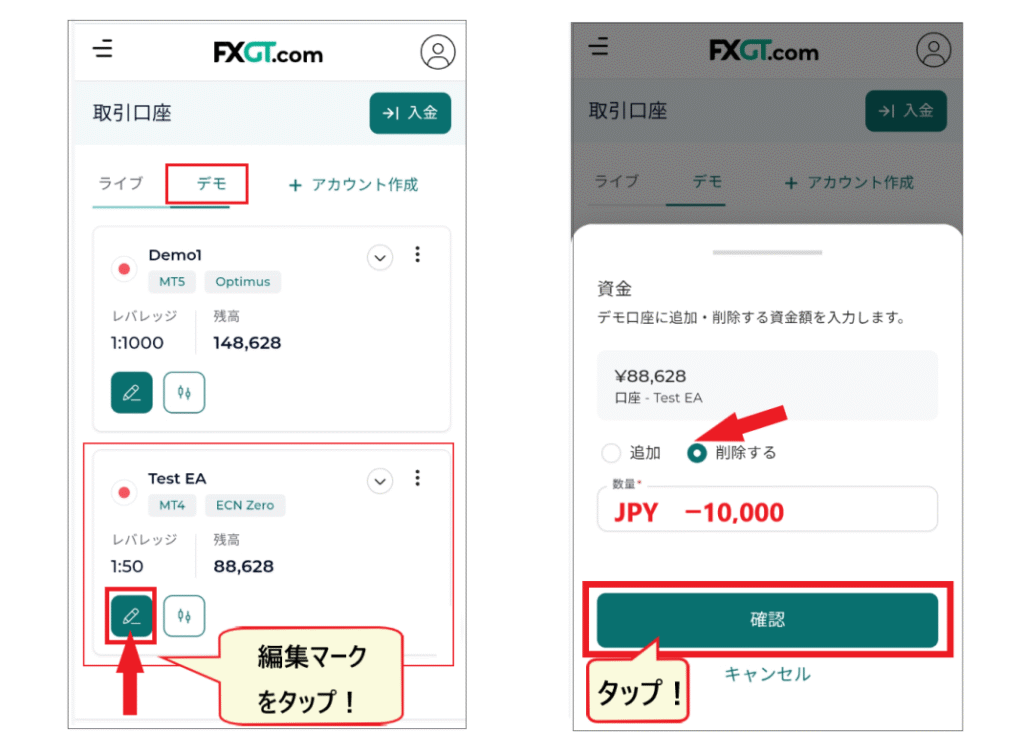
- STEP 1.Log in to the member page and open the "Trading Account" menu.
- STEP 2.From the "Demo" screen, tap the "Edit" icon for the account you want to change.
- STEP 3.Check the box for "Delete".
- STEP 4.Enter the currency and the amount to delete, then tap "Confirm".
This will allow you to set up a reduction in your account balance
Increase your account balance (add funds)
If you want to increase the balance in your demo account, you can do so through the member page menu : "Trading Account" → "Demo" → "Edit" → "Add"
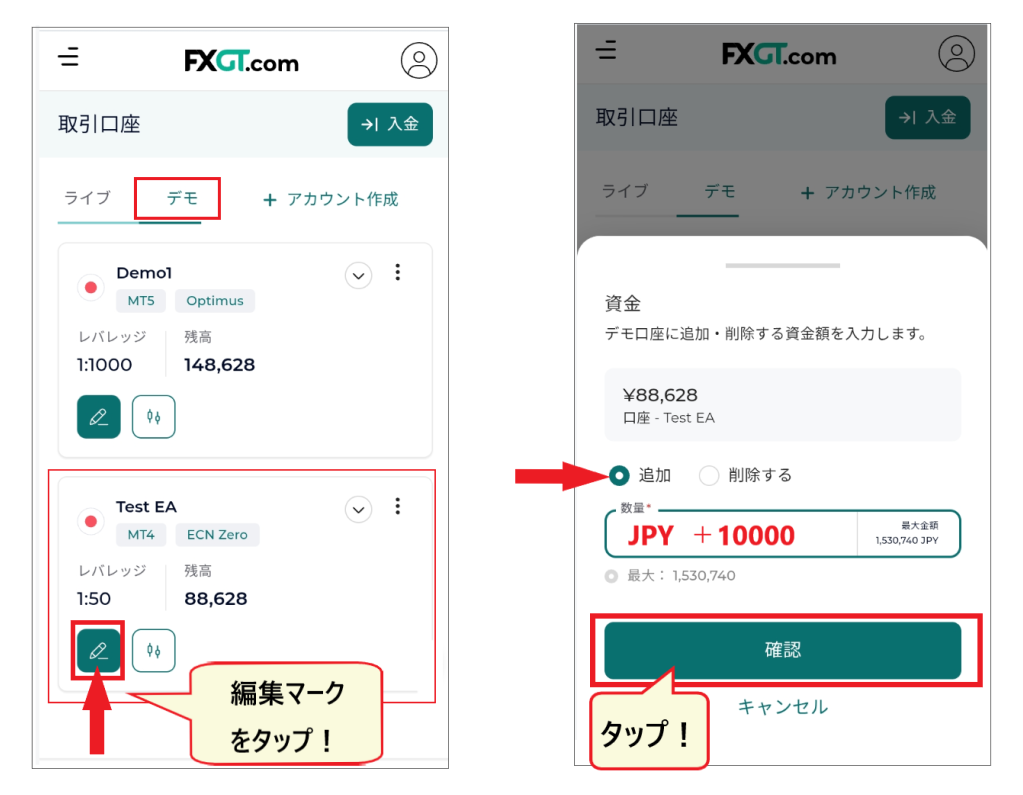
- STEP 1.Log in to the member page and open the "Trading Account" menu.
- STEP 2.From the "Demo" screen, tap the "Edit" icon for the account you want to change.
- STEP 3.Check the box for "Add".
- STEP 4.Enter the currency and the amount to delete, then tap "Confirm".
This completes the process of increasing your account balance
How to change the settings of your FXGT demo account
Finally, we will explain how to change the leverage, password, and other settings of your demo account
How to check your FXGT demo account information (Login ID, Server Name)
While you cannot change your demo account login ID or server name, you can check this information by accessing the "profile icon." Remember this icon menu, as it will display various account details
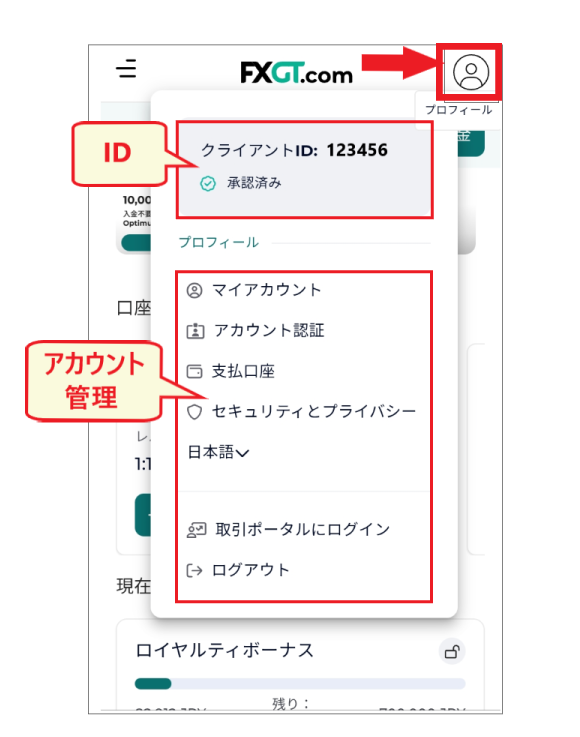
your MT4 (MT5) account number and server informationby going to the menu "Trading Accounts" → "Tap Account".
FXGT Demo Account Leverage Settings/Changes
You can change your leverage by going to the member page menu "Trading Account" →"Options icon in the upper right corner of Account Information" → "Change Leverage".
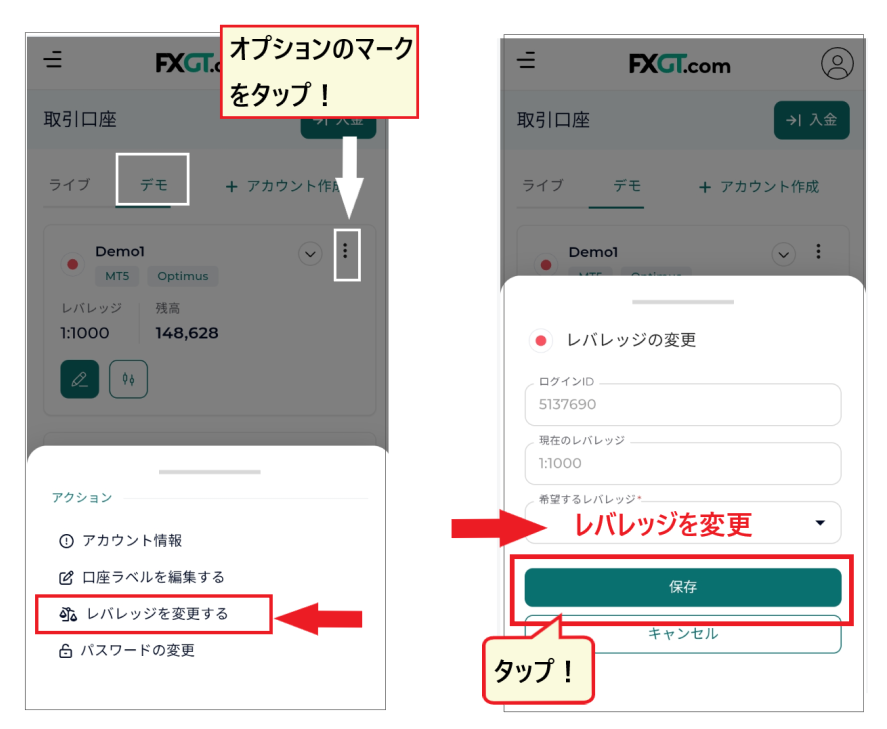
You can change the leverage by selecting the desired leverage from the dropdown menu on the "Change Leverage" screen and clicking "Save"
FXGT Demo Account Password Setting/Change
change your password through the member page menu: "Trading Account" →"Options icon in the upper right corner of Account Information" → "Change Password".

When the "Change Password" screen appears, enter your new password and tap "Save." Your new password will now be set
How to access FXGT customer support
If you have any problems or questions, feel free to contact FXGT's customer support
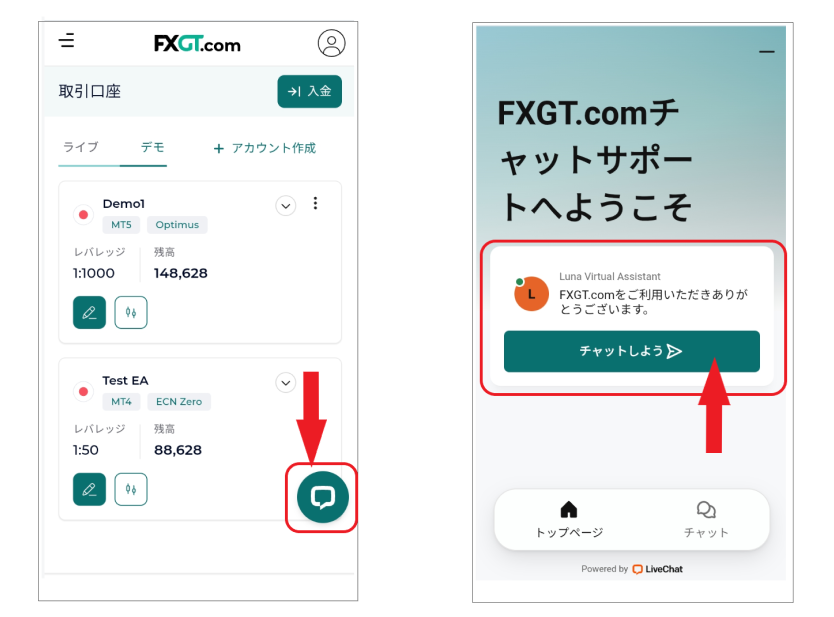
FXGT's customer supportthe live chat icon in the bottom right corner of your member page. During business hours (Japan Standard Time), you can speak with a representative via live chat immediately.
You can contact them in Japanese even at night or late at night, and they respond quickly, so you can rest assured
Practice with an FXGT demo account and learn the tricks to winning!
While domestic FX trading offers a maximum leverage of 25x, overseas FX trading commonly offers leverage of 1000x or even 2000x, making it high-risk. In particular, FXGTaccounts with leverage up to 5000x, so you must be very careful when investing your own funds.
With FXGT's demo account,you can try high-leverage trading completely risk-free. You can open up to 16 accounts, so you can practice until you feel confident. Practice thoroughly with a risk-free FX demo account and grasp the keys to winning in real trading.
Furthermore,opening an FXGT account through our website, "Money Charger (Manecha),"is highly advantageous because you will receive a cashback bonus. Every time you trade with FXGT, a portion of the spread will be returned to you as cashback at a high rate.
Opening an account through "MoneyChat" is explained in detail here, so please take this opportunity to try it out