FXGT's withdrawal methoda rule that you must withdraw the amount you deposited using the same method you deposited it into. This is a common rule in overseas forex trading, and it can be said that this rule is one of the challenges in overseas forex trading.
"I don't really understand how to withdraw money from FXGT."
"I want to know the procedure for withdrawing money via smartphone."
"Why can't I withdraw money to my bank account from FXGT?"
While there are many things that make me wonder,If you can't withdraw your money, it might be a scamThis can be worrying. However, most withdrawal refusals can be resolved by changing the withdrawal method,It is important to understand the withdrawal mechanism for overseas forex tradingis
This article provides a detailed explanation of how to withdraw funds from FXGT,including the steps on your smartphone, fees, transfer times, and how to register your bank account. We'll also touch on common reasons why withdrawals might fail, so reading this article should help you achieve a smooth withdrawal. Please use it as a reference.
You can check reviews and opinions regarding FXGT's withdrawal refusals here
Contents
- 1 FXGT withdrawal methods and overseas forex withdrawal rules
- 2 FXGT offers 5 withdrawal methods [Minimum deposit amount and fees]
- 3 How to withdraw funds from FXGT using a credit/debit card
- 4 How to withdraw funds from FXGT to bitwallet/STICPAY
- 5 How to withdraw cryptocurrency (BTC, ETH, USDT) from FXGT
- 6 How to withdraw funds from FXGT via bank transfer (online banking)
- 7 How to withdraw funds from FXGT using mobile payment (Apple Pay/Google Pay)
- 8 Examples of withdrawal refusals by FXGT and how to deal with them
- 9 Recommended withdrawal methods at FXGT
- 10 Frequently Asked Questions about FXGT Withdrawal Methods
- 10.1 Does FXGT charge withdrawal fees?
- 10.2 How long does it take for withdrawals from FXGT to be processed?
- 10.3 Can I withdraw funds from FXGT via bank transfer?
- 10.4 Which bank is recommended for withdrawing funds from FXGT?
- 10.5 Can I withdraw funds from FXGT using cryptocurrency?
- 10.6 What types of cryptocurrencies can I withdraw from FXGT?
- 10.7 What should I do if I can't withdraw money from FXGT?
- 11 Summary: Withdrawal methods vary depending on the deposit method
FXGT withdrawal methods and overseas forex withdrawal rules

Not just with FXGT, but with overseas forex brokers in general, the most confusingaspect is the withdrawal process. The rules are completely different from domestic forex brokers, which can be quite confusing.
First,thoroughly explain the common deposit and withdrawal rules for overseas forex brokers.
You can choose your withdrawal method based on the method you used to deposit funds
The first thing you need to understand about withdrawing funds from overseas forex brokers is:
"The first thing you must do is withdraw the deposited amount using the same method you used to deposit it.
This rule applies to all businesses, so you need to remember it
The reason why there is a rule that withdrawals must be made using the same method as the depositto prevent fraudulent activities and crimes.
What does it mean to withdraw using the same method used for deposit?
What exactly does it mean to withdraw funds using the same method used to deposit them ?
Let's look at the following example
- I deposited 50,000 yen using my credit card → I withdrew 50,000 yen to the same card
- I deposited 10,000 yen from Rakuten Bank → I withdrew 10,000 yen to the same Rakuten Bank account
- I deposited 30,000 yen into my Japan Post Bank account → I withdrew 30,000 yen into the same Japan Post Bank account
A system for withdrawing money using a credit card
At this point, some of you might be wondering, "Is it even possible to withdraw money to a credit card?" Withdrawing money to a credit card is somewhat unique. Let's take this opportunity to learn about it
Credit card withdrawal refers tocanceling and refunding the amount deposited with an overseas forex broker.
What I mean is..
Deposits to overseas forex brokers are treated as shopping payments. Therefore, when a customer requests a withdrawal, the shopping payment made to the overseas forex broker is canceled. The canceled shopping payment is then refunded to the credit card
canceling a purchase andreceiving a refund is the same for debit cards.
The card number (account number) and name must match exactly
When withdrawing a deposit,It's important to ensure that the card number, account number, and cardholder name match exactlyIf there are any discrepancies, it may raise suspicion of impersonation or fraud, and the withdrawal will be refused
- The credit card number used for the deposit matches
- The bank account number used for the deposit matches
- The payment service account ID matches
- The account holder's name matches
As stated above, all information must match perfectly for a withdrawal request to be approved
If you have your card reissued or change your bank account, you will need to prove again that it belongs to the person who made the deposit
Although it may take some time and effort, please rest assured that even if there are changes to your card or bank account, you will still be able to withdraw funds by submitting the necessary documents
After withdrawing your deposit, you can freely choose your withdrawal method
After withdrawing your initial deposit, you are free to choose any withdrawal method for any profits you make
For example,you have a 70,000 yen withdrawal and deposited 50,000 yen via credit card,you can withdraw 50,000 yen via credit card first, and then use bank transfer or other methods to withdraw the remaining amount.
If you deposited 50,000 yen of the 120,000 yen withdrawal via bank transfer, the 50,000 yen will be withdrawn to the bank account used for the deposit. You can choose to withdraw the remaining 70,000 yen to the same bank account together, or choose another method
The available withdrawal methodsvary depending on the overseas forex broker, so be sure to check the available withdrawal methods in advance.
By the way, please refer to this article for information on reputable and popular overseas forex brokers
FXGT offers 5 withdrawal methods [Minimum deposit amount and fees]

I learned that there are rules for withdrawing funds from overseas forex brokers. FXGT's withdrawal rule is that "withdrawals must be made using the same method used for the deposit."
Next, let's discuss the different withdrawal methods available at FXGT
FXGT offers the following five withdrawal methods:
- Credit card (debit card)
- bitwallet/STICPAY (payment service)
- Cryptocurrencies (BTC, ETH, USDT, etc.)
- Domestic bank transfer (online banking)
- Apple Pay/Google Pay (mobile payment)
| Withdrawal methods | Minimum withdrawal amount | commission |
|---|---|---|
| Credit card (debit card) | 5,000 yen | ※free |
| bitwallet/STICPAY (payment service) | 1,000 yen | ※free |
| Cryptocurrencies (BTC, ETH, USDT, etc.) | BTC: 0.0001 ETH: 0.05 XRP: 25 ADA: 10 USDT: 25 | ※free |
| Domestic bank transfer (online banking) | 10,000 yen | ※free |
| Apple Pay/Google Pay (mobile payment) | 5,000 yen | ※free |
Each withdrawal method has its own minimum withdrawal amount and fee regulations
*While FXGT does not charge any fees, depending on the financial institution, payment service, or cryptocurrency wallet you use,Please note that fees may applylet's
Withdrawal Method 1. Credit Card (Debit Card)
At FXGT, if you deposit funds using a credit or debit card, withdrawals will be processed first for the amount deposited via card . For example, even if you deposit funds using another method such as bank transfer and then use your card, withdrawals will be processed via card first
| This is because there is a deadline for canceling shopping payments made via card withdrawal, and if too much time passes, it becomes impossible to cancel (refund) the payment |
The credit and debit cards that can be used for deposits and withdrawals"VISA," "Mastercard," and "JCB.
Cards accepted at FXGT
VISA, Mastercard, JCB
The above brands are usable,Depending on the card issuer, use for overseas forex trading may be blockedThere are cases where this is the case. Since which cards are accepted varies depending on the time of year, it's best to have multiple cards
Minimum withdrawal amount and fees
Credit card/debit card withdrawals
- Minimum withdrawal amount: 5,000 yen
- Fee: Free
In the case of card withdrawals, the payment is treated as a cancellation, so there are generally no fees
Withdrawal method 2. bitwallet/STICPAY (payment service)
bitwallet and STICPAY are international payment services. Using bitwallet and STICPAY, you can transfer funds almost instantly between countries worldwide. These payment services can be used for withdrawing deposits and profits.
bitwallet
bitwallet is a method used for transferring funds in Japanese yen. Funds received via bitwallet can be withdrawn to a registered bank account. If you use bitwallet as your deposit method, select bitwallet when withdrawing the deposited amount . It's also convenient for withdrawing profits .
STICPAY
STICPAY allows you to withdraw Japanese yen from FXGT and thenits wallet function to exchange currency in 60 countries. It's also convenient for transferring funds between businesses and for payments at participating merchants, including financial services and games.
*Prior registration is required to use bitwallet and STICPAY
Register for a bitwallet account here
Register for a STICPAY account here
Minimum withdrawal amount and fees
From FXGT to bitwallet/STICPAY
- bitwallet minimum withdrawal amount: 1,000 yen
- bitwallet fees: Free
- STICPAY minimum withdrawal amount: 1,000 yen
- STICPAY fees: Free
Withdrawal from bitwallet to bank account
- Minimum withdrawal amount: 1,000 yen
- Withdrawal fee: 824 yen (flat rate)
Withdrawal from STICPAY to bank account
- Minimum withdrawal amount: 1,000 yen
- Withdrawal fee: 800 yen + 2%
from your payment service accountto your bank account. STICPAY has higher fees, so it's best used for exchanging currencies or transferring funds to other services. Both Bitwallet and STICPAY offer free fund transfers to other services.
Withdrawal Method 3: Cryptocurrency (BTC, ETH, USDT, etc.)
One of the advantages of FXGT is that you can deposit and withdraw funds using cryptocurrency
FXGT allows withdrawals in the following cryptocurrencies。
- BTC (Bitcoin)
- ETH (Ethereum)
- XRP (Ripple)
- ADA
- USDT (Tether)
If you used cryptocurrency to make a deposit, you must firstwithdraw the deposit amount in the same cryptocurrency. You can also request a refund of your profits in cryptocurrency.
Furthermore, FXGT allows you to exchange fiat currency (regular yen or dollars) for cryptocurrency if you meet certain conditions . Previously, this exchange was possible without any conditions, but it seems that regulations were put in place because many traders were using FXGT solely for currency exchange.
Conditions for exchanging cryptocurrency
Once you complete a transaction of 20 G-Lots (20 Lots),the exchange officewill be unlocked, allowing you to exchange "fiat currency → cryptocurrency" and "cryptocurrency → fiat currency".
Minimum withdrawal amount and fees
Check the minimum withdrawal amount and fees for cryptocurrency withdrawals
Minimum withdrawal amount for cryptocurrency
- BTC: 0.0001
- ETH: 0.05
- XRP: 25
- ADA: 10
- USDT: 25
The minimum deposit amount for each cryptocurrency varies, so please check before making a withdrawal
Cryptocurrency withdrawal fees
- free
*While FXGT does not charge any fees, some individual wallet services may charge fees
Withdrawal Method 4. Domestic Bank Transfer (Online Banking)
Recently,domestic bank transfers have become a commonly used withdrawal method.
Domestic bank transfers allow you to deposit and withdraw funds to and from Japanese bank accounts held by overseas forex brokers. The transfer process is the same as regular online banking
If you choose domestic bank transfer as your deposit method,the deposit amount will first be withdrawn to that bank account. It is also possible to withdraw the deposit amount using another method and thentransfer only the profits via domestic bank transfer.
Minimum withdrawal amount and fees
Withdrawal of domestic bank transfers
- Minimum withdrawal amount: 10,000 yen
- Fee: Free
There are no fees. The minimum withdrawal amount is 10,000 yen, which is slightly higher compared to other withdrawal methods
*If you have no deposit history and wish to withdraw your profits via bank transfer, you will need to register your bank account information in advance on the member page
Withdrawal method 5. Apple Pay/Google Pay (mobile payment)
If you have registered Apple Pay or Google Pay, you can use them directly for deposits and withdrawals at FXGT
You can make payments and receive refunds using cards linked to Apple Pay or Google Pay . Because you're using a mobile payment system , you're not directly using your card with the overseas forex broker, so it may still be usable even if your card itself is blocked.
This is a method you should have in mind as a backup in case your card doesn't work
Minimum withdrawal amount and fees
Apple Pay/Google Pay withdrawals
- Minimum deposit: 5,000 yen
- Fee: Free
The minimum deposit amount for smartphone payments is 5,000 yen, and there are no fees. In terms of conditions, it can be used just like a credit card
The above are the withdrawal methods available at FXGT
For more details on how to deposit funds into FXGT, please refer to the following article
How to withdraw funds from FXGT using a credit/debit card

Now, let's get straight to explaining how to withdraw funds from FXGT
First, let's look at how to withdraw funds using a credit card (debit card) your smartphone, whichon is something you should know when using overseas forex brokers
Download the FXGT smartphone app here
How to request a card withdrawal
After logging into the FXGT app, you can initiate a withdrawal from the home screen
STEP 1. Go to the FXGT app's home screen
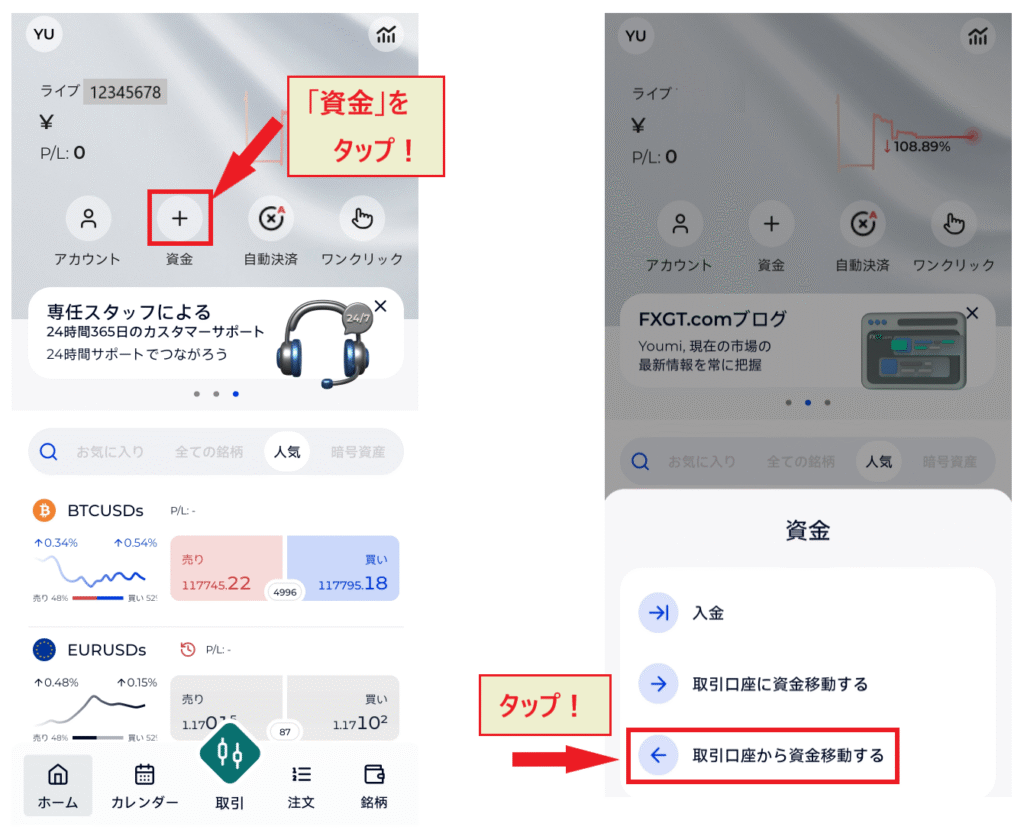
Tap "Funds" in the menu on the home screen
STEP 2. Transfer funds from your trading account to your eWallet
The fund transfer screen in the FXGT app will be in English, but don't worry. Just enter the information as shown below. You'll easily remember it after doing it a couple of times, so don't worry

Checkpoints for fund transfers
I agree that the bonus will be forfeited
When you request a fund transfer from your trading account, the following screen will appear

The content is,"Important Information - Do you wish to proceed with the withdrawal? A portion of your bonus will be forfeited proportionally to the withdrawal amount."That's what it means. If you don't mind losing part of your bonus, tap "Got it! (OK!)" to proceed
I understand that there is a possibility of a stop-loss order being triggered
There's one more thing I'll explain here: the English text at the very bottom of the fund transfer application screen (where you check a box)
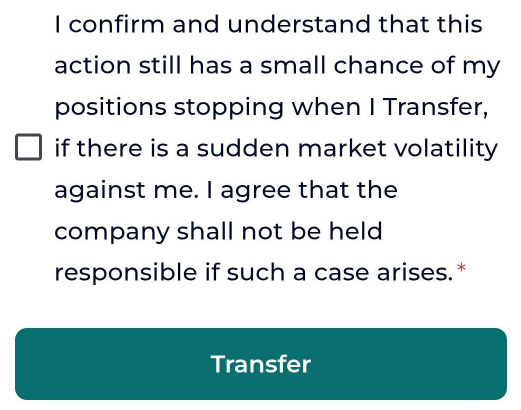
"I understand that transferring funds carries some degree of risk of a stop-loss, and that the broker is not responsible for any losses incurred due to sudden currency fluctuations."Therefore, if you still have positions open, please make your decision carefully
STEP 3. Once you have confirmed the fund transfer, submit a withdrawal request from your eWallet

Once the transfer is successful, a screen will appear saying "Success, the transfer to your eWallet was successful," as shown above. After confirming the screen,tap the "Withdrawal" button to go to the eWallet screen.
If the app does not switch to Japanese, you can select "Member Page" from the icon menu in the upper left corner of the app, and then view the deposit and withdrawal screen in Japanese from the "Member Page"
How to access the member page from the FXGT app
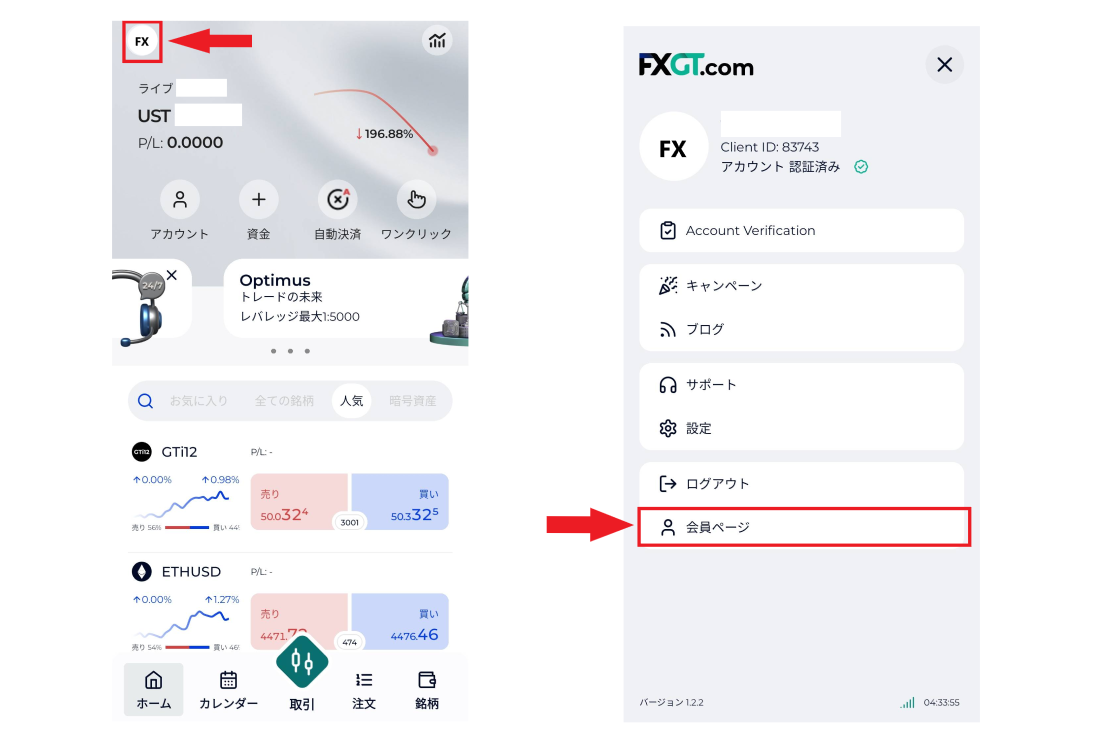
If you encounter English and feel confused, try accessing the member page from the app using the method described above. It's fully in Japanese
STEP 4. Enter the required information on the withdrawal request screen
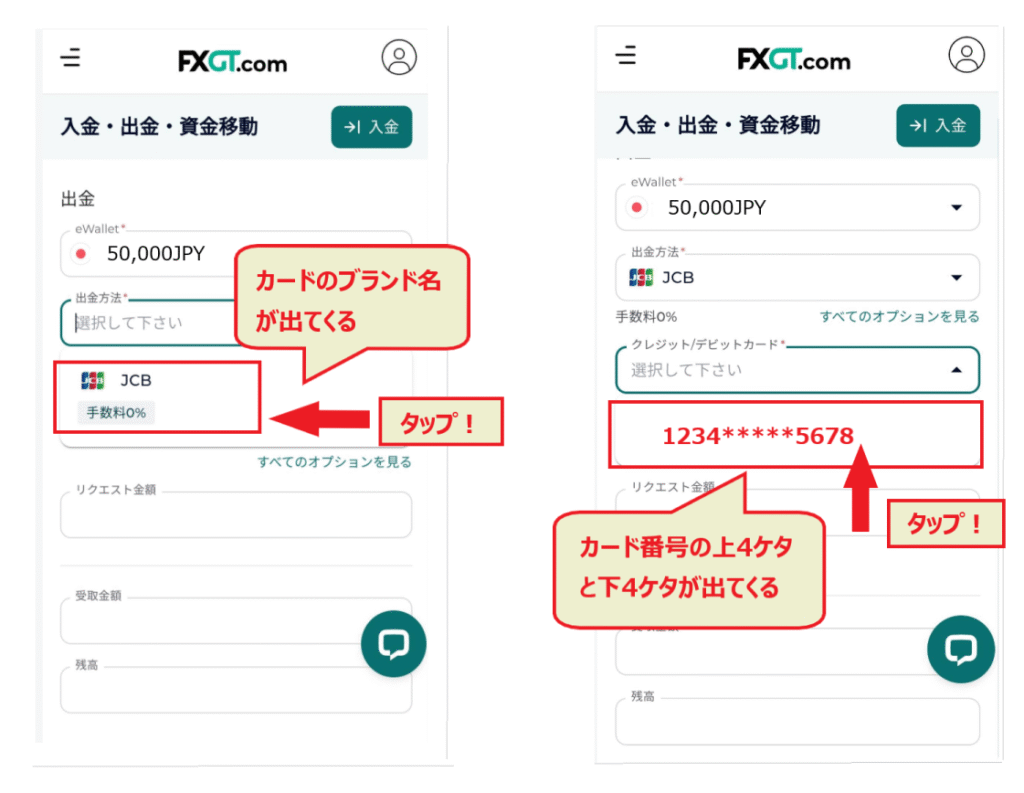
When the withdrawal screen appears,select your Japanese Yen account. If you have created and are managing multiple accounts, such as an MT5 account, be careful not to select the wrong account for withdrawal.
When you select the appropriate Japanese yen account, the brand of the credit card used for the deposit will be displayed. Tap the brand icon to open the drop-down menu below, and the card number will be displayed. Tap the appropriate card number
If your card information is not displayed, it means that you have not made a deposit using your credit card, or that the deposit has already been withdrawn from your card
Next, scroll down and enter the required information
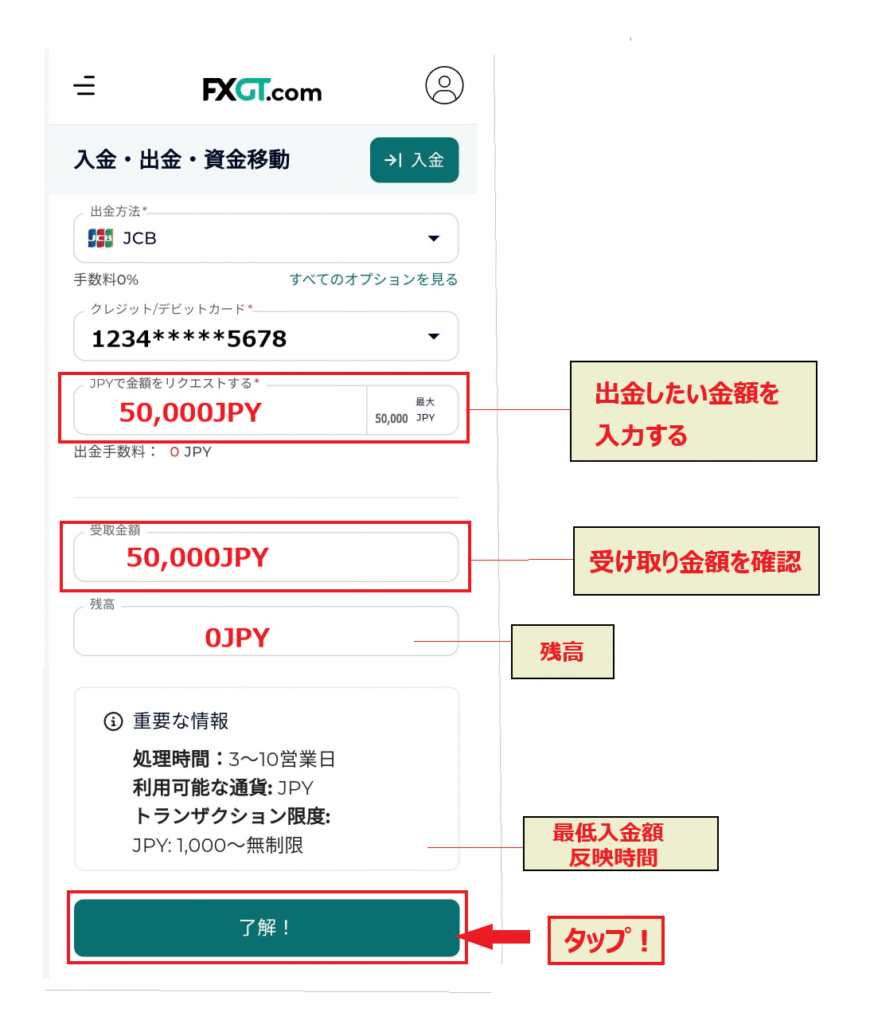
If you enter the amount you wish to withdraw in JPY in the "Request amount in JPY" field , the amount you will receive will be displayed in the field below.
Check your balance, minimum deposit amount, processing time, etc. If everything is correct,tap "OK!" to proceedto the next screen.
STEP 5. Perform email verification
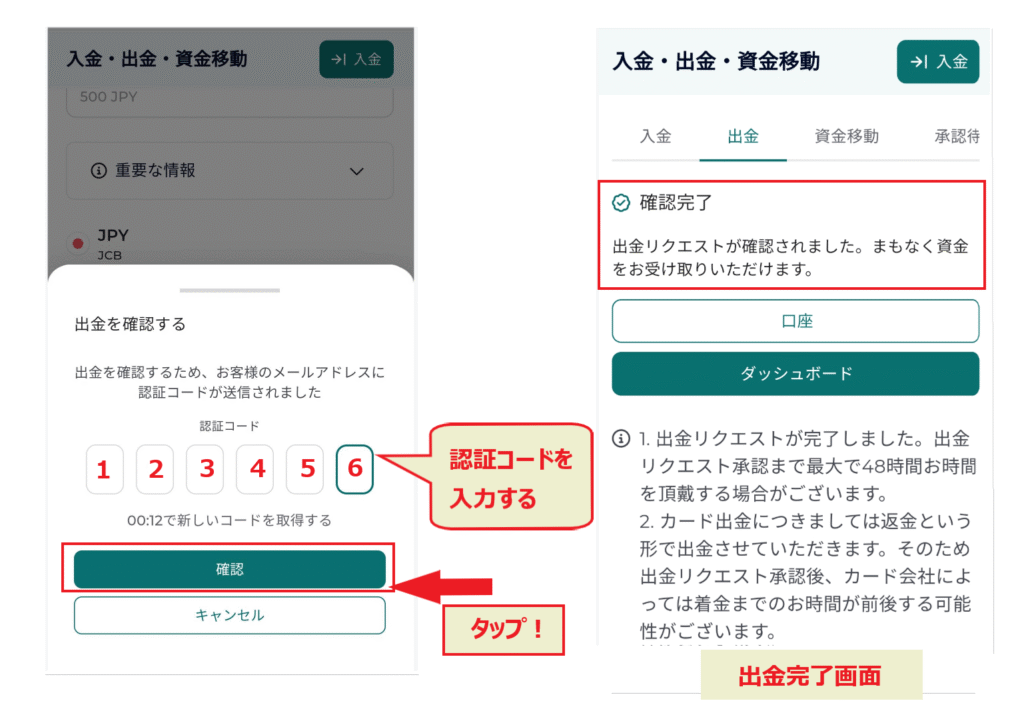
The next stepemail verification for your withdrawal request. A verification code will be sent to your registered email address. Please enter the verification code and press the "Confirm" button.
Your withdrawal request is now complete
Your withdrawal request will not be completed without email verification . Please be sure not to forget.
STEP 6. Withdrawal request confirmation email
Once you complete up to Step 5, you will receive an email confirming your withdrawal request
STEP 7. You will receive an email confirming that the withdrawal process is complete
within a few hours to a few days, it means the withdrawal process has been completed. If you do not receive this email, please contact customer service.
Credit card withdrawal processing time and important points
Credit card processing timeAfter the credit card company receives notification of the refund..It may take some time for the changes to be reflectedIt varies from a few days to about two weeks, depending on the credit card company
It's important to plan your deposits and withdrawals carefully, keeping in mind that card withdrawals can take time
The timing of the refundyour credit card company's billing cycle. If the refund is processed after the billing cycle ends, it will be reflected the following month.
However, even if the cancellation hasn't been reflected yet,able to check the data by contacting them. If you're concerned, try calling your credit card company.
Also, please note that if too much time has passed since the payment date (six months to more than a year) , it may not be possible to cancel the payment
I received a message from fxgt saying there's a problem with the payment side. I deposited using my Rakuten card, so does that mean the problem is with Rakuten? They
— Suddenly relaxed (@CvaDo9) April 2, 2024
told me to request a withdrawal using another method, so I'm requesting a bank transfer.
Please, just let me withdraw my money.
Debit card withdrawal processing time and important points to note
Debit card cancellations are usually reflected within a few days of the refund being processed . However, the processing time for debit cards varies depending on the bank, so if you have any concerns, it's best to call and check.
If the changes are delayed, it's a good idea to contact FXGT to be on the safe side
One of the things that makes FXGT trustworthy is their emphasis on smooth withdrawal processing.
— Trader-X (@parolibre_m) December 17, 2023
My withdrawal request via debit card, which I submitted on the morning of December 15th (Friday), was unusually still pending until evening. When I inquired via chat, the processing was completed immediately. It
will probably be reflected in my bank account on Monday. Thank you!#SurfingDojo
How to withdraw funds from FXGT to bitwallet/STICPAY
Now, the fastest way to withdraw funds from overseas forex trading is through payment services such as bitwallet and STICPAY. If you're thinking about situations where you need to withdraw funds quickly, depositing funds using bitwallet or STICPAY will allow you to withdraw them quickly at any time.
Now, let's look at the procedure for withdrawing funds from FXGT using bitwallet/STICPAY
How to request a withdrawal from bitwallet
First, go to the FXGT member page and transfer your funds
STEP 1. Transfer funds from your member page to your eWallet
Access "Member Page" from the icon menu in the upper left corner of the FXGT app.Open "Fund Transfer" on the Member Page and transfer funds from your trading account to your eWallet.
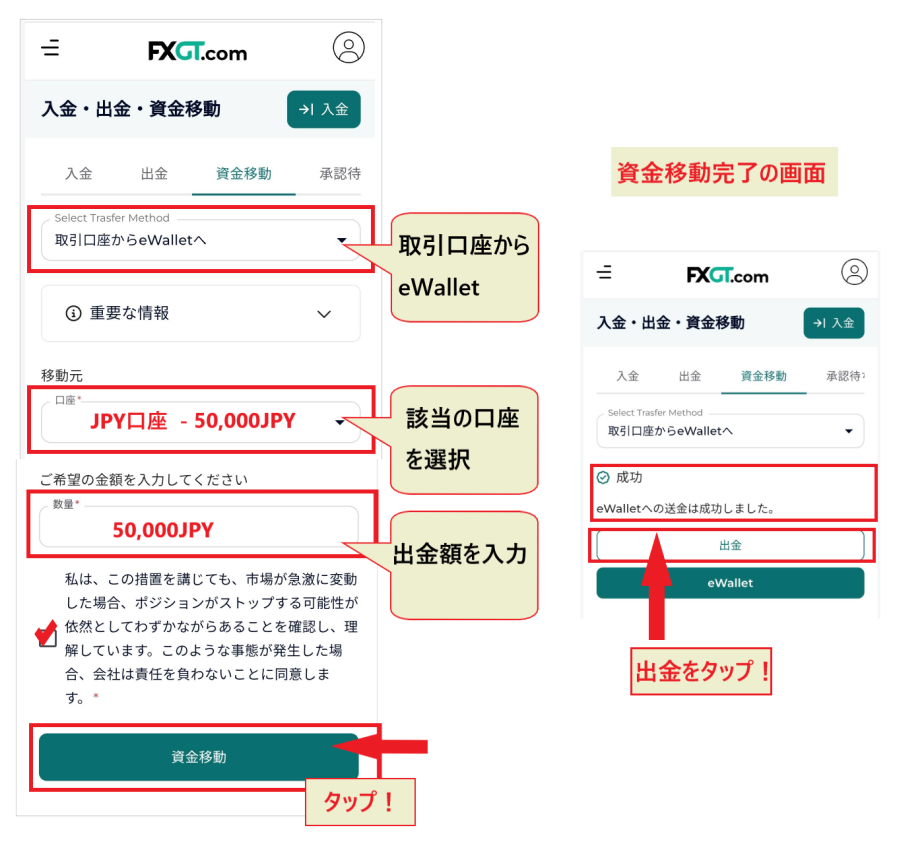
Explanation on the English page
STEP 2. Select bitwallet and submit a withdrawal request
Open the withdrawal screen and enter the required information

- eWallet → Japanese Yen
- Withdrawal method → bitwallet
- Virtual wallet → Email address
- Request amount → Withdrawal amount
- Amount received → Actual amount received
In the virtual wallet section, select your bitwallet ID (email address) from the dropdown menu.After confirming, please press the "OK" button.
STEP 3. After email verification, you will receive an email confirming the withdrawal is complete
Next, press the "Withdrawal" button andan email verification code. Enter the verification code to confirm the withdrawal.
Email verification code
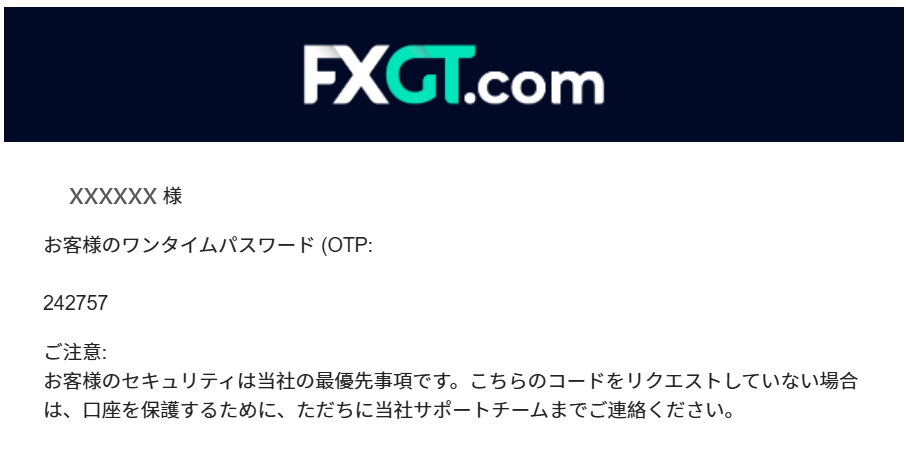
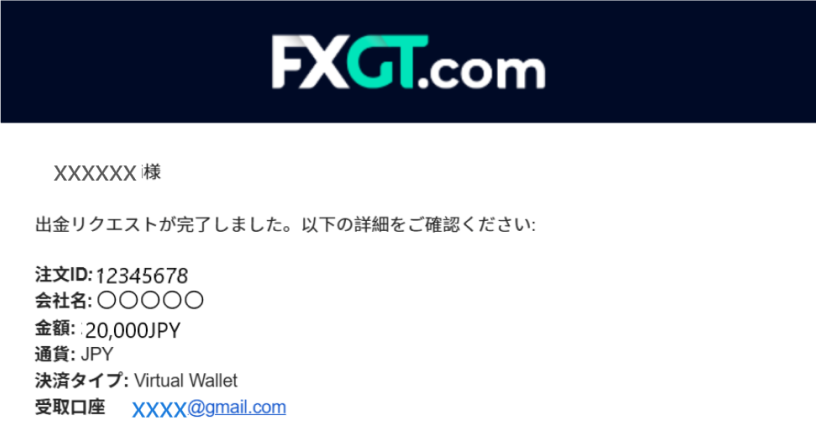
Once you've completed these steps, you'll receive a "Withdrawal Confirmation Email,"and then a few hours later, you'll receive a "Withdrawal Documents Completed Email.
Withdrawal processing complete email
STEP 4. Withdraw funds from bitwallet to your bank account
Once the withdrawal amount is reflected in your bitwallet, you will then receive the funds in your respective bank account. Withdrawals from bitwalletらかじめ銀行口座を登録しておくare faster if you register your bank account in advance.
To withdraw funds,the "Withdrawal" menuand follow the steps below to submit your request.
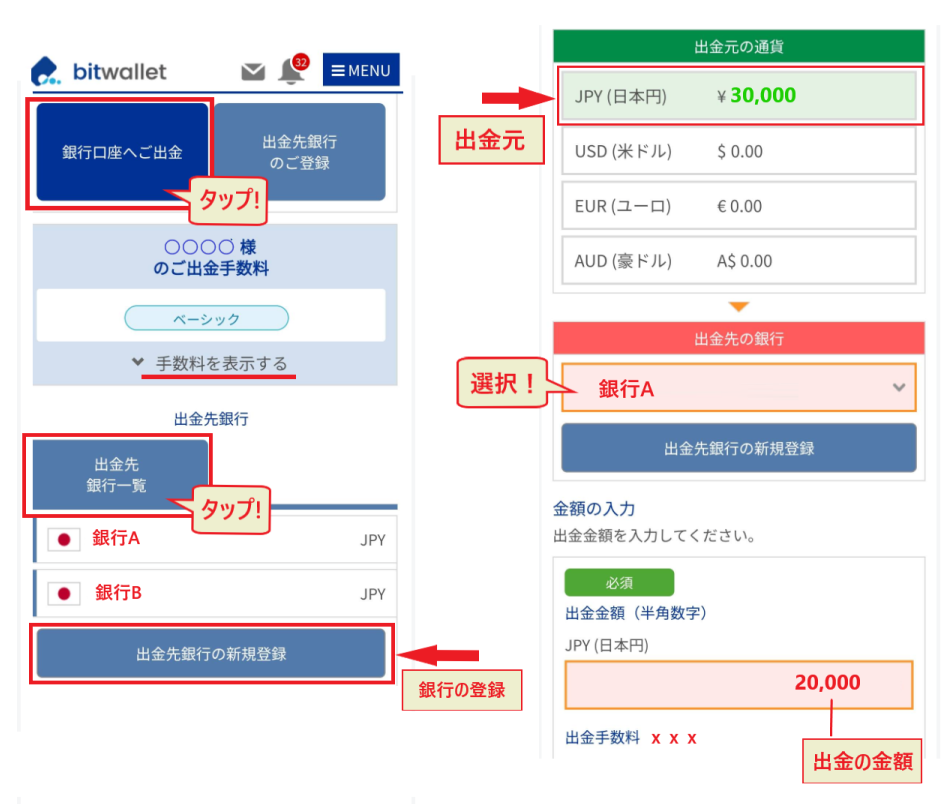
You will need your "Secure ID" when you enter the withdrawal amount and confirm the withdrawal . You can find your "Secure ID" in your account information.
How to request a withdrawal from STICPAY
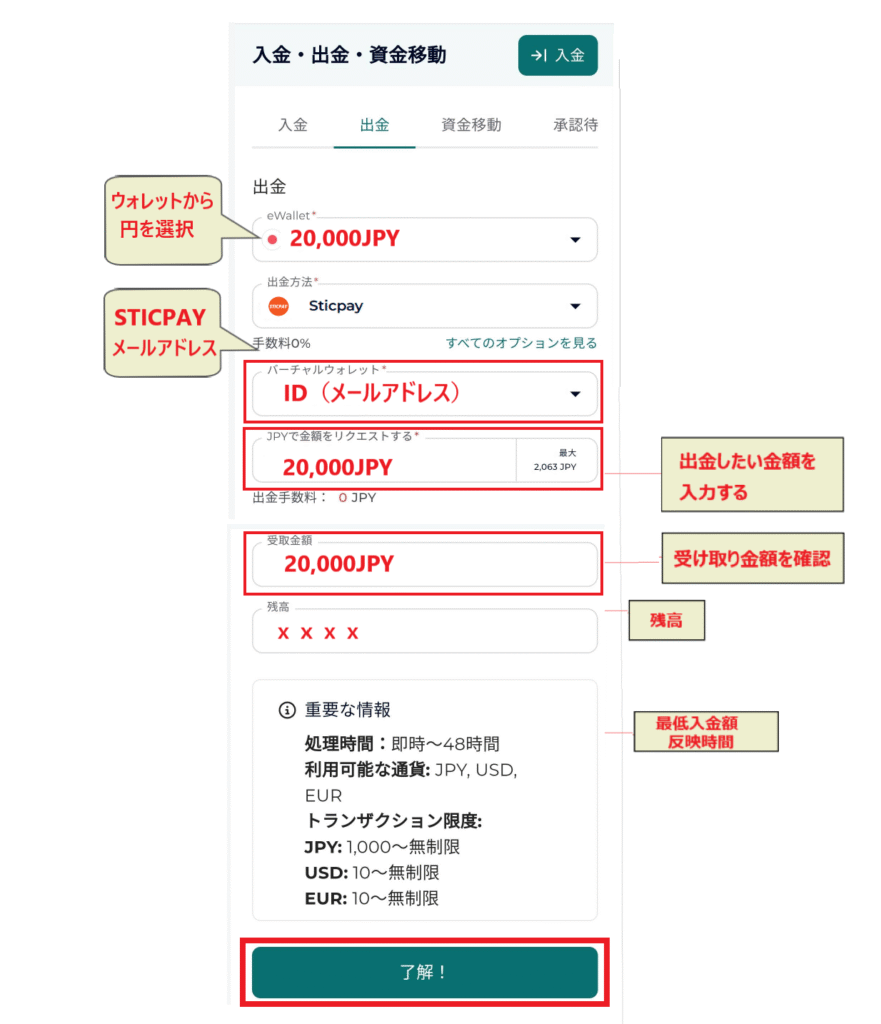
Withdrawal requests from STICPAYfollow the same procedure as with bitwallet. Please refer to the bitwallet withdrawal instructions and proceed as follows.
STEP 1. Transfer funds from your member page to your eWallet
On the member page home screen,select "Transfer funds from trading account" under the "Fund Transfer" menu to transfer funds to your eWallet.
STEP 2. Select STICPAY and submit a withdrawal request
STEP 3. After email verification, you will receive an email confirming the withdrawal is complete
Once you have completed the email verification for withdrawal confirmation, you will receive a "Withdrawal Confirmation Email." When the withdrawal is complete, you will be notified by a "Withdrawal Processing Complete Email" within a few tens of minutes to a few hours
STEP 4. Withdraw money from STICPAY to your bank account
If you log in to STICPAY andwithdraw funds from STICPAY to your bank account, the withdrawal will generally be completed within a few hours.
bitwallet/STICPAY withdrawal processing time and points to note
Bitwallet and STICPAY are recommended because withdrawalsare completed instantly or within a few hours at the latest. They are also commonly used payment services for withdrawing profits.
However, it requires some preparation beforehand, such as registering an account and registering a bank account
If you want to avoid the hassle of deposits and withdrawals, you should create accounts with bitwallet and STICPAY
My FXGT withdrawal this morning was successfully credited to my bitwallet
— axis_natural (@axis_natural) February 13, 2025
Withdrawal via STICPAY took about an hour.#fxgt
— Yu (@siiiisiiii7) July 16, 2024
How to withdraw cryptocurrency (BTC, ETH, USDT) from FXGT
FXGT offersfive types of cryptocurrency withdrawals.
| BTC, ETH, XRP, ADA,, USDT (ERC20/TRC20) |
Let's look at how to withdraw cryptocurrency using a smartphone app
How to request a cryptocurrency withdrawal
First, log in to the FXGT app and perform the operations from the home screen
STEP 1. Go to the member page from the FXGT app
Tap the account icon in the upper left corner of the home screen. From the account menu , select "Member Page" to open the member page
STEP 2. Transfer funds from your trading account to your eWallet
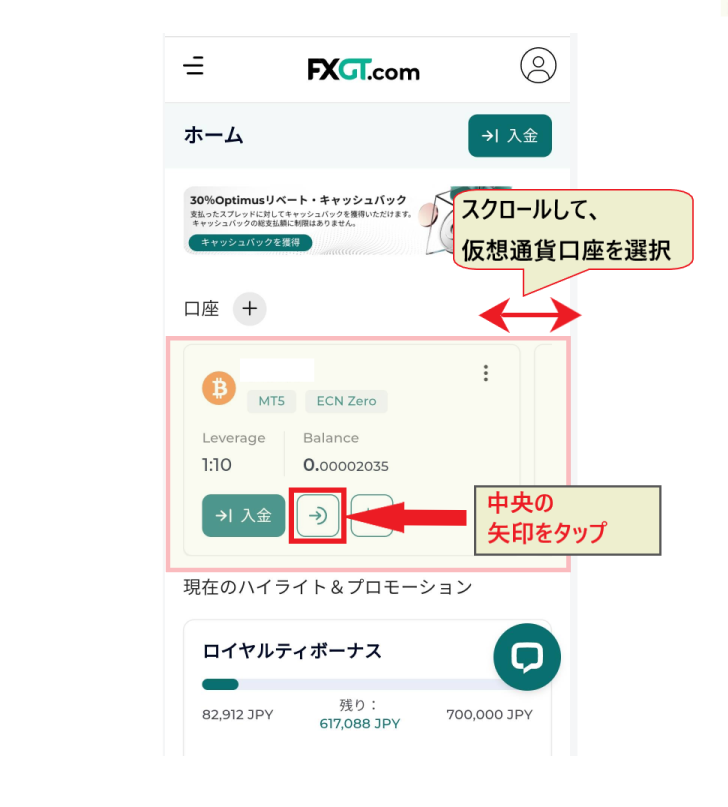
Scroll down the member page to find the relevant account, then tap the "arrow" in the center
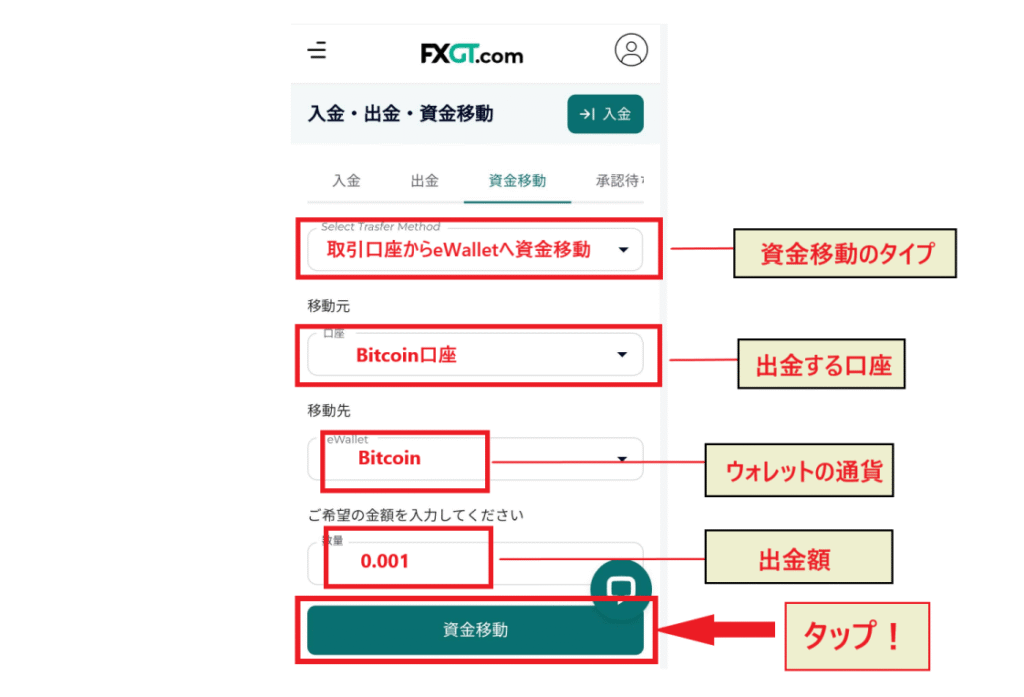
When the fund transfer screen appears,"Transfer funds from trading account". Enter the "cryptocurrency account," "cryptocurrency type," and "withdrawal amount" you wish to withdraw from, and thentransfer the funds to your eWallet.
Explanation on the English page
When you select "Funds" from the app and initiate a withdrawal,the procedure for transferring funds to your eWallet will be in English. For more details, please refer to the section "How to withdraw funds using a credit/debit card on FXGT" in this article.
STEP 3. Submit a withdrawal request from the withdrawal screen
Once the fund transfer is successful, a screen like the one above will appear.Tap the "Withdrawal" buttonto proceed to the eWallet withdrawal screen. You can also proceed directly to the withdrawal screen from this screen.
Once the withdrawal screen appears, enter the information as follows:
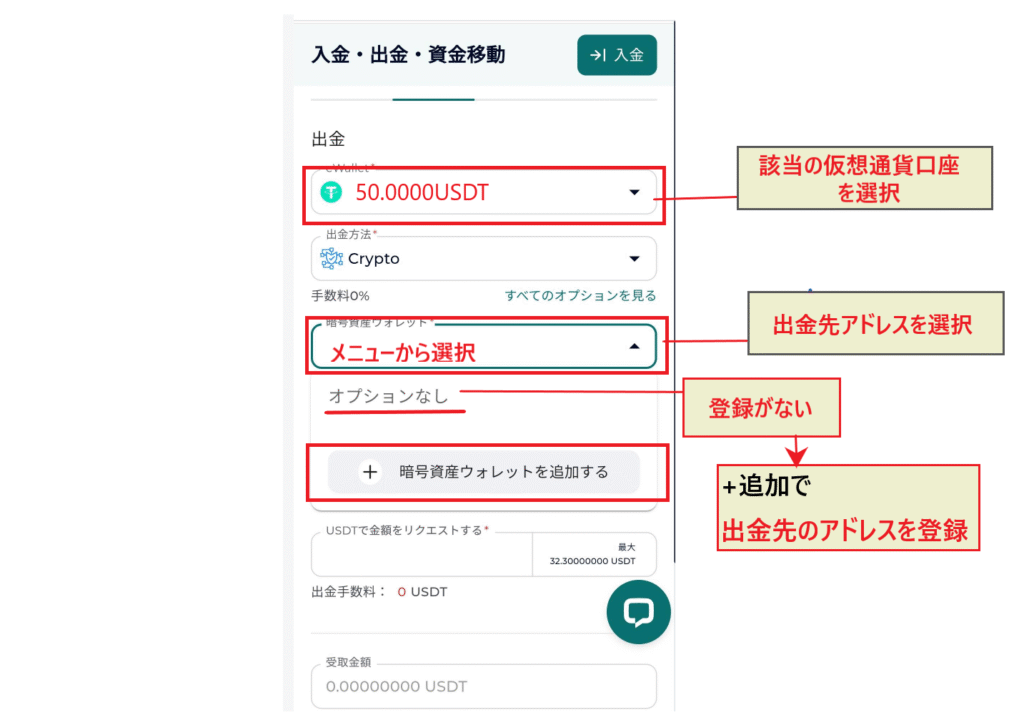
- Withdrawal account → Select the appropriate cryptocurrency account from the dropdown menu
- Withdrawal method → Crypto
- Cryptocurrency wallet → Withdrawal address
- No options → This will be displayed if you are not registered
- Add a cryptocurrency wallet → Register the withdrawal address
, cryptocurrency addressesare not saved.
If your address is not saved,register it using the "+ Add crypto wallet" button. You can register immediately by entering the verification code sent to your email.
STEP 4. Enter the required information and confirm withdrawal
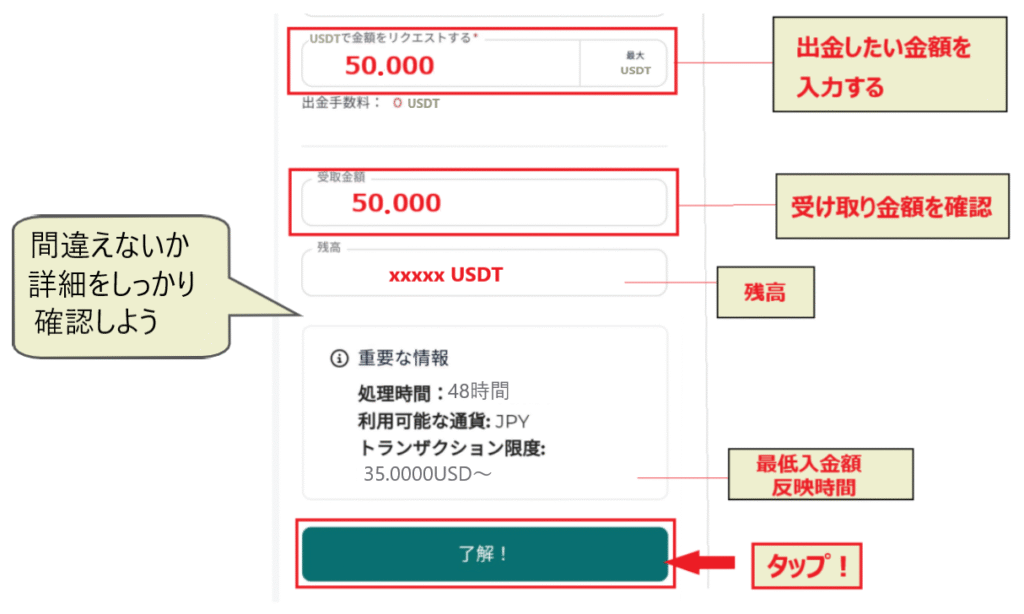
Once you have selected your wallet, proceedto enter the necessary information, such as the withdrawal amount. If the amount and other details are correct,click the "OK" buttonto confirm.
STEP 5. Perform email verification
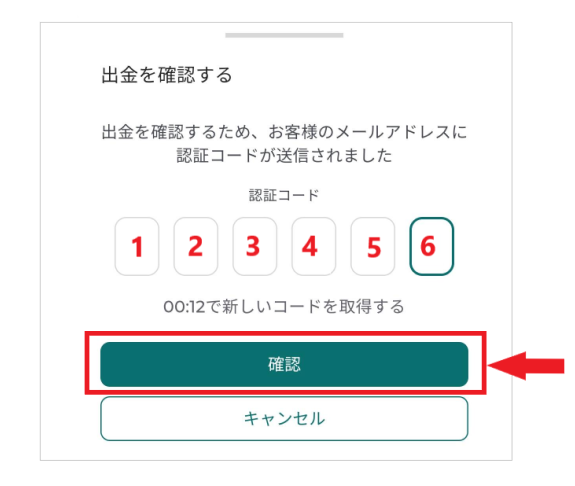
After submitting your withdrawal request, you will receive a verification code via email.Enter the verification code and tap "Confirm." Your withdrawal request has now been confirmed.
STEP 6. Withdrawal request confirmation email
Once email verification is complete,a "Withdrawal Request Confirmation Email." Receiving this email means your withdrawal request has been successfully processed.
STEP 7. Withdrawal processing completion email
All that'sto wait for the "Withdrawal Processing Complete Email." You'll receive an email once the funds have been successfully transferred to your cryptocurrency withdrawal address.
Cryptocurrency withdrawal processing time and points to note
Cryptocurrency withdrawals are said to take approximately 48 hours from the time the request is submitted until the funds are reflected. However, in most cases, if there are no problems, the funds arrive within a few hours.
Depending on the timing, you may have to wait, but if the changes are delayed, try contacting them to request an update
When withdrawing cryptocurrency, it's important to verify the cryptocurrency, address, and network
If you get the address or network wrong, that currency will be lost foreverYou will lose all of the money you withdrawCryptocurrency sent to the wrong network cannot be trackedProceed with the utmost carelet's
I forgot to convert it to USDT on Bybit and sent it as TRON to FXGT...
— Doctor FX (@fish_cat17505) July 11, 2025
I guess this is what they call self-inflicted GOX...
How to withdraw funds from FXGT via bank transfer (online banking)
Recently, the number of overseas forex brokers that have branches in domestic banks has been increasing
With domestic bank transfers for deposits and withdrawals,you can easily transfer funds just like with domestic FX trading. If you use a domestic bank for deposits, it's already registered, so you can easily use it to withdraw your profits as well.
Now, let's look at the procedure for withdrawing funds via domestic bank transfer
How to request a withdrawal via bank transfer (online banking)
Log in to the FXGT app and access the member page from the home screen
STEP 1. Go to the FXGT app's home screen

Tap the icon in the upper left corner of the home screenaccess the "Member Page" from the account menu.
STEP 2. Transfer funds from your trading account to your eWallet
Select "Deposits, Withdrawals, and Fund Transfers" from the menu, and thenenter the required information on the "Fund Transfers" page力します。
- Select Transfer Method → Transfer funds from trading account to eWallet
- Source → Select the account you want to withdraw from
- Quantity → Enter the amount you wish to withdraw
Enter the above information and tap "Transfer Funds". Once the "Success!" screen appears,the fund transfer to your eWalletis complete. Proceed to "Withdrawal".
Explanation on the English page
STEP 3. Submit a withdrawal request from your eWallet
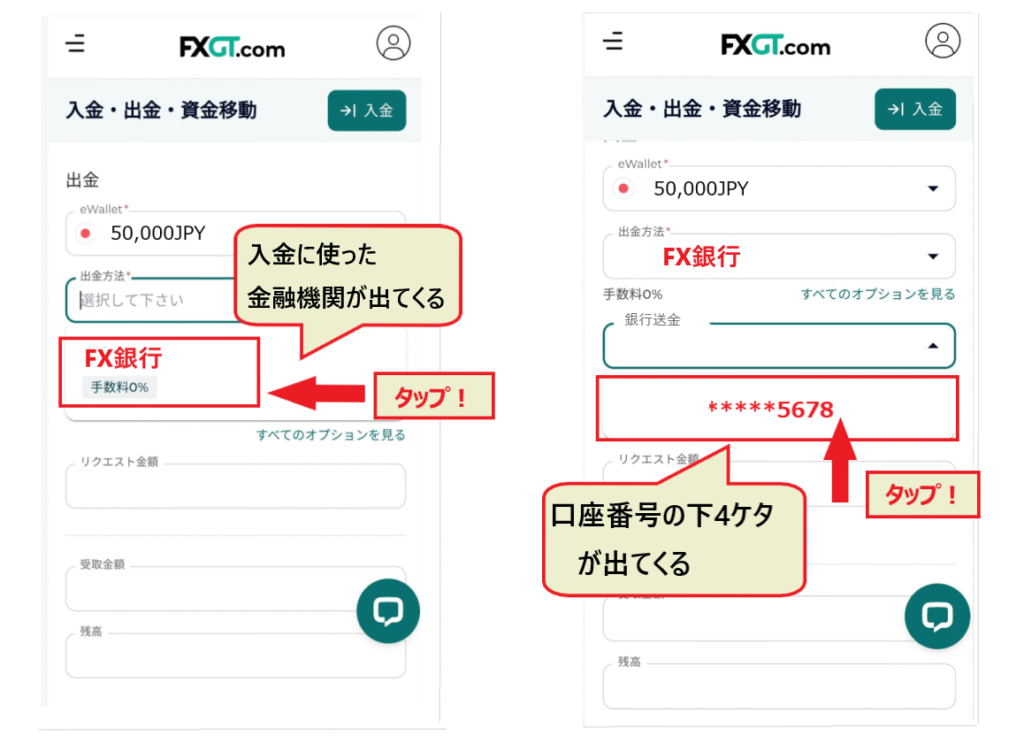
- Select currency from eWallet → Japanese Yen (JPY)
- Select the appropriate bank from the withdrawal methods
- Select your account number from the dropdown menu
STEP 4. Enter all the information required for the withdrawal request
Next, please enter all of the following required information
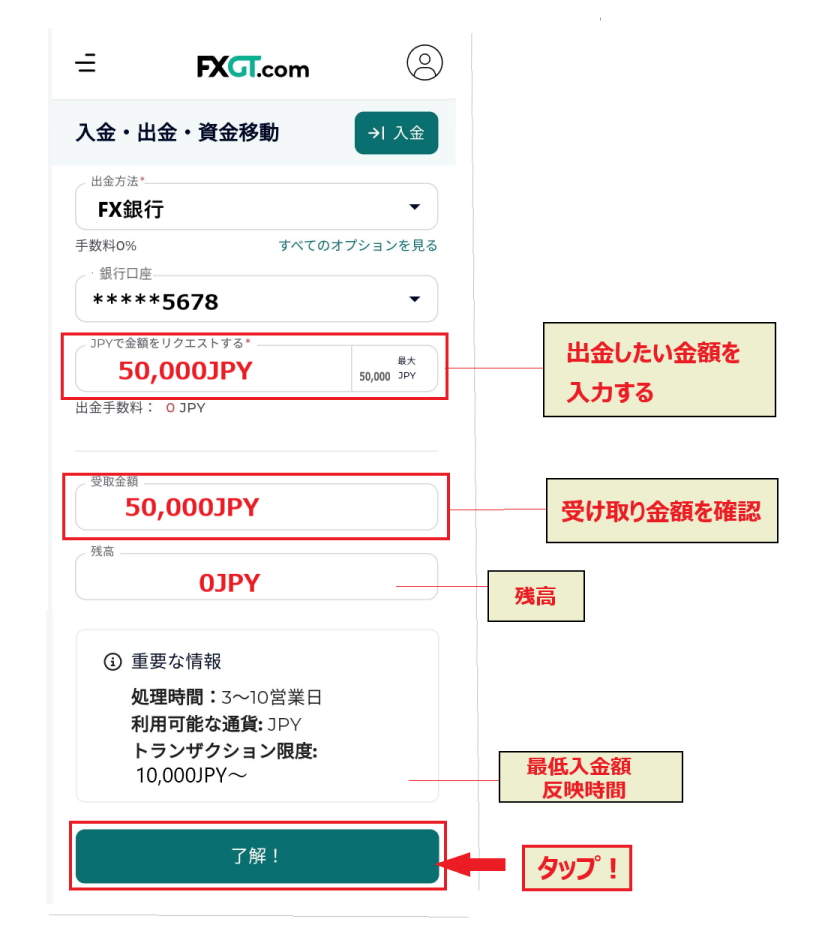
- Amount Request → Amount to withdraw
- Check the amount received
- Check balance
- Check processing time, minimum deposit amount, etc
If there are no problems with the details, tap "OK!" to submit your withdrawal request
STEP 5. Perform email verification
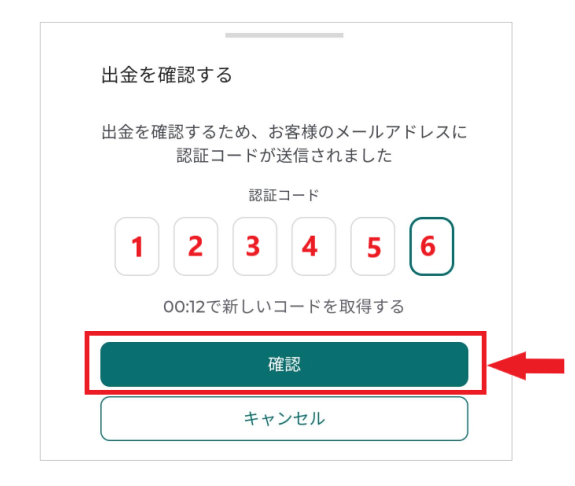
After submitting your withdrawal request, you will then be taken to an email verification screen.You will receive a verification code via email, so enter the code to confirm your withdrawal.
STEP 6. Withdrawal request confirmation email
Once email verification is complete,a "Withdrawal Request Confirmation Email." Receiving this email means that your withdrawal request has been successfully completed.
STEP 7. Withdrawal processing completion email
All you have to do now is wait for a "Withdrawal Processing Complete Email" to arrive within a few days to 10 days . After you receive the completion email, you should be able to confirm that the funds have been deposited into your bank account as soon as possible.
Bank transfer (online banking) withdrawal processing time and points to note
One thing to keep in mind when withdrawing money via bank transfer isit takes longer than a regular domestic bank transfer.
In interbank transactions within Japan, funds are generally received instantly, regardless of weekends or holidays, but it seems that processing by the broker takes time
There is also a withdrawal limit of 200,000 yen per day,Large sums of money cannot be withdrawn all at onceSo be careful when making a deposit
fxgt. Withdrawals arrive in the bank account about 30 hours after the withdrawal request. It used to be incredibly fast, arriving in 2-3 hours, but it's still reasonably quick. There are fees and a withdrawal limit of 200,000 yen per day, but it's still excellent
— K-ED (@7metalou) December 20, 2024
How to withdraw funds from FXGT using mobile payment (Apple Pay/Google Pay)
Anothersupplementary method you can use for deposits and withdrawalsis to use Apple Pay or Google Pay.
Let's look at how to withdraw money using Apple Pay and Google Pay
How to request a withdrawal from Apple Pay
First, let's look at the procedure for withdrawing funds using Apple Pay. First, log in to the FXGT app
STEP 1. Transfer funds from your member page to your eWallet
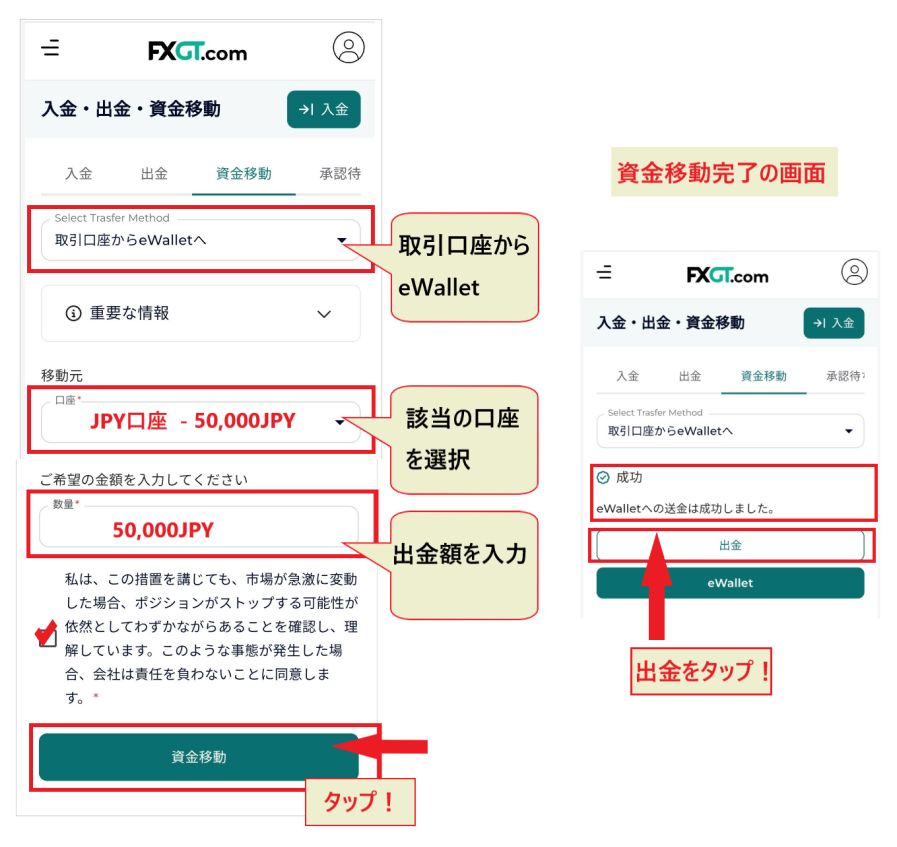
From the member page menu, go to the "Fund Transfer" page under "Deposits, Withdrawals, and Fund Transfers"
To transfer funds,"Transfer funds from trading account to eWallet," enter the "account you want to withdraw from" as the source, enter the withdrawal amount, and tap "Transfer Funds." From the fund transfer completion screen, tap the "Withdrawal" button to proceed to the withdrawal screen.
Explanation on the English page
STEP 2. Select Apple Pay and submit a withdrawal request
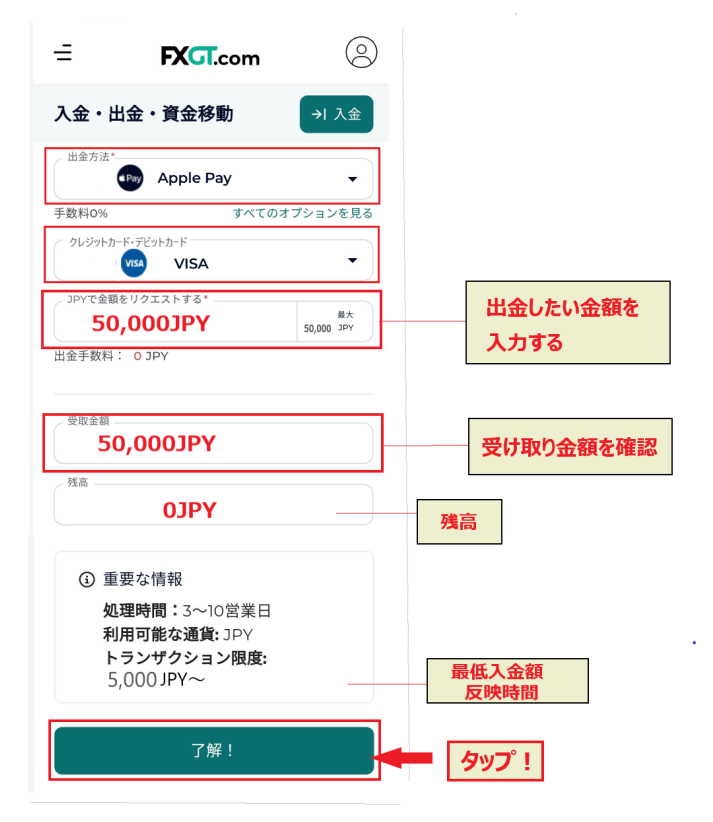
Next,enter the required information andsubmit a withdrawal request.
- Withdrawal method → Apple Pay
- Linked credit card → Select the appropriate card
- Amount of withdrawal request
After reviewing details such as the withdrawal amount and balance,click the "OK!" button to complete the application.
STEP 3. After email verification, you will receive an email confirming the withdrawal is complete
After submitting your application, you will need to verify your withdrawal via email. Enter the verification code sent to your email address, and once you receive a withdrawal confirmation email, your withdrawal has been accepted. You will thenan email within a few days confirming that the withdrawal process is complete, and the funds will be credited to your account.
How to request a withdrawal from Google Pay
The process for Google Pay is the same as for Apple Pay
STEP 1. Transfer funds from your member page to your eWallet
Open the "Deposits, Withdrawals, and Fund Transfers" menu on your member page, select "Transfer funds from trading account to eWallet," and transfer the funds to your eWallet
*For more details, please refer to Step 1 of Apple Pay
STEP 2. Select Google Pay and submit a withdrawal request
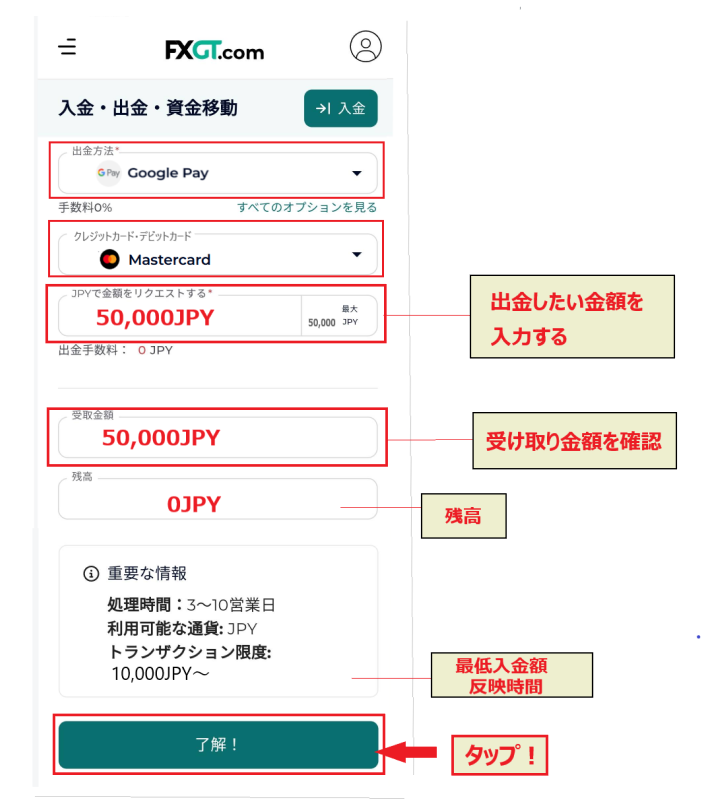
Once you open the withdrawal screen, enter the following information to submit a Google Pay withdrawal request
- Withdrawal method → Google Pay
- Linked credit card → Select the appropriate card
- Amount of withdrawal request
Once you have entered all the required information,click the "OK!" buttonto complete your application.
STEP 3. After email verification, you will receive an email confirming the withdrawal is complete
After submitting a withdrawal request, you will receive an authentication code via email. Once you enter and verify the authentication code,receive a "Withdrawal Confirmation Email.A few days later, you will receive a "Withdrawal Processing Complete Email"and the funds will be credited to your account.
Apple Pay/Google Pay withdrawal processing time and important points to note
Both Apple Pay and Google Pay use credit or debit cards for payments
The processing time for refunds is approximately two weeks for credit card payments and a few days for debit card payments
Credit cards are issued by the card companyThe timing of refunds varies depending on the billing cycleYes. Since this often takes time, it's important to have a financial plan with some leeway
Examples of withdrawal refusals by FXGT and how to deal with them

So far, we've seen that FXGT offers roughly five ways to withdraw funds. Now, the question is..Rumors of "withdrawal refusal"Yes. With overseas forex trading, we sometimes hear complaints about being unable to withdraw funds. It seems that FXGT also occasionally experiences cases where withdrawals are not possible
However, please rest assured that FXGT will not unfairly refuse your withdrawal
Next, we will explain the types of cases in which withdrawals may be rejected by FXGT, including examples of situations where withdrawals are not possible and how to deal with them
Examples of situations where withdrawals are not possible with FXGT
Let's look at some examples of situations where withdrawals from FXGT are not possible
You have selected a payment method different from the one specified
A common reason why you might not be able to withdraw funds from FXGT is if you select a withdrawal method different from the one you used to deposit funds. In this case, if you still have a deposit balance remaining..I cannot process a withdrawalIn most cases, you can withdraw your funds by applying using the same method you used to make the deposit
The information such as ID, email address, and account number is different
Once you've used a bank or payment service for a deposit or other transaction, your information is automatically registeredThere are errors in the registration information, such as the ID, email address, or account numberAnd you will no longer be able to withdraw your funds
If your credit card has not been approved
This happens when your credit card is renewed. When your credit card is renewed, the expiration date and security number will change
Withdrawals are not possible with the updated cardTherefore, you will need to resubmit images or undergo approval again. If you can prove that it is the same card and the same name, the withdrawal will be approved
Registration is required for the first time you use a deposit or withdrawal method
Additionally, withdrawal methods used for the first time, such as profit withdrawals, require prior registration. These include bank accounts, bitwallet, and cryptocurrency walletsIf you try to withdraw funds without registering, it will not be approvedWhen using a withdrawal method for the first time, be sure to register and get approved before using it
How to register a bank account or bitwallet for withdrawals
FXGT's deposit and withdrawal system is designed so that withdrawals cannot be made using methods that are not registered (methods not used for deposits). To prevent money laundering and identity theft,new bank accounts and services such as bitwallet (STICPAY) must be registered with FXGT and verified in advance.
If you register, you'll be able to select it from a pull-down menu whenever you want to withdraw your profits ルダウンメニューから選択できる
Accounts that can be registered as withdrawal destinations
bitwallet, STICPAY, bank account, cryptocurrency wallet
Now, let's look at how to register a financial institution that you'll be using for the first time to withdraw your profits
How to register for a new bank account or a bitwallet
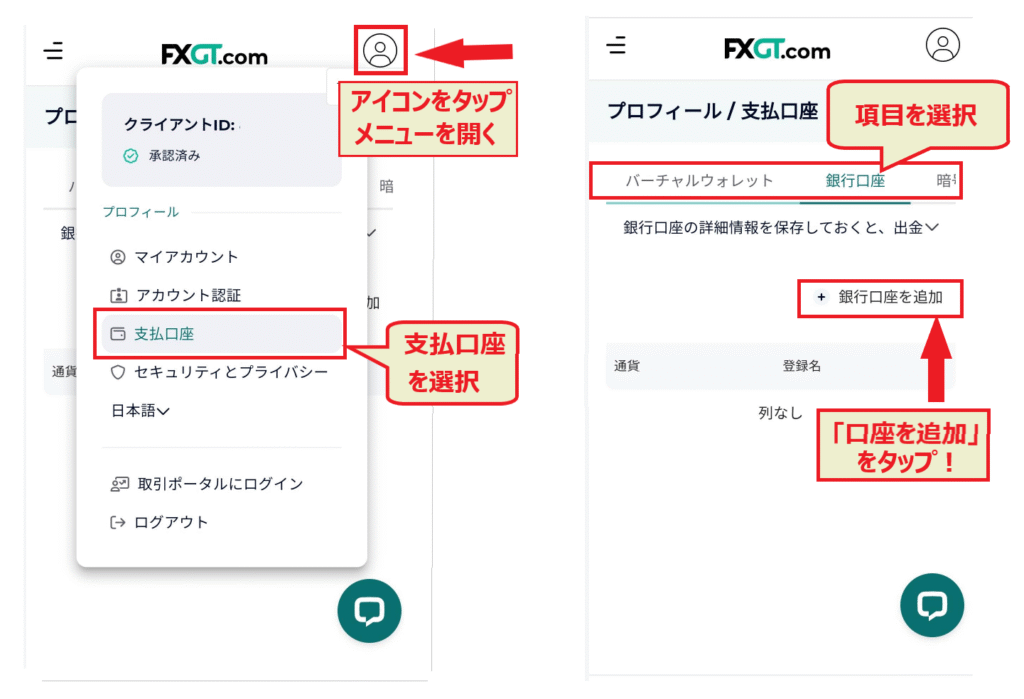
- Log in to the FXGT app (member page)
- Select "Payment Account" from the account menu
- Select the item you want to register from the payment account menu (bank account, virtual wallet, etc.)
- Click "Add bank account (virtual wallet)"
- Enter your account information and click "Add"
*The "Virtual Wallet" option in the payment account menu refers to bitwallet/STICPAY
*Additional verification may require submission of screenshots or documents proving that the account belongs to you
It's true that the withdrawal process for overseas forex brokers is somewhat complicated. However,because FXGT requires such thorough documentation,it can be said that fraudulent activities and crimes are avoided, making it a safer option.
You can view reviews and opinions regarding FXGT's withdrawal refusals here
Examples of withdrawal refusals at FXGT
Very rarely, in FXGTAccounts may be frozen or withdrawals may be refused due to violations of terms and conditions or fraudulent activityThis can happen in some cases
For example, the following actions:
- I received multiple bonuses by falsifying my registration information
- I repeatedly made deposits and withdrawals in order to receive bonuses
- Hedging was performed between different brokers
- He performed hedging arbitrage between different brokers.
- He engaged in excessive scalping with large lots
- He repeatedly performed lightning-fast scalping, targeting only economic indicator announcements and statements from key figures
due to a violation of the terms and conditions or fraudulent activity, you will be unable to withdraw your deposits or profits. In particular, falsifying information to obtain bonuses and using bonuses for arbitrage will result in severe penalties. You should absolutely never try to imitate these practices.
This article provides a detailed explanation of hedging arbitrage. Please refer to it for more information
FXGT will not unfairly refuse your withdrawal
FXGT is a popular overseas forex broker known for its generous bonuses. Because they frequently hold bonus campaigns,There are occasional cases of fraudulent activity involving the misuse of bonusesThat's what they say. If you obtain the bonus through legitimate means and trade honestly and normally,You will never experience unfair withdrawal refusals at FXGT。
The following article explains the second account opening bonus. It also touches on violations, so take this opportunity to check it out
How to deal with situations where you cannot withdraw funds from FXGT
If you are unable to withdraw funds or your withdrawal is rejected for an unknown reason,the best course of action is to contact customer service. Many issues can be resolved through this contact.
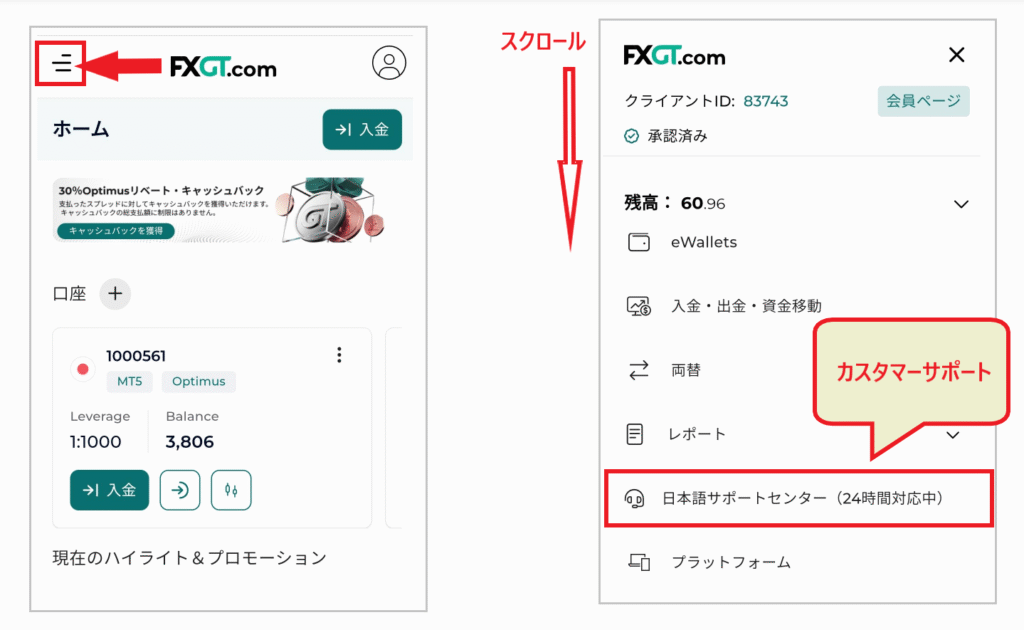
FXGT, in particular, is known for its excellent Japanese language support and quick response times
You can access 24-hour chat and email support from the "Japanese Support Center" menu on your member page . If you have any concerns, such as "withdrawal processing is slow" or "I can't withdraw funds," we recommend that you contact us without hesitation .
While the confusing withdrawal process is a drawback, overseas forex trading offers numerous attractive advantages. Let's examine the pros and cons of overseas forex trading in the following article
Recommended withdrawal methods at FXGT
Next, we'll introduce recommended withdrawal methods from FXGT, tailored to your specific needs and purposes
Easy-to-understand withdrawal methods for beginners
For those new to overseas forex trading, the most recommended withdrawal method isdomestic bank transfer.
It may take a little time, butyou can use it from online banking just like a regular bank transfer. If you use bank transfer when making a deposit, it will be automatically registered with FXGT, so you can easily withdraw both your deposit and profits.
A withdrawal method with absolutely no fees
The only way to completely avoid transaction fees is to use a debit card with no transaction fees
Deposits and withdrawals are completely free of charge. Debit cards offer the advantage of almost instant deposit processing, and refunds are faster than credit cards, making them a reliable option. However, please note that depending on the currency used for deposits and the type of bank account, there may be international transaction fees associated with using a debit card
Withdrawal methods that prioritize the speed of fund arrival
For fast deposit processing, bitwallet or cryptocurrency are recommended
Transfers from FXGT to bitwallet take from instant to a few hours. Transfers from bitwallet to your bank account take from the same day to 2-3 days. Cryptocurrency is deposited instantly to within a few hours. If you want to withdraw immediately, STICPAY is also fast, but the fees for withdrawals to bank accounts are relatively high.
Bitwallet charges a flat fee of 824 yen (sometimes as low as 777 yen), so if you withdraw funds to your bank account in bulk, you can reduce the fee ratio.
Withdrawal methods that can be used to transfer funds to other companies
If you use multiple overseas forex brokers,bitwallet or STICPAYare convenient options.
For fund transfers between brokers,both deposits and withdrawalsare free of charge. Since the transfers are processed quickly, it's very convenient to register an account on either platform.
Register for a bitwallet account here
Register for a STICPAY account here
Frequently Asked Questions about FXGT Withdrawal Methods
Finally, let's look at some common questions regarding withdrawal methods at FXGT
Does FXGT charge withdrawal fees?
FXGT does not charge any fees for any withdrawal method . However, fees may apply depending on the financial institution or payment service used.
How long does it take for withdrawals from FXGT to be processed?
The processing time for withdrawals from FXGTdepends on the withdrawal method.
The following are listed in order of the speed at which changes are reflected:
- bitwallet/STICPAY: Instant to a few hours
- Cryptocurrency: Instant to several hours
- Debit card: Same day to several days
- Domestic bank transfer: 2 to 10 days
- Credit card: Several days to 2 weeks
Can I withdraw funds from FXGT via bank transfer?
Yes.If you deposited funds via bank transfer, you can withdraw the deposited amount via bank transfer. You can also withdraw any profits at the same time.you did not use bank transfer to deposit funds, you cannot use bank transfer to withdraw the deposited amount.
Which bank is recommended for withdrawing funds from FXGT?
For FXGT, it's best to choose a bank that's easy to use for deposits. Ideally, one that offers several free bank transfers, issues debit cards, and isn't blocked for overseas forex trading. Large, financially focused banks sometimes don't accept cards.Retail and distribution-affiliated cardsseem less likely to be blocked.
Can I withdraw funds from FXGT using cryptocurrency?
Yes, you can also withdraw funds in cryptocurrency. To withdraw in cryptocurrency, you must first register the recipient wallet address in the "Payment Account" section of your member page
What types of cryptocurrencies can I withdraw from FXGT?
There are five types of cryptocurrencies that can be used for withdrawals at FXGT .
- BTC (Bitcoin)
- ETH (Ethereum)
- XRP (Ripple)
- ADA
- USDT (Tether)
What should I do if I can't withdraw money from FXGT?
If you are unable to withdraw funds from FXGT,contact customer support first. Contacting them often leads to a smoother withdrawal process. Even if there is a problem, they will likely offer solutions.
To expedite the process, it is effective to send screenshots of the withdrawal procedure
By the way, you can find information on overseas forex brokers with excellent Japanese language support in this article. Please take a look
Summary: Withdrawal methods vary depending on the deposit method

As we've seen,the biggest drawback of overseas forex trading is the complicated deposit and withdrawal system. In particular, withdrawal methodsinvolve rules uniqueto overseas forex trading, which can be confusing.
"After withdrawing the deposited amount using the same method used for the initial deposit, you can freely choose how to withdraw your profits."
"Credit card withdrawals take priority."
Remembering these two rules will make it easier to determine which withdrawal method is appropriate for you
The withdrawal methods available for overseas forex trading vary depending on the deposit method. It's essential to consider your preferred withdrawal method before choosing your deposit methodmethod . Choose a deposit and withdrawal that suits your trading plan and is easy to use