











HFM(formerly HotForex) offersseven deposit methods: bank transfer (domestic bank transfer), credit/debit card, bitwallet, BXONE, cryptocurrency (Crypto Payments), Binance Pay, and PESKA e-Wallet.HFMare free, and the official deposit options state that the funds will be reflected instantly or within 10 minutes.
On the other hand, this procedure often presents unique challenges specific to overseas forex trading, such as "Should I choose MyWallet or my trading account as the deposit destination?", "What happens to withdrawals if I deposit using a card?", and "My deposit hasn't been reflected in the account even though I made a transfer."
This article summarizesHFMbased on information published on the the minimum deposit amount, processing time, procedures, deposit rules, and causes and solutions for when deposits fail, as of October 7, 2026 , official website's deposit options and official blog ( deposit overview and deposit procedures by method) , as well as screenshots taken by this site using the myHF app
Conclusion | Key points forHFMdeposits
- fees areHFM's end. Minimum deposit amounts are 1,000 yen for bank transfer, bitwallet, and BXONE; 750 yen for card; 30 dollars for cryptocurrency; and 20 dollars for Binance Pay(official deposit options as of October 7, 2026; subject to change depending on the exchange rate).
- Deposits are reflected instantly for cryptocurrency, Binance Pay, and Visa/Mastercard cards, and within 10 minutes for bank transfers, JCB, bitwallet, and BXONE(official deposit options). According to the official blog, bank transfers take 10 minutes to 12 hours, and the recipient's account is valid for 60 minutes.
- Deposits must be made in the account holder's name only. Withdrawals up to the deposit amount will be made using the same method as the deposit, so choose your deposit method based on ease of withdrawal. To receive a deposit bonus, deposit into your Top-Up Bonus account or transfer funds from MyWallet.
*This article was created by the MoneyCharger editorial team in accordance with our content creation policy , based onHFMofficial website (deposit options, official blog deposit overview and deposit procedures by method) as of October 7, 2026, and combined with screenshots taken by this site using the myHF app (September 2025). Minimum deposit amounts and processing times may change, so please check the minimum and maximum amounts displayed on the myHF deposit screen before making a deposit. For precautions regarding the use of overseas FX brokers, please also refer to information published information published on by the Financial Services Agency , and for investment-related solicitation troubles, please refer to information published by the Consumer Affairs Agency
HFMdeposit methods list (minimum deposit amount, processing time, fees)
HFMThe deposit methods and conditions listed on the "Deposit Options" page ofPESKA e-Wallet, bringing the total to seven types.
| Payment Methods | Minimum deposit amount | Maximum deposit amount (official blog) | Reflection time (official notation) | HFM's fees | Supported currencies (Official Blog) |
|---|---|---|---|---|---|
| Bank transfer (domestic bank transfer) | 1,000 yen | 2.5 million yen (equivalent to $25,000) | Within 10 minutes (10 minutes to 12 hours according to the official blog) | Free (Bank transfer fees from the originating bank are the responsibility of the sender) | JPY only (USD accounts will be converted) |
| Credit/Debit Cards (Visa, Mastercard, JCB) | 750 yen (Official blog: equivalent to $10 with Visa/Mastercard and $5 with JCB) | Visa/Mastercard: $10,000 equivalent; JCB: $20,000 equivalent | Visa/Mastercard: Instant; JCB: Within 10 minutes | free | JPY/USD (JCB also accepts EUR) |
| bitwallet | 1,000 yen | 5 million yen (equivalent to $45,000) | Less than 10 minutes (approximately 15 minutes according to the summary on the official blog) | Free (excluding bitwallet top-up fees) | JPY/USD |
| B XONE | 1,000 yen | 1 million yen (30,000 dollars according to the official blog summary) | Within 10 minutes | free | JPY/USD |
| Crypto assets (Crypto Payments) | $30 (Option B is $15) | Worth $30,000 (official page states $10,000) | Immediately | Free (excluding wallet-side transfer fees) | Specify in USD/EUR |
| Binance Pay | $20 | Worth $20,000 (officially $30,000) | Immediately | free | Specify in USD/EUR (USDT-TRC20) |
| PESKA e-Wallet | 1,000 yen (official blog) | 2 million yen (official blog) | Within 10 minutes (Official Blog) | free | JPY/USD |
There are three key points:①HFMcharges no fees for deposits. ② Deposits can be made in Japanese Yen via bank transfer, card, bitwallet, BXONE, and PESKA; cryptocurrencies and Binance Pay are denominated in USD/EUR. ③ For bank transfers only, be sure to check that the recipient's account expiration date (60 minutes) matches the transfer amount.

Minimum and maximum deposit amounts fluctuate with exchange rates and may differ in display on the official website, official blog, and myHF deposit screen. The official blog states that "to check the current minimum deposit amount, access the deposit page from the myHF area," so please use the "minimum" and "maximum" displays on the deposit screen as your basis. According to the official blog, deposit processing takes place between 00:00 server time on Monday (7:00 JST) and 00:00 server time on Saturday (7:00 JST), and deposits processed over the weekend may not be reflected until the start of the next business hours

Five deposit rules for HFM
Overseas forex brokers, including HFM, have deposit and withdrawal rules that are not found in domestic forex brokers. Here are five points you should be aware of before making a deposit. Failure to understand these can lead to misunderstandings such as "deposits being refunded," "bonuses not being applied," or "inability to choose a withdrawal method."

Deposits must be made under the same name asHFMaccount (deposits under a different name will be refunded)
The official blog states, "Deposits must alwaysHFMaccount," and "Please note that funds sent from accounts in the names of family members, companies, or other individuals will be refunded."The name on your bank account, card, bitwallet, etc.,HFMmatch the name of the person registered with. If you forget your registered name, you can check it in "My Profile" on myHF.
You can make a deposit before identity verification, but you cannot conduct transactions beforehand
The official blog's FAQ states, "Can I deposit funds without verifying my identity? → Yes, you can. However, even if you can deposit funds, you cannot trade until you have verified your identity." Even if you deposit funds first, you cannot start trading until your identity verification (proof of identity and address) is approved . The safest order is to complete identity verification before depositing funds. The identity verification procedure is explained in "How to Open an HFMAccount ."
Withdrawals up to the deposited amount can be made using the same method as the deposit (for cards, withdrawals are generally limited to the deposited amount)
The official blog explains that "withdrawals are only possible to the same financial institution used for the deposit up to the initial deposit amount, and any profits exceeding the deposit amount can be withdrawn to any financial institution." For example, if you deposit 50,000 yen via bank transfer and make a profit of 20,000 yen,the 50,000 yen can only be withdrawn via bank transfer, while the 20,000 yen profit can be withdrawn via card or wallet.

Since card deposits are processed as "deposit cancellations (refunds)" upon withdrawal, the official blog states that "profits cannot be withdrawn using credit/debit cards" and advises users to withdraw profits using other methods. On the other hand, the official withdrawal options page also states that "with Visa Direct and Mastercard MoneySend, withdrawals exceeding the original deposit amount are possible if supported," so the general rule is that withdrawals are limited to the deposit amount, but profits can be withdrawn if the card is supported. The withdrawal process and rules are explained in detail in " HFMWithdrawal Methods List ."
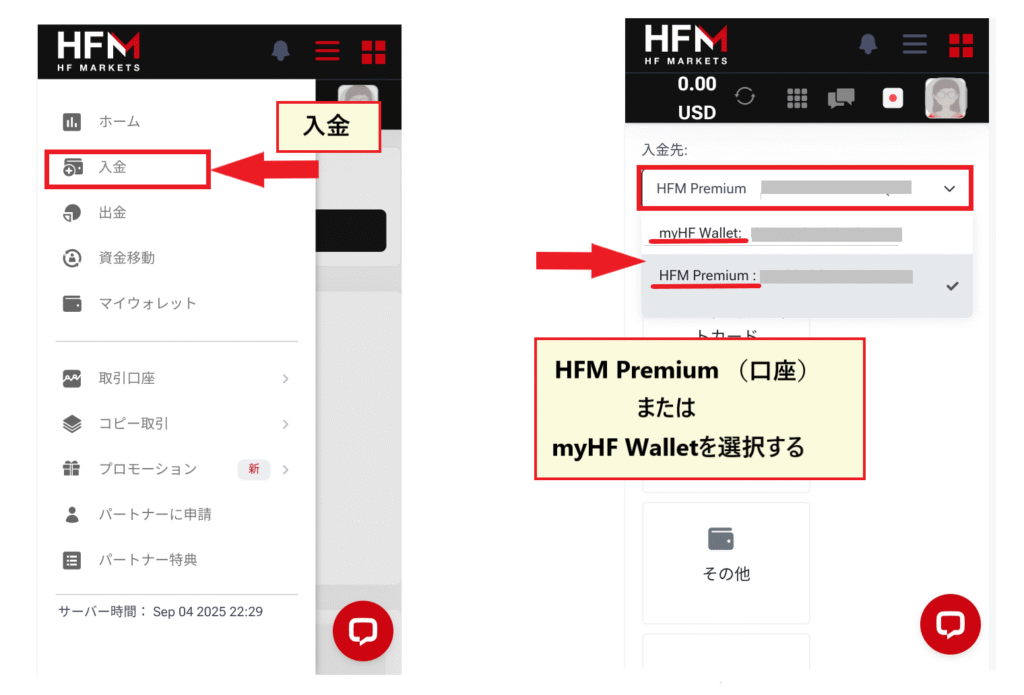
You can choose to deposit funds into MyWallet or your trading account (direct deposits to your trading account are also possible)
HFMdeposit screen, you choose either MyWallet (myHF Wallet), which manages all your funds in one place, or your MT4/MT5 trading account (such as a premium account or top-up bonus account)." The official blog also states, "Direct deposits to MT4/MT5 trading accounts are possible. If you want to deposit directly into a trading account, you need to select your desired trading account number in the account selection for transfer destination." If you want to distribute funds across multiple accounts, deposit them into MyWallet first and then transfer the funds; if you want to trade immediately, depositing directly into your trading account is more convenient. Choosing a top-up bonus account among your trading accounts makes you eligible for deposit bonuses, so it's easier to think of the deposit destinations as essentially three options: "MyWallet / regular trading account / top-up bonus account."
Deposit bonuses are received by depositing or transferring funds to the top-up bonus account
HFM's deposit bonuses (a permanent 20% deposit bonus and a limited-time 100% deposit bonus) areawarded when you deposit into a dedicated bonus account, the "Top-Up Bonus Account," or when you transfer funds to that account from MyWallet. The official blog states that "you cannot receive a bonus by depositing only through MyWallet." Deposits made into Premium or Pro accounts will not be eligible for a bonus.
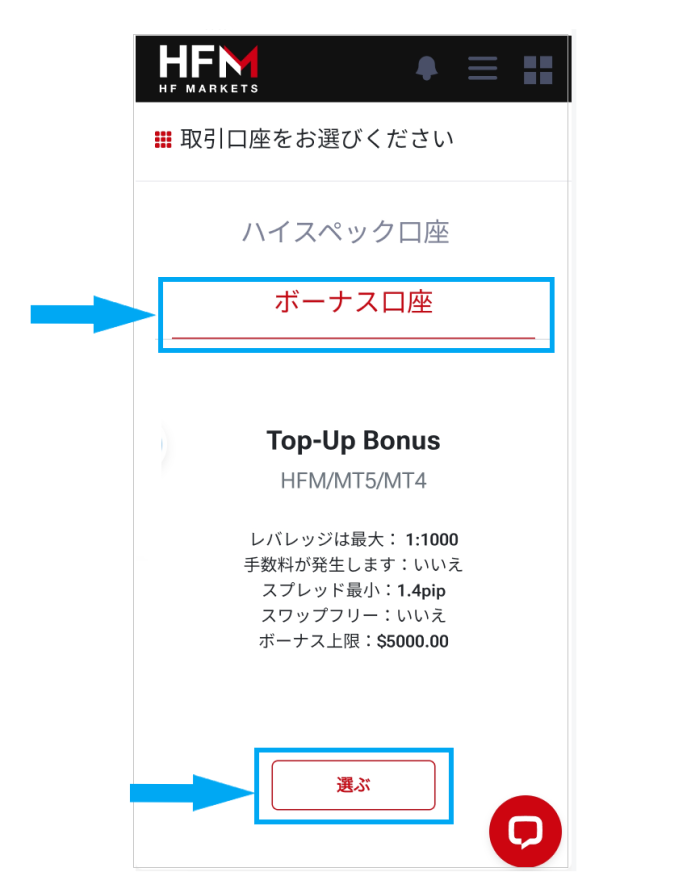
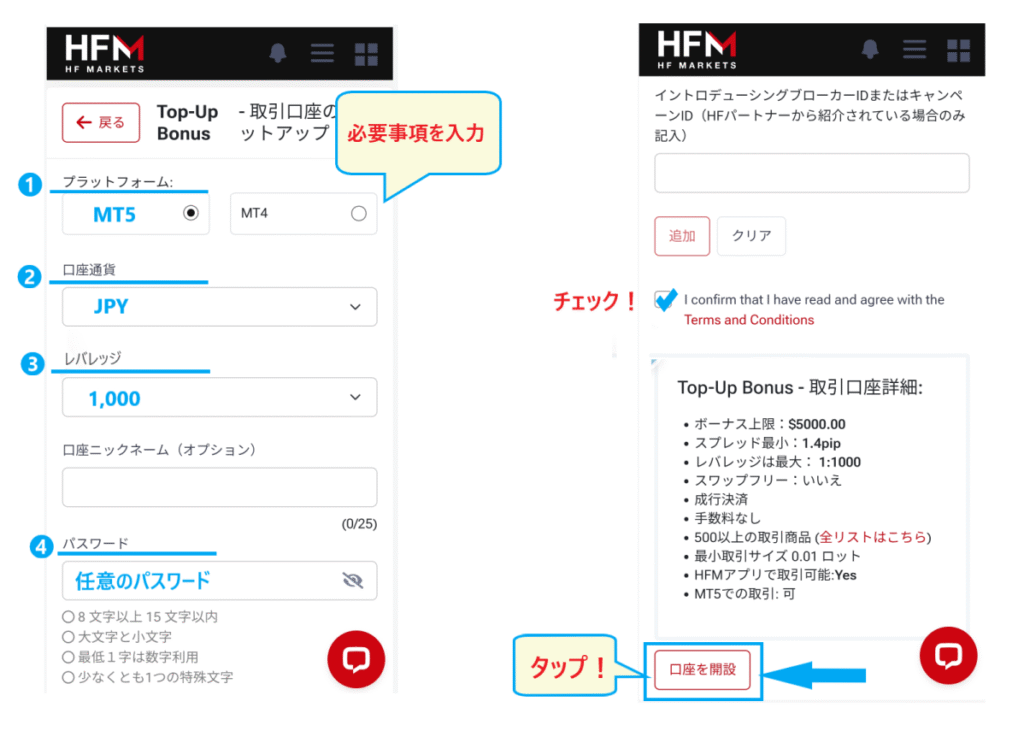
To open a Top-Up Bonus account, select "Open Top-Up Bonus Account" from the "Trading" menu in myHF, and set your platform (MT4/MT5), account currency, leverage, and password. After opening the account, either designate it as your deposit destination or transfer funds from MyWallet
The bonus limits, eligibility period, and the rule that a percentage of the bonus will be forfeited upon withdrawal are explained in the " HFMBonus List "
HFMCredit Card/Debit Card Deposit Procedure
From here, we will explain the procedures for each deposit method using screenshots taken by this site using the myHF app (smartphone). The PC version is the same, with only slight differences in screen layout. First, let's look at Visa, Mastercard, and JCB credit/debit cards. The official blog states that "there is basically no difference in the deposit conditions for credit cards and debit cards."

Step 1. Select the deposit destination from the "Deposit" menu and choose "Credit/Debit Card"
Log in to myHF and open "Deposit" from the menu.Under "Deposit destination," select either MyWallet or your trading account (or your Top-Up Bonus account if you want to receive a bonus), and then tap "Credit/Debit Card" from the list of deposit methods. On the next screen, select either the "VISA/Mastercard" or "JCB" brand.

Step 2. Enter the currency and deposit amount, then enter your card information and click "Pay"
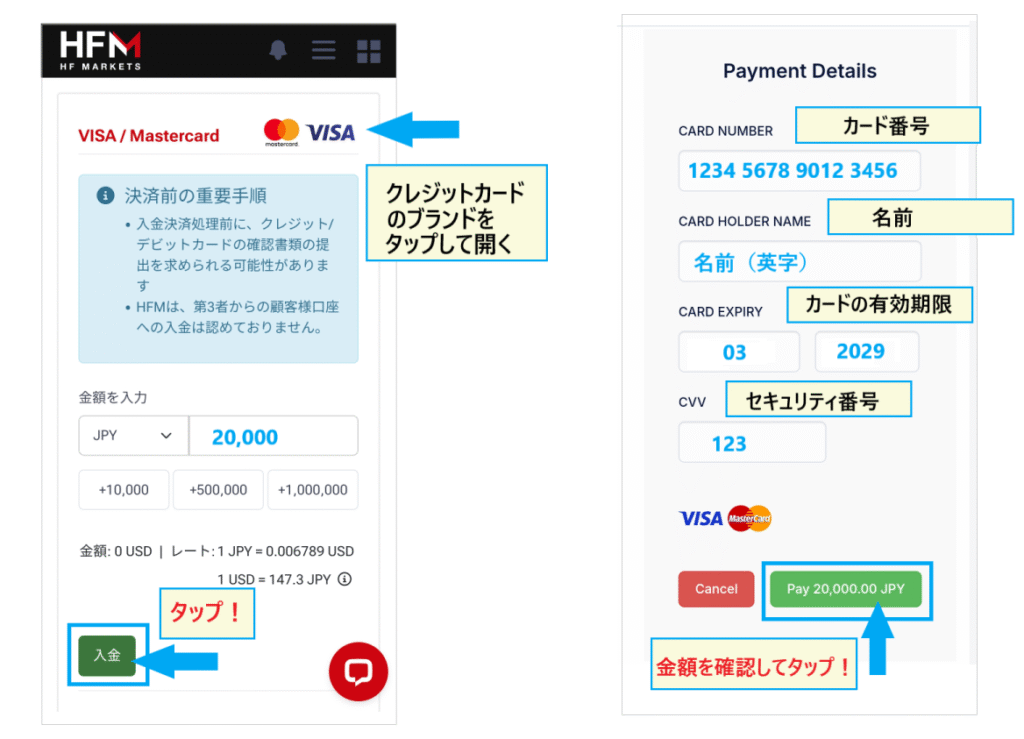
Select your currency (JPY or USD), enter the deposit amount, and tap "Deposit." On the next payment screen, enter your card number, cardholder name, expiration date, and security code (CVV), confirm the amount, and press "Pay" to complete the transaction.PleaseHFMa card in the same name as the one registered withuse
Step 3. Confirm that the funds have been credited (Deposit option notation: Visa/Mastercard: Instant; JCB: Within 10 minutes)
With the official deposit options, non-JCB cards (Visa/Mastercard) are credited instantly, while JCB cards are credited within 10 minutes (the official blog states "approximately within 10 minutes" for both). Once the deposit is complete, you will receive a confirmation email fromHFM, so please check it along with your myHF balance. Depending on the card, an authentication screen such as 3D Secure may appear during the process
Advantages, disadvantages, and points to note when using credit card deposits
The advantages are that deposits are reflected instantly or within 10 minutes simply by entering card information, and the minimum deposit amount is low at 750 yen (official deposit option). The disadvantage is the restrictions on withdrawals; since the amount deposited by card is refunded,in principle you can only withdraw up to the deposit amount by card(according to the official withdrawal FAQ, refunds are made to the card used for deposits in the past 6 months), and profits must be withdrawn using other methods such as bank transfer or bitwallet.
| item | Visa/Mastercard | JCB |
|---|---|---|
| Minimum deposit amount | $10 equivalent | $5 equivalent |
| Maximum deposit amount | $10,000 | Worth $20,000 |
| Reflection time | Within 10 minutes (instant with the deposit option) | Within 10 minutes |
| Supported currencies | JPY/USD | JPY/USD/EUR |
- The only accepted brands are Visa, Mastercard, and JCB. The official blog states that "AMEX (American Express), Diners Club, UnionPay, etc. cannot be used," and that even if the AMEX logo appears on the payment screen, it cannot be used for deposits.
- Some credit card companies may restrict payments to overseas forex brokers. The official blog advises, "HFMdoes not have information on whether deposits can be made with each credit card. If you are unable to make a deposit, please contact your credit card company first," and warns that repeatedly trying to deposit when errors persist may result in the card itself being suspended.
- Many cards require authentication methods such as 3D Secure 2.0. Since the authentication screen may not display correctly if you are using an ad blocker, please turn it off when making a deposit (official blog).
- Credit cards allow you to deposit funds even without cash on hand, so limit the deposit amount to your own funds, even within your credit limit. Debit cards cannot be used if there are insufficient funds in the linked account
HFMBank Transfer (Domestic Bank Transfer) Deposit Procedure
Bank transfer (bank deposit) isHFMJapanese bank account via online banking or ATM.The minimum deposit amount is 1,000 yen,HFMthere are no fees from. The only supported currency is Japanese yen. The official blog recommends bank transfer for those who want to deposit funds immediately.
Step 1. Select the recipient from the "Deposit" menu and then select "Bank Transfer"
Open "Deposit" in myHF, select your deposit destination (MyWallet or trading account), and then tap "Bank Transfer" in the list of deposit methods

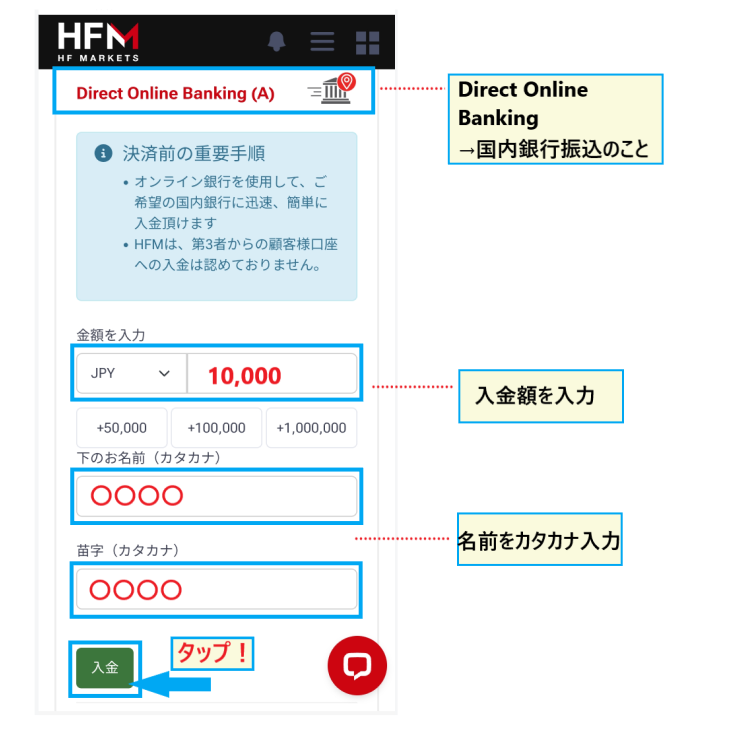
Step 2. Select "Direct Online Banking (A)" and enter the deposit amount and your name (in Katakana)
Select "Direct Online Banking (A)" (domestic bank transfer; as shown in the app at the time of shooting; the (A) may not be displayed), enter the currency (JPY), the deposit amount, and the name of the remitter (in katakana), then tap "Deposit". The official blog also instructs you to select in the order of "① Bank Transfer > ② Direct Online Banking"
Step 3. Transfer the same amount to the displayed bank account within 60 minutes
The bank name, branch name, account number, transfer amount, and transfer name of the recipient will be displayed on the screen, and the same information will also be sent to your registered email address.The recipient account information is validfor 60 minutes, and the official blog states, "Since the recipient account information is only valid for 60 minutes, be sure to make the transfer within the deadline," and "If 60 minutes have passed since the deposit procedure was completed, it will be automatically canceled." Copy the recipient information and make the transfer via online banking within the deadline.

The email also includes the bank account details, the amount to be transferred, and the name of the account holder (in katakana). The email text at the time of the photo indicated that transfers made during bank business hours would be reflected within 30 minutes, but that transfers with a different name would be delayed

Advantages, disadvantages, and points to note about bank transfers
The advantages are that you can deposit funds using the same procedure as a regular bank transfer, and withdraw both your deposits and profits together via bank transfer. The disadvantages are that you have to manually enter the recipient's name, amount, and account holder's name, and according to the official blog, the processing time varies widely, from as little as 10 minutes to as long as 12 hours
- Ensure the amount entered in myHF matches the actual transfer amount. The official blog states that "if these amounts are different, the automatic deposit will not be reflected and will remain on hold during the settlement period," and "manual verification will be required, which may significantly delay the deposit." If you have entered the wrong amount, contact support with a screenshot of the email containing the transfer details.
- Enter the transfer name exactly as it appears in katakana on the screen. The email sent during the photo shoot stated that the processing would be delayed if the name was incorrect. The official blog overview also includes a note saying "Don't forget to enter the verification number," so if a verification number or reference number is specified on the screen or in the email, enter it accordingly.
- HFMoffers free transfers, butthe transfer fee from the originating bank is the user's responsibility(according to their official blog). Since the recipient bank may not be the same each time, opening an account at the same bank doesn't guarantee that the transfer fee will be waived.
- If you have overpaid, you cannot cancel the transaction immediately; you must first confirm the deposit before proceeding with the withdrawal (according to the official blog. Withdrawal fees are free in this case)
HFMbitwallet deposit procedure
bitwallet is an online wallet adopted by many overseas forex brokers.HFMDeposits toa minimum of 1,000 yen,HFMare free of charge on. The maximum deposit amount is approximately 5 million yen. Prior to deposit, you will need to open a bitwallet account and top up your account via bank transfer or card.
Step 1. In the "Deposit" menu, select "Other" → "bitwallet"
Open "Deposit" in myHF, select your deposit destination, and then tap "Other" in the list of deposit methods. Scroll down and you will see "bitwallet" and "BXONE," so select "bitwallet."

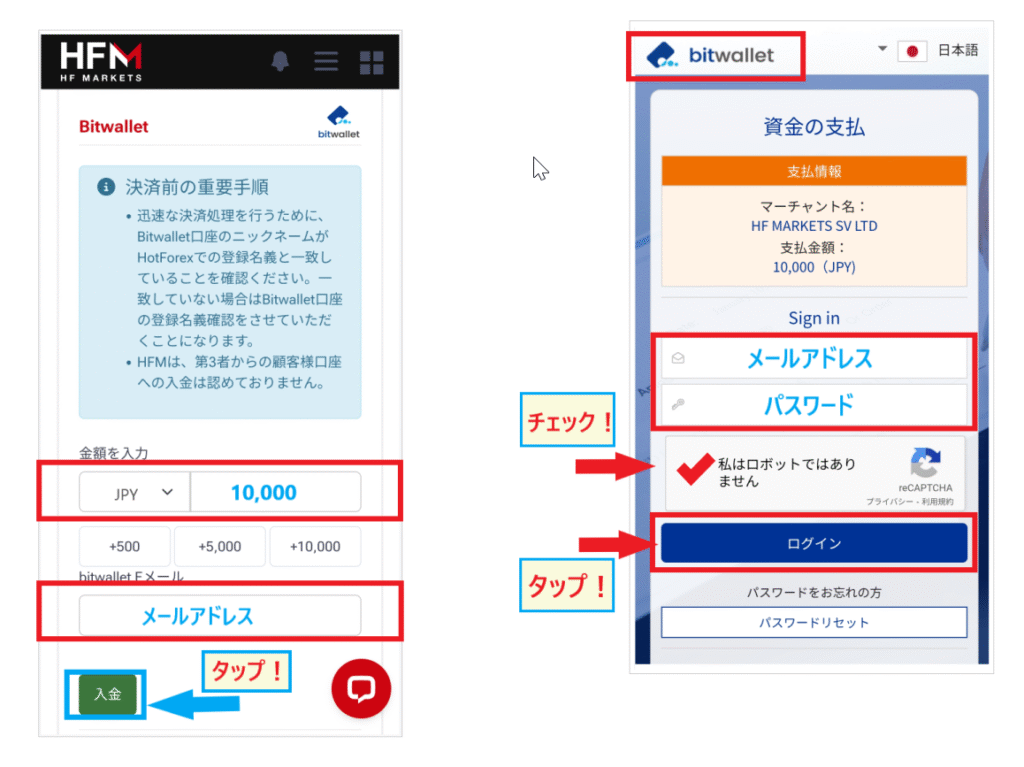
Step 2. Enter the deposit amount and your bitwallet email address, and complete the payment via bitwallet
the currency (JPY or USD), the deposit amount, andthe email address registered with bitwallet(HFMregistration email), then tap "Deposit" to be taken to the bitwallet login screen. After logging in, confirm the payment details, press "Pay," and then return to myHF by tapping "Return to Merchant Screen" to complete the transaction.
Advantages, disadvantages, and points to note when depositing money into bitwallet
The advantages are the speed of the reflection and the ability to manage funds together with other overseas FX brokers that support bitwallet. The official blog states that "in the shortest case, it will be reflected in about 15 minutes" and "at most about 30 minutes". The disadvantage is that there are fees and it takes time to charge bitwallet. According to the official blog, the charge fees are 8% for cards (Visa/Mastercard), 8.5% for other brands, and 0.5% for bank transfers (as of July 2026, there is a free campaign), and if you charge by bank transfer outside of banking hours, it will be processed on the next business day
- The bitwallet balanceHFMplus the bitwallet withdrawal fee. The official blog states that depending on the currency used, a withdrawal fee equivalent to $10 may be incurred, and if you only have that amount charged, your balance will be insufficient.
- The email address you enter is the one registered with bitwallet.HFMregistration email address, you won't be able to log in (official blog).
- The name on the bitwallet accountHFMthe same as the name registered with. You cannot deposit funds using a family member's account (official blog).
HFMCryptocurrency Deposit Procedure
To deposit using cryptocurrency, use the "Crypto Payments" option in the "Cryptocurrency" menu of myHF.HFM's cryptocurrency deposits havea minimum deposit of $30,HFMno fees from(official deposit option). The amount can be specified in USD or EUR. According to the official blog, Crypto Payments has two options, Option A and Option B, with different available cryptocurrencies and minimum deposit amounts.
| item | Crypto Payments (Option A) | Crypto Payments (Option B) | Binance Pay |
|---|---|---|---|
| usable brands | BTC・LTC・ETH・BCH・DASH・ZEC・ADA・USDC・USDT (ERC20/TRC20) | BTC・LTC・ETH・USDT (ERC20/TRC20) | USDT (TRC20) |
| Amount in specified currency | USD/EUR | USD | USD/EUR |
| Minimum deposit amount | $30 equivalent | $15 equivalent | Equivalent to $20 |
| Maximum deposit amount | Worth $30,000 | Worth $30,000 | Worth $20,000 |
| Reflection time | Immediately | Immediately | Immediately |
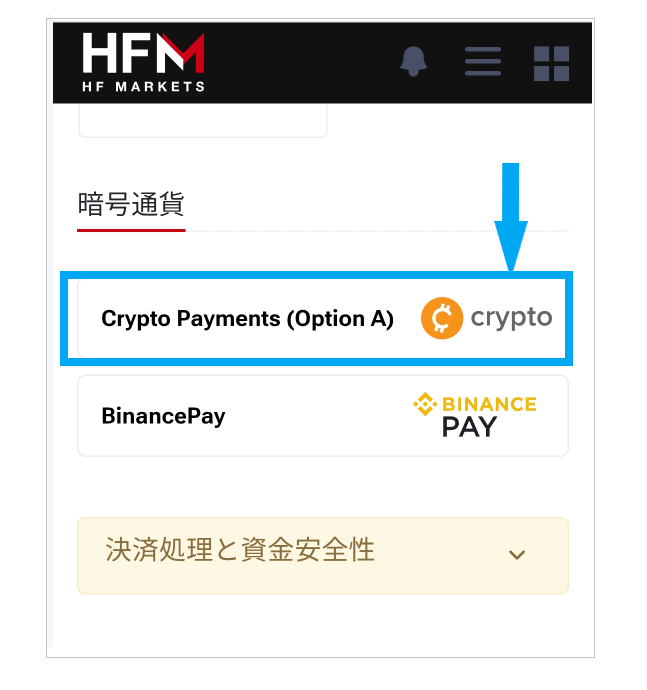
Step 1. In the menu, select "Deposit" → "Cryptocurrency" → "Crypto Payments"
Open "Deposit" in myHF, select your deposit destination, and then tap "Cryptocurrency" in the list of deposit methods. Scroll down and you will see "Crypto Payments (Option A)" and "Binance Pay". Select Crypto Payments (the screen shown on this site in September 2025 only had two options, and Option B, which is mentioned in the official blog, was not displayed. If it is displayed, please select the one that matches the cryptocurrency you want to use)

Step 2. Select the amount (USD/EUR) and currency pair, and send the funds to the displayed address
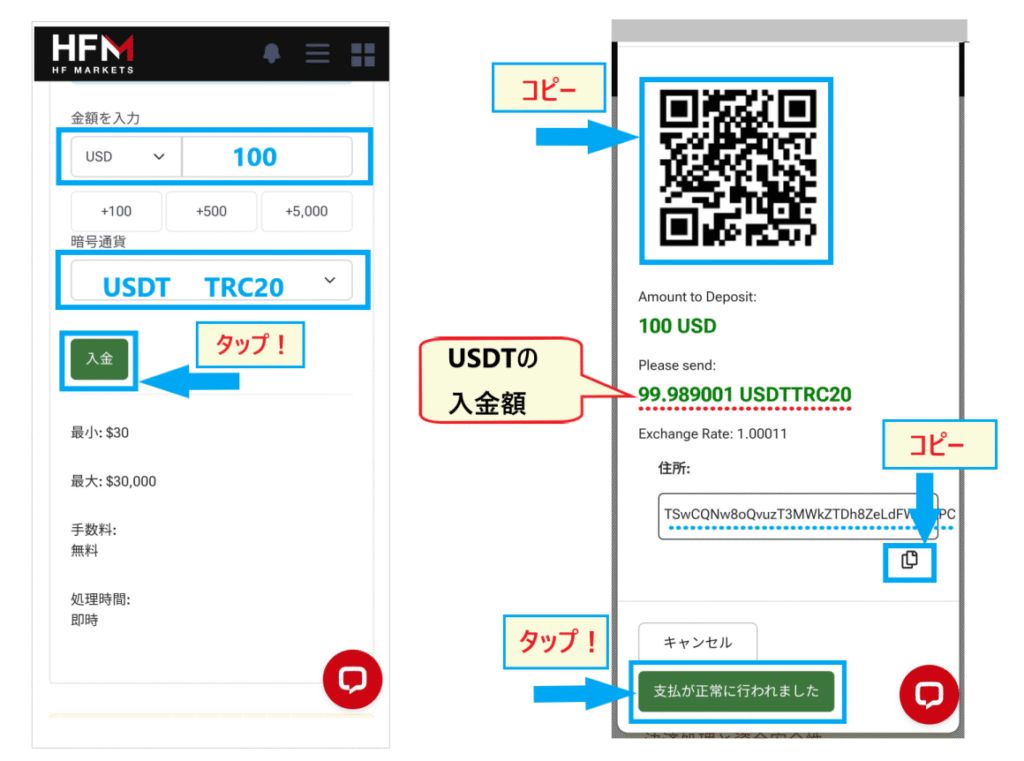
Enter the deposit amount in USD or EUR, select the cryptocurrency (such as USDT TRC20), and tap "Deposit."The amount of cryptocurrency to be sent, the recipient address, and a QR code will thenbe displayed. The official blog explains, "You cannot determine the amount in cryptocurrency during the deposit process. You must first determine the amount in fiat currency and then convert it to cryptocurrency. The available conversion method varies depending on the deposit method." Send the displayed amount from your wallet or exchange, and after the transfer, tap "Payment successful."
Advantages, disadvantages, and points to note when depositing cryptocurrency
The advantages are that you can use your crypto assets as margin without converting them to fiat currency, andHFM(High-Financial Management) process is instantaneous. The disadvantages are that the actual amount received may differ from the input amount due to price fluctuations and transfer fees, and you cannot recover your funds if you enter the wrong address or network
- Do not manually enter the address; enter it by scanning the QR code or copying and pasting. The sending address changes with each deposit, so do not send to an address that was previously displayed (official blog). The official blog states that "the chances of recovering cryptocurrency sent to the wrong address are extremely low." Be careful not to make the mistake of entering your email address, your wallet address, account number, or seed phrase.
- The wallet balance is set aside to cover the transfer fees. The official blog lists cases where the balance may be insufficient due to transfer fees, exchange fees, and price fluctuations.
- If the entered amount and currency differ from the actual transfer details,HFMwill conduct a verification process, which may result in delays in the transaction or even cancellation of the deposit (official blog)
- The deposited amount must be withdrawn in the same cryptocurrency (patent), but profits can be withdrawn using a different method. The withdrawal procedure is explained in " HFMCryptocurrency Withdrawal Procedure "
HFMBinance Pay deposit procedure
Binance Pay is a payment service from the cryptocurrency exchange Binance.HFMallowsof USDT (TRC20) starting from a minimum of $20,with no fees and instant reflection (official deposit option, official blog). A key feature is that you can log in to Binance, select your balance (wallet), and make payments.
Step 1. In the menu, select "Deposit" → "Cryptocurrency" → "Binance Pay"
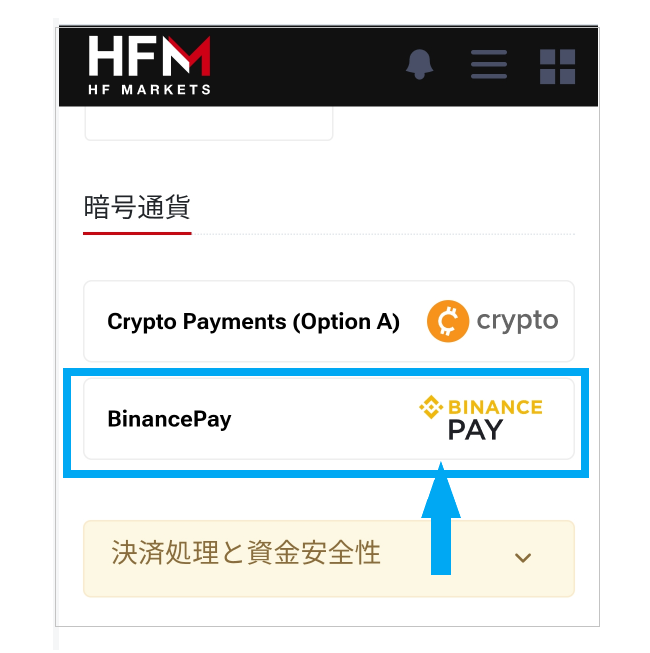
Open "Deposit" in myHF, select your deposit destination, then tap "Cryptocurrency" in the list of deposit methods, scroll down, and select "Binance Pay"
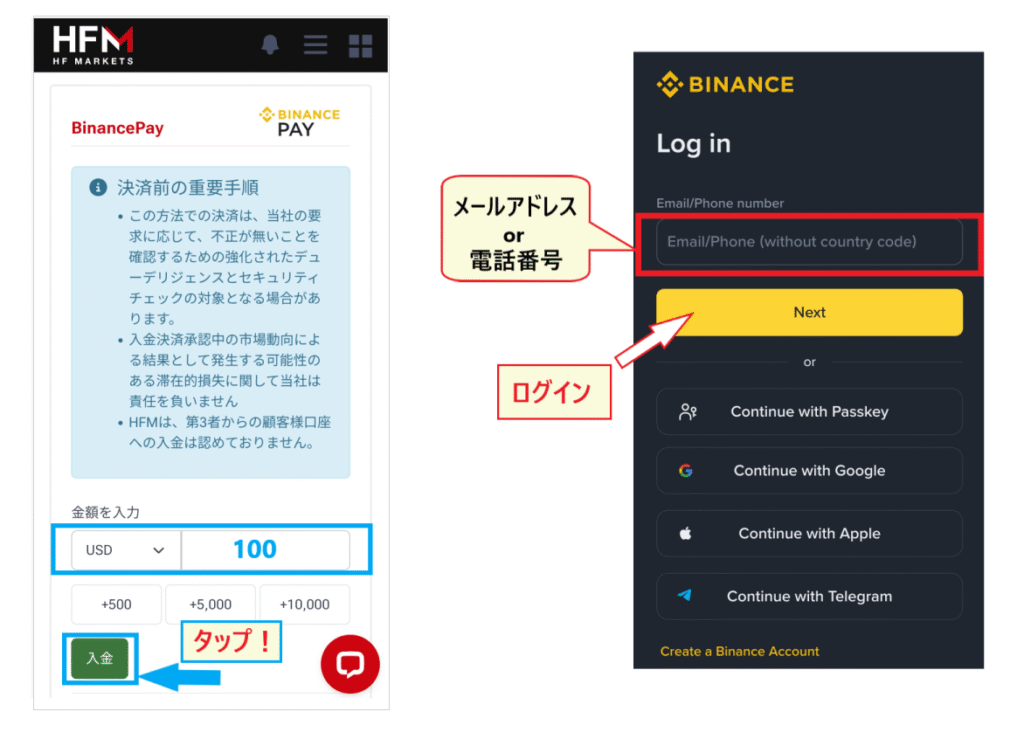
Step 2. Enter the amount (USD), log in to Binance, and confirm the payment
Enter the deposit amount in USD and tap "Deposit" to be redirected to the Binance login screen. After logging in, tap "Begin Payment," select the cryptocurrency (USDT) or wallet you want to use for payment, and confirm the transfer. You will receive a deposit confirmation email fromHFMonce the transaction is complete
Advantages, disadvantages, and points to note when depositing funds with Binance Pay
The advantage is that you can log in to Binance and pay from your balance (the official blog instructions also include instructions to copy the address or send a QR code after clicking "Begin Payment"). The disadvantages are that the only usable currency is USDT (TRC20), and withdrawals are made via cryptocurrency withdrawal (Crypto Payments Option A) and not Binance Pay . The official blog article on cryptocurrency withdrawals states that "if you deposit using Binance Pay, you cannot withdraw to Binance Pay regardless of whether it is the deposit amount or profits," so you will need to have your Binance deposit address ready when withdrawing. For more details, please see " HFM's Binance Pay Withdrawal Procedure and Precautions ."
HFMBXONE deposit procedure
BXONE, like bitwallet, is an online wallet that requires you to open an account and top up your balance before use.HFMDeposits toa minimum of 1,000 yen, are free of charge, and are reflected within 10 minutes(official deposit option). The official blog lists it as "HFM." You will need to open a BXONE account, complete identity verification, and top up your balance beforehand.
Step 1. In the "Deposit" menu, select "Other" → "BXONE"
Open "Deposit" in myHF, select your deposit destination, then tap "Other" in the list of deposit methods, scroll down, and select "BXONE" (this is the same screen as bitwallet)
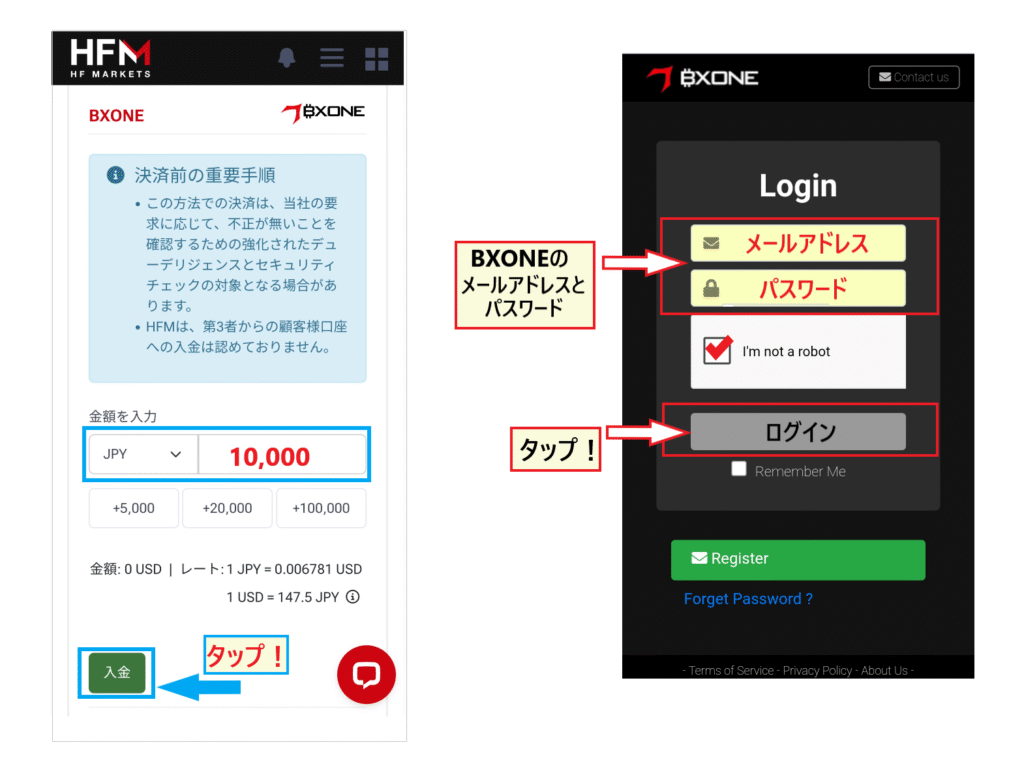
Step 2. Enter the currency and deposit amount, log in to BXONE, and send the money
Enter the currency (JPY or USD) and the deposit amount, then tap "Deposit" to be taken to the BXONE login screen. Log in with your BXONE registered email address and password, and confirm the transfer to complete the process
BXONE deposit advantages, disadvantages, and points to note
The advantage is that the funds are reflected in Japanese yen within 10 minutes. The disadvantage is that it takes time from account creation to start using the service due to identity verification and other procedures. The official blog points out two things to be careful about: "check the minimum deposit amount" and "don't make a mistake in selecting the currency." Also, make sure that your BXONE balance is sufficient for the deposit amount
HFMPESKA e-Wallet deposit procedure
PESKA e-WalletHFMis a deposit method listed inthere are no fees, the minimum is 1,000 yen, the maximum is 2,000,000 yen, and the funds are reflected within 10 minutes. The supported currencies are JPY and USD (although the list in the same overview shows amounts ranging from 10 dollars to 10,000 dollars, so the value varies within the page). As it is not yet listed on the official website's "Deposit Options" page (as of October 7, 2026), please check if it is displayed in the myHF deposit list before using it.
Instructions for depositing funds into your PESKA e-Wallet (as explained on the official blog)
- Log in to myHF and select "Deposit" from the menu
- Select the recipient of the payment, and then select "PESKA e-Wallet" from the payment methods
- Enter the currency type (JPY/USD) and the deposit amount
- Log in to PESKA e-Wallet and confirm the transfer
The official blog lists two points to be aware of: "Check the minimum deposit amount" and "Don't choose the wrong currency." As with other methods, it is assumed that the PESKA account name must be the same asHFMregistration name (there is no specific mention in the PESKA section of the official blog, and this is based on the general principles of the deposit rules)
Main reasons why deposits cannot be made or reflected in HFMand how to resolve them
Many cases of "deposit errors" or "transfers not being reflected" are due to input errors or conditions set by the respective services. We have compiled the causes listed inHFMofficial blog's articles on each method (card, bank transfer, bitwallet, cryptocurrency) into a single table in the order you should check them
10 main reasons why you might be unable to make a payment (in order of checking)
| cause | things that happen | handle |
|---|---|---|
| ① The minimum deposit amount has not been reached | I can't proceed even after entering the amount | Apply with an amount greater than the "minimum" displayed on the deposit screen (e.g., 1,000 yen for bank transfers, bitwallet, and BXONE; 750 yen for credit cards; $30 for cryptocurrency; amounts may vary depending on the exchange rate) |
| ② The name on the account is different from the name onHFMregistration | Deposits made in the name of someone else or a family member will be refunded | Use a card, bank account, or wallet in your own name. You can verify your registered name in "My Profile" on myHF |
| ③ Incorrect card information, expired card, or reissued card | Payment error occurs | Please double-check your card number, expiration date, and CVV. After reissuance, please enter the new information |
| ④ Card brand is not supported / Restrictions from the card company | AMEX, Diners Club, and UnionPay are not accepted. Even Visa, Mastercard, and JCB may not be accepted if the card company restricts transactions for overseas forex trading | Switch to a different brand of card, or use bank transfer or bitwallet. The official blog advises "First, contact your credit card company." Do not try again multiple times |
| ⑤ Insufficient credit limit or debit card balance, or failure of 3D Secure authentication | Payment not approved | Check your credit limit and balance. If the authentication screen doesn't appear, turn off your ad blocker |
| ⑥ Bank transfer amount is different from the requested amount / More than 60 minutes have passed / The name on the transfer is different | If the amount is incorrect, it will not be automatically reflected and will be put on hold (official blog). The application will be automatically canceled after 60 minutes (official blog). If the name is incorrect, the reflection will be delayed (notification email at the time of shooting) | Transfer the same amount as the application amount and use the displayed Katakana name within the deadline. If you make a mistake, please contact support with a screenshot of the email containing the transfer details |
| ⑦ Incorrect email address or password for bitwallet/BXONE, or insufficient balance | The login screen for each service gets stuck, and I can't send money | Log in using the email address registered with each service (notHFMregistration email). Make sure to add the wallet's withdrawal fee to your balance |
| ⑧ Incorrect cryptocurrency address, token, or network; insufficient amount to send | The funds are not being received, and the verification process is causing delays in the reflection of the payment | Enter the address using QR code or copy and paste, and send the funds using the same brand and network as the displayed quantity. A transfer fee will be added |
| ⑨ Applications processed on weekends or outside of business hours are concentrated | The status remains "Applying" and does not progress | Processing takes place Monday 7:00 AM to Saturday 7:00 AM (Japan time - see official blog). If it's not reflected after several hours, please contact support |
| ⑩ Deposit was successful, but trading is not possible | I have a balance, but I can't place an order | Your identity verification (KYC) has not been approved. Check the status of your document submission and approval on myHF |
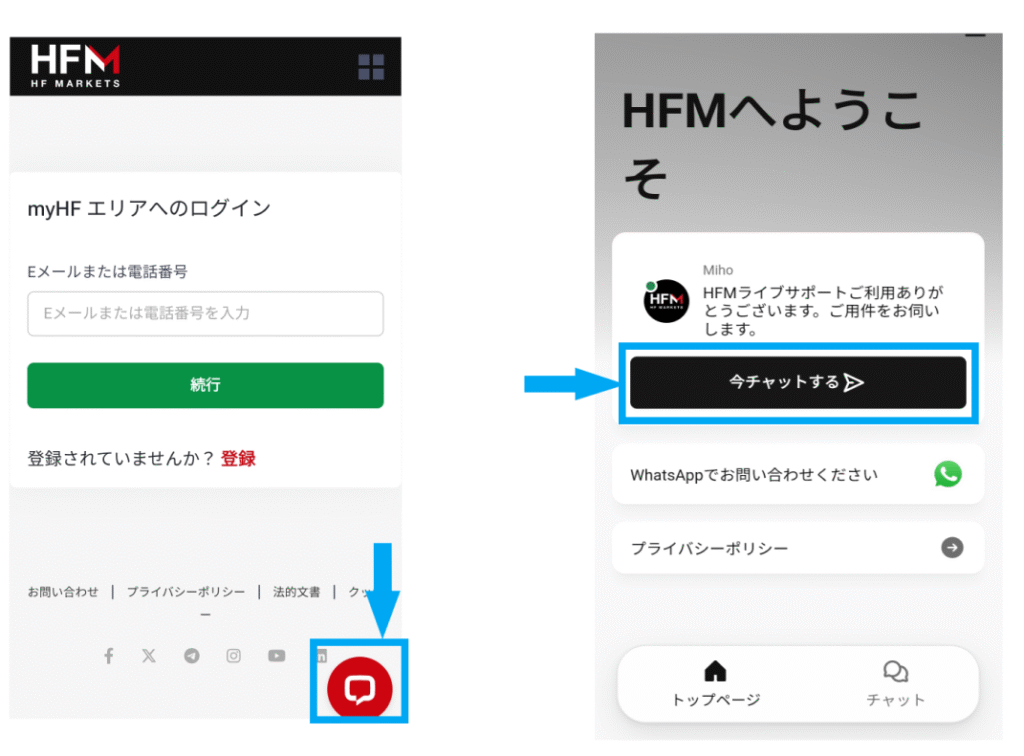
If the problem persists, contact us via live chat
If the cause cannot be identified, or if the transaction is not reflected even after the estimated time has passed, please contact customer support as soon as possible. When contacting support,your myHF ID, registered email address, and screenshots of the payment procedure screen or transfer completion screen(and the bank transfer confirmation email if it's a bank transfer) ready will expedite the verification process. Bank transfer requests can be canceled via live chat if the transfer has not yet been made, and will be automatically canceled after 60 minutes.
Instead of limiting yourself to just one deposit method, having two or more options available, such as bank transfer and bitwallet, will prevent trading interruptions even if there are restrictions from your card company or service-side problems. General principles of deposits and withdrawals for overseas forex are explained in " Summary of Overseas Forex Deposit and Withdrawal Methods ," andHFM's security and fund management mechanisms are explained in " HFMReputation and Reviews ."
Frequently Asked Questions about HFMDeposit Methods
What is the fastest way to have a deposit reflected in HFM? (Estimated deposit reflection time)
The official deposit options marked "instant" are cryptocurrency payments (Crypto Payments), Binance Pay, and Visa/Mastercard cards. Bank transfers, JCB, bitwallet, and BXONE take less than 10 minutes (PESKA e-Wallet takes less than 10 minutes according to the official blog). The official blog states that "if you already have bitwallet, Binance Pay, or cryptocurrency, these methods are the fastest way to deposit." The processing time is an estimate fromHFM, and it may take several hours on weekends or during peak application times
What is the recommended deposit method for HFM?
If you want to easily deposit in Japanese yen and withdraw to your bank account, bank transfer (from 1,000 yen, transfer to recipient within 60 minutes) is a convenient option. If you want to deposit instantly with a card, Visa/Mastercard is the best choice (withdrawals are generally limited to the deposit amount). If you want to transfer funds across multiple overseas FX brokers, bitwallet (from 1,000 yen, be aware of charge fees) is a convenient option. The official blog recommends bank transfer for those who want to deposit immediately
What is the minimum deposit amount for HFM?
The official deposit options (as of October 7, 2026) are 1,000 yen for bank transfer, bitwallet, and BXONE; 750 yen for credit/debit cards; 30 dollars for cryptocurrency; and 20 dollars for Binance Pay. PESKA e-Wallet is listed as 1,000 yen on their official blog. Please check the "minimum" displayed on the deposit screen as it may fluctuate depending on the exchange rate
Are there no deposit fees for HFM?
HFMdoes not charge any deposit fees for any method. However, bank transfer fees, bitwallet top-up fees (8% for cards, 0.5% for bank transfers, etc.), and cryptocurrency wallet transfer fees are the responsibility of the user
Can I make a deposit on weekends or at night?
While deposit requests can be submitted 24 hours a day, according to the official blog,HFM's deposit and withdrawal processing takes place between 00:00 server time on Monday (7:00 JST) and 00:00 server time on Saturday (7:00 JST). Transactions processed over the weekend may not be reflected until the next business day. Bank transfers are also subject to the business hours of both the sending and receiving banks
What should I do if my payment hasn't been reflected in my account?
First, check that the deposit amount is above the minimum amount, that there are no errors in the name, card information, email address, or address, and if using a bank transfer, check that the requested amount and the transfer amount match and that the transfer was made within 60 minutes. During weekends or busy periods, the status may remain "processing." If it still does not appear, please prepare your myHF ID and a screenshot of the procedure screen and contact us via live chat
Can I make a deposit before my identity verification is complete?
Yes, you can. The official blog states that "even if identity verification is not complete, you can still deposit funds as long as you have registered, but you will not be able to trade." To start trading immediately after depositing funds, you will need to have your identity verified, so it is best to complete identity verification before depositing funds
Where should I deposit my money to receive the deposit bonus?
The bonus is awarded either by depositing directly into the "Top-Up Bonus Account" dedicated to bonuses, or by depositing into MyWallet and then transferring the funds to the Top-Up Bonus Account. Simply depositing into MyWallet is not sufficient to receive the bonus, and deposits to Premium or Pro accounts are also excluded. The conditions for the permanent 20% deposit bonus and the limited-time 100% deposit bonus are explained in "HFMBonus List"
Summary: Depositing money intoHFMis smooth if you keep in mind "using your own name, selecting the appropriate deposit destination, and matching it with your withdrawal method."
This article summarizes the seven deposit methods and deposit rules for HFM(formerly HotForex), based on information from their official deposit options and blog. Here's a breakdown of the key points
- HFMcharges no fees for any deposit method. Minimum deposit amounts are ¥1,000 for bank transfer, bitwallet, and BXONE; ¥750 for credit card; $30 for cryptocurrency; and $20 for Binance Pay(official deposit options as of October 7, 2026).
- The funds will be reflected instantly for cryptocurrency, Binance Pay, and Visa/Mastercard payments, and within 10 minutes for other methods. For bank transfers, the recipient's account must be valid for 60 minutes, the amount must be the same as the requested amount, and the name must be in katakana.
- Deposits must be made in the account holder's name only. Withdrawals are made using the same method as the deposit, so profits from card depositsmust be
- Deposits can be made to MyWallet or your trading account. Deposit bonuses are awarded when you deposit or transfer funds to your Top-Up Bonus account.
If you use Moneycha, you can receive cashback every time you make a trade
Our website, "Money Charger (Manecha),"HFMis an official IB partner ofOpening an account through Manecha will earn you cashback with every trade,HFM's deposit bonus. There is no difference based on deposit method or amount.
| Account type | BTC/USD | Gold (XAU/USD) |
|---|---|---|
| Top-up / Premium | $16.00/lot | $12.00/lot |
| Pro/Zero | $6.40/lot | $5.60/lot |
| KATANA | $2.80/lot | $2.40/lot |
| Saint | $1.60/lot | $0.12/lot |
*Cashback rates may fluctuate. For rates per instrument, including FX currency pairs, how to receive them, and whether you can switch existing accounts, please see "How to Receive HFMCashback ". The procedure for opening an account is explained in " HFMHow to Open an Account ", and withdrawal methods are explained in "List of HFMWithdrawal Methods "
\ The terms and conditions are the same as the official site, and you get cash back with every transaction! /
*Deposit methods, minimum deposit amounts, processing times, and fees are subject to change. The information in this article is based on information published onHFMofficial website and official blog as of October 7, 2026. Please check the official website and the myHF deposit screen for the latest conditions. Overseas FX trading involves exchange rate fluctuation risk, and investment decisions should be made at your own risk