HFMdeposit methods: offers six credit/debit card, domestic bank transfer, Bitpay, bitwallet, cryptocurrency, and BXONE
"HFMWhich deposit method should I use for
"HFMI don't know how to deposit money into
"I'm worried that the deposit might not go through successfully."
As you can see, many people may feel anxious when depositing funds into an overseas forex broker. Therefore, this time, we will explainHFM's deposit rules, points to note, and what to do if you are unable to deposit funds, so you can rest assured after reading this article. Please use it as a reference. the deposit method for HFMwith images, including the procedure and steps . We will also thoroughly explain
You can find HFMrecommended overseas forex brokers such as in the "Overseas Forex Broker Recommendation Comparison Ranking"
Check out the six deposit methods for HFMin this list!
First, let's take a look at a table listing the six deposit methods available atHFM
【HFMdeposit methods list】
| Payment Methods | Minimum deposit amount (supported currencies) | commission | Reflection time |
|---|---|---|---|
| Credit/ Debit Cards: JCB/VISA/Mastercard | approx. $4.69 (USD, JPY) | ※free | Immediately ~ 10 minutes |
| Bank transfer (domestic bank transfer) | approx. $6.25 (USD, JPY) | ※free | 10 minutes to several hours |
| bitwallet | approx. $6.25 (USD, JPY) | ※free | Immediately - within 10 minutes |
| Cryptocurrency | Equivalent to $15 to $30 (USD, EUR) | ※free | Immediately |
| Binance Pay | Equivalent to 20 dollars (USD, EUR) | ※free | Within 10 minutes |
| B XONE | approx. $6.25 (USD, JPY) | ※free | Immediately |
* There are no fees forHFMtransactions using any deposit method. However, fees may apply depending on the financial institution you use
Credit/debit cards have the lowest minimum deposit amount, while cryptocurrencies and BXONE offer the fastest deposit processing times. As you can see from the table, minimum deposit amounts and processing times vary depending on the deposit method. We will now explain the user manuals for each deposit method
HFMdeposit method 1. Credit card/Debit card
Credit and debit cardsare the most standard and easiest deposit methods for overseas forex trading.HFMalso accepts deposits using VISA, Mastercard, and JCB cards.

At this point, some of you may not be familiar with the concept of depositing funds using a credit card. The mechanism for depositing funds using a credit cardsimilar to paying for shopping with an overseas forex broker. The amount you pay for shopping is then reflected in your forex account or the broker's wallet.
Incidentally, credit card withdrawal refers to the process of canceling (refunding/returning) this shopping payment
Minimum deposit amount / Deposit fees
- Minimum deposit: approx. $4.69
- Fee: Free
The minimum deposit amount for credit and debit cards is equivalent to $5 in US dollars. Currently, it is set at approximately $4.69. The minimum deposit amount in Japanese yen may vary depending on the time of year. Just remember that it is roughly equivalent to $5
While there are no fees forHFMHigh-Frequency Financial Management), you may be charged a fee when making a payment depending on the policies of your credit card company
Time until reflection
It takes up to 10 minutes for the funds to be reflected in your account. Compared to other deposit methods, card deposits are often reflected instantly (within a few minutes). The deposit process is also simple and easy to understand
Credit card payments are recommended for these types of people
When you need to make a deposit immediately without any hassle or time commitment, credit cards and debit cards are very useful. This is especially important to remember for situations where you need to make an urgent deposit, such as in the event of a stop-loss order being triggered
HFMPayment Method 2: Bank Transfer (Domestic Bank Transfer)
HFM,allowing you to send money to domestic bank accounts. This method allows you to transfer funds via online banking or ATM to domestic bank branches provided by overseas forex brokers.
You can complete the process using the same procedure as a regular bank transfer. Since you'll be copying the recipient's information, this method is recommended for those familiar with bank transfer procedures
Minimum deposit amount and deposit fees
- Minimum deposit: approx. $6.25
- Fee: Free
The minimum deposit is approximately $6.25. Fees depend on the transfer fees charged by your bank. If you use a bank account with no transfer fees, there are absolutely no fees
Time until reflection
The processing time varies depending on the financial institution, but it's generally around 10 minutes. However, if you submit the transaction on weekends or late at night, it may take longer for the changes to be reflected
Bank transfer deposits are recommended for these people
If you're comfortable with online banking transfers or are hesitant to use a credit card, try sending money via bank transfer
HFMdeposit method 3. bitwallet
Another deposit method to rememberbitwallet HFMfor is . bitwallet is an international payment service that can be used worldwide, and many overseas forex brokers have adopted it. You can use bitwallet as an intermediary to transfer funds between your overseas forex account and your bank account.
To use bitwallet, you will need to register for a bitwallet account beforehand. Creating a bitwallet account now will be convenient in the future
Click here to register for a new bitwallet account
Minimum deposit amount and deposit fees
- Minimum deposit: approx. $6.25
- Fee: Free
The minimum deposit is approximately $6.25 or more, and there are no fees. Other fees depend on the financial institution you use. There may be fees when transferring money from your bank account to the bank account designated by bitwallet
Time until reflection
It takes approximately 10 minutes for funds to be transferred from bitwallet toHFM. Please note that deposits from bank accounts to bitwallet are generally only possible during the financial institution's business hours
bitwallet is recommended for people like this
Transfers from bitwallet toHFMare reflected relatively quickly. If you want to have a way to deposit funds quickly in case of an emergency, using bitwallet is recommended. It can also be conveniently used for sending money to other companies
HFMDeposit Method 5: Cryptocurrency (Crypto Payment)
CryptocurrencyalsoHFMa deposit method available at.HFMthrough the "Crypto Payment" section.
HFMoffers 11 different cryptocurrencies to choose from, including Bitcoin (BTC), Ethereum (ETH), Ripple (XRP), Litecoin (LTC), Bitcoin Cash (BCH), and Tether (USDT)
Minimum deposit amount and deposit fees
- Minimum deposit: $15 to $30
- Fee: Free
HFMoffers two payment methods for cryptocurrency deposits: Option A and Option B. Option A offers a wider selection of cryptocurrencies, but the minimum deposit is equivalent to $30. Option B offers only four types of cryptocurrencies, and the minimum deposit is $15
Transaction fees are free for all cryptocurrencies. However, some wallets may charge a fee for transfers
Time until reflection
HFM's official website states that cryptocurrency deposits are processed "instantly," making it the fastest option. Those who already own cryptocurrency can make quick deposits using cryptocurrency
Cryptocurrency deposits are recommended for these types of people
Because the value of cryptocurrencies fluctuates greatly from time to time, this deposit method is not recommended for beginners. It is a preferred deposit method among experienced cryptocurrency traders
HFMdeposit method 4. Binance Pay
Another HFMcryptocurrency deposit method available for is Binance Pay .
Binance Pay is a cryptocurrency payment service provided by Binance, a major overseas cryptocurrency exchange. The only cryptocurrency that can be used with Binance Pay is USDT (TRC20)
Click here to learn how to create a new Binance Pay account
Minimum deposit amount and deposit fees
- Minimum deposit: equivalent to $20
- Fee: Free
The minimum deposit amount for Binance Pay is the equivalent of $20, and there are no fees. Depending on the terms of your cryptocurrency wallet, there may be fees for sending funds
Time until reflection
Funds transferred from BinancePay toHFMare instantaneous. WithHFM, you can manage your USDT investments stress-free
Binance Pay is recommended for these types of people
This deposit method is recommended for cryptocurrency traders who already hold USDT. Beginners in cryptocurrency should start by using the Japanese Yen deposit method
HFMdeposit method 6. BXONE
One last thing.HFMThe payment method available atis a payment service called BXONE.
BXONE provides a payment account to connect customers' bank accounts with theirHFMaccounts. This payment service was introduced in the past when convenient payment methods such as domestic bank transfers and bitwallet were not available forHFM. Currently, bitwallet is available, so it's sufficient to just keep this method in mind as an option
You can find information on creating a new BXONE account here
Minimum deposit amount and deposit fees
- Minimum deposit: approx. $6.25
- Fee: Free
Time until reflection
The BXONE update takes approximately 10 minutes
BXONE is recommended for people like this
It's recommended to use this as an alternative method when bank transfers, bitwallet, or credit cards are unavailable
HFMdeposit rules

Overseas forex brokersunique rules regarding deposits and withdrawals. While these rules can be confusing if you're unaware of them, knowing them beforehand will give you peace of mind.
Next, let's look atHFM's deposit rules
The name on HFMaccount and the name on the deposit are the same
HFMAn important rule when making a deposit withHFMaccount and the name on the sending account (such as a bank account or payment service account)must belong to the same person. If the names on the accounts do not match, the deposit or withdrawal will not be authenticated.
Make sure that both your HFMFX account and the bank account you use for deposits and withdrawals are in your own name
You cannot make a deposit or conduct transactions without verifying your identity
Just because you've made a deposit doesn't mean you can immediately start trading unconditionally.HFM, At even if you deposit funds, you cannot trade until your identity has been verified, including providing identification and proof of address
It's safer to make a deposit after your identity has been verified
Withdrawals will be made using the same method as the deposit
The most troublesome aspect of overseas forex deposit and withdrawal rulesthe rule that withdrawalsmust be made using the same method as the deposit. This rule is common to most overseas forex brokers and is intended to prevent money laundering, fraud, and crime.

- Deposit via credit card → Withdraw deposit amount via credit card
- Deposit from bank account → Withdraw deposit amount to bank account
- Deposit via payment service → Withdraw deposit amount via payment service
Choose your deposit method with withdrawals in mind
You can choose to deposit funds into your wallet or trading account
You can choose from two destinations for receiving your funds
- myHF Wallet(Comprehensive Wallet)
- HFM Premium,Top-Up Bonus Account(Trading Account)
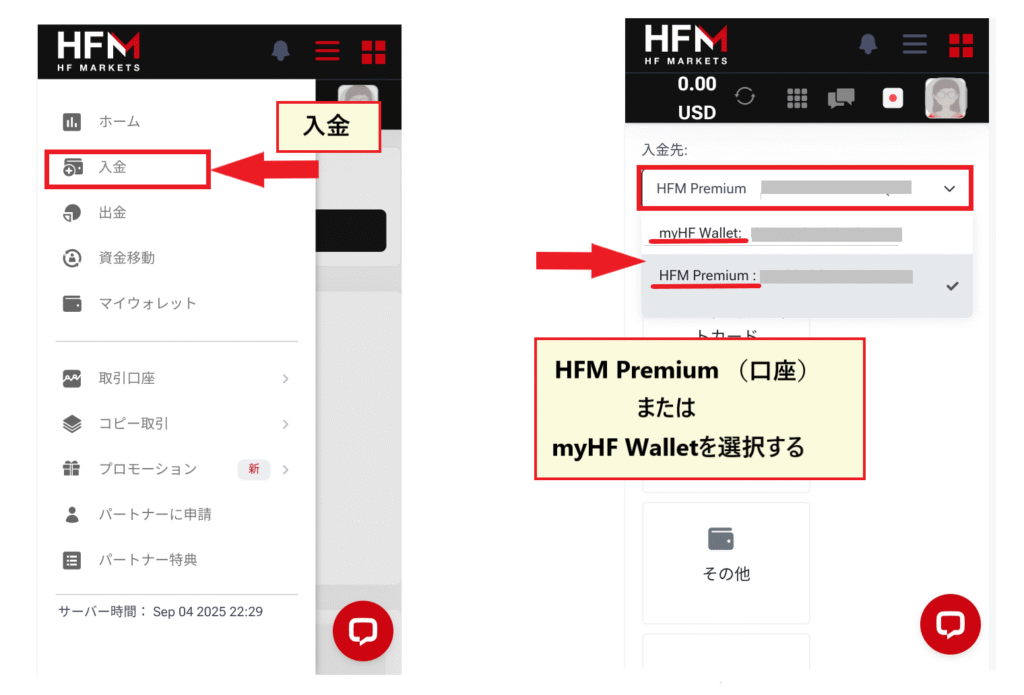
One method is to first deposit funds into your wallet and then transfer a portion of the funds from your wallet to your trading account. Another method is to deposit funds directly into your trading account. If you prioritize fund management, it is recommended to first deposit funds into your wallet and then allocate trading funds from there
The bonus is earned by making a deposit into your top-up bonus account
To receive HFMbonuses, you need to deposit funds into a dedicated bonus account called a "Top-Up Bonus Account"
HFMis a popular overseas forex broker known for its frequent bonus campaigns. Many people likely open accounts specifically for the bonuses. However, be aware that deposit bonuses are not awarded for deposits made into regular trading accounts
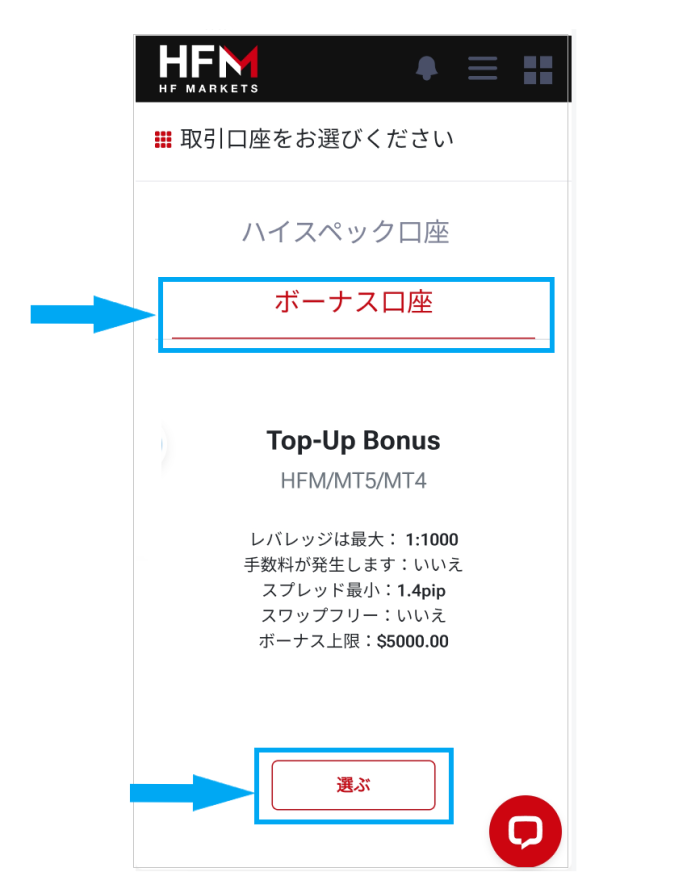
To open a "Top-Up Bonus Account,"to the myHF (member page) menuand select "Trading → Top-Up Bonus → Open a Top-Up Bonus Account."
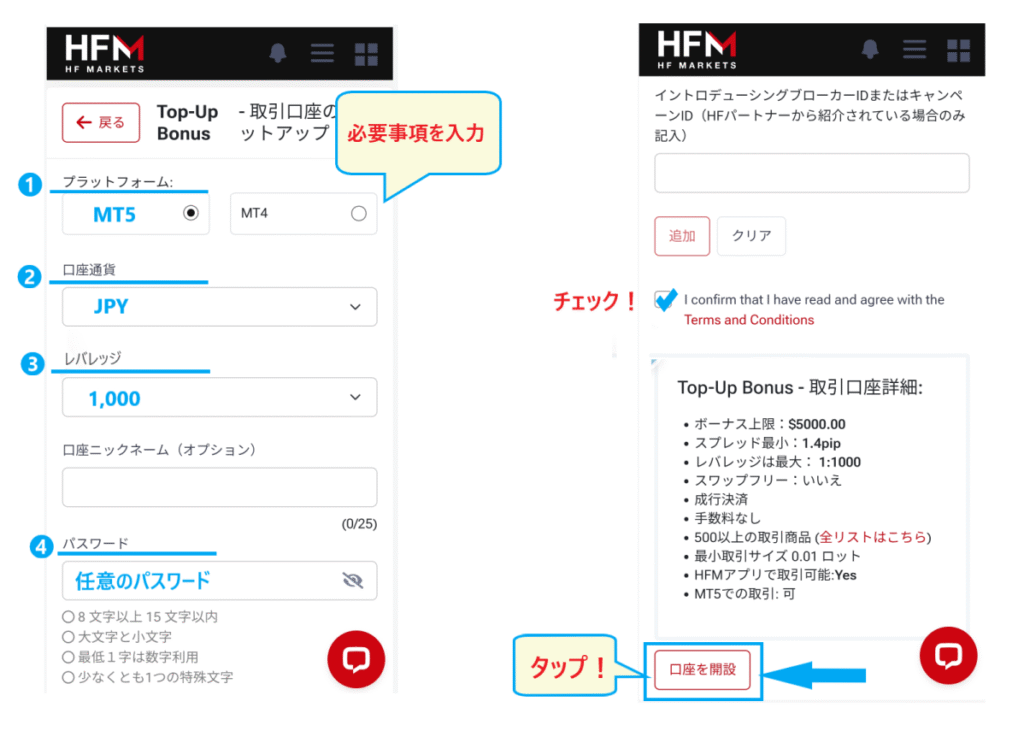
- Platform → Select MT4 or MT5
- Account currency → JPY
- Leverage → Select a value
- Password → Set as you like
- Terms of Use (English) → Check the box
After filling in the required information and tapping "Open Account,"an "Account Opening Complete Email." Then, you can deposit funds directly into your "Top-Up Bonus Account" or transfer funds from your wallet to receive the deposit bonus.
The usual deposit bonus is 20% to 30%. Occasionally, a limited-time 100% deposit bonus is available
By the way,HFMif you want to find out more about"Overseas FX Account Opening Bonus/Deposit Bonus Comparison Ranking". Our site is constantly updated with the latest bonus information. You can also find information on trader awards and demo trading contests.
How to deposit funds into HFMusing a credit or debit card
Now, let's take a look at how to make a deposit toHFM. First, we'll explain the process for credit and debit cards step by step
HFM Credit Card Deposit Procedure
Credit card paymentslogging into the "myHF area (member page)". The process is the same for debit cards, so please refer to this guide.
Step 1. Select "Deposit" and then "Credit Card" from the myHF menu
Open the menu from the menu button in the upper right corner of the myHF area (member page) , and select "Deposit" → "Credit/Debit Card" . Set either your wallet or trading account (such as a top-up bonus account) as the "Deposit Destination".

After selecting "Credit/Debit Card" as your payment method, scroll down . You will then see a list of credit card brands. Tap the one that applies to you from "VISA, Mastercard" or "JCB"
Step 2
Tap the relevant brand to open it, then enter the deposit amount. Note that some parts may be in English, so be sure to carefully check the entered information
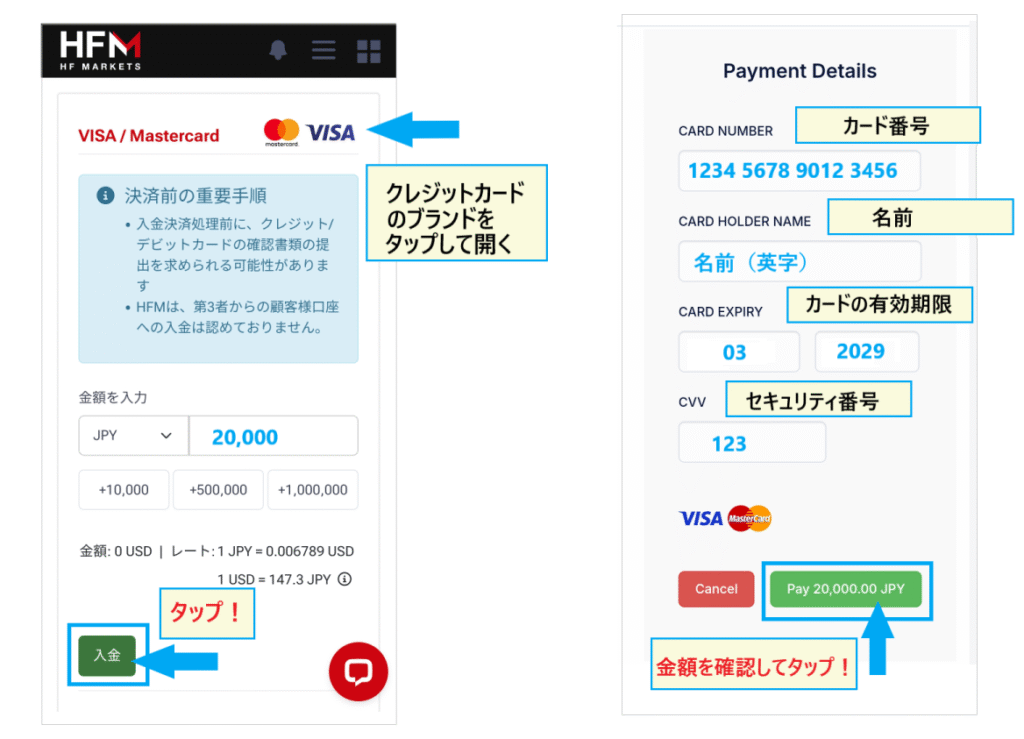
First, set the deposit amount to either "JPY" or "USD". Then,enter your desired deposit amount. If everything is correct, press the "Deposit" button to proceed.
On the next screen,enter your card information.
- CARD NUMBER → Card Number
- CARD HOLDER NAME → Cardholder's name
- CARD EXPIRY → Card expiration date
- CVV → Security Number
After entering the above information and confirming the deposit amount,press the "Pay" button to complete the deposit process.
Step 3. Once the procedure is complete, it will be reflected in a few minutes to 10 minutes
The deposit amount will be reflected in your account within a few minutes at the earliest, or within 10 minutes at the latest, after the deposit process is completed
Advantages and disadvantages of HFM credit card deposits
The advantage of depositing funds by credit card isthe deposit process is simple. Since it only requires entering your card information, it's a recommended method for first-time overseas forex deposits. However, ait can take time for withdrawals to be reflected in your account.
Since withdrawals (cancellation of payment amounts) are reflected relatively quickly with debit cards, it's best to use a debit card whenever possible
Important points to note when making a deposit using a credit card HFM
Credit cards are actuallyCaution is advised as it is possible to make a deposit even if you do not have the funds on handPlease be very careful, as exceeding your acceptable deposit limit can lead to debt and become a financial burden
The key to using credit card deposits wisely is to avoid spending more than the balance you have in your bank account
HFM Bank Transfer Deposit Procedure
Next, let's look at how to deposit money intoHFMvia bank transfer
HFM Bank Transfer Deposit Procedure
Bank transfers must be initiatedlogging into the "myHF Area (Member Page)". Please log in using the link below.
Step 1. Select "Deposit" or "Bank Transfer" from the myHF menu
Open the menu from the menu button in the upper right corner of the myHF area (member page) , and select "Deposit" → "Bank Transfer" . Set either your wallet or trading account (such as your top-up bonus account) as the "Deposit Destination".

Step 2. Select Direct Online Banking and enter the deposit amount
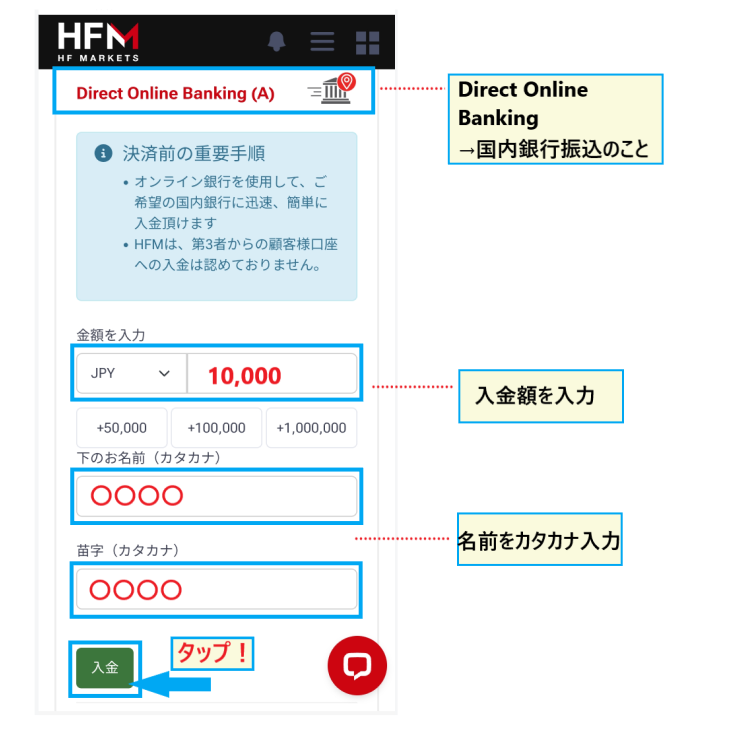
Step 3. Copy the recipient's information and make a bank transfer
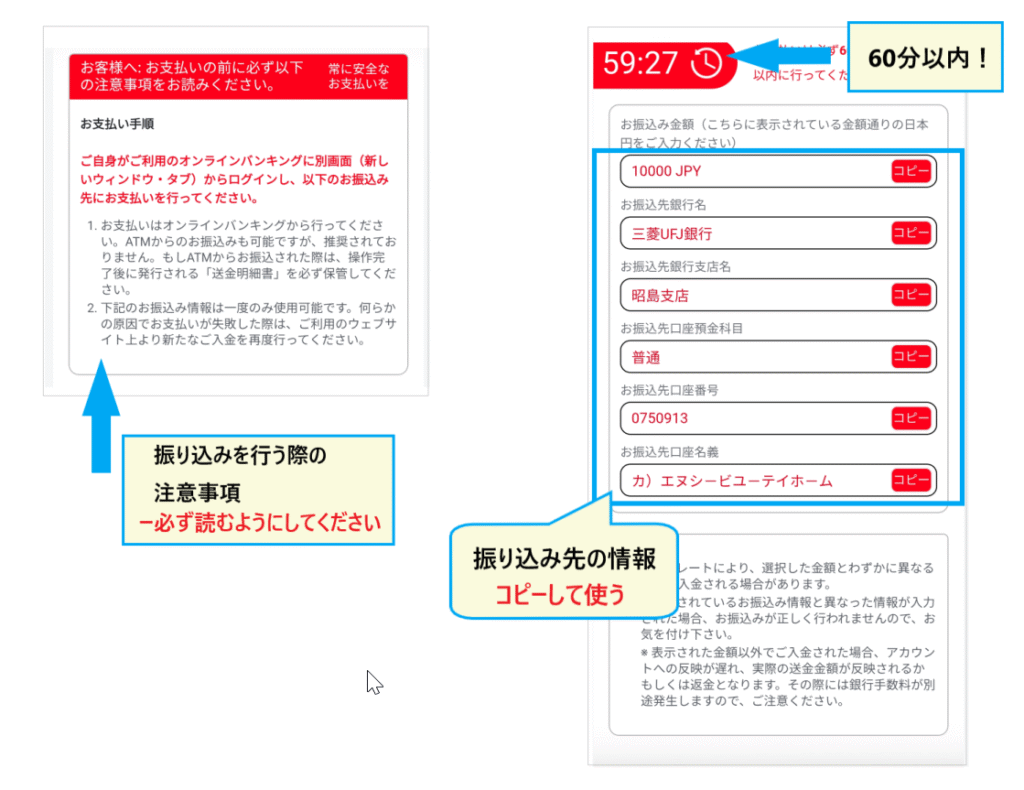
Step 4. The deposit amount will be reflected in your account in about 10 to 30 minutes
The deposit will be completed within 10 to 30 minutes after the bank transfer is initiated. However, the deposit process screen may state a maximum of 12 hours, so it may take longer in some cases. If you are concerned, please contactHFMcustomer support
Advantages and disadvantages of HFM bank transfers
The advantage of using bank transfers isyou can deposit funds in the same way as a regular bank transfer. The process can be easily completed through online banking. Depending on your bank account, you may be able to avoid transfer fees entirely.The ease of withdrawalsis another advantage.
One disadvantage of bank transfers is the large number of fields to enter, such as recipient information and the amount to be transferred . It's crucial to copy and paste the information carefully to avoid errors. Also, transfers made on weekends or outside of business hours may take longer depending on the financial institution
Points to note when making a bank transfer to HFM Bank
The bank transfer details will also be sent via email. Please pay particular attention to the following:"Transfer amount" and "Name of transferor"If this information is incorrect, the processing will take longer
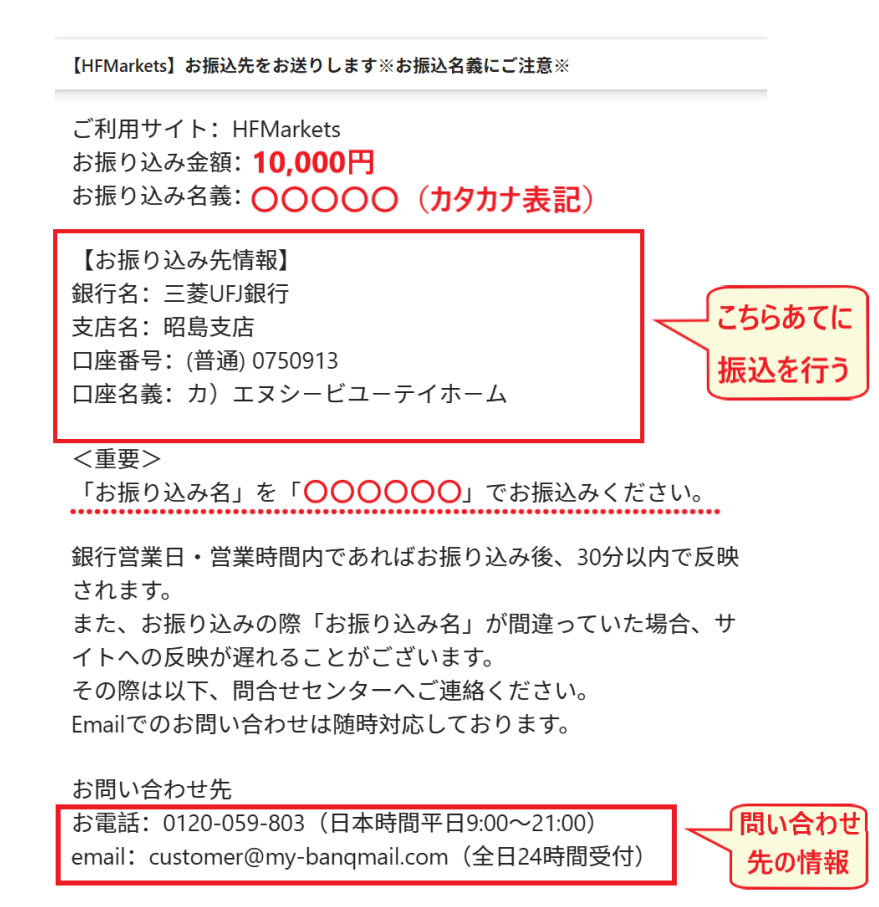
If you think you might have made a mistake in the information you provided, please contact the above contact point as soon as possible. By contacting them, you can rest assured that your payment will proceed without any problems
How to deposit funds into HFM bitwallet
Next, let's look at deposit methods using the payment service "bitwallet"
*To use bitwallet, you need to register an account in advance. Please complete the new bitwallet account registration process
HFM bitwallet deposit procedure
To deposit funds into your bitwallet account,log in to the "myHF area (member page)". Please log in using the link below.
Step 1. Select "Deposit" and then "Other" from the myHF menu
Open the menu from the menu button in the upper right corner of the myHF area (member page) , and select "Deposit" → "Other" . Set the bank account to which you want to deposit using the drop-down menu.

After selecting "Other" as your deposit method,scroll down andyou will see a screen where you can choose between "bitwallet" and "BXONE". Select "bitwallet" to open the deposit request screen.
Step 2. Enter your bitwallet email address and proceed on the bitwallet screen
Once the bitwallet screen appears, enter the "deposit amount" and "bitwallet email address," then press the "deposit" button
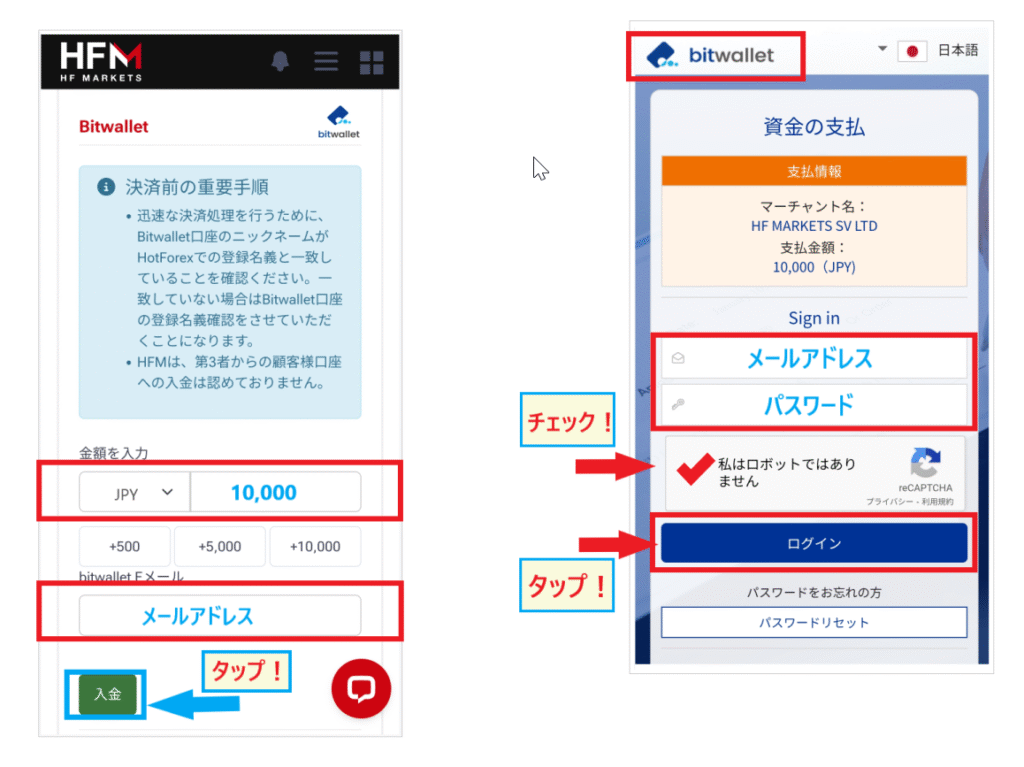
When you press the "Deposit" button, the bitwallet login screen will appear. Enter your "email address" and "password" on the bitwallet screen
Check the box that says "I'm not a robot" and tap the "Login" button . Then, a screen will appear asking you to verify your deposit from bitwallet . Verify the deposit to complete the process
Step 3. The deposit amount will be reflected in your account in a few minutes to 10 minutes
Once the deposit process is complete, the amount will be reflected in your account in as little as a few minutes . In most cases, even if it takes longer, the funds will arrive within about 10 minutes. If it seems to be taking a long time, there may be a problem, so please contact us immediately.
Advantages and disadvantages of depositing funds into HFM bitwallet
The advantage of depositing via bitwallet is that it is reflected more quickly compared to other deposit methods. Since it's also easy to transfer funds from bitwallet to other brokers, it's very convenient to always keep some funds in your account
However, depositing funds from your bank account to bitwallet may take some time. Please make sure to transfer funds to bitwallet during banking hours. For urgent deposits, you can use a credit card for a quicker process. However, depositing funds to bitwallet via credit card incurs a fee, so use this method only in emergencies
Important points to note when depositing funds into HFM bitwallet
One important point to remember when using bitwallet is to ensure that the name on your bitwallet account and the name onHFMmatch exactly. If even one character is different, such as in the English spelling, your application may be put on hold
Furthermore, bitwallet is characterized by its extremely strict security regulations. You may be required to submit documents such as proof of deposit and for identity verification of your bank account or credit card
Having your bank account and credit card information registered and prepared in advance will allow for a quicker processing of your application
How to deposit HFM cryptocurrency (BTC, ETH)
Next, I will explain how to deposit cryptocurrency
HFM Cryptocurrency (BTC, ETH) Deposit Procedure
To deposit cryptocurrency,log in to the "myHF area (member page)". Please log in using the link below.
Step 1. Select "Deposit" and then "Cryptocurrency" from the myHF menu
Open the menu from the menu button in the upper right corner of the myHF area (member page) and select "Deposit" → "Cryptocurrency". For the deposit destination, select the account you wish to deposit into from the dropdown menu.

While still on the screen where you selected your cryptocurrency,scroll downand select either "Crypto Payment" or "Binance Pay".
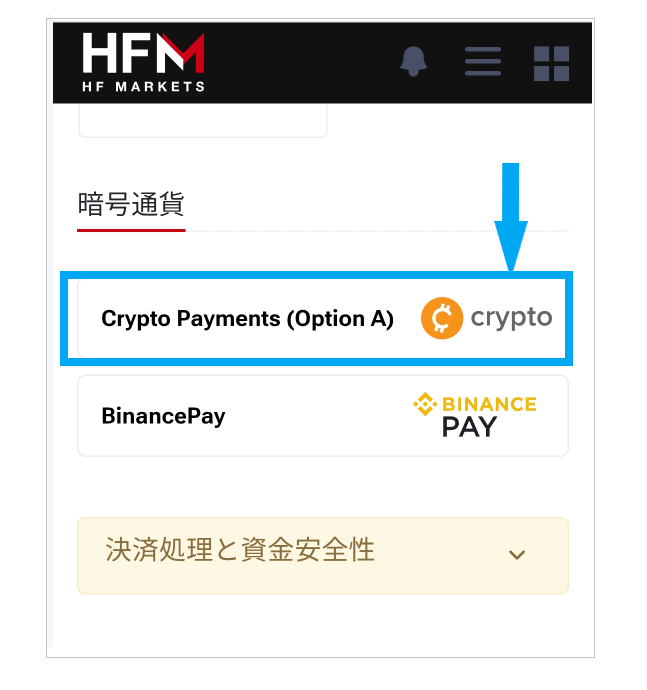
You can open the "Crypto Payment" screen from the list and proceed with the deposit.
Step 2. Select the deposit amount and cryptocurrency type and send the funds
Once you open the cryptocurrency deposit screen, set the "Deposit Amount" and "Type of Cryptocurrency" as shown below, and then tap the "Deposit" button
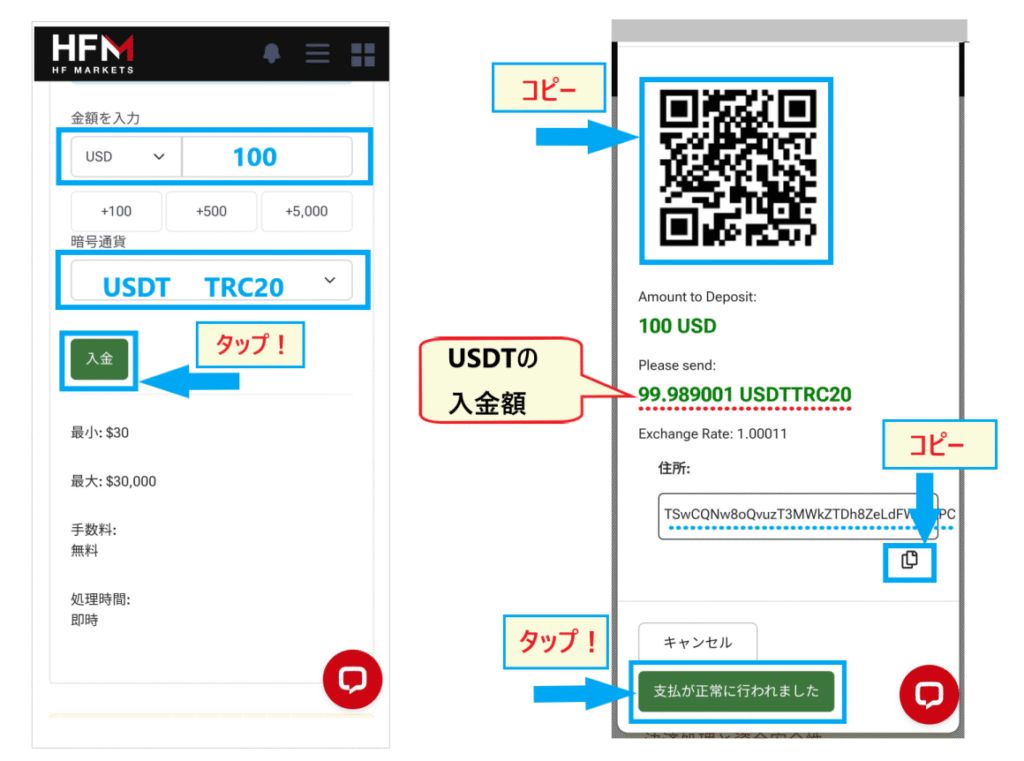
Tapping the deposit button will display a QR code for sending funds and the recipient's address . Scan the QR code or copy and paste the address to send funds from your cryptocurrency wallet
The displayed USDT amount is theUSDT equivalent of your deposit of $100. Copy this amount andHFMwithdraw it from your wallet toHFM) is complete, tap the "Payment successful" button on this screen.
Step 3. Once the transfer from your cryptocurrency wallet is complete, wait for the funds to arrive
Once the transfer from your cryptocurrency wallet is complete,you haveHFMwait for the funds to arrive in. It usually takes only a few minutes to be reflected immediately. However, it may take longer in some cases, so if you feel it's taking too long, please contact us.
Advantages and disadvantages of depositing cryptocurrencies (BTC, ETH) HFM
The advantages of depositing cryptocurrency are that the process is simple and the funds are reflected quickly. For those familiar with cryptocurrency transfer procedures, the transfer can be completed in just a few minutes. Another advantage is that you can use your cryptocurrency holdings to manage your assets in an overseas forex account
On the other hand, the downside is that it's not a method that everyone can easily use. If you don't already own cryptocurrency, it's not recommended to go through the trouble of buying it before depositing funds. Since the value of cryptocurrency is constantly fluctuating significantly, this method is best suited for those with experience in cryptocurrency trading
Important points to note when depositing cryptocurrencies (BTC, ETH) HFM
The only supported cryptocurrency deposit currencies are USD or EURDeposits cannot be made in Japanese yenPlease be careful
Also, if you enter the wrong recipient information,Since it cannot be corrected, the funds will be lostYes, it will
When sending cryptocurrency, be sure to copy the "address" and take great care not to make a mistake with the "network name"
How to deposit funds into HFM Binance Pay
Next, I will explain how to use "Binance Pay" as a method for depositing funds using cryptocurrency
HFM Binance Pay Deposit Procedure
To deposit funds into Binance Pay,log in to the "myHF area (member page)". Please log in using the link below.
Step 1. Select "Deposit" and then "Cryptocurrency" from the myHF menu
Open the menu from the menu button in the upper right corner of the myHF area (member page) , and select "Deposit" → "Cryptocurrency" . Select your desired account as the deposit destination from the dropdown menu.
After selecting "Cryptocurrency,"scroll down on this screen. You will then see a screen where you can select "Binance Pay," as shown below.
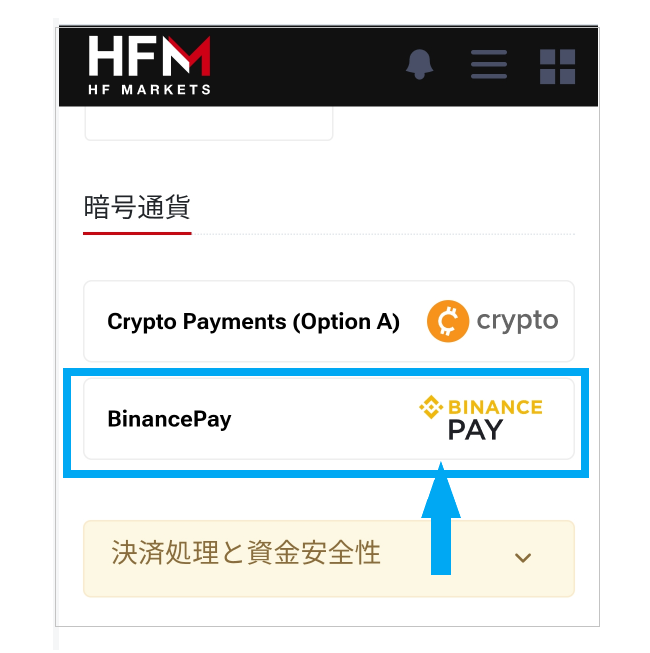
Tap "Binance Pay" to open the deposit screen
Step 2. Enter the deposit amount on the Binance Pay screen and complete the procedure
Once you open the Binance Pay deposit screen, enter the deposit amount (in USD) and tap the "Deposit" button. Next, the Binance screen will appear, so log in to Binance and access Binance Pay
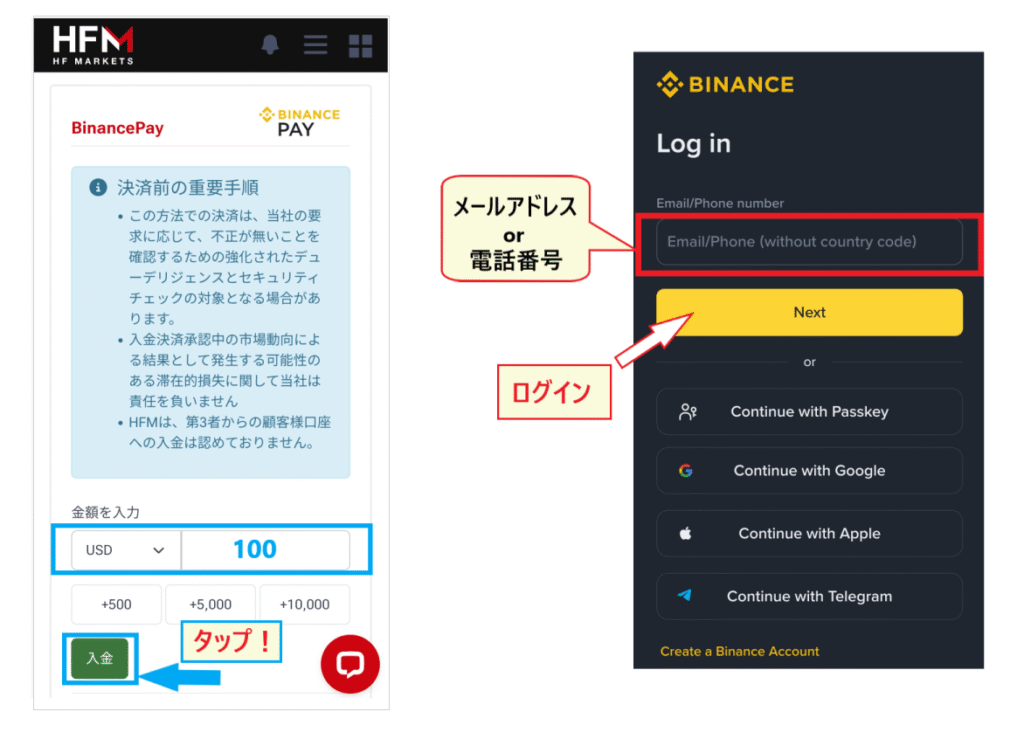
Once you access Binance Pay,HFMwill be displayed, so follow the instructions to complete the transfer. After the transfer from Binance Pay is complete,tap the "Payment successful" button to finish.
Step 3. Once the procedure is complete, the changes will be reflected immediately or within 10 minutes
Once the procedure is complete, all you have to do is wait for the deposit amount to be reflected inHFM. Cryptocurrency deposits are usually credited instantly or within 10 minutes
Advantages and disadvantages of depositing money using HFM Binanace Pay
For those using Binance,the ease of making transactions directly through Binance Pay. It also offers the benefit of free transaction fees and fast fund transfers.
However,HFM's Binance Pay a drawback of is that it only supports USDT , meaning there are no cryptocurrency options
Important points to note when depositing funds using HFM Binance Pay
While Binance Pay deposits are generally instant, they may take longer than expected depending on the circumstances
If it's taking a long time, try contactingHFMcustomer support as soon as possible
How to deposit funds into HFM BXONE
One more thing you should know for reference is how to deposit funds into BXONE
As mentioned earlier, keep this in mind as an alternative method in case bank transfers or bitwallet are unavailable
HFM BXONE deposit procedure
To make a deposit to BXONE,log in to the "myHF area (member page)". Please log in using the link below.
Step 1. Select "Deposit" and then "Other" from the myHF menu
Open the menu from the menu button in the upper right corner of the myHF area (member page) , and select "Deposit" → "Other" . For the deposit destination, select either Wallet or trading account from the dropdown menu. (If you want to receive a bonus, select the Top-Up Bonus Account.)
the screen where you selected "Other,"a screen will appear where you can select "BXONE,"so tap "BXONE" to open the deposit screen.
Step 2. Access BXONE fromHFMand complete the deposit procedure
On the BXONE procedure screen,enter the "Deposit Amount (Japanese Yen OK)" and tap "Deposit".
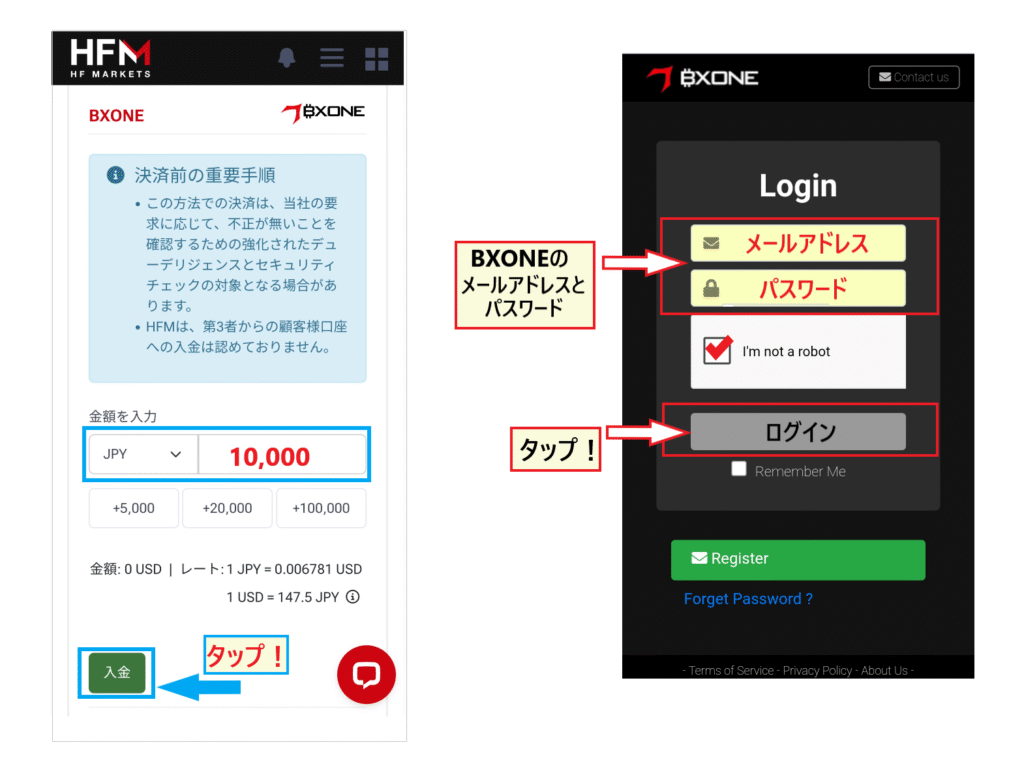
Tapping "Deposit" will bring up the BXONE login screen. Log in and proceed with the transfer. To log in to BXONE, you will need the email address and password you registered when you created your account
Step 3. Once the transfer process is complete, the funds will be credited to your account in about 10 minutes
Once the transfer process from BXONE is complete, the funds will be reflected inHFMwithin a few minutes to 10 minutes
Advantages and disadvantages of depositing funds into HFM BXONE
One of the advantages of BXONE is that it offers a wide range of deposit methods, including domestic bank transfers, bitwallet, and cryptocurrencies . Being able to choose the source of the funds according to the situation can be very helpful in emergencies.
On the other hand, a disadvantage of BXONEnot many overseas forex brokers have adopted it.HFM, which accepts it, it's not particularly convenient for fund transfers.
Important points regarding deposits to HFM BXONE
One thing to keep in mind when making a deposit to BXONE is that even if you want to deposit money from BXONE, it won't be available immediately. It takes some time for account registration and identity verification before you can start using the service
If you're interested in using it in the future, be sure to create an account and deposit funds beforehand
Reasons why you might not be able to deposit money into HFMand how to resolve them
HFMis a major overseas forex broker with financial licenses in seven countries worldwide and boasts over 4 million accounts. It is highly reliable, and deposit/withdrawal problems are rarely reported. However,Very rarely, we hear of problems with deposits and withdrawals。
If IHFMam unable to make a deposit viacould be the possible reasons?
Here, we will introduce cases where deposits could not be made viaHFM, and what to do if you are unable to make a deposit
Cases where payments could not be made via HFM
The following are some possible reasons why you might not be able to deposit money into HFM
Credit card/debit card usage denied
As many of you may know, overseas forex brokersnot registered with Japan's Financial Services Agency. (However, this lack of registration is not a violation.)
Some financial institutions block the use of overseas forex brokersThere are some limitations. First, major megabanks such as Mitsubishi UFJ and Sumitomo Mitsui Banking Corporation generally do not accept them. In addition, cards from major online banks such as Sony Bank and Rakuten Bank are often not accepted
Conversely, usable cardsthose from Epos Card, AEON Net Bank, GMO Aozora Bank, and Seven Bank.It has been reported that cards from retail and distribution companies are also usable. However, their usability varies depending on the time of year, so it's convenient to have several usable cards on hand for overseas forex trading.
Bank transfers can be delayed due to discrepancies in the transfer ID or deposit amount
For bank transfers,Failure to enter the remittance ID can result in the payment being delayed or unsuccessfulThis is how it works. For overseas forex bank transfers, most brokers require you to enter something like an ID or transfer number in the sender's information. In the case ofHFM, the transfer ID will be displayed during the bank transfer processBe sure to enter the remittance IDLet's do that
Please note that discrepancies in the deposit amount may cause delays in processing
I can't make a deposit because my bitwallet email address or password is showing an error
Another common issue is encountering errors when using payment services such as bitwallet, Binance Pay, and BXONE. The reasons for these errors are..In many cases, the registered email address or password is incorrectis
These days, it's common to use multiple payment services. Managing the account information for all of them can be a hassle. Since registration information can easily get confused, it's important to carefully manage the email address and password for each account
Three ways to deal with situations where you can't deposit money into HFM
So, what should you do if you can't make a deposit usingHFM? Here are three solutions
1. Take a screenshot of your deposit history
Regardless of the deposit method,always save data that proves the deposit has been completed, such as a screenshot,. If you can prove that you made a deposit, the overseas forex broker will be able to investigate properly.
2. Contact customer support as soon as possible
If you feel your payment is taking too long,don't hesitateHFM's customer support. There may be a discrepancy in the information you provided, causing a delay in processing. Contacting them will help ensure a smoother process.
Furthermore, even if it's simply taking a long time, contacting them can be effective as it serves as an urgent reminder
3. Always have multiple methods available for depositing and withdrawing funds from overseas forex trading
When starting out with overseas forex trading,reassuring to have as many deposit and withdrawal options as possible.
This is because some overseas forex brokers are fraudulent and malicious, and many reports of victims have been received by the Financial Services Agency and consumer centers. The Japanese Financial Services Agency frequently issues warnings about the use of overseas forex brokers, and due to pressure from the FSA, certain deposit and withdrawal methods may suddenly become unavailable
Having multiple deposit and withdrawal methods available at all times is key to successfully using overseas forex trading.
As we've seen, overseas forex trading can indeed be a bit worrying when it comes to deposits and withdrawals. However, overseas forex trading also offers many attractive features and advantages that domestic forex trading doesn't, such as high leverage, bonuses, and zero-cut guarantees
Why is overseas forex trading so popular despite the risks? The following article explains the advantages of overseas forex trading. Please refer to it as well
Frequently Asked Questions about HFMDeposit Methods
Finally, let's look at some frequently asked questions about depositing funds intoHFM
Please use this as a reference when you actually make a deposit
Which method is the fastest way to deposit money into HFM?
HFMAccording tothe fastest methods for processing depositsare "Crypto Payment" or "Binance Pay." If you're not using cryptocurrency,credit cards or bitwalletare the fastest options. If you trade cryptocurrency, use cryptocurrency. If you've never traded cryptocurrency before, try depositing using a credit card or bitwallet.
What is the easiest way to deposit money into HFM?
HFMThe easiest way to deposit funds intoby credit card. It's straightforward; simply enter your card information on the myHF deposit page. However, withdrawals tend to take some time, so if you're concerned about the processing time for withdrawals,bank transfer is also a relatively easyand recommended option.
Does HFMoffer any deposit bonuses or promotions?
The regular deposit bonus is a 20% bonus on your deposit. During limited-time bonus campaigns , a 100% bonus may be offered . Be sure to check occasionally to see what bonuses are currently available.
There are several types of bonus payout rates, and the conditions vary from time to time. In addition to bonuses, you can also take advantage of a variety of other benefits such as cashback and loyalty programs
What are the conditions for receiving a deposit bonus?
HFMTo receiveyou must deposit funds into a dedicated "Top-Up Bonus Account." Please note that you will not receive the bonus if you deposit funds into any other account.
In the case of HFM, there are many campaigns where you can receive a bonus by depositing money into a "Top-Up Bonus Account," regardless of whether you are a new or existing customer
What should I do if I can't make the payment?
If your payment fails, please contact customer support via chat
HFM's customer support is 100% in Japanese.Japanese staffwill provide courteous assistance. They will investigate the reason why your payment failed, so you can rest assured.
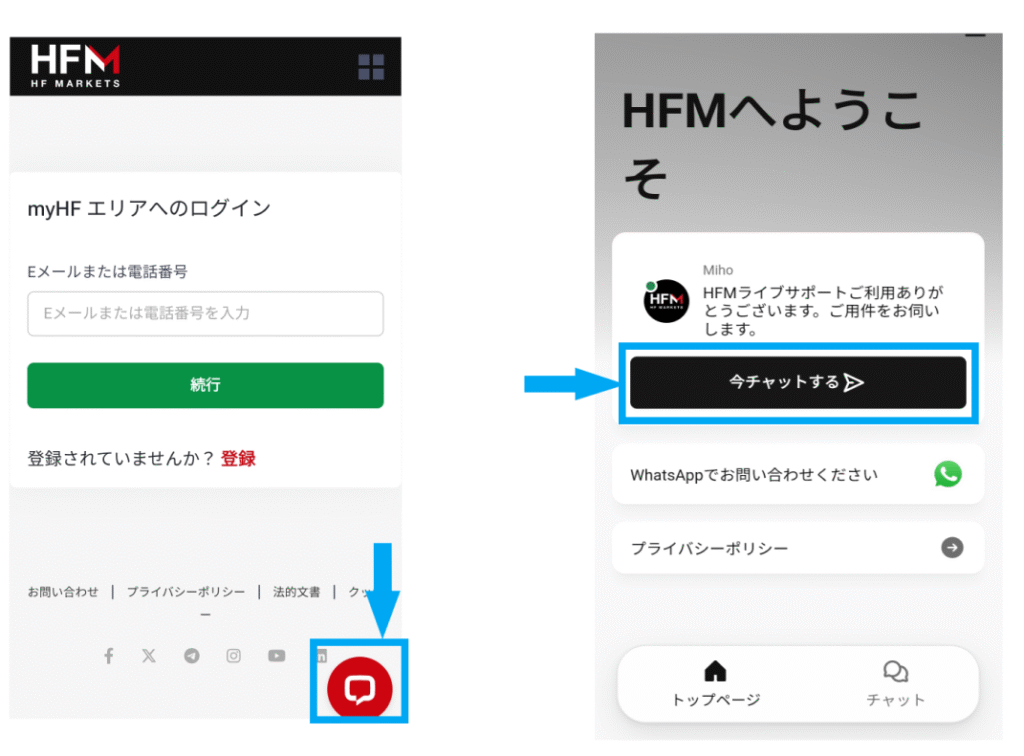
You can access the customer support chat screen by clicking the "chat icon" on the myHF area (member page) screen
When making an inquiry, it will be helpful to have your "account number," "email address," and"screenshot of the deposit confirmation"ready.
You can also find reviews and opinions regardingHFM's security and withdrawal refusals in this article. Please refer to it as well
Summary: Let's deposit money intoHFMand start trading!
HFMoffers six deposit methods:"Credit/Debit Card," "Bank Transfer (Domestic Bank Transfer)," "bitwallet," "Cryptocurrency," "Binance Pay," and "BXONE."
Generally,people use card deposits, bank transfers, and bitwallet depending on their needs. If you remember these three methods, you can trade in overseas forex without any inconvenience by choosing the deposit method that suits your situation. Choose the method that's easiest for you andHFMstart depositing into
WeHFMopening anthrough our website, "Money Charger (Manecha)." Opening an account through "Manecha" allows you to receive a portion of the spread as cashback.HFMis known for its particularly high cashback rate. Please give it a try!