
This article provides a clear explanation of ThreeTrader's withdrawal rules, fees, processing times, and solutions to common problems
When trading with ThreeTrader and making a profit, whether or not you can withdraw the funds safely is a key concern
Knowing the actual withdrawal methods and points to note will help you receive your funds smoothly
Contents
First, let's check ThreeTrader's withdrawal rules
When withdrawing funds from ThreeTrader, it's important to fully understand the withdrawal requirements, fees, and other important points
Here, we will explain the following three points
- We have summarized the withdrawal amounts and conditions in an easy-to-understand way
- Withdrawal fees and points to note
- Main reasons why withdrawals fail and immediate solutions
If you apply without knowing the rules regarding withdrawal procedures, your application may be delayed during the review process or the funds may not be credited to your account
Make sure you understand the correct procedure to ensure a smooth withdrawal process
We have summarized the withdrawal amounts and conditions in an easy-to-understand way
The specifications for each withdrawal method at ThreeTrader are summarized in the table below
| Withdrawal methods | Minimum withdrawal amount | Processing days | conditions | remarks |
|---|---|---|---|---|
| Domestic bank transfer | 100 USD | 1-3 business days | Only accounts under the same name | Exchange fees apply |
| Bitwallet | 10 USD | Same day to 1 business day | Only accounts under the same name | No fees |
| Cryptocurrency (USDT) | 10 USD | Same day to 1 business day | Same wallet name | Be careful of network errors |
| Peska | 10 USD | Same day to 1 business day | Only accounts under the same name | No fees |
ThreeTrader's minimum withdrawal amount is $100 (approximately 15,000 yen)
There is no upper limit, but transactions exceeding $10,000 may be processed in multiple installments
withdrawal methods available: domestic bank transfer, Bitwallet, cryptocurrency (USDT), and Peska
Withdrawals generally take 1 to 3 business days
Furthermore, withdrawals cannot be processed if the name on the account does not match the name on the recipient's account

Since transfers to third-party accounts are not permitted, please be sure to use an account in your own name
Withdrawal fees and points to note
ThreeTrader generally does not charge withdrawal fees
However, if the withdrawal goes through the receiving bank or an intermediary bank, a transfer fee may be deducted
Also, when withdrawing funds in US dollars and receiving them in a yen account, the amount may fluctuate slightly due to changes in the exchange rate
If you wish to withdraw a large amount of money, splitting your request into multiple applications is recommended as it will expedite the processing
Main reasons why withdrawals fail and immediate solutions
If your withdrawal request hasn't been processed, there could be several reasons
This could be due to reasons such as incomplete identity verification, mismatched names, or withdrawal amounts below the minimum required amount
During system maintenance or when large withdrawals are being processed in installments, it may take longer for funds to be credited to your account
If you are having trouble withdrawing funds, please check the following points in order
- Have your identification documents been approved?
- Is the name of the recipient of the withdrawal the same as the account name?
- Is the withdrawal amount within the rules?
If the problem persists after checking these points, contacting support with screenshots of your transaction history and withdrawal request screen will help them quickly identify the cause of your withdrawal issue
A detailed explanation of how to withdraw funds from ThreeTrader
Here, we will explain how to withdraw funds from ThreeTrader in the following order
- The process for withdrawing funds via domestic bank transfer
- When withdrawing funds using an online wallet such as Bitwallet
- When withdrawing using cryptocurrency (such as USDT)
- When withdrawing using Peska
Review the withdrawal procedures for each option to ensure a smooth withdrawal from ThreeTrader
The process for withdrawing funds via domestic bank transfer

The procedure for withdrawing funds from ThreeTrader via domestic bank transfer is as follows:
Log in to your ThreeTrader account
To withdraw funds from ThreeTrader, first log in to your member page
Open the withdrawal menu
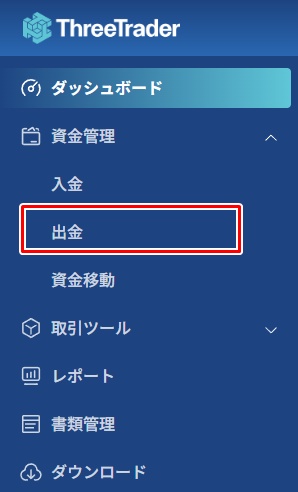
On the TTheeTrader member page, open "Withdrawal" from the fund management menu
"Domestic bank transfer withdrawal"
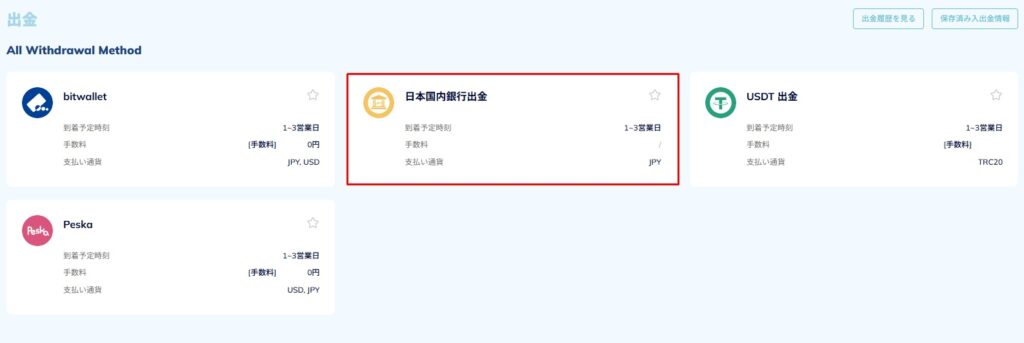
From the list of withdrawal methods, select "Withdrawal to a Japanese domestic bank account"
Set withdrawal details
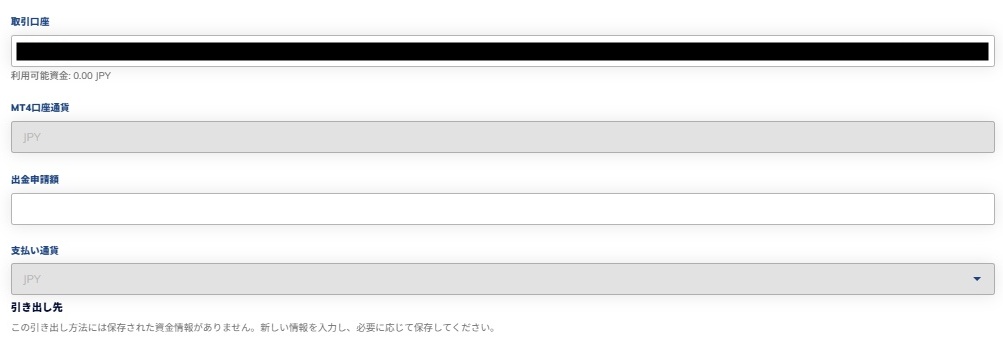
Next, let's configure the following items
| item | Content |
|---|---|
| Trading account | Select the ThreeTrader trading account from which you wish to withdraw funds |
| MT4 account currency | The margin currency is displayed automatically |
| Withdrawal application amount | Enter the amount you wish to withdraw |
| Payment currency | When selecting the currency you wish to withdraw via bank transfer, "JPY (Japanese Yen)" will be automatically selected. |
Enter the bank account information for the withdrawal
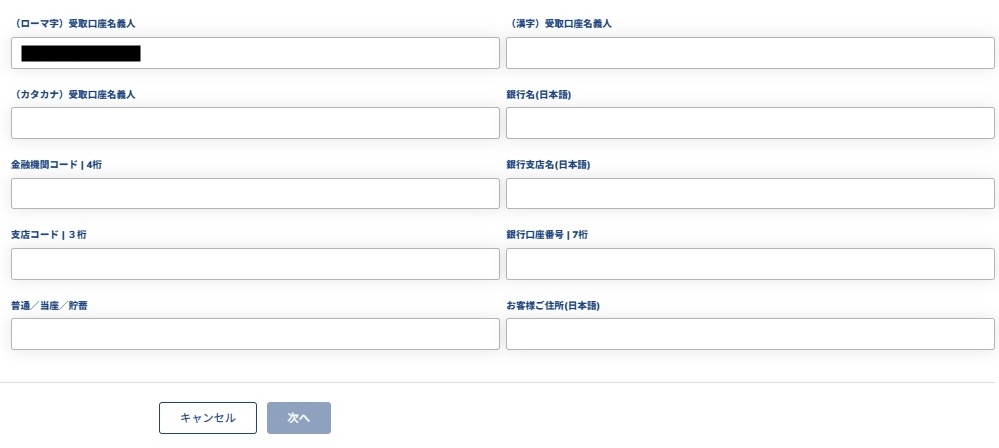
Next, enter the following information regarding the bank account to which you wish to withdraw funds
| item | Content |
|---|---|
| (Romanized) Name of recipient account holder | Enter your name in Roman letters |
| (Kanji) Name of recipient account holder | Enter your name in kanji |
| (Katakana) Name of recipient account holder | Enter your name in katakana |
| Bank name (in Japanese) | Enter the bank name in Japanese |
| Financial Institution Code | Enter your 4-digit financial institution code |
| Bank branch name (in Japanese) | Enter the name of the bank branch where you want to withdraw the money in Japanese |
| Branch Code | Enter the 3-digit branch code of the withdrawal destination |
| bank account number | Enter the 7-digit account number of the withdrawal destination |
| Regular/Current/Savings | Enter the appropriate account type: regular, current, or savings |
| Customer Address (in Japanese) | Enter your address in Japanese |
Once you have entered all the required information, click "Next" to complete your withdrawal request
When withdrawing funds using an online wallet such as Bitwallet
The procedure for withdrawing funds from ThreeTrader using Bitwallet is as follows:
Log in to your ThreeTrader account
To withdraw funds from ThreeTrader, first log in to your member page
Open the withdrawal menu
On the TheeTrader member page, open "Withdrawal" from the fund management menu
Open "Bitwallet"
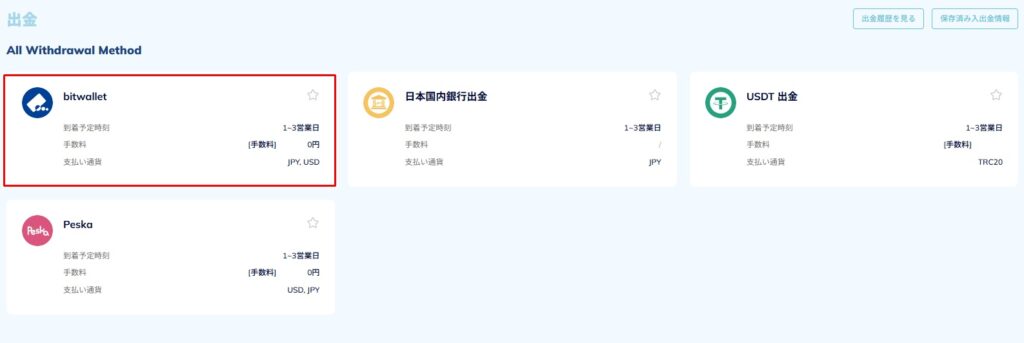
Select "bitwallet" from the list of withdrawal methods
Set the withdrawal amount and other details and submit the application
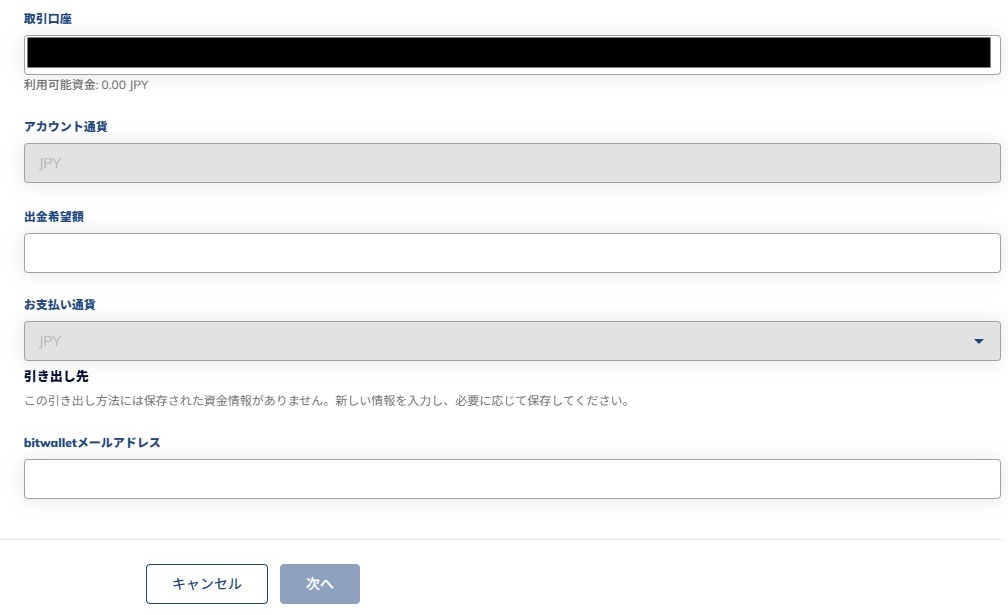
Please enter the following information regarding the withdrawal to Bitwallet
| item | Content |
|---|---|
| Trading account | Select the ThreeTrader trading account from which you wish to withdraw funds |
| Account Currency | The margin currency is displayed automatically |
| Desired withdrawal amount | Enter the amount you wish to withdraw |
| Payment currency | Select the currency you wish to withdraw |
| bitwallet email address | Enter the Bitwallet address to which you want to withdraw funds |
Once you have entered all the required information, click "Next" to complete your withdrawal request
When withdrawing using cryptocurrency (such as USDT)
The procedure for withdrawing funds in cryptocurrency from ThreeTrader is as follows:
Log in to your ThreeTrader account
To withdraw funds from ThreeTrader, first log in to your member page
Open the withdrawal menu
On the TheeTrader member page, open "Withdrawal" from the fund management menu
Open "USDT"
Select "USDT Withdrawal" from the list of withdrawal methods
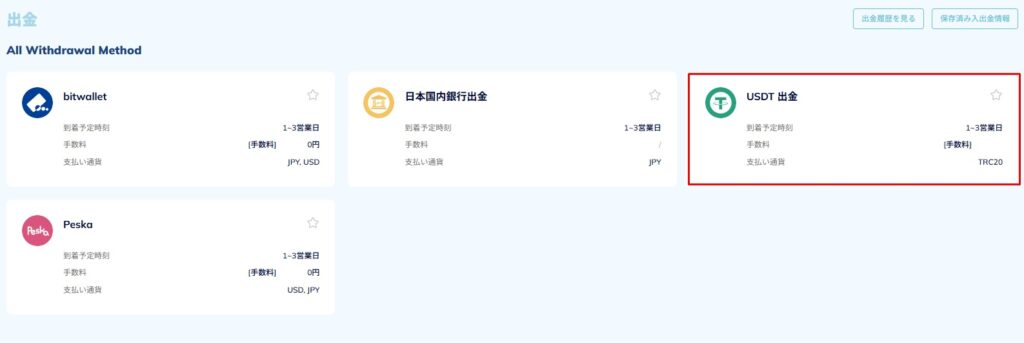
Select "USDT Withdrawal" from the list of withdrawal methods
Enter the withdrawal details and submit the request
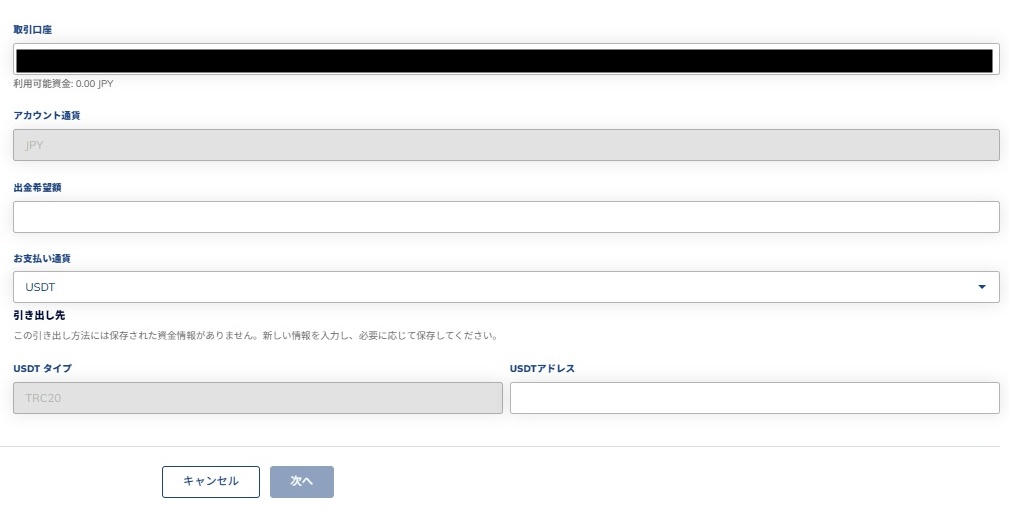
When withdrawing in USDT, please enter the following information
| item | Content |
|---|---|
| Trading account | Select the ThreeTrader trading account from which you wish to withdraw funds |
| Account Currency | The margin currency is displayed automatically |
| Desired withdrawal amount | Enter the amount you wish to withdraw |
| Payment currency | Select the currency you wish to withdraw |
| USDT type | Currently, only the TRC20 is supported, so it will be selected automatically |
| USDT address | Enter the USDT recipient's transfer address |
Once you have completed entering all the required information, click "Next" to complete your withdrawal request
When withdrawing using Peska
The procedure for withdrawing funds from ThreeTrader using Peska is as follows:
Log in to your ThreeTrader account
To withdraw funds from ThreeTrader, first log in to your member page
Open the withdrawal menu
On the TheeTrader member page, open "Withdrawal" from the fund management menu
Open "Peska"
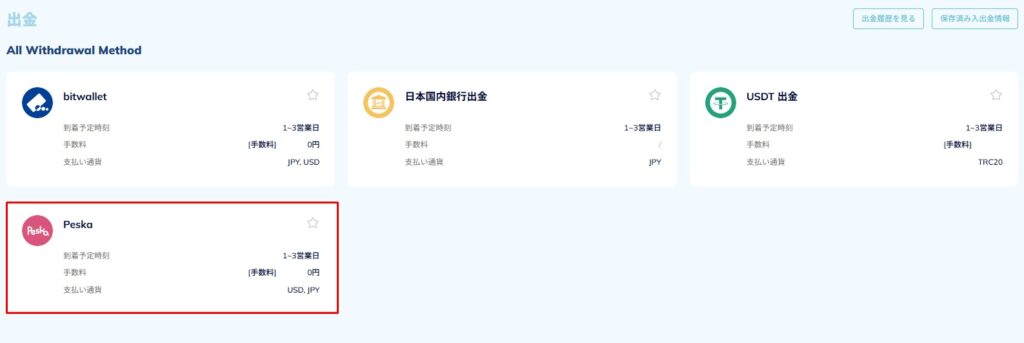
Select "Peska" from the list of withdrawal methods
Set the withdrawal details and submit a withdrawal request
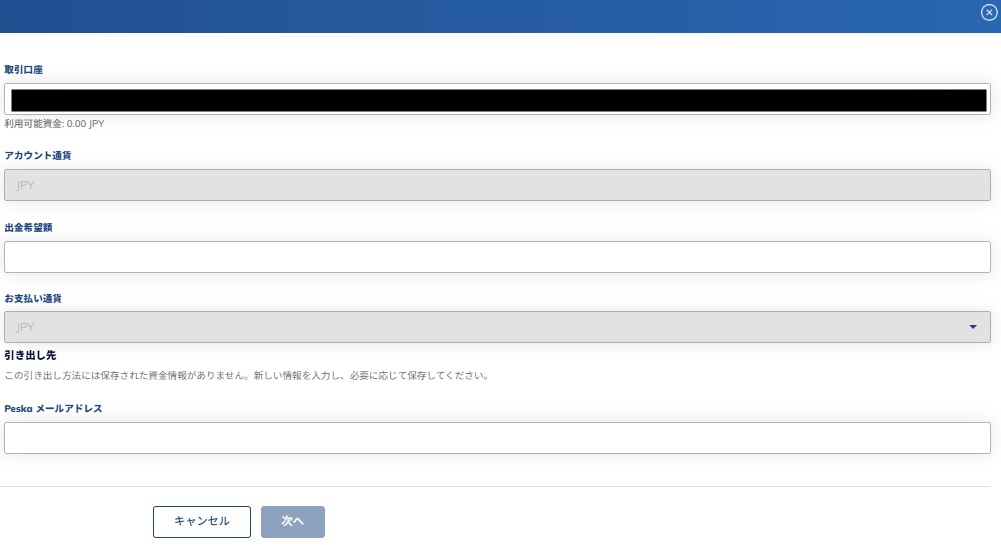
When withdrawing funds via Peska, please enter the following information
| item | Content |
|---|---|
| Trading account | Select the ThreeTrader trading account from which you wish to withdraw funds |
| Account Currency | The margin currency is displayed automatically |
| Desired withdrawal amount | Enter the amount you wish to withdraw |
| Payment currency | Select the currency you wish to withdraw |
| Peska email address | Enter the Peska address to which you wish to withdraw funds |
Once you have entered all the required information, click "Next" to complete your withdrawal request
Causes of withdrawal problems and tips for resolving them
Here, we will explain the causes and solutions to common withdrawal problems with ThreeTrader, in the following order
- Common reasons why withdrawals stop and how to deal with them
- Things to check when your status is "Under Review" or "On Hold"
- Documents to prepare before contacting support
There are no particularly difficult procedures involved, and withdrawal problems can be smoothly resolved with solutions tailored to the cause
Common reasons why withdrawals stop and how to deal with them
The table below summarizes the reasons why withdrawals might stop working on ThreeTrader and how to resolve them
| cause | Solutions |
|---|---|
| Identity verification is not yet complete | Check the status of your document submission on the member page and re-upload it |
| The name on the bank account does not match | Use an account with the same name as your registered name |
| It is below the minimum withdrawal amount | Adjust the withdrawal amount to $100 or more |
| System congestion and maintenance time | I will reapply after some time has passed |
The most common reason for withdrawals being stopped is "incomplete identity verification or mismatch in account name."
Furthermore, discrepancies between your registration information and your bank information can also cause delays in the application process
Processing may be delayed if the withdrawal amount is below the minimum amount or if multiple applications are submitted on the same day or in the same week
Things to check when your status is "Under Review" or "On Hold"
In ThreeTrader, after submitting a withdrawal request, you may see a message indicating "Under Review" or "Pending."
This message indicates that the system is still reviewing your application and does not mean that it is suspected of being fraudulent or incomplete
However, if your identity verification information is outdated, or if you attempt to withdraw funds using a different method than the one used for deposit, the verification process may take longer.
If you have checked things like whether your identity verification documents have expired and whether you are withdrawing funds through the same method as you made them, and no problems are found, then all you have to do is wait for the review to be completed
Documents to prepare before contacting support
When contacting ThreeTrader support regarding withdrawals, it is important to have as much accurate information as possible
Having the necessary documents readily available allows the person in charge to quickly determine the cause and ensure a smoother resolution
If you have already submitted your identity verification documents, it would be a good idea to prepare the following documents
- Withdrawal application information: application date and time, application amount, withdrawal method
- Transaction history: Screenshot of recent deposit and withdrawal records
If you gather all of these items and submit them through the inquiry form, you are more likely to receive a faster response
Also, support is available in Japanese, so please contact them calmly and without rushing
Tips for smooth withdrawals from ThreeTrader
To ensure a smooth withdrawal from ThreeTrader, be sure to check the following three points
- Be aware that the withdrawal rules differ for deposits and profits
- Withdrawing small amounts frequently is also a safe method
- Points to learn from real-world examples of successful and unsuccessful withdrawals
First, we'll explain ThreeTrader's withdrawal rules and provide tips for making large withdrawals
Be aware that the withdrawal rules differ for deposits and profits
At ThreeTrader, the withdrawal rules differ depending on whether you are withdrawing your deposit or profits earned from trading
You can only withdraw the deposited amount using the same method you used to make the deposit; any profits must be withdrawn using a different method
For example, if you deposit using a credit card, you can only withdraw up to the amount you deposited via card. Profits must be withdrawn via bank transfer or Bitwallet
If you submit a withdrawal request without knowing about this system, your request may be stopped during the review process or even canceled
Withdrawing small amounts frequently is also a safe method
It's safer to withdraw small amounts regularly than to withdraw a large sum all at once
Withdrawing funds in smaller increments tends to streamline the process and expedite the review process
Furthermore, developing the habit of regularly withdrawing trading profits will help you develop a sense of money management
In particular, setting up withdrawals on a weekly or monthly basis makes it easier to cope with unexpected problems or exchange rate fluctuations
Points to learn from real-world examples of successful and unsuccessful withdrawals
Here, let's look at some examples of withdrawals from ThreeTrader based on user reviews
Yay!
— Parsley Taro @BurgerKingTaro (@paseritaroufx) March 17, 2023
Got the money from SriTrade ☺️
I applied yesterday at 12pm, so it only took a day and a half!
Should I try KOW's Ares or not? pic.twitter.com/bHGOaKV7Cb
Generally, withdrawals from ThreeTrader via bank transfer will arrive within 3 business days
The above review mentioned that the transaction was smooth, with the funds arriving in about a day and a half, as posted on social media
SuriTore-san → bitwallet →
— (@NO195930391) July 14, 2025
2.5 million yen has been received at Sumitomo Mitsui Banking Corporation!!
If you don't want to use bank transfers from ThreeTrader, withdrawing funds via domestic bank transfer through Bitwallet is also a convenient option
Withdrawals from Bitwallet are supported by many online banks and major banks
Frequently Asked Questions about Withdrawals from ThreeTrader
summary
Withdrawals from ThreeTrader can be done with peace of mind if you understand the basic rules. There are no fees, and funds are usually credited within 1-3 business days
However, processing may be delayed if identity verification is not completed or if there is a name mismatch
Also, depending on the deposit method, the withdrawal options may be limited, so it's important to check beforehand. If you follow the correct procedures, you can withdraw funds safely and smoothly from ThreeTrader