
HFMwithdrawal methods: credit/debit card, bank transfer, bitwallet, cryptocurrency, Binance Pay, and BXONEyou can choose from six.
However, overseas forex tradingrules such as requiring withdrawals to be made using the same method as the deposit, which can be confusing for many beginners.
"HFMWhy can't I select bank transfer as an option with
"HFMHow long does it take to withdraw funds from
"I can't withdraw my funds, what should I do?"
This time,HFM, in an easy-to-understand way with images, so that you can use it with peace of mind we will explain the rules and procedures for withdrawals using , an overseas forex broker
This article also covers important points, processing times, and what to do if you are unable to withdraw funds, so please refer to it
For information on HFM's withdrawal refusal cases, please check HFMreviews and reputation page , where we have conducted a thorough investigation
HFMwithdrawal methods and rules

To use overseas forex trading with peace of mind, it is essential to understand the deposit and withdrawal procedures, especially the mechanisms and rules of withdrawal procedures. The deposit and withdrawal systems for overseas forex brokers are significantly different from those of domestic forex brokers
First,overseas forex brokers (HFMexplain the important rules for withdrawing funds from.
What are the withdrawal rules for overseas forex trading?
Overseas forex brokers generally have almost identical withdrawal rules. There are three main withdrawal rules to keep in mind when usingHFM
- When withdrawing funds, first withdraw the amount using the same method you used to deposit it
- Credit card withdrawals can only be used to withdraw the amount you deposited
- Withdrawals from HFMmust be made after transferring funds to My Wallet
- Withdrawing funds will cause the bonus to disappear
Now, let's take a look atHFM's withdrawal rules in order
When withdrawing funds, first withdraw the amount using the same method you used to deposit it
The withdrawal methods available at HFMvary depending on the deposit method. Generally, when withdrawing funds from an overseas forex broker, you must use the same method you used for deposit
This rule is unique to overseas forex brokers that offer multiple deposit and withdrawal methods. Such rules are in place because..Preventing credit card cash advances, money laundering, and fraudulent activitiesThis is because it is a major difference from domestic FX trading and can be considered a drawback
Specific example of withdrawing funds using the same method used for deposit

Let's look at a specific example of withdrawing funds using the same method used for deposit
- I deposited approximately $187.50 using my credit card → I will first withdraw approximately $187.50 using my credit card
- I deposited approximately $125.00 via bank transfer → I will first withdraw approximately $125.00 via bank transfer
- I deposited approximately $62.50 in cryptocurrency → I will first withdraw approximately $62.50 in cryptocurrency
As mentioned above,HFMmost overseas forex brokers, includinga system where you can only withdraw your deposits using the same method you used for deposit. Therefore, if you find yourself thinking, "Huh?! I can't withdraw my money!", make sure you've selected the same method you used for deposit.
Once you've withdrawn the deposited amount, any withdrawal method is fine
The requirement to withdraw funds using the same method as the deposit only applies to the initial deposit. Any profits earned after withdrawing the initial deposit can be withdrawn using any method you choose
Credit card withdrawals can only be used to withdraw the amount you deposited
However,credit cards can only be used to withdraw the amount you deposited. This is because credit card withdrawals are refunded by canceling the payment amount. Since it is not possible to refund amounts that have not been paid, you cannot use credit cards to withdraw profits that exceed your initial deposit.
Specific examples of credit card deposits and withdrawals
For example, let's say you want to withdraw a profit of approximately $187.50
If you deposited approximately $125.00 via credit card, you must first withdraw approximately $125.00 from your credit card . The remaining approximately $62.50 can be withdrawn using any method you prefer, such as bank transfer.

- I first withdrew the deposit amount of approximately $125.00 via credit card
- The remaining approximately $62.50 will be withdrawn via bank transfer
*If you have made a deposit via bank transfer or bitwallet, you can withdraw both the deposit amount and your profits at once
Reasons why you cannot withdraw more than the amount you deposited using a credit card
Credit card withdrawalswork by canceling and refunding deposits made to overseas forex brokers (overseas forex accounts). Simply put, it uses the same method as returning and refunding money paid for shopping.
Once you understand the mysteries surrounding deposits and withdrawals, you'll be able to use overseas forex trading freely and according to your own financial plan. The key to successfully using overseas forex trading is to "thoroughly understand the withdrawal rules."
Withdrawals from HFMmust be made after transferring funds to My Wallet
Another important point to keep in mindHFM's withdrawal rulesthat funds must be transferred to My Wallet.
HFMprovides a separate My Wallet for comprehensively managing funds, distinct from your trading account. The system allows you to allocate funds from your Wallet to each account for trading; direct withdrawals from your trading account are not possible
Withdrawals from HFMmust first be transferred to My Wallet
Withdrawing funds will cause the bonus to disappear
Another important point to note is that withdrawingresult in the loss of some or all of your bonus, depending on the withdrawal amount.
If you have received a bonus through HFM, the bonus will be reduced the moment you withdraw funds from your trading account. You must consider your bonus not only when withdrawing funds but also when transferring funds. In particular, be careful when withdrawing funds while you have open positions, as the reduction in your bonus will increase the risk of a margin call
HFMWithdrawal Methods, Fees, and Processing Times
So, what withdrawal methods are actuallyHFM? Here, available at we'll look at HFMthe types of withdrawal methods available at , as well as the fees and processing times
List of HFMwithdrawal methods
Below is a table summarizing the withdrawal methods and details forHFM
| Withdrawal methods | Fees /Minimum Withdrawal | Reflection time |
|---|---|---|
| Credit cards and debit cards (Visa, Mastercard, JCB) | Free / Equivalent to $5 | Approximately 2 to 10 days (depending on the card company) |
| Bank transfer (domestic bank transfer) | Free /Approximately $6.25 | Up to 2 business days |
| bitwallet | Free / Equivalent to $20 | Immediately |
| Cryptocurrency (Crypto Payment) | Free / Equivalent to $10 | Within 24 hours |
| Binance Pay | Free / Equivalent to $10 | Immediately |
| BXONE | Free / Equivalent to $10 | Immediately |
As you can see from the table,withdrawal feesHFMare generally free. The differences lie in the minimum withdrawal amount and the time it takes for the funds to be credited.
Payment services such as bitwallet, Binance Pay, and BXONE offer the fastest, most immediate withdrawals. Credit and debit card withdrawals tend to take several days. The lowest minimum withdrawal amount is for credit and debit cards, equivalent to $5 (approximately $4.69). Bitwallet has a slightly higher minimum withdrawal amount, starting from $20
Depending on the financial institution or payment service you use, additional fees may apply
How to withdraw funds using HFM credit/debit card
Now, let's get straightHFMexplaining the withdrawal methods and procedures for.
This article uses screenshots from a smartphone app for explanation, but the process is the same for the PC version. You can follow these steps from any device—smartphone, PC, or tablet—so please use this as a reference
Let's start by looking at credit and debit card withdrawals
How to withdraw funds HFM using a credit card
HFMWithdrawals fromlogging into the myHF area (member page).
Step 1. Transfer funds (Trading account → My Wallet)
To submit a withdrawal request with HFM, you need to transfer funds from your trading account to your My Wallet

- Source of funds → Select the trading account you wish to withdraw from from the dropdown menu.
- Destination for fund transfer → Select Wallet type (USD, JPY)
- Amount to transfer → Amount to withdraw
Once the fund transfer is complete, you can withdraw the funds from My Wallet
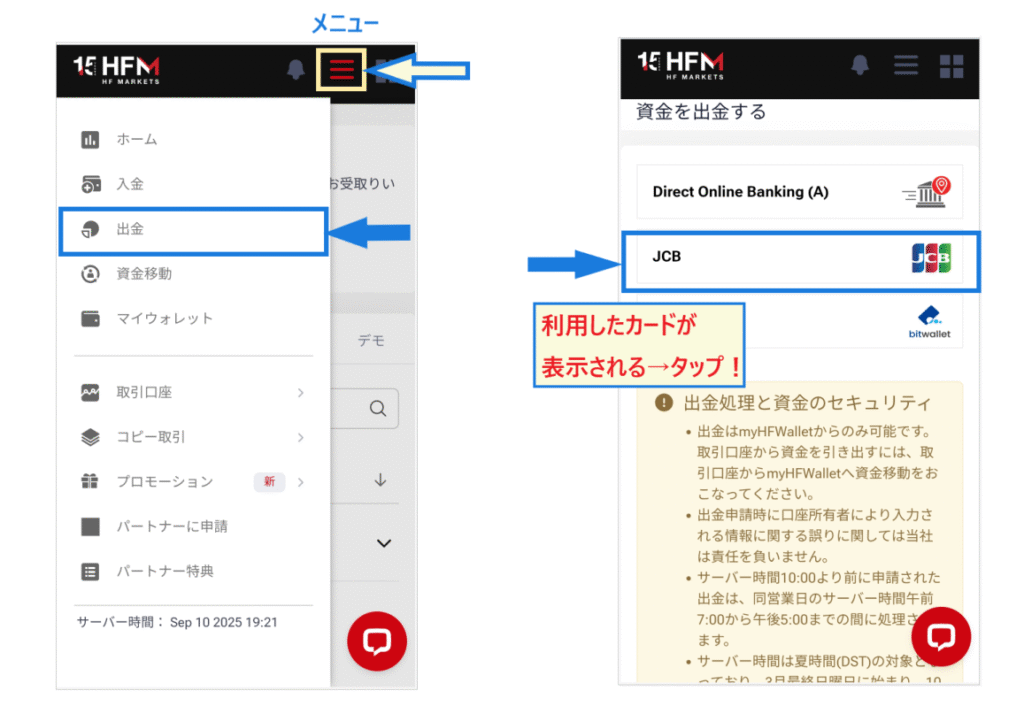
Step 2. Select "Credit Card" on the "Withdrawal" menu screen
Open the myHF menu in the upper right corner, andselect "Withdrawal" → "Credit Card".
Step 3. Enter the amount on the credit card application screen
A screen for requesting a credit card withdrawal will appear.Select either JPY or USD as your currency and enter the withdrawal amount.
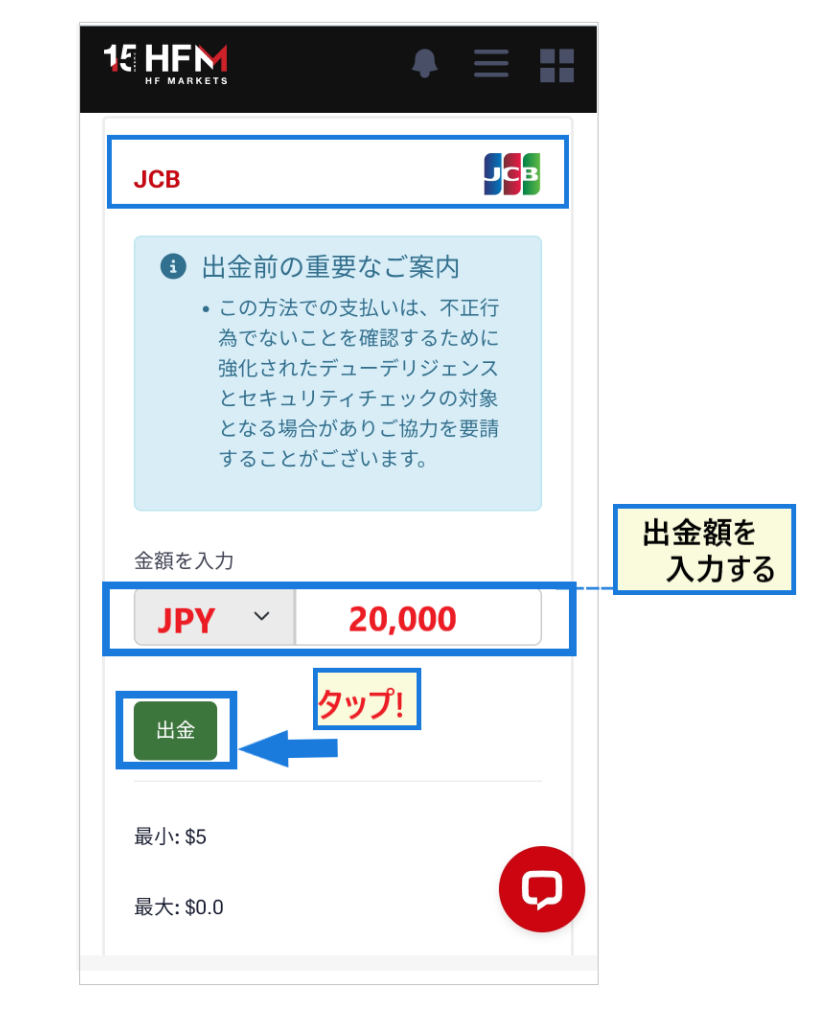
Confirm the amount andtap the "Withdrawal" button. The credit card information you used for the deposit is already recorded, so the process is very simple.
Step 4. Enter the email verification code to complete the withdrawal
When you press the "Withdrawal" button, you will be prompted to confirm your withdrawal request.You will receive an authentication code via email; please enter the code to complete the authentication process.
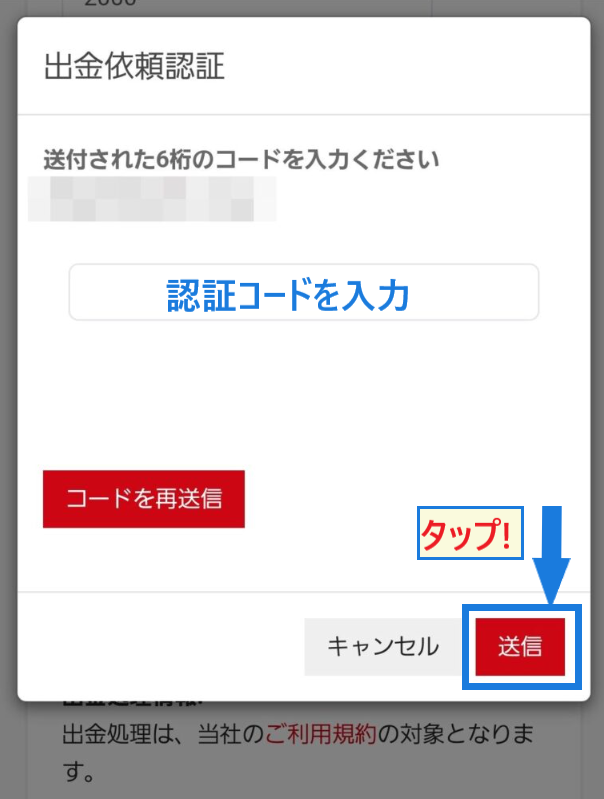
Once you press the "Submit" button and authenticate, your withdrawal requestis complete. All that's left is to wait for the card company to be notified of the cancellation and for the refund to be processed.
Advantages and disadvantages of withdrawing funds from HFM credit card
of withdrawing funds using a credit or debit cardthe ease of the process. You don't need to enter card information; the withdrawal process is completed simply by depositing the funds.
However, a disadvantage of card withdrawals is that it takes time for the funds to be reflected.Credit card withdrawals typically take several days to two weeks,while debit card withdrawals are slightly faster,taking only a few days.
Important points to note when withdrawing funds HFM using a credit card
Depending on your credit card company's billing cycle, the refund may be deferred to the following month
Cancellation notifications usually reach the card company within a few days, so if the withdrawal is taking too long, you should contact your card company
How to withdraw funds via HFM bank transfer (domestic bank transfer)
Next, let's look at the procedure for withdrawing funds via bank transfer
HFM Bank Transfer (Domestic Bank Transfer) Withdrawal Procedure
Withdrawal procedures for bank transfers from HFMare performed by logging into the myHF area (member page)
Step 1. Transfer funds (Trading account → My Wallet)
First, transfer the withdrawal amount from your trading account to My Wallet
- Source of funds → Select the trading account you wish to withdraw from from the dropdown menu.
- Destination for fund transfer → Select Wallet type (USD, JPY)
- Amount to transfer → Amount to withdraw
Once the fund transfer is complete, you will be taken to the withdrawal request screen
Step 2. Select "Bank Transfer" on the "Withdrawal" menu screen
Open the myHF menu in the upper right corner, and select "Withdrawal" → "Bank Transfer (Direct Online Banking)"
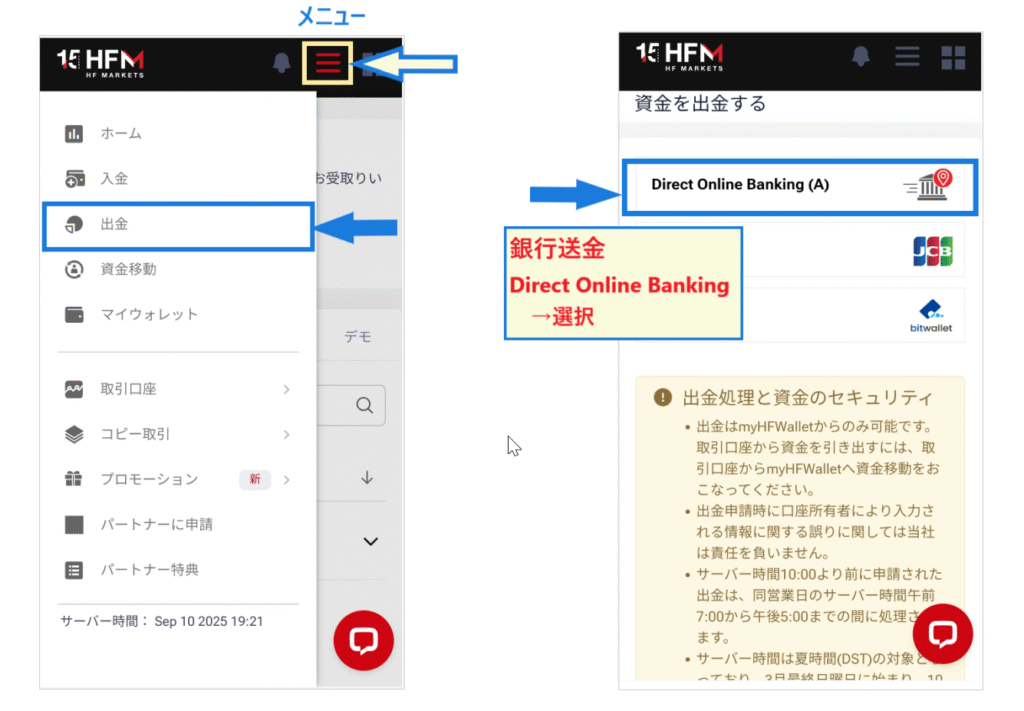
Tap "Bank Transfer" from the withdrawal list
Step 3. Enter your bank account information on the bank transfer withdrawal screen
Next, a screen will appear where you can enter your bank account information

- Withdrawal amount (JPY or USD)
- Bank account name → Katakana spelling
- Bank name → Select from the menu
- Branch Code
- Account type → Regular
- bank account number
Enter the required information as described above, and then review your entries. If everything is correct,tap the "Withdrawal" button.
Step 4. Enter the email verification code to complete the withdrawal
When you tap the "Withdrawal" button, a verification code will be sent to your email. Enter the verification code and tap "Submit" to complete your withdrawal request.
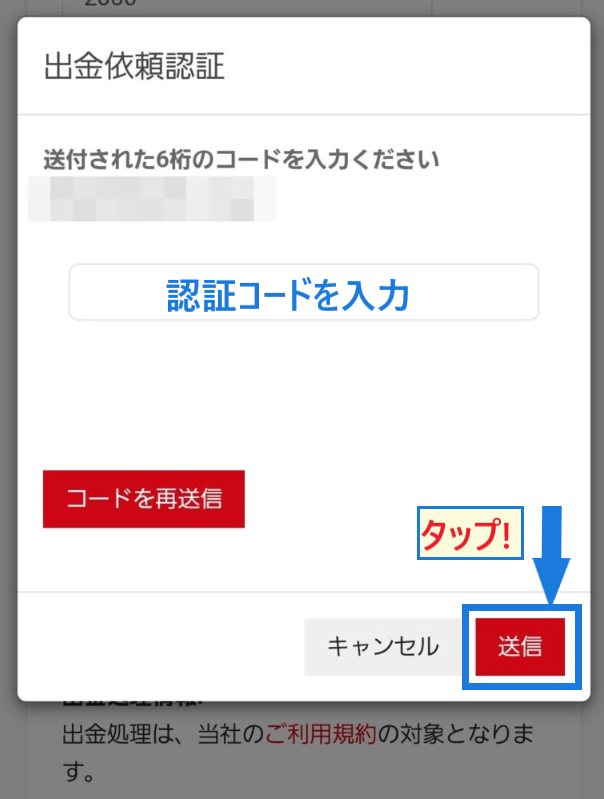
All you have to do now is wait for the funds to arrive in your bank account within a few hours. The maximum withdrawal time is two business days
Advantages and disadvantages of withdrawing funds via HFM bank transfer (domestic bank transfer)
The advantage of bank transfers isyou can withdraw cash directly to your bank account. The processing time is a maximum of two business days, and it works exactly like a regular bank transfer.
On the other hand, the disadvantages of bank transfersthe procedure is somewhat cumbersomeand it can take more than two days. This deposit and withdrawal method is suitable for those who do not require immediate processing.
Important points to note when withdrawing funds HFM bank transfer (domestic bank transfer)
Please be very careful not to make any mistakes when entering your bank account information
If you think you might have made a mistake, contact customer support as soon as possible
How to withdraw funds from HFM bitwallet
Next, we will explain in detail how to withdraw funds from bitwallet
HFM bitwallet withdrawal procedure
Withdrawals from HFM's bitwallet are processed by logging into the myHF area (member page)
Step 1. Transfer funds (Trading account → My Wallet)
Select "Fund Transfer" from the menu in the upper right corner to transfer the funds from your trading account to My Wallet.
- Source of funds → Select the trading account you wish to withdraw from from the dropdown menu.
- Destination for fund transfer → Select Wallet type (USD, JPY)
- Amount to transfer → Amount to withdraw
Please carefully review the information you entered. If everything is correct,the "Transfer Funds" buttonto proceed to the withdrawal screen.
Step 2. Select "bitwallet" on the "Withdrawal" menu screen
Open the myHF menu in the upper right corner, andselect "Withdrawal" → "bitwallet".
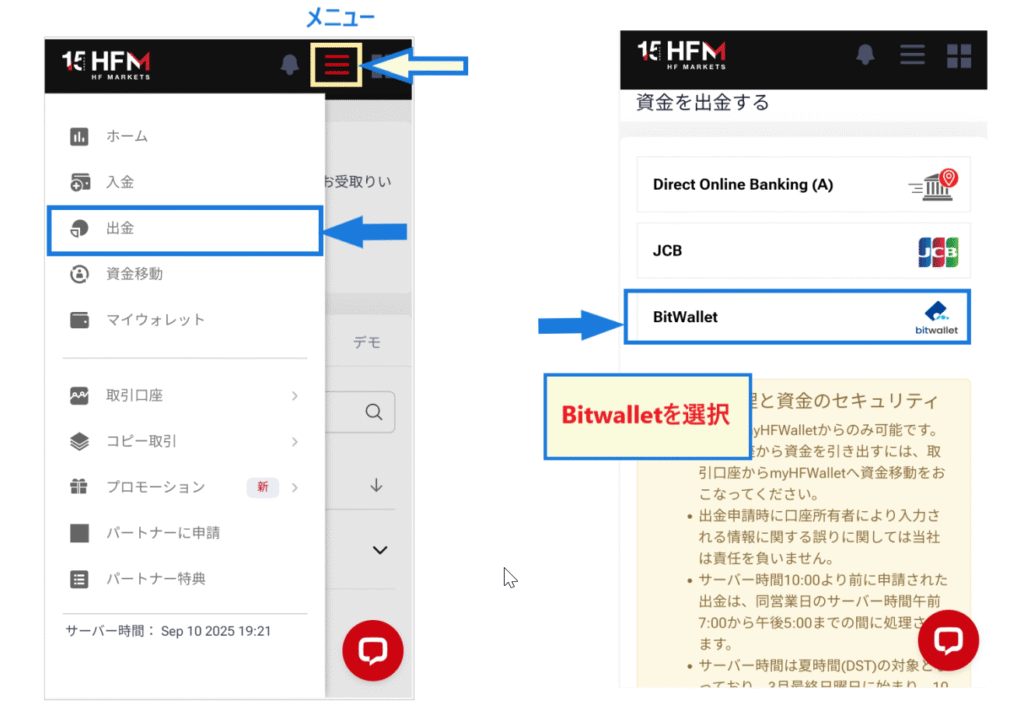
Please select "bitwallet" from the list of withdrawal methods
Step 3. Enter the withdrawal amount on the bitwallet withdrawal request screen
The bitwallet withdrawal screen will appear, so enter the required information

- Withdrawal amount → Enter the amount you wish to withdraw in JPY or USD.
- bitwallet ID(email address)
Carefully review the information you entered, and if there are no errors,tap the "Withdrawal" button.
Step 4. Enter the email verification code to complete the withdrawal
When you tap the "Withdrawal" button, you will receive a verification code for your withdrawal request via email.enter the verification code andpress the "Submit" button.
This completes the withdrawal process from bitwallet. Now, simply wait for the withdrawal amount to be reflected in your bitwallet account. It should be reflected within a few minutes, or even immediately
Step 5. Withdraw funds from bitwallet to your bank account
Once funds arrive in your bitwallet account,need to withdraw them from bitwallet to your bank account. The transfer fee to your bank account is a flat rate of approximately $5.15 (discounts may apply). Registering your bank account in advance will allow for a smoother withdrawal process.
Advantages and disadvantages of withdrawing funds from HFM bitwallet
The main advantage of withdrawing funds via bitwallet isit's processed quickly on average. It's an ideal method for urgent withdrawals. Many overseas forex brokers use bitwallet, anddeposit funds into other brokersfor free is also a convenient feature.
While convenient,it takes time to prepare, including account registration and identity verification. When starting overseas forex trading, it's best to complete identity verification as early as possible.
Important points to note when withdrawing funds from HFM bitwallet
Since there is a fee for transferring funds from bitwallet to your bank account,the fee ratio becomes high for small withdrawals.
It's generally more advantageous to withdraw your funds all at once once you've accumulated a substantial amount
How to withdraw HFM cryptocurrency (BTC, ETH, USDT)
Next, we will explain the procedure for withdrawing cryptocurrency (Crypto Payment). There are two methods for withdrawing cryptocurrency, so be sure not to make a mistake
HFM Cryptocurrency (BTC, ETH, USDT) Withdrawal Procedure
Withdrawals of cryptocurrency from HFMare processed by logging into the myHF area (member page)
Step 1. Transfer funds (Trading account → My Wallet)
First, transfer funds from your trading account to My Wallet
Open the "Fund Transfer" menu and enter the required information
- Source of funds → Select the trading account you wish to withdraw from from the dropdown menu.
- Destination for fund transfer → Select Wallet type (USD, JPY)
- Amount to transfer → Amount to withdraw
Fund transfers to My Wallet are reflected instantly. Once the transfer is complete, proceed to the "Withdrawal" page
Step 2. Select "Crypto Payments" on the "Withdrawal" menu screen
Open the myHF menu in the upper right corner, andselect "Withdrawal" → "Crypto payment".

Step 3. Enter the withdrawal amount on the Crypto Payments application screen
When the withdrawal screen for "Crypto Payments" appears, please enter the required information
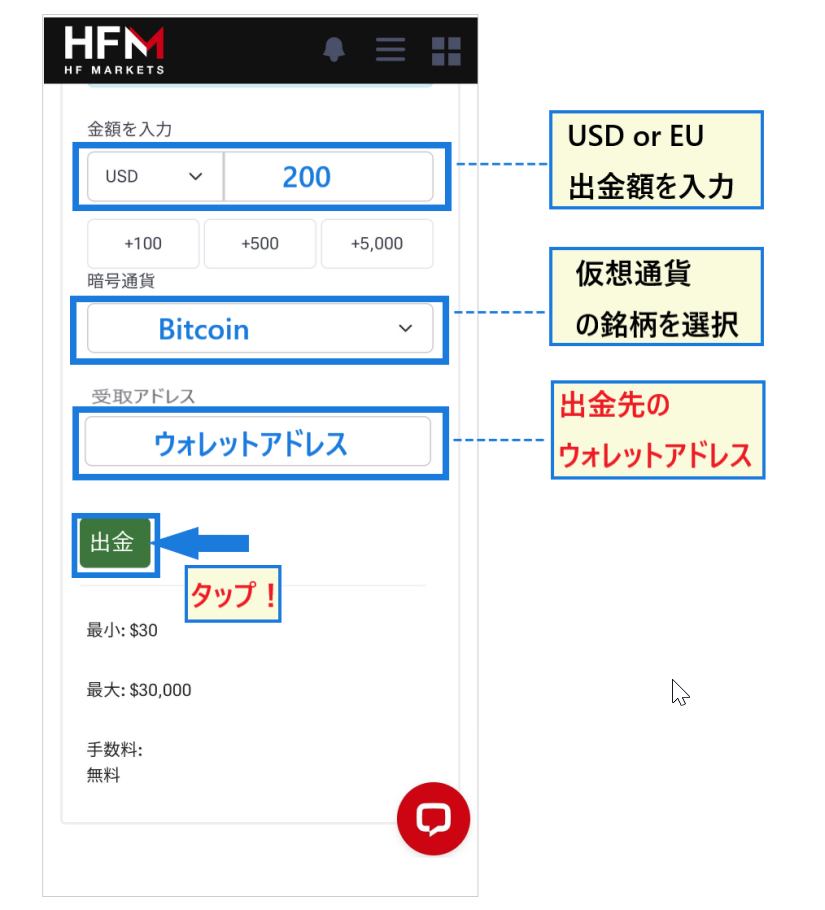
- USD or EUR → Japanese Yen not supported.
- Select the cryptocurrency you want to use → Choose from the dropdown menu.
- Receiving address → Copy and paste the wallet address to which you want to send the funds.
Please carefully check that the information is entered correctly. If everything is correct,press the "Withdrawal" button.
Step 4. Enter the email verification code to complete the withdrawal
When you press the "Withdrawal" button, you will receive a verification code via email. Once you enter the verification code, your withdrawal request will be complete
All that's left is to wait for the funds to arrive. Cryptocurrency withdrawals are generally processed instantly, so please check to see if the funds have arrived successfully
Advantages and disadvantages of withdrawing HFM cryptocurrencies (BTC, ETH, USDT)
The advantage of withdrawing funds in cryptocurrency is that you can withdraw fiat currency (USD, JPY, etc.) from your account as cryptocurrency. Depending on the exchange rate at the time,make a small profit just by going through the withdrawal process.
On the other hand, a disadvantage of withdrawing cryptocurrency is that, depending on the exchange rate, the value may have increased since the deposit,potentially resulting in a loss.
Important points to note when withdrawing HFM cryptocurrencies (BTC, ETH, USDT)
Cryptocurrency withdrawals are not available if you did not use cryptocurrency as your deposit method
If you are using it as your deposit method, you can also withdraw your profits in cryptocurrency, regardless of the specific cryptocurrency
How to withdraw funds from HFM Binance Pay
Next, we will explain how to withdraw funds using Binance Pay, a cryptocurrency payment service. Binance Pay is a wallet service provided by Binance, a major overseas exchange
HFM Binance Pay Withdrawal Procedure
Withdrawals from HFM's Binance Pay account are processed by logging into the myHF area (member page)
Step 1. Transfer funds (Trading account → My Wallet)
First, transfer the amount you wish to withdraw from your trading account to your My Wallet
- Source of funds → Select the trading account you wish to withdraw from from the dropdown menu.
- Destination for fund transfer → Select Wallet type (USD, JPY)
- Amount to transfer → Amount to withdraw
After entering the above information, please be sure to check the details. If there are no problems, tap "Transfer Funds" to confirm the deposit to your Wallet
Step 2. Select "Binance Pay" on the "Withdrawal" menu screen
Next, open the myHF menu in the upper right corner and select "Withdrawal" → "Binance Pay"
Depending on the time of yearSometimes the funds may not appear on the Binance Pay withdrawal screenIn that case, please select Crypto Payment and withdraw your funds using Crypto Payment
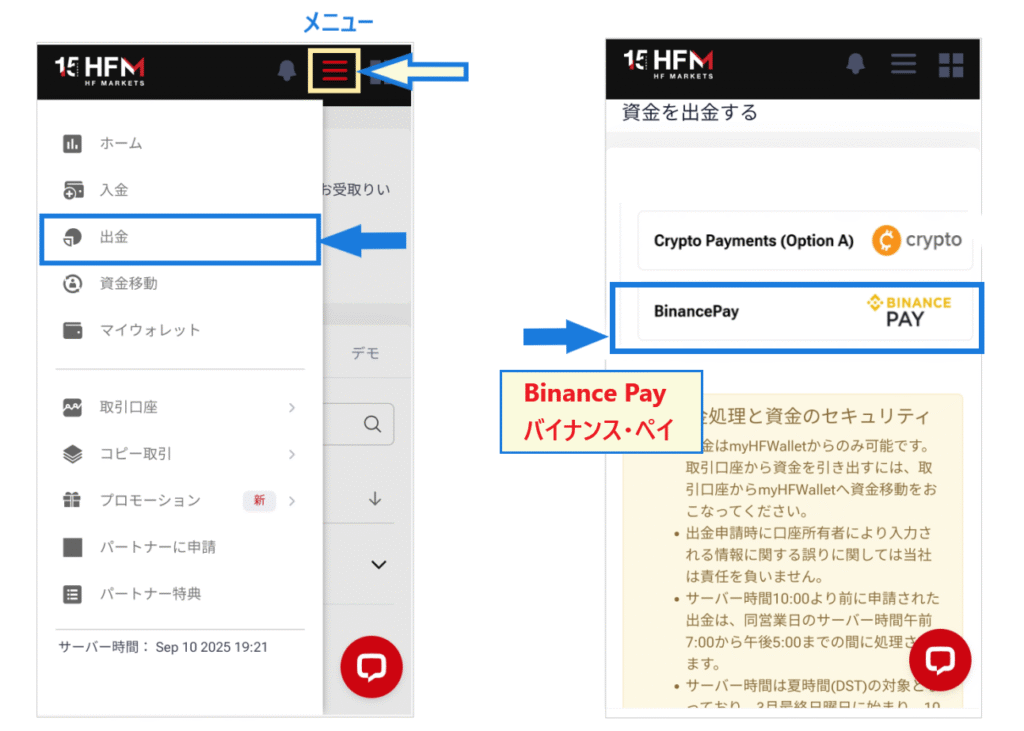
Step 3. Enter the deposit amount on the Binance Pay withdrawal request screen
Once the Binance Pay withdrawal request screen appears, enter the required information
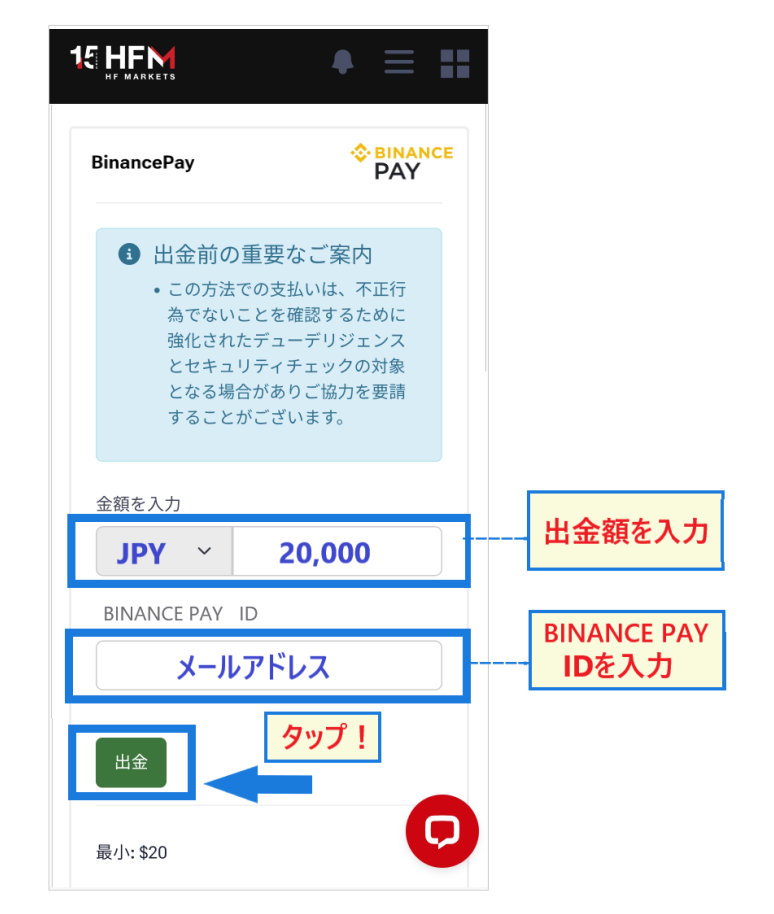
Enter the withdrawal amount in Japanese Yen. Enter your BINACE PAY account ID (email address), confirm the details, and thentap the "Withdrawal" button.
Step 4. Enter the email verification code to complete the withdrawal
When you press the "Withdrawal" button, you will receive a verification code via email
Enter the verification code andclick the "Submit" button. This will confirm your withdrawal request.
HFM Binance Pay Withdrawal: Advantages and Disadvantages
Binance Pay offers the advantage of easy deposits and withdrawals, a drawback isthat it's often unusable for withdrawals. You can use alternative methods such as regular cryptocurrency withdrawals, bank transfers, or bitwallet.
Important points to note when withdrawing funds from HFM Binance Pay
If you are unable to withdraw funds via Binance Pay, try withdrawing via Crypto Paymet first and then transferring the cryptocurrency to Binance Pay
HFM BXONE Withdrawal Procedure

Finally, let's look at one more withdrawal method fromHFM: BXONE
HFM BXONE Withdrawal Procedure
Withdrawals of cryptocurrency from HFMare processed by logging into the myHF area (member page)
Step 1. Transfer funds (Trading account → My Wallet)
- Source of funds → Select the trading account you wish to withdraw from from the dropdown menu.
- Destination for fund transfer → Select Wallet type (USD, JPY)
- Amount to transfer → Amount to withdraw
Enter the above information, be sure to check it, and then tap "Transfer Funds"
Step 2. Select "BXONE" on the "Withdrawal" menu screen
Open the myHF menu in the upper right corner, andselect "Withdrawal" → "BXONE".
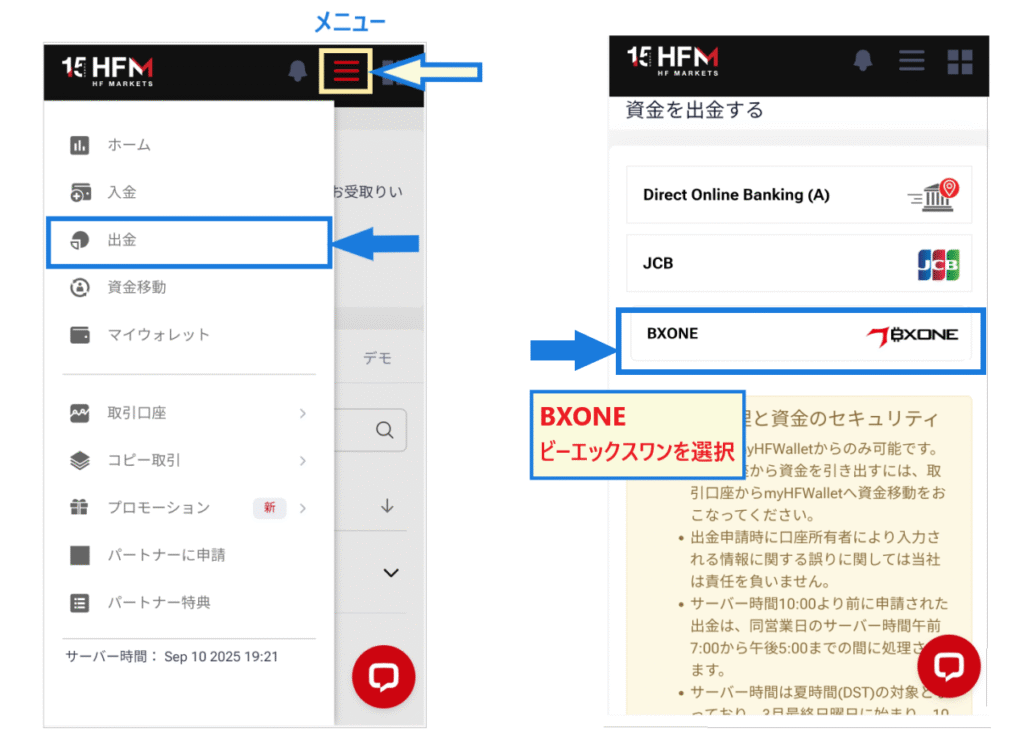
If you haven't used it for deposits, "BXONE" will not be displayed. Also, if you haven't completed a withdrawal via credit card (withdrawal of your deposit amount), you may not be able to withdraw from BXONE
Step 3. Enter the withdrawal amount on the BXONE withdrawal request screen
Once the BXONE withdrawal request screen appears, enter the required information

- Withdrawal amount → Select USD or JPY and enter the amount.
- BXONE ID → Enter your email address
review the information you entered, andif everything is correct,press the "Withdrawal" button.
Step 4. Enter the email verification code to complete the withdrawal
When you press the "Withdrawal" button, you will receive an authentication code via email to confirm your withdrawal
After entering the verification code andpressing the "Submit" button, the withdrawalis complete. BXONE's withdrawal time is almost instantaneous, so all you have to do now is wait for the withdrawal to be reflected in your BXONE wallet.
Advantages and disadvantages of withdrawing funds from HFM BXONE
The advantage of using BXONE issupports both fiat currencies (such as Japanese yen and US dollars) and cryptocurrencies. You can also use BXONE's exchange function to exchange dollars for Japanese yen and Japanese yen for cryptocurrencies.
The disadvantages are that few overseas forex brokers use BXONE, andtransferring funds between overseas forex brokersis somewhat inconvenient.
Important points to note when withdrawing funds from HFM BXONE
One important point to note when using BXONE isa flat fee of approximately $3.13 is charged.
At HFM, you can also use BXONE to withdraw your profits, so try to withdraw them all at once whenever possible
Examples of withdrawal problems and refusals with HFM, and how to deal with them
Needless to say, the ability to withdraw funds is a minimum requirement for anyone engaging in FX trading. Are there any issues withHFM, such as withdrawal refusals? Many people are concerned about whetherHFMis a safe and reliable broker
Here, we'll explain HFMthe reasons why you might be unable to withdraw funds from , why withdrawals might be rejected, and how to resolve these issues
Cases where withdrawal is not possible
HFMTo be honest,a reputable overseas forex broker where you rarely hear complaints about being unable to withdraw funds or having withdrawal requests rejected. Originally,HFMwas established in 2010 under the service name HotForex, and as of 2025, it will have celebrated its 15th anniversary.
Operating in nine countries, HFM holds financial licenses in seven countries, including the UK, Dubai, and Cyprus. With services in 200 countries and over 4 million accounts, it is the largest broker in the industry. Therefore, it can be assumed that a major overseas forex broker likeHFMwould not have any withdrawal problems that would damage its reputation
If I were to give an example, it would be the following case
The deposited amount has not been withdrawn using the same method of deposit
As explained at the beginning,HFM, have "withdrawal rules." A typical example is many overseas forex brokers, including " withdrawing funds using the same method as when you made the deposit."
In particular, because there are restrictions on the period during which withdrawals can be canceled (refunded) via credit card, you may be instructed to withdraw funds via credit card first
You must first withdraw using the same method you used to deposit the moneyOther withdrawal methods will be rejectedSo be careful
The name on the designated bank account and the name onHFMaccount are different
As a general rule, withdrawalsHFMcannot be sent to any account other than the one registered to your.
Withdrawals to family members or accounts under different names will not be approved, so please be sure to use your own bank account or payment service account for the transaction. If your name is in English, the way it is written may vary depending on the financial institution
If the way the name is written changes for any reason,If you can prove your identity, the withdrawal will be approvedIt will be done
The credit card used for the deposit has been updated and the card number has changed
A common reason why withdrawals cannot be processed is that the credit card information, such as the card number, changes when the card is renewed. In this case,the withdrawal will not be approved because the information is different from the card used previously.
Even with the same card, if the card information has changed..If you register updated information, you can withdraw your fundscan
The withdrawal destination information you entered is incorrect
Sometimes, people make mistakes when entering bank account information or payment service account information.If you don't enter the correct information and proceed with the withdrawal, itwill be rejected.
When you initiate a withdrawal,Carefully check the information for any errorsLet's do that
In the cases we've seen above, the issues can be resolved by contacting customer support.HFM, unless there's a very good reason, At you can rest assured that while withdrawals may be delayed, they will never be impossible to withdraw
Incidentally, the following article contains a report from our website, "Money Charger (Manecha)," about our visit toHFM's Cyprus branch. Please refer to it to learn more about what kind of companyHFMis
Reasons for withdrawal refusal or account freezing
Unfair withdrawal problems are unlikely withHFM,Violating the terms and conditions may result in withdrawal refusal or account freezing atHFMThis is the result
I looked into what kinds of rule violations there might be by checking X (formerly Twitter), blogs, and other sources
Fraudulent use of bonuses
Overseas forex brokers like HFM, which frequently hold bonus campaigns and cashback offers, are plagued by cases of fraudulent use of bonuses. Fraudulent use of bonuses will result in immediate withdrawal refusal and account freezing
- I opened an account using the names of family, friends, or other people in order to receive a bonus
- They obtained a bonus by falsifying (forging) their personal information
- Hedging was performed using multiple accounts
- He used another broker to perform hedging (arbitrage)
If you falsify information to get a bonus, or if you abuse the bonus to engage in arbitrage,Profits may be seized, and you may not even be able to withdraw the deposited fundsthere is
Bonuses from overseas forex brokers are incentives offered as a courtesy to "acquire customers." Please be careful to use these bonuses in a fair manner
Violation of terms and conditions
Even without any abuse of bonuses,some traders violate the trading rules with extreme trading strategies,.
- High-speed scalping software for frequent large-lot trading
- Trading in large lots, targeting only the release of economic indicators
- Trading in large lots, targeting only gap-opening and gap-closing trades
- I withdrew funds without ever making a transaction, such as through cryptocurrency exchange
Short-term trading, such as scalping, does not violate the terms of service as long as you are trading normally. However, scalping with large lot sizes may raise suspicion, so you should be carefulSince you might unknowingly violate the terms of service, be sure to readHFM's terms of service。
HFMofficial media outlets have published information regarding withdrawal refusals. Please refer to them as well
Additionally, please check out the article below, which thoroughly investigatesHFM's withdrawal refusals
What to do if you can't withdraw funds
If you're having trouble withdrawing funds without knowing the reason, or if your withdrawal is taking a long time, contact customer service immediately
Customer service can be easily accessed through the chat icon in the myHF area (member page) . If you prefer not to use chat, you can also contact us via email
[What you need when making an inquiry]
- ID
- email address
- A screenshot showing the withdrawal process (if possible)
Contact customer support via chat
Once you log in to the myHF area (member page),a red chat iconwill appear in the bottom right corner. Tapping this will bring up the live chat access screen.
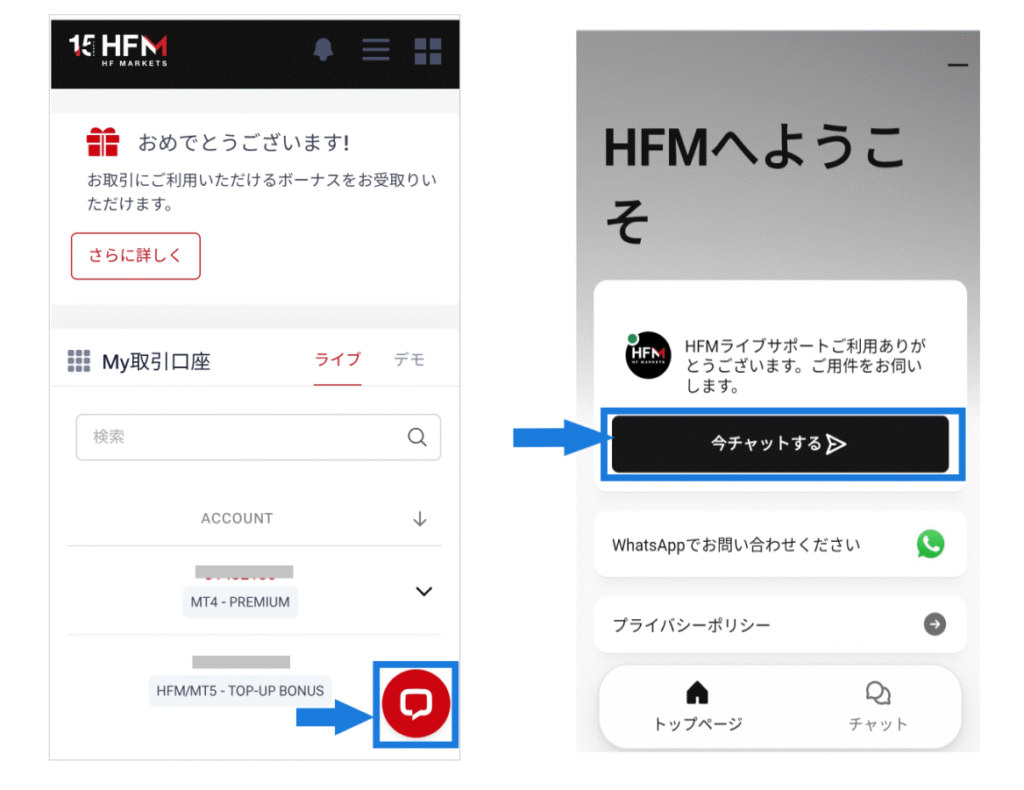
Tapping "Chat Now" will allow you to contact a Japanese representative directly
Contact customer support via email
If you wish to contact us by email, please tap the square icon in the upper right corner of the home screen to open the inquiry icon (speech bubble icon)
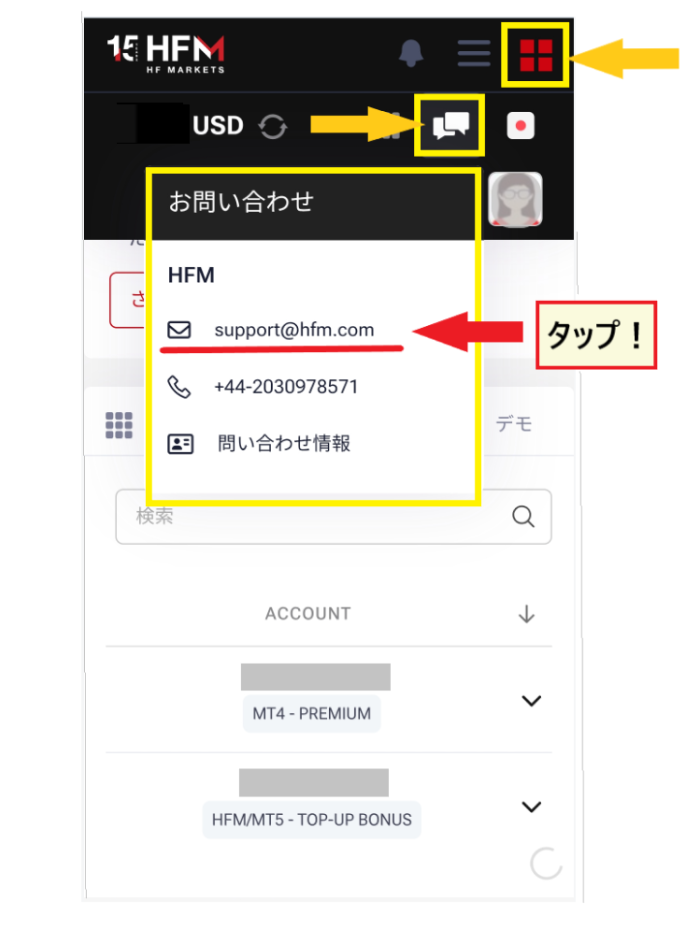
HFM's email addresswill take you to the email inquiry screen. If you have any concerns, it's best to contact them as soon as possible. We recommend that you actively utilize customer service without hesitation.
In the case of HFM, it seems that their withdrawal rules are not as strictly restricted as those of other companies. We have heard that they are quite flexible in their handling of withdrawal requests. If you are unable to withdraw using the same method you used to deposit your funds, or if you would like to use an alternative method, please contact customer support
Frequently Asked Questions about HFMWithdrawal Methods
Finally, let's look at some frequently asked questions aboutHFM's withdrawal methods
Please use this as a reference if you are having trouble deciding on a withdrawal method
What is the fastest withdrawal method using HFM?
HFMThe fastest withdrawal method atSpecifically, "bitwallet" and "BXONE". Payment services are also recommended because deposits are reflected quickly, but it may take some time for the funds to be transferred from the payment service to your bank account.
If you want to deposit money into your bank account quickly, "bank transfer"might be a better option.
Why can't I choose a withdrawal method for HFM?
HFM's withdrawal methodsvary depending on the deposit method used. If you used a credit card for your deposit, withdrawals will be prioritized to your credit card. Once the credit card withdrawal is complete, you will be able to withdraw using other methods.
What is the best method for withdrawing profits?
Once your deposit has been withdrawn,the recommended withdrawal methods for your profitsare bank transfer or bitwallet. If you want to receive the funds directly into your bank account, bank transfer is recommended. If you are unsure how you will use the funds after withdrawal, you can also withdraw them to bitwallet for the time being.
Does it sometimes take time for withdrawals to be reflected in the system?
HFMThe withdrawal times listed on 's official website are only estimates. Depending on the circumstances at the time, it may take longer for the funds to be reflected . Withdrawals other than those made by credit card generally do not take more than a few days, so if it is taking a long time, please contact customer support as soon as possible
What should I do if my withdrawal is rejected?
If your withdrawal is refused, there are two possible solutions. If you suspect you may have committed fraudulent activity, it seems you have no choice but to accept the refusal. This is because the terms of service clearly state that withdrawals may be refused or accounts may be frozen in case of violations of the terms. If you have no idea why this is happening, try contacting customer support. It is important to ask questions as many times as necessary until you are satisfied with the explanation
Summary: Understand the relationship between withdrawals and deposits atHFM!

This time, we've provided a detailed explanation of how to withdraw funds fromHFM
HFMoffers six withdrawal methods: "Credit/Debit Card," "Bank Transfer," "bitwallet," "Cryptocurrency (BTC, ETH, USDT)," "Binance Pay," and "BXONE." However, the withdrawal method you can actually use is the same one you used for your deposit
Once your initial deposit has been withdrawn, you are free to choose to withdraw your profits. By thoroughly understandingHFM's deposit and withdrawal procedures and mechanisms, you can effectively use the deposit and withdrawal method that suits you best
Furthermore,HFMFX accountwith our website "Money Charger (Manecha)," you can receive a portion of the spread back as cashback. This service is available to both new and existing customers.
in particularHFM, is popular for its high cashback rate. If you want to reduce spread costs, take this opportunityto register with "Moneycha" andreceive cashback.