Exness offers a variety of deposit methods, making it convenient for a wide range of users, from small-scale traders to advanced traders and cryptocurrency traders
| Payment Methods | Supported currencies | Reflection time | Minimum deposit amount | Maximum deposit per transaction |
|---|---|---|---|---|
| Bank transfer (domestic bank transfer) | JPY/USD | Up to 24 hours | $100 equivalent | Equivalent to $2,500 |
| Credit card / Debit card | JPY, USD, EUR | Immediately | $10 equivalent | Equivalent to $10,000 |
| STICPAY | JPY/USD | Immediately | $10 equivalent | Equivalent to $10,000 |
| Cryptocurrency | BTC, USDT, USDC, TRX | Immediately | $10 equivalent | Equivalent to $200,000 |
The minimum deposit is as low as $10, and the fact that there are no fees makes it an attractive option for keeping costs down
This article provides a thorough explanation of each deposit method, including its features, points to note, and solutions for when you are unable to make a deposit
Contents
- 1 Exness deposit overview
- 2 List of deposit methods for Exness
- 3 Reasons and solutions for when deposits are not reflected or cannot be made in Exness
- 3.1 Delays in deposit reflection may be due to bank maintenance or processing
- 3.2 If you cannot make a payment by credit card, identity verification is required
- 3.3 If you are unable to deposit funds into your bank account or the deposit is not reflected in your account, it is often due to an error in entering the transfer ID
- 4 Exness deposit rules and restrictions
- 5 Which deposit method is recommended for Exness?
- 6 Frequently Asked Questions about Deposits at Exness
- 7 Summary of Exness deposits
Exness deposit overview
Here, we will explain the basic specifications of deposits to Exness, focusing on the following three points
- Exness offers a variety of deposit methods and is easy for beginners to use
- The minimum deposit is $10, so you can start with a small amount
- Deposit fees are free, so you can use it without worrying about costs
Exness offers multiple deposit methods, making it attractive to users as they can choose one that suits their financial situation and trading style
We provide an environment where even those using overseas forex trading for the first time can start trading with peace of mind
Exness offers a variety of deposit methods and is easy for beginners to use
Exness offers a wide range of deposit methods, including domestic bank transfers, credit and debit cards, STICPAY, and cryptocurrencies
With a wide variety of deposit methods available, both beginners who want to start with a small amount and advanced users who want to deposit a large sum of money can choose the method that suits their situation
Cryptocurrency and card deposits can be processed instantly, making it ideal for those who want to quickly access their funds for trading
The minimum deposit is $10, so you can start with a small amount
Exness has a minimum deposit of $10, making it suitable for those who want to try overseas forex trading with a small amount of capital
Since many domestic FX brokers require a deposit of tens of thousands of yen or more, the fact that you can start trading with as little as $10 is a major advantage
This allows users to experience a real trading environment while minimizing financial risk, providing reassurance for first-time traders

Furthermore, the ability to deposit small amounts is convenient for advanced traders who want to diversify their funds by managing multiple accounts and minimize leverage restrictions
Deposit fees are free, so you can use it without worrying about costs
In Exness, allNo fees for this payment methodis
There are no user fees for any method of payment, including domestic bank transfers, card deposits, online wallets, and cryptocurrencies
For example, while other companies may charge several thousand yen in fees for bank transfers, a major advantage of Exness is that you can use the funds you deposit directly for trading
List of deposit methods for Exness
| Payment Methods | Supported currencies | Reflection time | Minimum deposit amount | Maximum deposit per transaction |
|---|---|---|---|---|
| Bank transfer (domestic bank transfer) | JPY/USD | Up to 24 hours | $100 equivalent | Equivalent to $2,500 |
| Credit card / Debit card | JPY, USD, EUR | Immediately | $10 equivalent | Equivalent to $10,000 |
| STICPAY | JPY/USD | Immediately | $10 equivalent | Equivalent to $10,000 |
| Cryptocurrency | BTC, USDT, USDC, TRX | Immediately | $10 equivalent | Equivalent to $200,000 |
The payment methods supported by Exness are summarized in the table above
This section explains the features and points to note for each deposit method, as well as the procedure for depositing funds into your Exness trading account
Deposits from Exness via domestic bank transfer

| item | Content |
|---|---|
| Payment Methods | Bank transfer (domestic bank transfer) |
| Supported currencies | JPY/USD |
| Reflection time | Up to 24 hours |
| Minimum deposit amount | $100 equivalent |
| Maximum deposit per transaction | Equivalent to $10,000 |
Here, we will introduce two methods for domestic bank transfers with Exness
- Domestic bank transfer deposit procedure
- Features and points to note about domestic bank transfers
Here's a look at the procedure, features, and important points to consider when depositing funds into your Exness trading account using domestic bank transfer
Domestic bank transfer deposit procedure
The procedure for depositing funds into Exness via domestic bank transfer is as follows:
Log in to your Exness member page
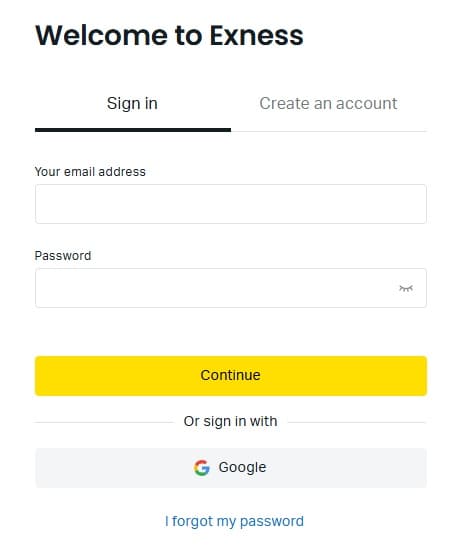
First, log in to your Exness member page
If you are making a deposit via the Exness mobile app, log in to your Exness account through the app
Open the deposit menu
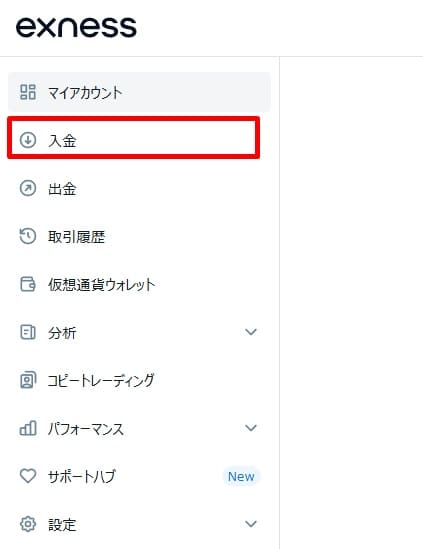
Open "Deposit" from the menu
Select "Bank Transfer" from the list of deposit methods
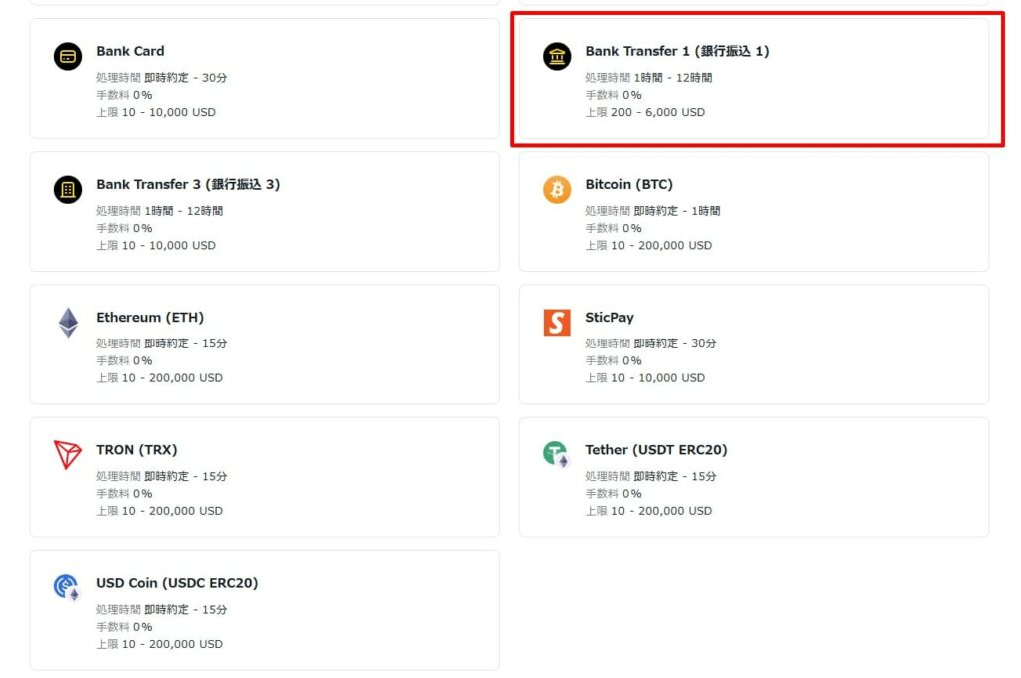
From the list of payment methods, select "Bank Transfer"
There are several domestic bank transfer options available, but be aware that the minimum and maximum deposit amounts may differ because they are handled by different money transfer service providers
Enter the deposit information for domestic bank transfer
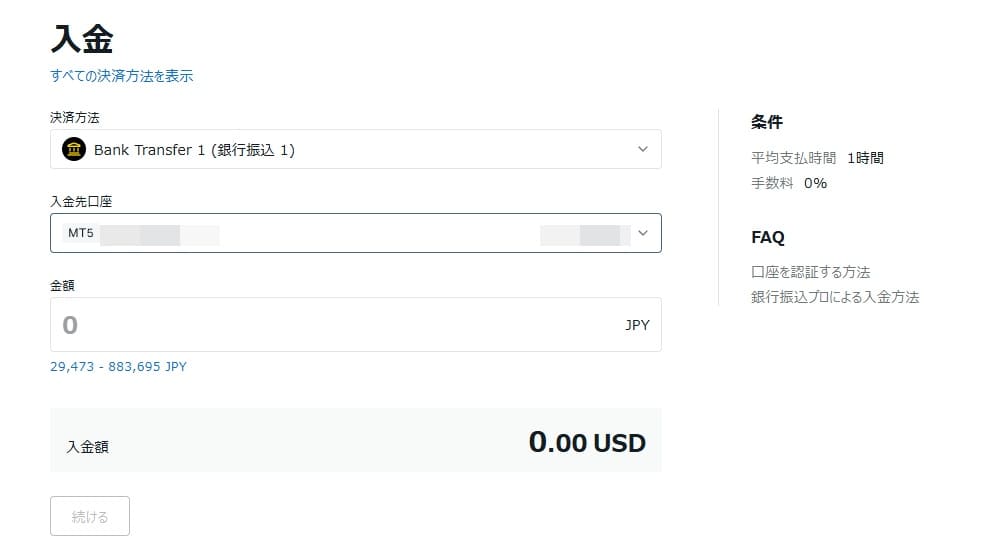
Set the amount to be deposited via domestic bank transfer and the recipient's account, then press "Continue"
Please confirm the payment information
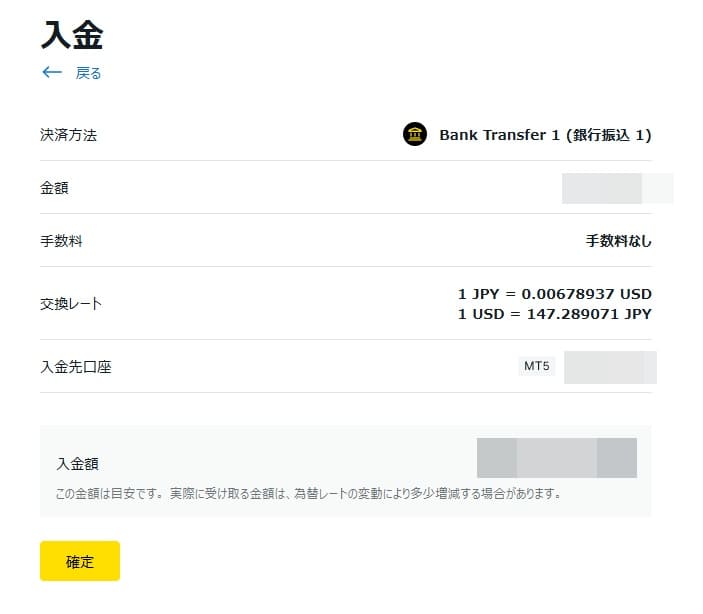
Please review the payment information and press "Confirm"
Transfer to the designated account
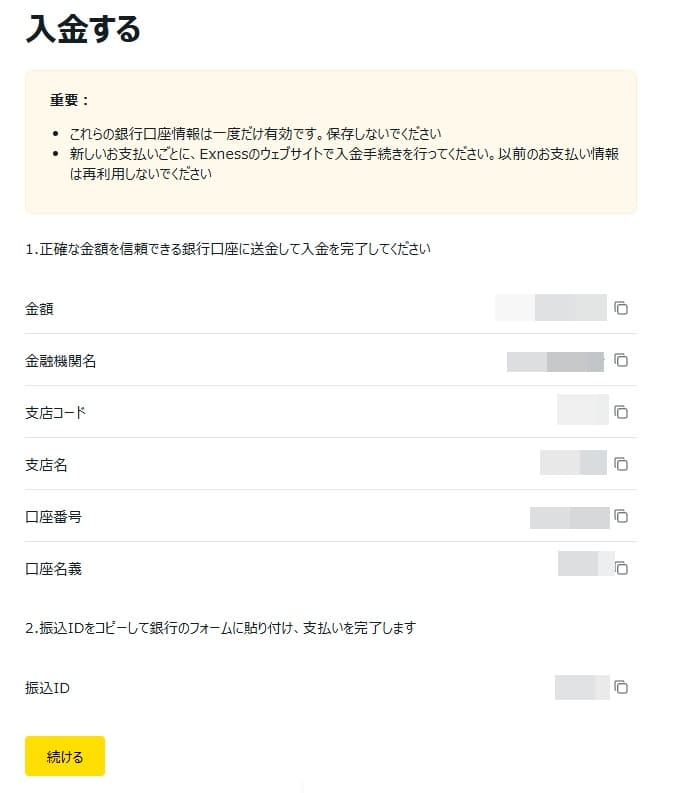
The recipient's payment information will be displayed
When making a deposit, be sure to enter your "Transfer ID" in the remitter's name field
After the transfer is completed, the funds will be reflected in your Exness account within approximately 1 hour to 1 business day
If you forget to enter your transfer ID, your payment will not be processed. If you forget to enter your transfer ID, be sure to contact Exness support
Features and points to note about domestic bank transfers
With Exness, deposits via domestic bank transfer work as follows: once you deposit funds into the bank account of a payment processing company partnered with Exness, the funds will be reflected in your Exness account
The characteristics and points to note regarding deposits made via domestic bank transfer are as follows:
- It supports large deposits and offers high stability
- It may take up to 24 hours for the changes to be reflected
- Delays may occur during bank maintenance
- The transaction will not be processed unless you enter the transfer ID correctly
Domestic bank transfers are a suitable deposit method for users planning large deposits or withdrawals
Because you can transfer money directly from a Japanese bank, there are no refund procedures when withdrawing funds after depositing via card, and there is no hassle of withdrawing funds from a wallet like with online wallets
On the other hand, compared to other deposit methods, it can take up to 24 hours for the deposit to be reflected in your account
Exness credit card/debit card deposit

| item | Content |
|---|---|
| Payment Methods | Credit card / Debit card |
| Supported currencies | JPY, USD, EUR |
| Reflection time | Immediately |
| Minimum deposit amount | $10 equivalent |
Here, we will explain two ways to deposit funds into Exness using credit or debit cards
- Credit card/debit card deposit procedure
- Features and points to note regarding credit card and debit card deposits
Card deposits are a convenient deposit method that can be reflected instantly, but there are many points to be aware of, so be sure to carefully check the procedures and precautions beforehand
Credit card/debit card deposit procedure
The procedure for depositing funds into Exness using a credit or debit card is as follows:
Log in to your Exness member page
First, log in to your Exness member page
If you are making a deposit via the Exness mobile app, log in to your Exness account through the app
Open the deposit menu
Open "Deposit" from the menu
Select "Bank Card" from the list of deposit methods
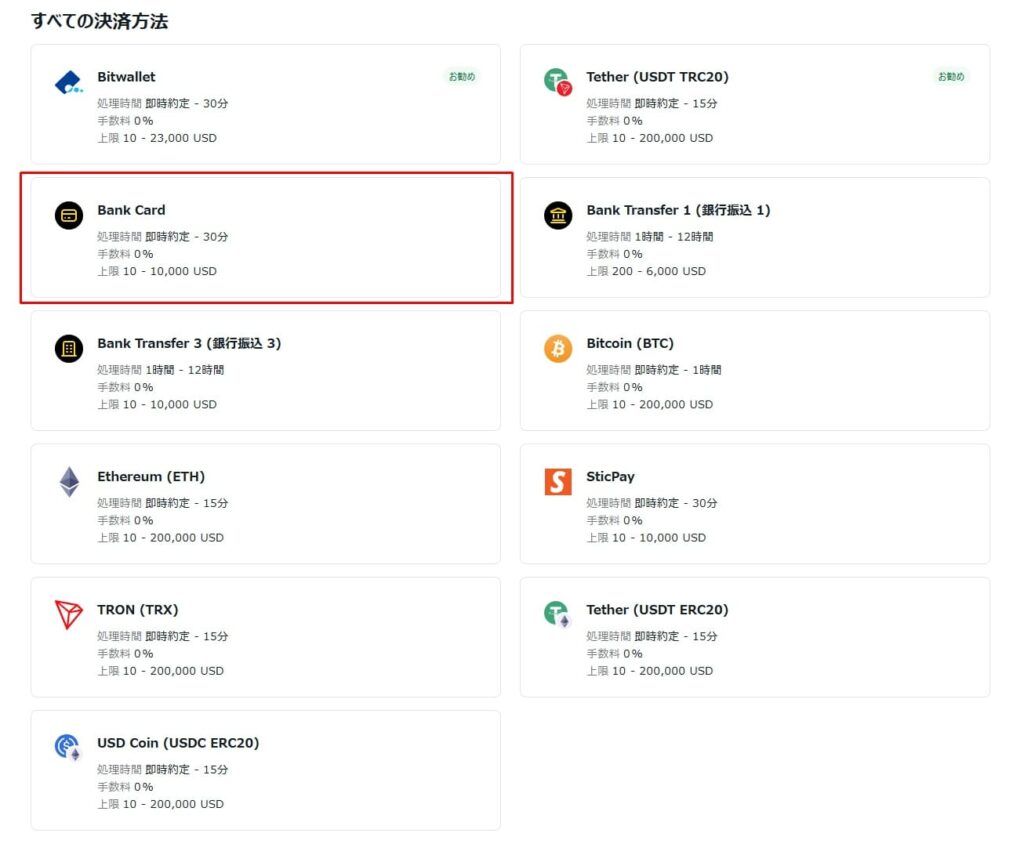
Select "Bank Card" from the list of deposit methods
Set card information and deposit amount
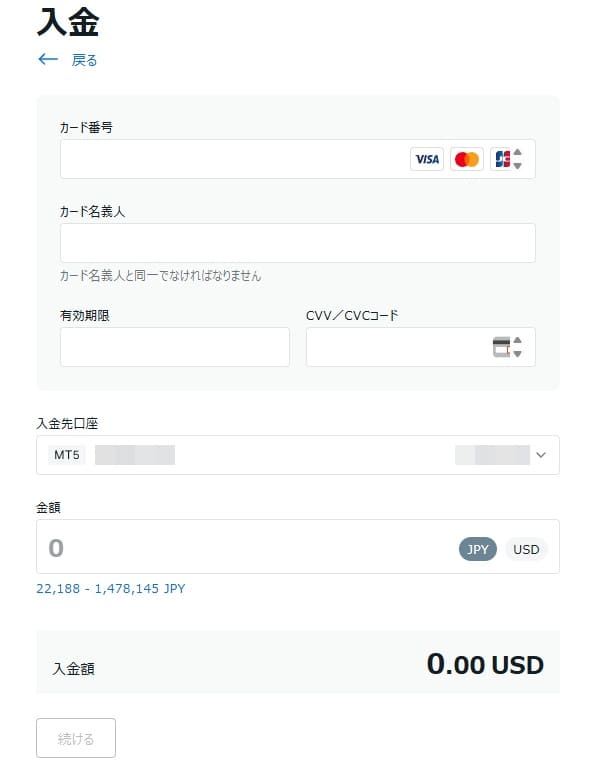
Enter the card information you will use for the deposit, the bank account to which the deposit will be made, and the amount you wish to deposit using the card, then press "Continue"
Complete the card payment
The payment screen for the card you will use to make a deposit will be displayed
Enter your password and other information according to your card to complete the payment
The funds will be reflected in your Exness account immediately after the card payment is completed
Features and points to note regarding credit card and debit card deposits
Deposits to Exness via credit or debit card use the same system as regular card payments
Therefore, its greatest feature is the speed at which deposits are reflected in the account
- Transactions are reflected immediately, allowing for quick trading
- Available for small amounts with no fees
- If your identity verification is not complete, you may not be able to make a deposit
- Some credit card companies may impose restrictions on usage
Card deposits allow you to deposit small amounts and are reflected instantly, but there are a few things to keep in mind
First, be aware that some credit card companies prohibit using them for deposits into overseas forex trading accounts
Furthermore, since withdrawals involve canceling the card payment, it may take more than three months for the card company to process the transaction
Exness STICPAY deposit
| item | Content |
|---|---|
| Payment Methods | STICPAY |
| Supported currencies | JPY/USD |
| Reflection time | Immediately |
| Minimum deposit amount | $10 equivalent |
| Maximum deposit per transaction | Equivalent to $10,000 |
Here, we will introduce two aspects of Exness's STICPAY
- STICPAY deposit procedure
- Features and points to note about STICPAY deposits
Let's review the deposit procedure and important points regarding STICPAY's specifications
STICPAY deposit procedure
The procedure for depositing funds into Exness using STICPAY is as follows:
Log in to your Exness member page
First, log in to your Exness member page
If you are making a deposit via the Exness mobile app, log in to your Exness account through the app
Open the deposit menu
Open "Deposit" from the menu
Select "STICPAY" from the list of payment methods
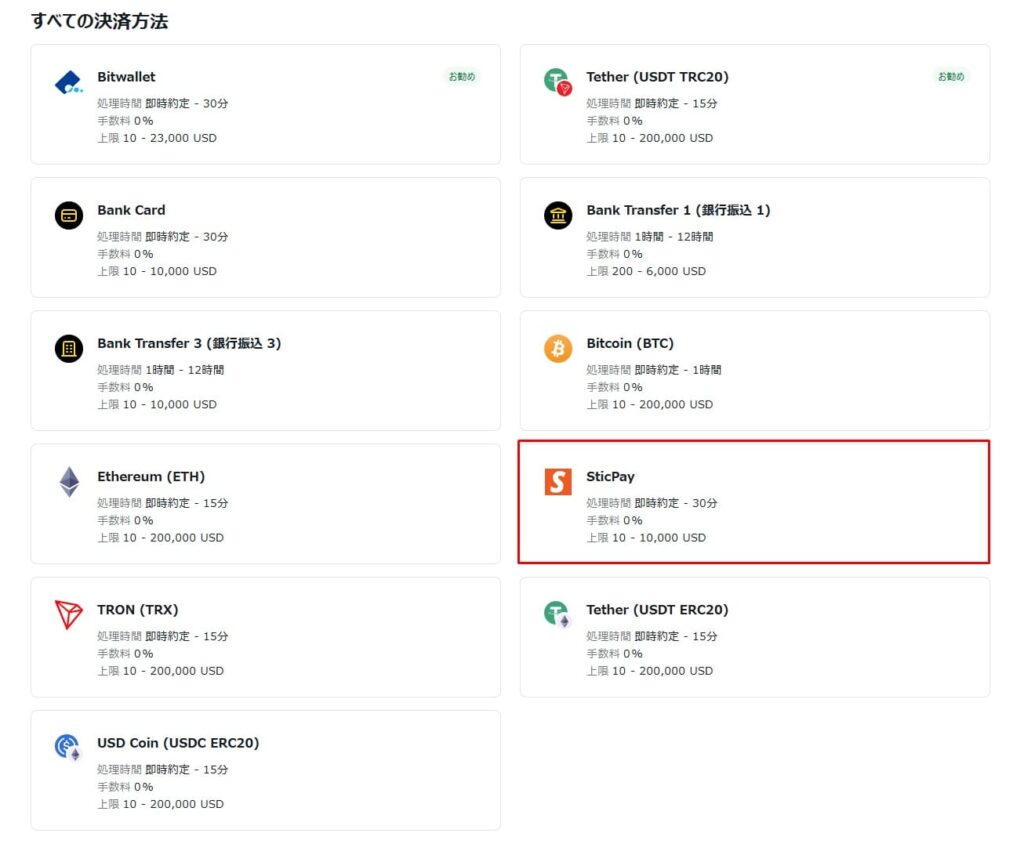
Select "STICPAY" from the list of payment methods
Set up your payment information
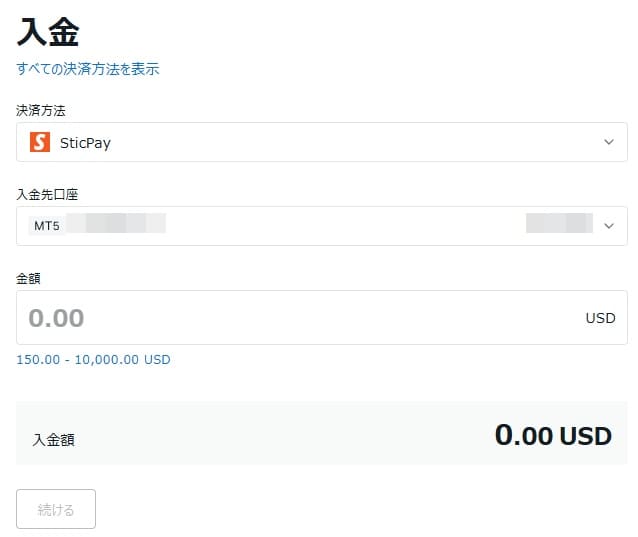
Set the amount you want to deposit and the trading account to which you want to deposit using STICPAY, then press "Continue"
Deposit via STICPAY from the confirmation screen
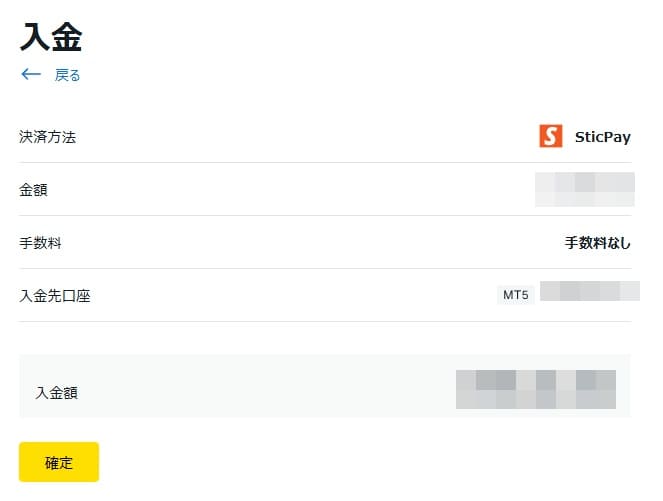
On the confirmation screen, pressing "Continue" will take you to the STICPAY login screen. If you complete the deposit there, the funds will be immediately reflected in your Exness account
Features and points to note about STICPAY deposits
Since some overseas forex brokers support this, you can use it to transfer funds from other companies' accounts via your wallet
- It supports immediate reflection and offers high convenience
- Deposits and withdrawals are both free of charge (by Exness)
- STICPAY account registration is required
- STICPAY will charge a fee
Regarding deposits to STICPAY, as with other online wallets, you will need to prepare a STICPAY account and complete the Exness account verification process in advance.
Regarding fees, Exness will not charge any deposit or withdrawal fees, but STICPAY will charge its own deposit and withdrawal fees
Exness cryptocurrency deposits (USDT, Bitcoin, etc.)

| item | Content |
|---|---|
| Payment Methods | Cryptocurrency |
| Supported currencies | BTC, USDT, USDC, TRX |
| Reflection time | Immediately |
| Minimum deposit amount | $10 equivalent |
| Maximum deposit per transaction | Equivalent to $200,000 |
Here, we will introduce two points regarding cryptocurrency deposits to Exness
- Cryptocurrency deposit procedure
- Features and points to note regarding cryptocurrency deposits
For cryptocurrency traders, cryptocurrency deposits allow them to send funds directly from their exchange accounts
Let's check the details, including any unique specifications specific to cryptocurrencies that are not available in other deposit and withdrawal methods
Cryptocurrency deposit procedure
The procedure for depositing funds into Exness using cryptocurrency is as follows:
Log in to your Exness member page
First, log in to your Exness member page
If you are making a deposit via the Exness mobile app, log in to your Exness account through the app
Open the deposit menu
Open "Deposit" from the menu
Choose the cryptocurrency you want to deposit from the list of deposit methods
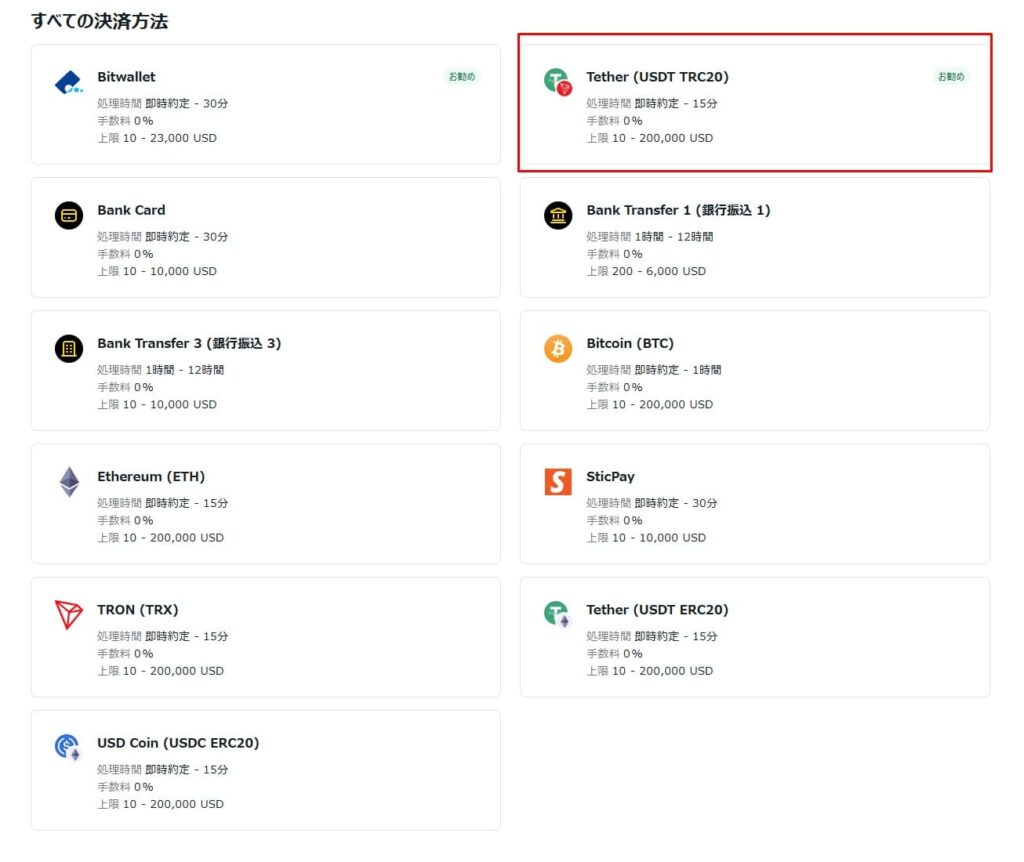
Select the cryptocurrency you want to use for your deposit from the list of deposit methods
Proceed to confirmation screen
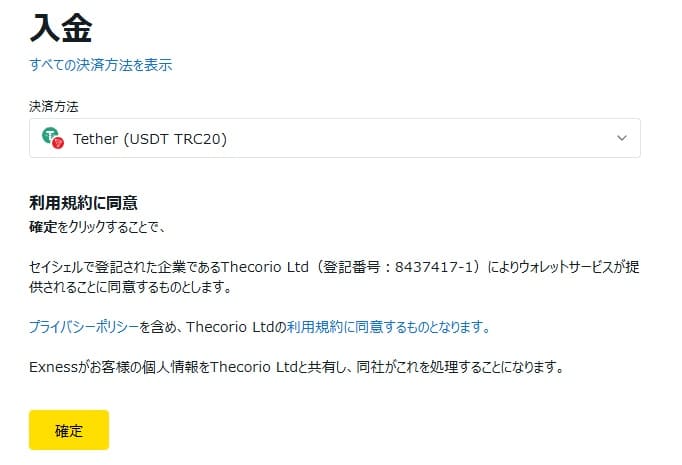
A confirmation screen will appear regarding the use of the wallet service used for sending cryptocurrency
Please review the terms of service and press "Confirm"
Check the bank account to which the payment will be made
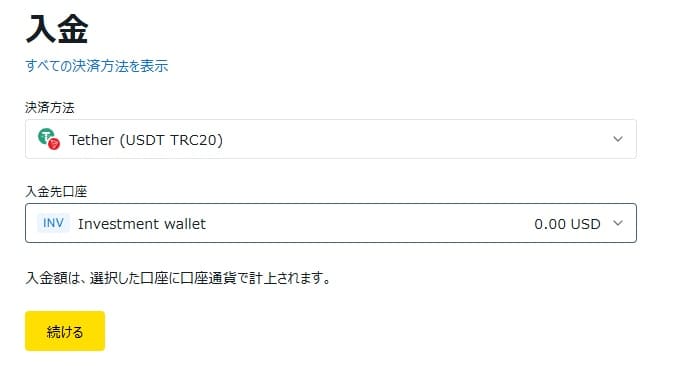
Set up the wallet for your trading account or Exness account where you will receive deposits
When you press "Continue," the recipient's address will be displayed, so be sure to check the address before sending the funds. Once the cryptocurrency deposit is received, it will be reflected in your Exness account immediately
Features and points to note regarding cryptocurrency deposits
You can deposit cryptocurrency into Exness by sending it directly from your cryptocurrency exchange account or cryptocurrency wallet to Exness
- It can handle large deposits and is suitable for large-scale investments
- Network congestion can cause the update time to vary
- There is a risk of price fluctuations in cryptocurrencies
- Entering the wrong remittance address carries the risk of losing funds
Because transfers are made using each cryptocurrency's network, transaction congestion can cause delays, making cryptocurrencies with faster transfer speeds highly valued
Furthermore, due to the nature of cryptocurrencies, there is a risk of losing funds if you send them to the wrong address, so caution is advised
Reasons and solutions for when deposits are not reflected or cannot be made in Exness
While Exness generally allows for instant deposits, there may be cases where deposits are not reflected depending on the circumstances
- Delays in deposit reflection may be due to bank maintenance or processing
- If you cannot make a payment by credit card, identity verification is required
- If you are unable to deposit funds into your bank account or the deposit is not reflected in your account, it is often due to an error in entering the transfer ID
Deposit problems can cause significant anxiety, so here we have compiled solutions for different reasons why your deposit might not be reflected
Delays in deposit reflection may be due to bank maintenance or processing
While deposits to Exness are usually processed instantly through many methods, bank transfers may take up to one business day to be reflected
Processing is often temporarily delayed, especially when financial institutions are closed or online wallets are undergoing maintenance
Additionally, updates tend to be delayed on weekends and public holidays
Beforehand, check the business hours of the bank you will be using for deposits and any maintenance information for your online wallet. If maintenance is in progress, use alternative methods such as card deposits
If you cannot make a payment by credit card, identity verification is required
If you are unable to deposit funds using your credit card, it is often because your identity verification process has not been completed. At Exness, to prevent money laundering and protect our users, there are restrictions on the amount you can deposit and the payment methods you can use if you have not completed identity verification and address verification
| Account Verification | deposit limit | Available payment methods |
|---|---|---|
| Unverified | Equivalent to $2,000 | Domestic bank transfer STICPAY |
| Verification of economic status and identity documents completed | Equivalent to $50,000 | Domestic bank transfer STICPAY |
| Verification of address documents | No restrictions | All payment methods |
For example, if your credit card is rejected during your initial deposit, it can usually be used after submitting identity verification documents
To ensure smooth transactions, please complete your profile verification as soon as possible
Information required for identity verification
Photo ID (such as a driver's license or passport)
Documents that can verify your address (such as utility bills or resident registration certificates)
If you are unable to deposit funds into your bank account or the deposit is not reflected in your account, it is often due to an error in entering the transfer ID
When using domestic bank transfers, incorrect entry of the transfer ID is the main cause of deposit errors and delays in processing
The transfer ID is an identification number assigned to each account. If it is not entered correctly, automatic verification will not be possible, and the deposit process will be put on hold
Even if you have entered the information incorrectly, it is possible to have the funds reflected by contacting support, but please note that it will take longer than usual
Exness deposit rules and restrictions
Exness has the following deposit rules and restrictions in place
- The deposit limit will be removed once identity verification is complete
- Deposits and withdrawals must be made using the same method
- If you want to withdraw funds smoothly, you should choose the same method as your deposit
Make sure you understand Exness's deposit system beforehand to prevent problems such as not having enough trading funds to deposit
The deposit limit will be removed once identity verification is complete
Exness has deposit limits in place depending on whether identity verification is incomplete or whether proof of trading funds has been submitted
This deposit limit varies depending on your country of residence and the financial license you hold
If you wish to trade using more funds, you will need to submit documents proving your trading source in order to remove the deposit limit
However, as long as your funds are within the range that allows you to use Exness's signature unlimited leverage, there is no need to increase your deposit limit, so basically, as long as you have completed identity verification, there will be no inconvenience
Deposits and withdrawals must be made using the same method
With Exness, you must use the same method for both deposits and withdrawals
This system complies with international regulations to prevent money laundering and misuse
For example, funds deposited via credit card will be withdrawn to the same credit card
While you can withdraw profits to an online wallet or via bank transfer, deposits must always be made through the same method
Of particular note is the withdrawal of funds deposited via credit card, as it may take up to three months for the credit card company to process the refund (cancellation)
If you want to withdraw funds smoothly, you should choose the same method as your deposit
If you want to use Exness smoothly, including withdrawals, we recommend using only one deposit and withdrawal method
By unifying your deposit method to either bank transfer or an online wallet, you can request a combined withdrawal of both your deposit and profits at once .
Which deposit method is recommended for Exness?
Here, we will explain the recommended deposit methods for Exness, categorized by usage scenario
- For small deposits, card payment is recommended
- For large deposits or when stability is a priority, domestic bank transfer is the best option
- If you want to withdraw funds smoothly, you should choose the same method as your deposit
Choose the deposit method that best suits the size of your investments and your needs to enjoy using Exness comfortably
For small deposits, card payment is recommended
If you're starting trading with a small amount of capital, depositing funds via credit or debit card is recommended
Since you can start trading immediately with a minimum of $10, it's convenient when you want to start trading quickly
Furthermore, there are no fees charged by Exness for card deposits
For large deposits or when stability is a priority, domestic bank transfer is the best option
For large deposits, domestic bank transfer is the best option
When using a credit card for deposits, there are issues such as the need to pre-charge your wallet balance and the inability to deposit more than the available credit limit on the card
On the other hand, , you can easily make a deposit by simply transferring funds to the account designated by Exness
Please note that for large withdrawals, you may need to use an international bank transfer, and the bank may request additional documents. Therefore, it is less troublesome to make smaller withdrawals rather than large ones
If you want to withdraw funds smoothly, you should choose the same method as your deposit
Matching your deposit and withdrawal methods will streamline processing and reduce the time it takes for funds to arrive
Using multiple deposit methods can be inconvenient, as it requires you to go through the withdrawal process with multiple destinations
Therefore, it's best to stick to just one method for depositing funds into Exness to ensure smoother withdrawals
Frequently Asked Questions about Deposits at Exness
Summary of Exness deposits
Exness offers multiple deposit methods, allowing users to choose the best option based on their funds and trading style
For small amounts that are reflected quickly, a credit card is recommended. For larger amounts where stability is important, domestic bank transfer is recommended
Furthermore, completing identity verification removes deposit limits, allowing you to manage large sums of money with peace of mind. Since deposits and withdrawals must be made using the same method, it's important to consider the convenience of withdrawals when making your choice
Please use this article as a reference and try using Exness with a deposit method that suits you