This article explains how to withdraw funds from Money Charger, including screenshots from your smartphone
Currently, MoneyChat offers the following three withdrawal methods
- Bank transfer withdrawal
- USDT (TRC20) withdrawal
- Direct withdrawal to Exnessaccount
Withdrawals from MoneyChat are easy and can be done in just 3 steps
- Step 1: Log in to your MoneyChat My Page
- Step 2: Register your bank account or USDT wallet
- Step 3: Withdrawal Request
Bank withdrawal procedure
First, let's explain how to withdraw your cashback via bank transfer
Step 1: Log in to your MoneyChat My Page
① Click the link below to go to the MoneyChat login screen
https://portal.money-charger.com/login
② Enter your login information and tap "Log in"
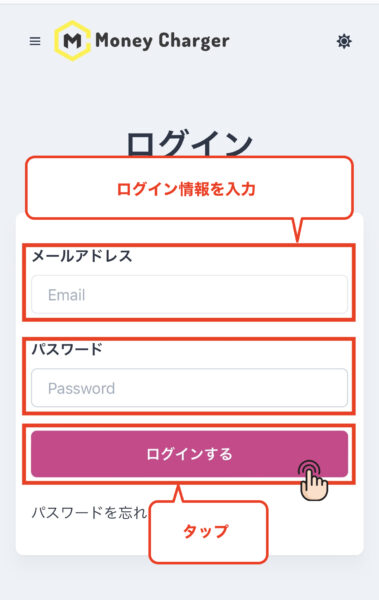
- Email address: Enter your registered email address
- Password: Enter your registered password, which must include uppercase letters, lowercase letters, and numbers, and be at least 8 characters long
Step 2: Register your bank account
① Tap the menu bar

② Tap "Account Information"

③ Scroll to the bottom of the screen

④ Enter your payment information

- Bank Name: Enter the name of the bank for the bank account you wish to register
- Financial Institution Code: Enter the financial institution code of the bank account you wish to register
- Branch Name: Enter the branch name of the bank account you wish to register
- Branch number: Enter the branch number of the bank account you wish to register
- Account Type: Select the account type of the bank account you wish to register
- Account Number: Enter the account number of the bank account you wish to register
- Account Name: Enter the account name of the bank account you are registering in katakana
⑤ Tap "Change"

This completes the withdrawal process
Step4: Withdrawal application
① Scroll to the bottom of the screen

② Enter the withdrawal amount, select the payment destination, and tap "Submit withdrawal request"

③ Scroll up the screen

Once you see the message "Application submitted," the withdrawal request process is complete
- Next, let's check the withdrawal information
④ Tap the menu bar

⑤ Tap "Withdrawal Information"

⑥ Check the list of pending withdrawals

If the "Requested Withdrawal Details" are displayed in the "List of Pending Withdrawals," the "Withdrawal Request" process is complete
- If there are no issues with the procedure, the transfer to your designated bank account will be completed within 1-3 business days
Instructions for withdrawing USDT (TRC20)
Next, we will explain how to withdraw cashback in USDT (TRC20)
Step 1: Log in to your MoneyChat My Page
① Click the link below to go to the MoneyChat login screen
https://portal.money-charger.com/login
② Enter your login information and tap "Log in"
- Email address: Enter your registered email address
- Password: Enter your registered password, which must include uppercase letters, lowercase letters, and numbers, and be at least 8 characters long
Step 2: Register your USDT wallet
① Tap the menu bar
② Tap "Account Information"
③ Scroll to the bottom of the screen
④ Enter the payment recipient's wallet information and tap "Change"
-338x600.png)
- Recipient address: Enter the address to which you will register to receive USDT (TRC20)
- *There are two types of USDT: "TRC20" and "ERC20". MoneyChat only supports "TRC20", so please be careful not to enter the wrong wallet address
⑤ "Registration is complete when the message 'Saved' appears."
This completes the registration process for the "recipient address"
Step4: Withdrawal application
① Scroll to the bottom of the screen
② Enter the "Withdrawal Amount," select "USDT" as the payment method, and tap "Submit Withdrawal Request."

③ Scroll up the screen
Once you see the message "Application submitted," the withdrawal request process is complete
Next, let's check the withdrawal information
④ Tap the menu bar
⑤ Tap "Withdrawal Information"
⑥ Check the list of pending withdrawals
If your requested withdrawal is displayed in the "Pending Withdrawal List," your withdrawal request is complete.
If there are no problems with the procedure, the funds will be transferred to your designated bank account within 1-3 business days.
Exnesswithdrawal procedure
Next, we will explain how to withdraw funds directly to yourExnesstrading account
What isExnesswithdrawal?
If you have registered yourExnesstrading account with MoneyChat, you can have the cashback you earn through MoneyChat transferred directly to yourExnesstrading account. This service can also be used for cashback earned from other brokers
*If you are currently usingExnesswithdrawals, you will need to submit the email address registered withExness
If the email address you are using is different from the one registered with Money Charger, we apologize for the inconvenience, but please send an email to [support@money-charger.com] with the following information
① Subject: [ExnessWithdrawal Request]
② Email address registered withExness
③ The email address you registered with MoneyChat
④Withdrawal application amount
⑤Exnesstransaction number for withdrawal
We are currently working diligently to ensure that you can use the service even if your email address is different. Please bear with us for a little while longer
*Exnessaccounts are denominated in USD, so exchange rate fluctuations may occur during transfers
*Please submit a withdrawal request for a minimum of approximately $156.25
Step 1: Log in to your MoneyChat My Page
① Click the link below to go to the MoneyChat login screen
https://portal.money-charger.com/login
② Enter your login information and tap "Log in"
- Email address: Enter your registered email address
- Password: Enter your registered password, which must include uppercase letters, lowercase letters, and numbers, and be at least 8 characters long
Step 2: Check if yourExnessaccount registration is complete
① Tap the menu bar
② Tap "Register Account"

③ Confirm that yourExnessaccount registration status is "Approved"
If the status of yourExnessaccount, which you have applied to register, is "Approved," then you are ready to withdraw fundsExness

*If you haven't completed account registration yet, please refer to this article for instructions on how to register your account
Money Charger FX Account Registration Procedure [Easy with Smartphone Image Explanation!]
Step 3: Withdrawal Request
① Scroll to the bottom of the screen
② Enter the "Withdrawal Amount" and select "Exness" as the payment destination

③ Under the "Exness" section, your registered trading accounts will be displayed, so select the account you want to send money to

④ Tap "Withdrawal Request"

Once you see the message "Application submitted," the "Withdrawal Request" process is complete
Next, let's check the withdrawal information
⑤ Tap the menu bar
⑥ Tap "Withdrawal Information"
⑥ Check the list of pending withdrawals
If the "Requested Withdrawal Details" is displayed in the "Pending Withdrawal List," the "Withdrawal Request" process is complete
If there are no issues with the procedure, the transfer to your designated bank account will be completed within 1 to 3 business days