











\Better deal than registering directly through the official site/in 1 minuteDecodeFXOpen a

That's all you need to do!
Step 1
Open an account via the referral link
DecodeFXoffersauto-rebates. Account application through MoneyChat's My Page is not required.
Let's get started by opening aDecodeFXaccount!
Proceed to the officialDecodeFXwebsite via the referral link ↗Check the account opening procedure
that suits you.

DecodeFXcreating a
?
HOW TO OPEN
Account Opening Procedure
Please see below for detailed instructions
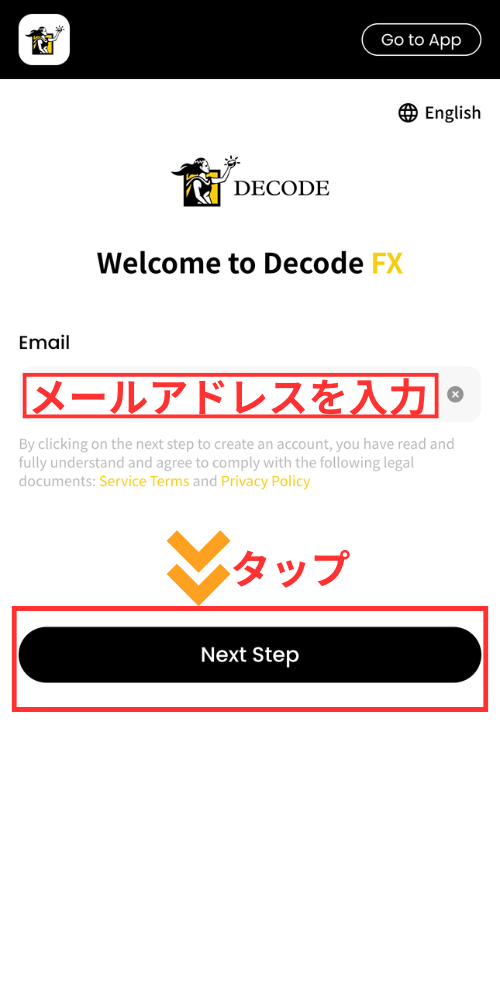
Enter your email address and password to register
Enter your email address and password. A verification code will be sent to the email address you registered. Enter the code to complete the verification process
Get cashback
once your account is open !
AUTO REBATE
DecodeFXonly offers auto-rebates;
no account application to MoneyChat is required.
Open an account through the referral link on this page
That's all you need to do. If you open an account on the official website without using a referral link, you won't receive any cashback
No account application is required for MoneyChat
There's no need to log in to your My Page and register your account number, nor do you need to wait for approval from the administrators
The cashback will be automatically credited to yourDecodeFXaccount
The cashback from each trade will be deposited directly into yourDecodeFXtrading account. No withdrawal request is required
HOW TO OPEN
Transfer procedure
Please see below
for instructions on how to make your existing account eligible for MoneyChat
How to change the linking in DecodeFX
I will send an email to DecodeFXsupport requesting a change in the linked account
- ThedecodefxSend an email to jpsupport@decodefx.com (ref code l-918652355-S58KQ5FH). official page is here
- Subject: "Request to change linking"
- Please include the following in the text: "Registered email address, account number, MoneyChat UID, and reason for change."
- After processing is complete, the cashback for each transaction will be automatically deposited into your trading account (no application is required on MoneyChat)
FAQ
Frequently Asked Questions about
Opening an Account or Switching Accounts
What documents are required to open an account?
Generally, you will need to provide proof of identity (passport, driver's license, or My Number Card) and proof of address (utility bill, bank statement, or resident registration certificate, issued within the last three months)
How long does it take to open an account?
The input process itself takes as little as 5 minutes, and the identity verification review is usually completed within one business day. The actual time required may vary depending on the service provider and the review status
I already have aDecodeFXaccount. Can I receive the cashback?
Existing accounts are generally not eligible. Please check the instructions for transferring or adding an account from the "Already usingDecodeFX" tab at the top of the page
Can I open multiple accounts with DecodeFX?
The possibility and conditions for opening multiple accounts vary from broker to broker. If you plan to use an additional account, please check the process for receiving cashback through MoneyChat before proceeding
Does DecodeFXsupport auto-rebates?
Yes.DecodeFXoffersauto-rebates. You don't need to apply for an account on your MoneyChat My Page;DecodeFXif you open aDecodeFXwill be automatically deposited into your